
1. Introduction
The TKMARS 4G Mini GPS Tracker TK903 is a compact and versatile tracking device designed for real-time location monitoring of vehicles, assets, and individuals. It features a long-lasting battery, magnetic attachment for easy installation, and advanced alert functions. This manual provides detailed instructions for setting up, operating, and maintaining your device.

Image 1.1: The TKMARS TK903 4G Magnetic Mini GPS Tracker, highlighting its compact design and key features such as real-time tracking, 10-second updates, history route playback, geo-fence, built-in magnets, smart power saving, and various custom alerts.
2. Setup Guide
2.1. Package Contents
Before you begin, ensure all items are present in the package:
- TKMARS 4G Mini GPS Tracker TK903
- USB Charging Cable
- User Manual
- SIM Card Ejector Tool (if applicable)

Image 2.1: Contents of the TKMARS TK903 package, including the GPS locator, charging cable, and instruction manual.
2.2. SIM Card Installation and Subscription
The TK903 requires a 4G SIM card with an active data plan for real-time tracking. A subscription plan is necessary to activate tracking features. Please refer to the subscription options below:
- 1 Month: $12.99
- 6 Months: $60
- 1 Year: $102
- 2 Years: $144
Insert the activated 4G SIM card into the device following the instructions provided with the tracker. Ensure the SIM card is correctly oriented.

Image 2.2: Overview of the subscription plans and key features of the GPS tracker, including 10-second updates, movement alerts, smart notifications, worldwide tracking, and geo-fencing.
2.3. Initial Charging
Before first use, fully charge the device using the provided USB cable. Connect the cable to the tracker and a standard USB power adapter (not included). The charging indicator will show the charging status.
2.4. App Download and Login
Download the official GPS tracking application from your smartphone's app store (available on iOS and Android) or access the web platform. Create an account and log in using the device ID and password provided with your tracker.
3. Operating Instructions
3.1. Real-Time Tracking
Once the device is powered on and connected to the network, you can view its real-time location on the mobile app or web platform. The location updates occur every 10 seconds, providing precise tracking with an accuracy of approximately 5 meters outdoors.

Image 3.1: Illustration of real-time tracking capabilities, showing the device's location on Google Maps accessible from a cellphone, tablet, or PC, with data updates every 10 seconds.
3.2. Geo-Fencing
Set up virtual safety boundaries (geo-fences) through the application. You will receive an alert message on your mobile app if the tracker enters or exits these predefined zones.

Image 3.2: Demonstrates how to set up a secure virtual area (geo-fence) on the mobile application. Alerts are sent if the target leaves or enters the defined zone, with icons indicating movement, leaving an area, low battery, overspeeding, and tracker removal.
3.3. Alert Functions
The TK903 supports various intelligent alerts:
- Overspeed Alarm: Receive notifications if the tracker exceeds a set speed limit.
- Movement Alarm: Get alerts if the device detects movement after being stationary.
- Vibration Alarm: Notifies you of any significant vibrations detected.
- Low Battery Alarm: Informs you when the battery level is critically low, prompting a recharge.
3.4. History Route Playback
Review past travel routes and activities for any chosen period directly within the tracking application. This feature provides a comprehensive overview of the tracker's movements.
3.5. Multi-Device Management
If you own multiple TKMARS trackers, the application allows you to manage and monitor all your devices simultaneously from a single account.

Image 3.3: Illustrates the multi-facility management feature, allowing users to monitor multiple trackers simultaneously. Also highlights the low battery alarm and IP65 waterproof rating.
3.6. Mounting Options
The TK903 features a powerful built-in magnet for easy and secure attachment to metallic surfaces. Common mounting locations for vehicles include:
- Glove box
- Center console
- Lower rear window
- Side trunk
- Rear bumper
- Side door inner compartment
- Front bumper
- Engine compartment
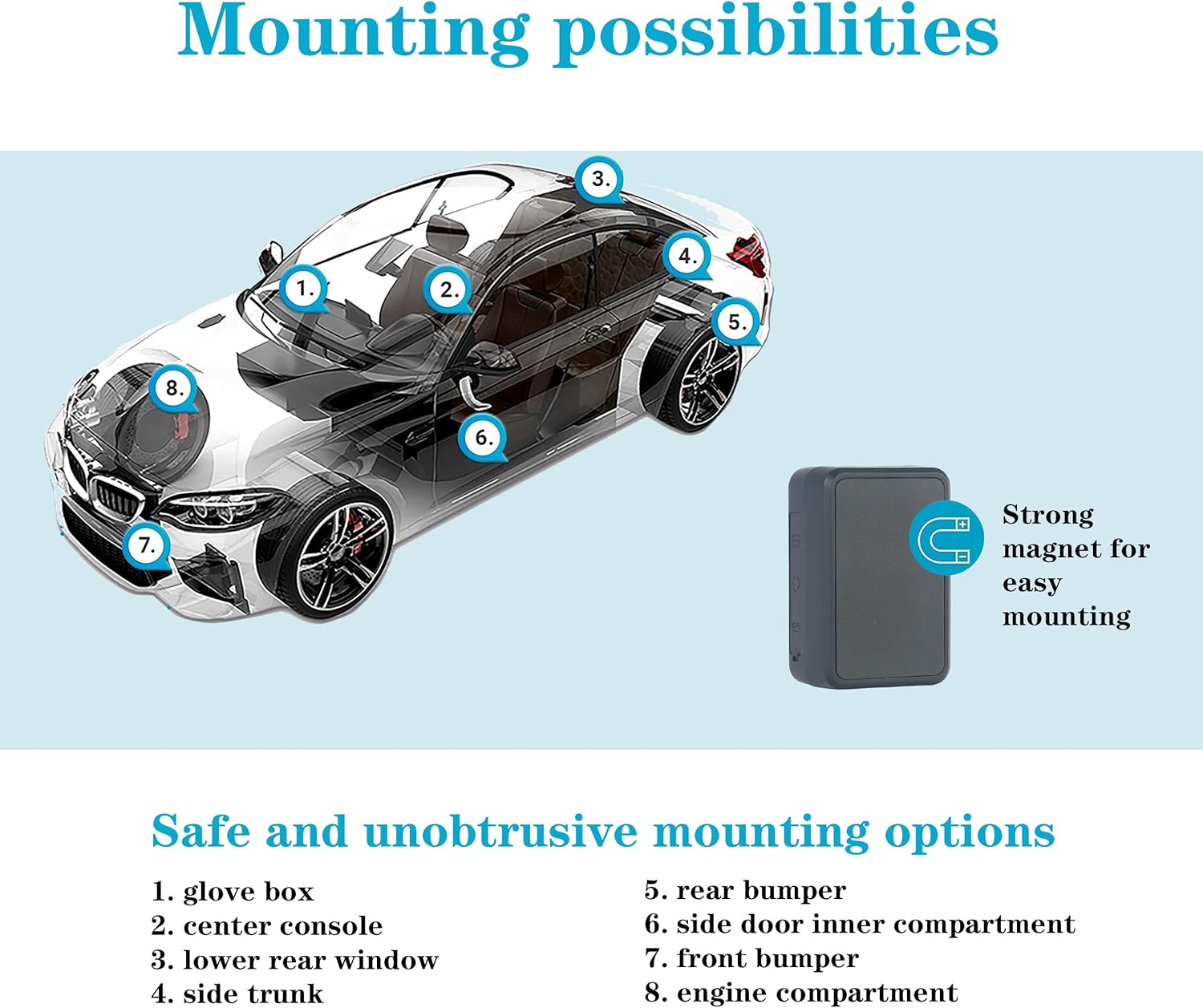
Image 3.4: Diagram showing various safe and unobtrusive mounting options for the GPS tracker on a car, utilizing its strong magnet for easy installation.
4. Maintenance
4.1. Charging
The TK903 is equipped with a 1500mAh rechargeable battery, offering up to 40 days of normal use and 60 days in standby mode. Recharge the device when the low battery alert is received. Use only the provided USB cable for charging.
4.2. Cleaning
Wipe the device with a soft, dry cloth. Avoid using harsh chemicals or abrasive cleaners, as these can damage the device's casing and internal components.
4.3. Water Resistance
The TK903 has an IP65 waterproof rating, meaning it is protected against dust ingress and low-pressure water jets from any direction. It is not designed for submersion in water.
5. Troubleshooting
If you encounter issues with your TKMARS TK903, please refer to the following common problems and solutions:
- Device not powering on: Ensure the device is fully charged. Connect it to a power source and wait a few minutes before attempting to power it on again.
- No signal or inaccurate location: Verify that the SIM card is correctly installed and has an active 4G data plan. Ensure the device is in an area with good cellular network coverage. Move the device to an open area if it's indoors or obstructed.
- App not showing real-time data: Check your internet connection on your smartphone or computer. Confirm that your subscription plan is active. Restart the app or refresh the web page.
- Battery draining quickly: This may occur in areas with poor signal, as the device constantly searches for a network. Ensure the device is in an area with stable 4G coverage. Adjust tracking frequency settings in the app if available, to optimize battery life.
If the problem persists, contact customer support for further assistance.
6. Specifications
| Feature | Specification |
|---|---|
| Model Number | TK903 |
| Dimensions (L x W x H) | 5.5 x 3.6 x 2.1 cm |
| Weight | 58 g |
| Battery Capacity | 1500 mAh |
| Battery Life (Standby) | Up to 60 days |
| Connectivity Technology | 4G LTE, RF |
| Waterproof Rating | IP65 |
| Location Accuracy | Approximately 5 meters (outdoor) |
| Update Interval | 10 seconds |
| Special Features | Real-time tracking, History route playback, Geo-fence, Vibration alarm, Overspeed alarm, Movement alarm, Low battery alarm, Built-in microphone, Magnetic attachment |
| Compatible Devices | Smartphone, PC, Tablet |
7. Warranty and Support
7.1. Warranty Information
The TKMARS 4G Mini GPS Tracker TK903 comes with a lifetime warranty, ensuring long-term reliability and customer satisfaction. Please retain your proof of purchase for warranty claims.
7.2. Customer Support
For any questions, technical assistance, or warranty inquiries, please contact our professional and reliable after-sales support team:
Email: sage@cnhanguang.cn
Our support team is available to assist you with any issues you may encounter.


