
1. Introduction
Thank you for choosing the HOMMPA LED Nightstand. This modern bedside table is designed to enhance your bedroom with convenient features including a wireless charging station, USB ports, AC outlets, and customizable RGB LED lighting. This manual provides essential information for assembly, operation, maintenance, and troubleshooting to ensure optimal use of your new nightstand.
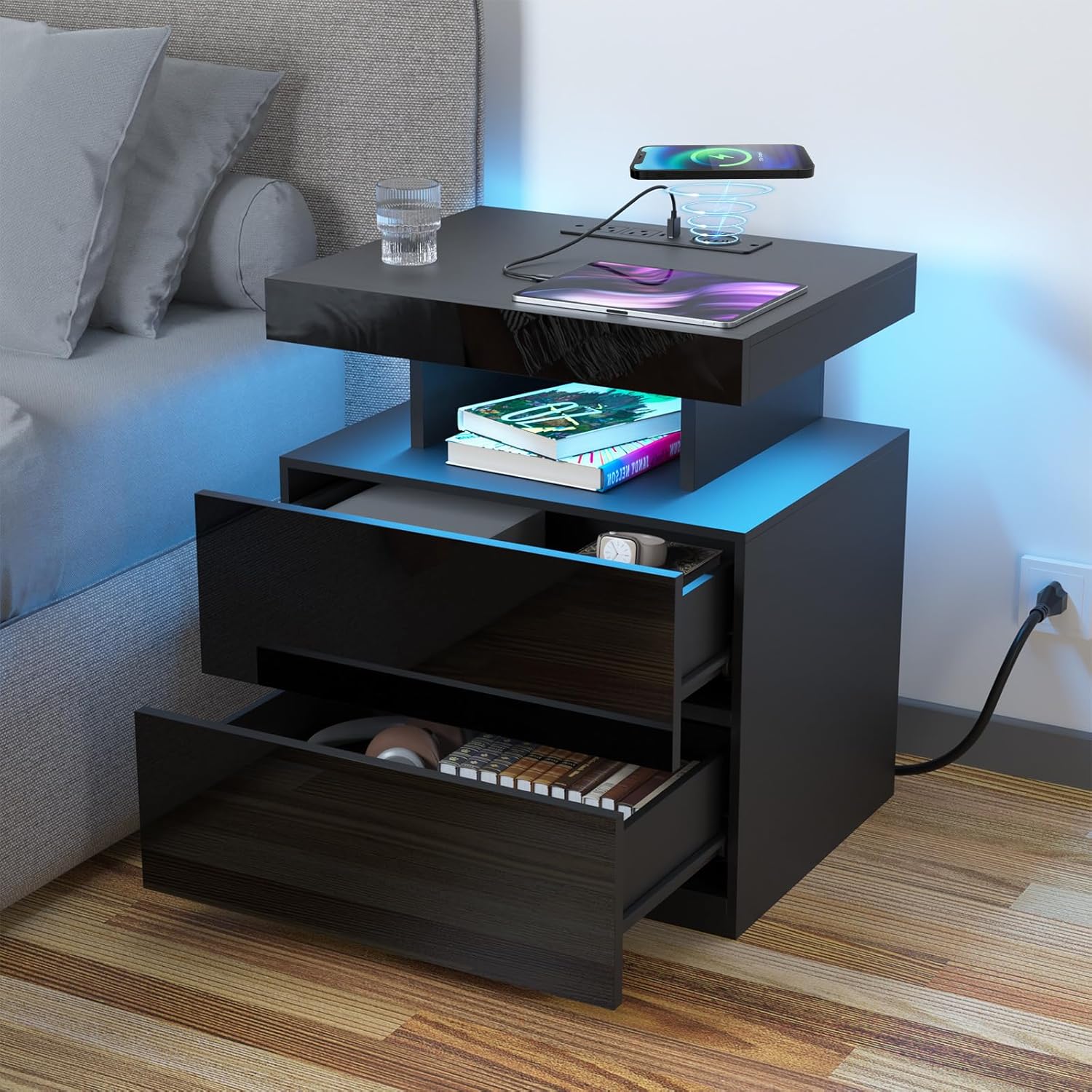
Image 1.1: The HOMMPA LED Nightstand in a bedroom setting, showcasing its wireless charging capability, open shelf, and LED illumination.
2. Important Safety Information
Please read and understand all safety warnings before assembly and use. Failure to follow these instructions may result in injury or damage to the product.
- Assembly: Ensure all parts are correctly assembled according to the provided instructions. Do not overtighten screws.
- Weight Limits: Do not exceed the maximum weight recommendation of 100 pounds (45 kg) for the nightstand. Distribute weight evenly.
- Electrical Components: Only use the integrated charging station and outlets as intended. Do not attempt to modify or disassemble the electrical components. Avoid liquid spills near electrical outlets.
- Placement: Place the nightstand on a flat, stable surface to prevent tipping. Keep away from direct heat sources and excessive moisture.
- Children and Pets: Keep small parts and packaging materials away from children and pets.
3. Setup and Assembly
The HOMMPA LED Nightstand is designed for straightforward assembly. All necessary labeled parts, tools, and a step-by-step installation manual are included in the package. We recommend reviewing the installation video for a visual guide to facilitate faster assembly.
3.1 Package Contents
Before beginning assembly, verify that all components listed in your included assembly guide are present and undamaged. Typical components include:
- Main panels (top, side, bottom, back)
- Drawer components (front, side, back, bottom)
- Metal slide rails (pre-installed on drawers)
- Hardware pack (screws, dowels, cam locks, etc.)
- Power cord with integrated charging station
- RGB LED light strip and controller
- Remote control for LED lights
- Protective feet
- Assembly Guide
3.2 Assembly Steps
- Prepare Workspace: Clear a spacious area and lay out all components on a soft, clean surface to prevent scratches.
- Follow Guide: Refer to the detailed step-by-step assembly guide provided in your package. Each part is labeled for easy identification.
- Install Drawers: The metal slide rails are pre-installed for smooth operation. Ensure drawers are inserted correctly.
- Connect Power: Once the main structure is assembled, connect the power cord to the integrated charging station.
- Attach Protective Feet: Secure the four protective feet to the bottom of the nightstand to prevent floor scratches.
Recommended assembly time: 30-40 minutes with one person. A screwdriver is recommended for assembly.

Image 3.1: Details of the pre-installed metal slide rails for smooth drawer operation and the protective feet designed to prevent floor scratches.
4. Operating Instructions
4.1 Multifunctional Charging Station
The nightstand is equipped with a 15W wireless charging pad, one USB-A port, one Type-C port (5V/2A), and two 120V/12A AC outlets. These allow you to charge multiple devices simultaneously.
- Wireless Charging: Place your compatible smartphone directly on the designated wireless charging area on the tabletop. Ensure the device is centered for optimal charging.
- USB Ports: Connect your devices using a USB-A or Type-C cable to the respective ports for wired charging.
- AC Outlets: Plug in lamps, laptops, or other small appliances into the standard AC outlets.

Image 4.1: The integrated charging station, featuring 15W wireless charging, USB-A and Type-C ports, and two AC outlets for convenient device power.
4.2 RGB LED Lighting
The integrated RGB LED lights can be controlled via a dedicated remote control or a smartphone application (APP). This allows for customization of colors, brightness, and lighting modes.
- Remote Control: Use the included remote to power the lights on/off, change colors, adjust brightness, and select various dynamic modes (e.g., flash, fade).
- Smartphone APP: Download the recommended app (refer to the assembly guide for app name/QR code) to access advanced features such as:
- Over 16 million color options
- Brightness adjustment (10 levels)
- Multiple dynamic modes (Multicolors, Flash Style, Music Sync, Mix, Timing)
- Scheduling and timer functions

Image 4.2: Control options for the RGB LED lights, including the remote and smartphone app, offering various colors and modes.
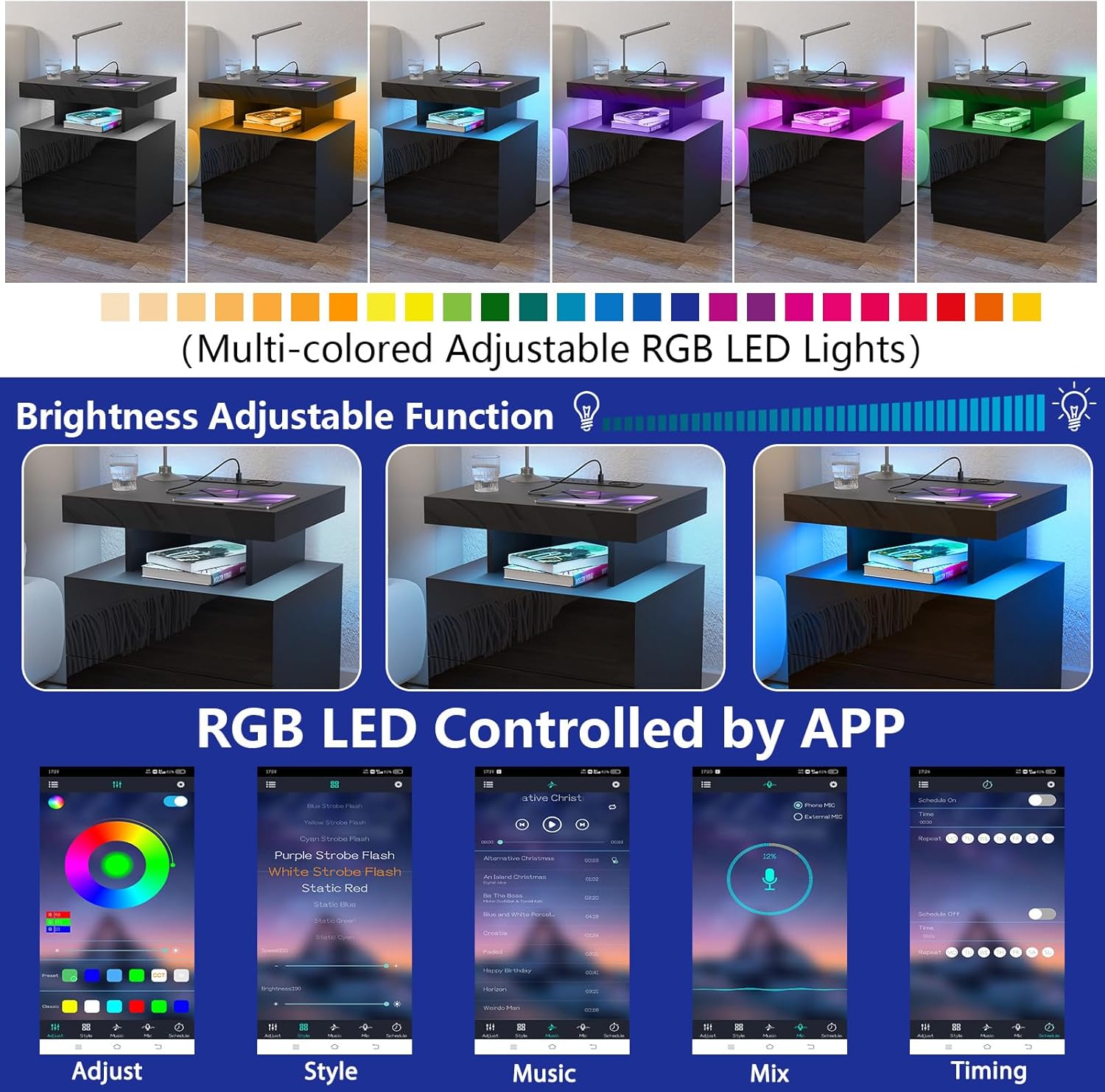
Image 4.3: Visual representation of the adjustable brightness and diverse color palette available through the RGB LED control app.
4.3 Storage Features
The nightstand includes two drawers and an open shelf for organized storage.
- Drawers: Utilize the two spacious drawers for storing personal items, books, or other bedside essentials. The pre-installed metal slide rails ensure smooth opening and closing.
- Open Shelf: The lighted open shelf provides easy access storage for frequently used items like headphones, glasses, or decorative pieces.

Image 4.4: The lighted open shelf provides convenient storage and display space, complementing the durable UV melamine veneer panel.
5. Care and Maintenance
Proper care will help maintain the appearance and functionality of your HOMMPA LED Nightstand.
- Cleaning: Wipe surfaces with a soft, damp cloth. Avoid abrasive cleaners or harsh chemicals that may damage the high-gloss finish or other surfaces.
- Spills: Immediately wipe up any spills to prevent staining or damage to the engineered wood.
- Electrical Components: Keep the charging station and outlets dry and free from dust. Do not spray cleaning liquids directly onto electrical parts.
- Moving: When moving the nightstand, lift it rather than dragging to prevent damage to the protective feet and your flooring.
6. Troubleshooting
If you encounter issues with your nightstand, refer to the following common problems and solutions:
| Problem | Possible Cause | Solution |
|---|---|---|
| LED lights not turning on or responding to remote/app. | Power connection issue, remote battery low, app not connected. | Check if the nightstand is plugged in. Ensure the LED light strip is securely connected. Replace remote battery. Re-pair the app via Bluetooth. |
| Wireless charging not working. | Device not compatible, misaligned, foreign objects, power issue. | Ensure your device supports 15W wireless charging. Re-position the device on the charging pad. Remove any metal objects between the device and pad. Verify the nightstand is powered. |
| USB ports or AC outlets not providing power. | Nightstand not plugged in, power strip issue. | Confirm the nightstand's power cord is securely plugged into a functional wall outlet. |
| Drawers are stiff or not sliding smoothly. | Misalignment, obstruction, or damaged rails. | Check for any objects obstructing the drawer slides. Ensure drawers are correctly installed on the rails. If rails are damaged, contact support. |
7. Product Specifications
- Brand: HOMMPA
- Model Name: Nightstand wl-2
- Overall Dimensions (L x W x H): 19.7" x 15.8" x 22.83" (50 cm x 40 cm x 58 cm)
- Maximum Weight Recommendation: 100 lbs (45 kg)
- Material: Engineered Wood, Particleboard, UV Melamine Veneer Panel
- Finish: High-gloss (front panel), Matte (other surfaces)
- Color: Black
- Number of Drawers: 2
- Charging Station:
- Wireless Charging: 15W
- USB Ports: 1x USB-A, 1x Type-C (5V/2A total)
- AC Outlets: 2x (120V/12A)
- LED Lighting: RGB, APP & Remote Control, Multiple Colors & Modes, 10 Brightness Levels
- Power Cord Length: 4.9 feet

Image 7.1: Detailed dimensions and load-bearing capacity of the HOMMPA LED Nightstand.
8. Warranty and Customer Support
HOMMPA is committed to providing quality products and customer satisfaction. This product comes with a standard manufacturer's warranty covering defects in materials and workmanship under normal use.
8.1 Warranty Information
Please retain your proof of purchase for warranty claims. The warranty period typically covers manufacturing defects. Damage resulting from improper assembly, misuse, accidents, or unauthorized modifications is not covered.
8.2 Contacting Customer Support
If you have any questions, require assistance with assembly, or experience issues not covered in the troubleshooting section, please do not hesitate to contact our customer support team.
Email: Refer to your purchase documentation or the HOMMPA official website for the most current customer service email address. (As per product information, you can email us for any questions.)
When contacting support, please provide your model number (Nightstand wl-2) and a detailed description of the issue.