
HOTONE SP
HOTONE Ampero II Press 2-in-1 Passive Expression Footswitch User Manual
Model: SP
Introduction
The HOTONE Ampero II Press is a versatile 2-in-1 passive expression footswitch designed for musicians. It combines the functionality of an expression pedal with a built-in footswitch, offering enhanced control over various effects units. Its passive circuit design ensures reliability and convenience, requiring no external power supply. The pedal features a high-quality potentiometer for precise response and an optimized footswitch structure for excellent tactile feedback.

Image: The HOTONE Ampero II Press pedal shown with an included 15 CM TS cable. The pedal is white with a black textured top surface and features two output jacks labeled "EXP" and "FOOTSWITCH".
Setup
The Ampero II Press is a passive device and does not require a power supply. Proper connection is crucial for optimal performance.
Connecting the Pedal
- Expression Output (EXP): Connect this 1/4-inch jack to the expression pedal input of your multi-effects unit or other compatible device using a TRS (Tip-Ring-Sleeve) cable.
- Footswitch Output (FOOTSWITCH): Connect this 1/4-inch jack to the footswitch input of your multi-effects unit or other compatible device. This output is typically used for toggling effects or functions.
- Important Note on Cables: While a 15 CM TS (Tip-Sleeve) cable is included in the box, for full functionality and proper operation, especially for expression control, a TRS cable is often required. If you experience issues with reversed control or incomplete functionality, ensure you are using a TRS cable for the expression output.
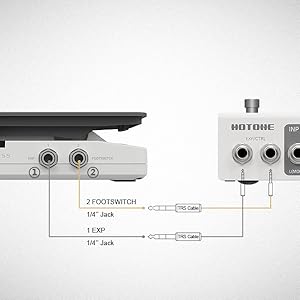
Image: A diagram illustrating the correct wiring for the Ampero II Press. It shows the EXP output connected via a TRS cable and the FOOTSWITCH output also connected via a TRS cable to a multi-effects unit, indicating the need for TRS cables for both functions.

Image: The Ampero II Press connected to a larger multi-effects processor, demonstrating a typical setup. Cables are shown connecting the pedal's outputs to the processor's inputs.
Operating the Pedal
The Ampero II Press offers intuitive control for various musical applications.
Expression Function
The main pedal surface allows for continuous control over assigned parameters, such as volume, wah, or modulation depth, depending on how it's configured on your connected device. The high-quality potentiometer ensures smooth and precise adjustments across its full range of motion.
Footswitch Function
The integrated footswitch provides a "click" mechanism for confident activation. This can be used to toggle effects on/off, switch between presets, or activate other functions on your connected device. The optimized structure provides clear tactile feedback upon activation.

Image: A close-up view of the Ampero II Press, highlighting the integrated footswitch mechanism. The pedal is shown in a partially depressed state, illustrating the "click" action.
Video: This video demonstrates the physical features and operation of the Ampero II Press pedal, including its expression and footswitch capabilities. It showcases the pedal's compact design and how it integrates into a musician's setup.
Maintenance
The HOTONE Ampero II Press is built with durable metal construction for long-lasting performance. To ensure its longevity and optimal function, follow these simple maintenance guidelines:
- Cleaning: Use a soft, dry cloth to wipe down the pedal's exterior. Avoid using abrasive cleaners, solvents, or excessive moisture, as these can damage the finish or internal components.
- Storage: When not in use, store the pedal in a clean, dry environment away from extreme temperatures, humidity, and direct sunlight.
- Cable Care: Always handle connection cables by the plug, not the cable itself, to prevent damage to the wiring. Ensure cables are not kinked or excessively bent during storage or use.
- Inspection: Periodically inspect the pedal for any loose screws, damaged jacks, or unusual wear. Address any issues promptly to prevent further damage.
Troubleshooting
If you encounter issues with your Ampero II Press, consider the following common solutions:
- Pedal Not Responding or Reversed Control:
The most common issue is using an incorrect cable type. The Ampero II Press expression function typically requires a TRS (Tip-Ring-Sleeve) cable for proper operation. If you are using a TS (Tip-Sleeve) cable, the pedal may not function correctly, or its sweep might be reversed (e.g., 0% at max position, 100% at min position). Replace the TS cable with a TRS cable for the expression output.
- No Footswitch Response:
Ensure the footswitch output is connected to the correct input on your device. Some devices may require specific settings to recognize an external footswitch. Verify the cable connection is secure.
- Intermittent Functionality:
Check all cable connections for looseness or damage. Try using different cables to rule out faulty wiring. Ensure the jacks on both the pedal and your connected device are clean and free of debris.
- Physical Damage or Malfunction:
If the pedal appears physically damaged or completely unresponsive after checking connections and cables, it may require professional inspection or replacement. Refer to the warranty information for support options.
Specifications
| Brand | HOTONE |
| Model Number | SP |
| Item Weight | 1.32 pounds (0.6 Kilograms) |
| Product Dimensions | 6.38 x 3.19 x 2.01 inches (16.2 x 8.1 x 5.1 cm) |
| Hardware Interface | 1/4-inch Audio Jacks (EXP, FOOTSWITCH) |
| Signal Format | Analog |
| Power Source | Passive (No external power required) |
| Country of Origin | China |
Warranty and Support
For detailed warranty information, technical support, or service inquiries regarding your HOTONE Ampero II Press, please refer to the official HOTONE website or contact their customer service directly.
Included Accessories: Please note that a 15 CM TS Cable is included in the box. Ensure you check the packaging upon receipt.
Online Resources:
Related documentsSP


Ask a question about this manual
Ask about setup, troubleshooting, compatibility, parts, safety, or missing instructions. Manuals+ will review the question and use this page’s manual context to help answer it.