
1. Introduction
The Tripp Lite by Eaton DIN850AC is an 850VA/510W Uninterruptible Power Supply (UPS) designed for industrial applications. This standby UPS system provides reliable power protection and battery backup for critical computing, networking, control, and storage equipment in demanding environments such as factories, warehouses, and automated manufacturing facilities. Its rugged, compact design allows for seamless integration into electrical cabinets and features hardwired AC input and output connections.
This manual provides essential information for the safe and efficient installation, operation, and maintenance of your DIN850AC UPS.
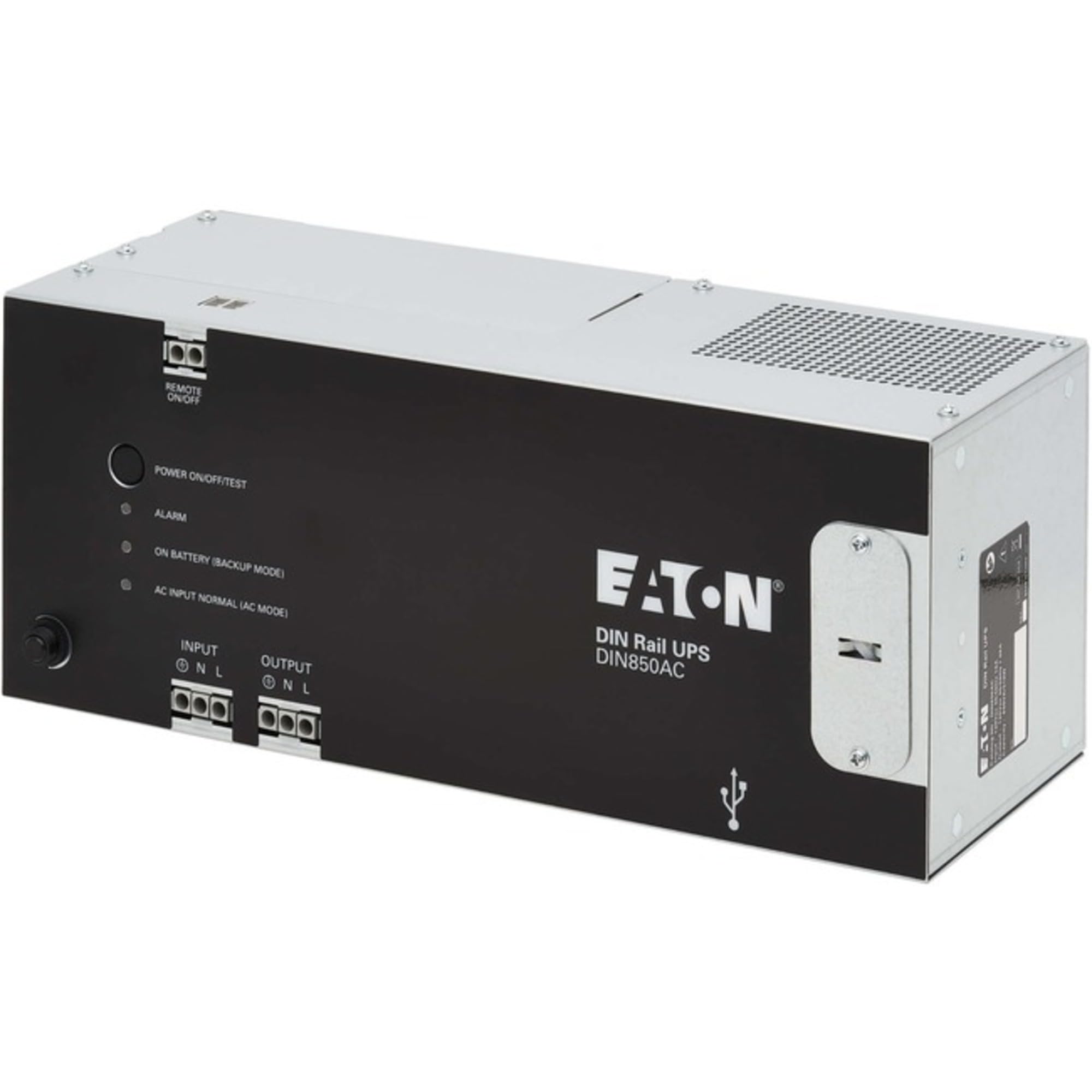
Image 1.1: Front view of the Tripp Lite by Eaton DIN850AC Industrial UPS, showcasing its compact design and industrial-grade enclosure.
2. Safety Instructions
Read and understand all instructions before installing or operating this equipment. Failure to follow these instructions may result in electric shock, fire, or serious injury.
- Electrical Safety: This unit contains hazardous voltages. Do not open the UPS enclosure. There are no user-serviceable parts inside. Refer all servicing to qualified service personnel.
- Battery Safety: Batteries can present a risk of electrical shock and high short-circuit current. Observe the following precautions:
- Do not dispose of batteries in a fire. The batteries may explode.
- Do not open or mutilate batteries. Released electrolyte is harmful to the skin and eyes. It may be toxic.
- Replace batteries only with the same type and number of batteries as originally installed.
- Installation Environment: Install the UPS in a controlled environment, free from excessive dust, moisture, and corrosive elements. Ensure adequate ventilation.
- Hardwiring: All hardwired connections must be performed by a qualified electrician in accordance with all local and national electrical codes.
- Grounding: Ensure the UPS is properly grounded to prevent electrical shock.
3. Package Contents
Verify that all items are present before installation. If any items are missing or damaged, contact your dealer immediately.
- DIN850AC Industrial UPS Unit
- Owner's Manual (this document)
- Mounting Hardware (pre-installed DIN rail clamp)
4. Setup
Follow these steps for proper installation of your DIN850AC UPS.
4.1 Mounting the UPS
The DIN850AC is designed for quick mounting on a 35mm DIN rail. The unit comes with a pre-installed clamp for this purpose.
- Ensure the DIN rail is securely installed within your electrical cabinet or desired location.
- Align the top edge of the UPS's DIN rail clamp with the top edge of the DIN rail.
- Push the UPS firmly downwards until the clamp engages with the bottom edge of the DIN rail, securing the unit in place.
- Verify that the UPS is firmly attached and does not wobble.
4.2 Hardwire Connections
The DIN850AC features hardwired AC input and output. All wiring must be performed by a qualified electrician.
- Disconnect Power: Before making any connections, ensure that the main AC power source to the installation area is completely disconnected and locked out.
- Access Terminal Block: Locate and open the terminal block cover on the UPS unit.
- Input Wiring: Connect the incoming AC power lines (Line, Neutral, Ground) to the designated input terminals on the UPS. Ensure correct polarity and secure connections.
- Output Wiring: Connect the protected equipment's power lines (Line, Neutral, Ground) to the designated output terminals on the UPS. Ensure correct polarity and secure connections.
- Close Terminal Block: Once all connections are secure, replace the terminal block cover.
4.3 Initial Power-Up
- After all hardwire connections are complete and verified, restore AC power to the installation area.
- The UPS will automatically power on and begin charging its internal battery.
- Observe the front-panel LEDs for normal operation indication.
5. Operating the UPS
The DIN850AC is designed for automatic operation, providing continuous power protection to connected equipment.
5.1 Normal Operation
During normal operation, when utility power is present and within acceptable voltage limits, the UPS will pass AC power to the connected equipment while simultaneously charging its internal battery. The front-panel LEDs will indicate the operational status.
5.2 Battery Backup Mode
In the event of a power outage, brownout, or overvoltage condition, the UPS will automatically switch to battery backup mode, providing power to connected equipment from its internal battery. This transition is typically instantaneous, ensuring uninterrupted operation.
- The UPS will emit an audible alarm (if enabled) and the relevant front-panel LED will illuminate to indicate battery mode.
- The runtime on battery power depends on the load connected to the UPS. Refer to the specifications for typical runtime.
- During an extended outage, save any open files and shut down connected equipment gracefully to prevent data loss.
5.3 Auto-Restart Feature
The DIN850AC features an auto-restart function. When AC power is restored after an outage, the UPS will automatically restart and resume normal operation, eliminating the need for manual intervention.
5.4 Front Panel Indicators
The front panel includes LEDs to confirm normal operation and indicate alarm or fault status. Consult the detailed product documentation for a complete description of LED patterns and their meanings.
6. Maintenance
Regular maintenance ensures the longevity and optimal performance of your UPS.
6.1 Battery Care and Replacement
The internal battery has a typical lifespan of 3-5 years under normal operating conditions. Factors such as frequent power outages and high operating temperatures can reduce battery life.
- Battery Testing: Periodically test the battery by simulating a power outage (if safe to do so) to ensure it provides adequate backup time.
- Replacement: When the battery reaches the end of its service life, it should be replaced by qualified service personnel. Use only Tripp Lite approved replacement batteries to maintain warranty and safety compliance.
- Disposal: Dispose of old batteries properly according to local regulations.
6.2 Cleaning
Keep the UPS unit clean and free of dust. Use a dry cloth to wipe down the exterior. Do not use liquid cleaners or solvents.
6.3 Environmental Conditions
The DIN850AC is designed to operate within a temperature range of 32.0°F (0°C) to 122.0°F (50°C) without derating. Ensure the operating environment remains within these limits for optimal performance and battery life.
7. Troubleshooting
This section provides solutions to common issues you may encounter with your UPS. If the problem persists, contact Tripp Lite technical support.
| Problem | Possible Cause | Solution |
|---|---|---|
| UPS does not power on. | No AC input power. | Check the circuit breaker for the input power line. Verify hardwire connections. |
| UPS is in battery mode frequently. | Unstable utility power. | Monitor utility power quality. Consider consulting an electrician if power fluctuations are common. |
| Short battery runtime. | Battery nearing end of life or excessive load. | Reduce connected load if possible. Consider battery replacement. |
| Alarm sounds continuously. | Overload condition or internal fault. | Disconnect non-essential equipment. If alarm persists, contact technical support. |
8. Specifications
Key technical specifications for the Tripp Lite by Eaton DIN850AC UPS.
- Model: DIN850AC
- Capacity: 850VA / 510W
- Input Voltage: 120V AC
- Output Voltage: 120V AC
- Frequency: 60 Hz
- Battery Type: Lead Acid
- Typical Runtime (Half Load): Approximately 2 minutes (at 255W)
- Operating Temperature: 32°F to 122°F (0°C to 50°C)
- Dimensions (H x W x D): 15.7 x 7.5 x 7.5 inches (approximate)
- Weight: 14 Pounds (6.35 kg)
- Mounting: 35mm DIN Rail
- Certifications: UL 508 Recognized Component
9. Warranty and Support
Tripp Lite by Eaton products are backed by a limited warranty. For specific warranty terms and conditions, please refer to the warranty statement included with your product or visit the official Tripp Lite website.
For technical support, product information, or service inquiries, please contact Tripp Lite customer service. Have your model number (DIN850AC) and serial number ready when contacting support.
Tripp Lite by Eaton Contact Information:
(Please refer to the official Tripp Lite website for the most current contact details.)


