
1. Introduction
The ITGlobal BS-468 Network Cable Tester is a diagnostic tool designed for verifying the integrity and configuration of various network and telephone cables. It supports testing for UTP, FTP, STP cables, as well as RJ45, RJ11, and RJ12 connectors. This device helps identify common wiring faults such as open circuits, short circuits, cross-overs, and split pairs, ensuring proper network connectivity.
2. Safety Information
- Do not expose the device to moisture or extreme temperatures.
- Use only the specified 9V PP3 battery.
- Keep the device away from strong electromagnetic fields.
- Do not attempt to disassemble or repair the unit yourself. Refer to qualified personnel for service.
- Ensure cables are disconnected from active network equipment before testing to prevent damage.
3. Package Contents
- 1 x ITGlobal BS-468 Network Cable Tester (Master Unit and Remote Unit)
- 1 x User Manual (English)
Note: A 9V PP3 battery is required for operation and is not included in the package.
4. Product Overview
The ITGlobal BS-468 cable tester consists of two main parts: a Master unit and a Remote unit. These units can be separated for testing installed cables or kept together for patch cables.
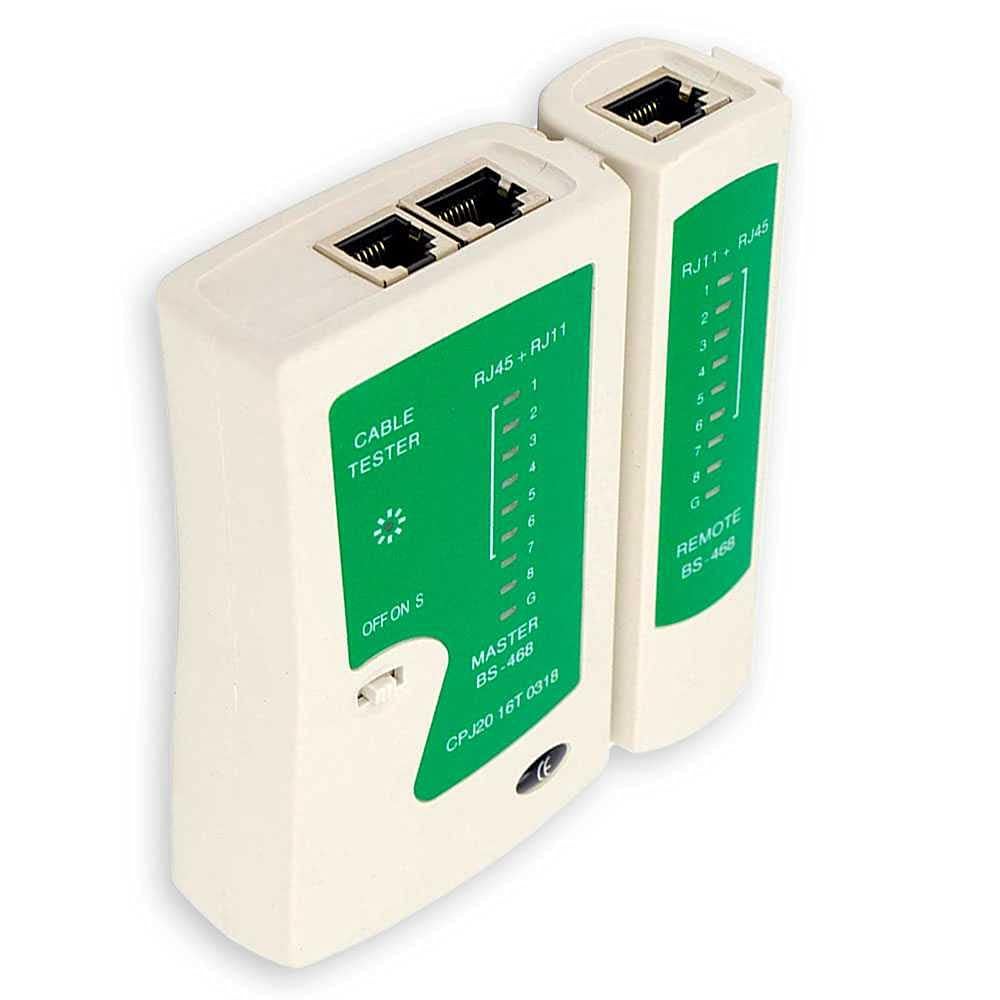
Figure 1: Front view of the ITGlobal BS-468 Network Cable Tester, showing the master unit and remote unit connected, with LED indicators and control switch.
Key Components:
- Master Unit: Contains the power switch, RJ45 and RJ11/RJ12 ports, and 9 LED indicators (1-8, G) for testing.
- Remote Unit: Contains RJ45 and RJ11/RJ12 ports and 9 corresponding LED indicators (1-8, G).
- Power Switch: Offers OFF, ON (normal scan speed), and S (fast scan speed) modes.
- LED Indicators: Display the wiring status for each pin (1-8) and ground (G).

Figure 2: The ITGlobal BS-468 Network Cable Tester with the master and remote units separated, highlighting the RJ45 and RJ11 ports.
5. Setup
5.1 Battery Installation
- Ensure the power switch is in the 'OFF' position.
- Locate the battery compartment on the back of the Master unit.
- Slide open the battery cover.
- Connect a new 9V PP3 battery to the battery clip, observing polarity.
- Place the battery into the compartment and close the cover securely.

Figure 3: Rear view of the ITGlobal BS-468 Network Cable Tester, showing the battery compartment for a 9V PP3 battery.
6. Operating Instructions
6.1 Testing Patch Cables (Master and Remote Units Connected)
- Ensure the Master and Remote units are connected together.
- Connect one end of the cable to be tested into the appropriate port (RJ45 or RJ11/RJ12) on the Master unit.
- Connect the other end of the cable into the corresponding port on the Remote unit.
- Slide the power switch to 'ON' for normal scan speed or 'S' for fast scan speed.
- Observe the LED indicators on both units.
6.2 Testing Installed Cables (Master and Remote Units Separated)
- Separate the Master and Remote units.
- Connect one end of the installed cable (e.g., wall jack) to the appropriate port on the Master unit.
- Connect the other end of the installed cable (e.g., patch panel) to the corresponding port on the Remote unit.
- Slide the power switch to 'ON' or 'S'.
- Observe the LED indicators on both units.

Figure 4: The ITGlobal BS-468 Network Cable Tester demonstrating compatibility with RJ45 and RJ11 cables, showing both cable types.
6.3 Interpreting LED Indicators
- Sequential Lighting (1-8, G): Indicates correct wiring. The LEDs on both the Master and Remote units should light up in sequence (1 to 8, then G) for each corresponding wire.
- No Light: An open circuit or broken wire. If an LED on one unit lights up but not on the other, that specific wire is open.
- Multiple Lights Simultaneously: Indicates a short circuit. If two or more LEDs light up at the same time on either unit, there is a short between those wires.
- Incorrect Sequence: Indicates a cross-over or split pair. The LEDs will light up, but not in the expected 1-to-1 sequence.
- 'G' LED: Indicates the ground or shield connection. If present, it should light up at the end of the sequence.
7. Maintenance
- Cleaning: Wipe the device with a soft, dry cloth. Do not use abrasive cleaners or solvents.
- Battery Replacement: If the LEDs become dim or the tester does not power on, replace the 9V PP3 battery as described in Section 5.1. Remove the battery if the device will not be used for an extended period.
- Storage: Store the tester in a cool, dry place, away from direct sunlight and extreme temperatures.
8. Troubleshooting
| Problem | Possible Cause | Solution |
|---|---|---|
| Tester does not power on / LEDs are dim. | Low or dead battery. | Replace the 9V PP3 battery. |
| No LEDs light up for a connected cable. | Cable not properly connected; cable is completely open. | Ensure cable is fully inserted into both ports. Check cable for severe damage. |
| LEDs light up out of sequence or some don't light up. | Wiring fault (open, short, cross-over, split pair). | Inspect cable connectors and wiring for damage or incorrect termination. Re-terminate if necessary. |
| Only Master unit LEDs light up, Remote unit LEDs do not. | Break in the cable or faulty Remote unit. | Test with a known good cable. If issue persists, the cable is faulty. |
9. Specifications
| Feature | Specification |
|---|---|
| Brand | ITGlobal |
| Model | BS-468 |
| Supported Cable Types | UTP, FTP, STP, RJ12, RJ11, RJ45 (Cat 5/5E/6/6A/7/7A/8) |
| Indicators | 9 LED lights (1-8, G) |
| Scan Speeds | Normal (ON), Fast (S) |
| Power Source | 1 x 9V PP3 Battery (not supplied) |
| Country of Origin | China |
10. Warranty and Support
This ITGlobal BS-468 Network Cable Tester comes with a standard manufacturer's warranty against defects in materials and workmanship. Please refer to your purchase documentation for specific warranty terms and duration.
For technical support, troubleshooting assistance, or warranty claims, please contact your retailer or the ITGlobal customer service department through the contact information provided at the point of purchase or on the official ITGlobal website.


