
BestGlory 5200H
BestGlory Office Chair User Manual
Model: 5200H
Introduction
This manual provides essential information for the assembly, operation, and maintenance of your BestGlory Ergonomic High Back Office Chair. Please read this manual thoroughly before assembly and use to ensure proper function and longevity of your chair.

Image: BestGlory Ergonomic High Back Office Chair, Coffee color, without footrest.
Safety Information
Always adhere to the following safety guidelines to prevent injury or damage to the product:
- Ensure all components are securely fastened before use.
- Do not stand on the chair.
- Do not use the chair on uneven surfaces.
- Keep children away from moving parts.
- Refer to the maximum weight recommendation in the specifications.
For detailed safety instructions, please consult the official user manual available as a PDF document.
Safety instructions included in the user manual.
Setup and Assembly
Your BestGlory office chair comes with all necessary tools and detailed instructions for assembly. For a visual guide, an assembly video is available on the product page.
Assembly Steps Overview:
- Unpack all components and verify against the parts list.
- Attach the casters to the chair base.
- Insert the gas lift into the center of the base.
- Assemble the seat and backrest components.
- Attach the assembled seat and backrest to the gas lift.
- Ensure all screws are tightened securely.

Image: Product dimensions and weight capacity (up to 400 lbs) of the BestGlory Office Chair.
Operating Instructions
Your BestGlory office chair is designed for ergonomic comfort and adjustability. Familiarize yourself with its features for optimal use.
Adjustable Seat Height
Use the lever located under the seat on the right side to adjust the chair's height. Pull the lever up while seated to lower the chair, or pull it up while standing to raise it. Release the lever at your desired height.
Rocking Function and Tilt Tension
The chair features a rocking function allowing you to recline between 90 and 135 degrees. Use the same lever as the height adjustment. Pull it out to enable rocking, and push it in to lock the backrest in an upright position. The tilt tension knob, located under the seat, allows you to adjust the flexibility of the rocking motion.

Image: Adjustment System illustrating rocking function, tilt tension adjustment, and adjustable seat height.
Flip-Up Armrests
The armrests can be flipped up to allow the chair to be pushed closer to a desk or for space-saving storage. Simply lift the armrests upwards until they lock into the vertical position. To lower, pull them down.

Image: Flip-up armrests demonstrating their space-saving capability.
Ergonomic Support
The chair features an ergonomic design with neck, back, and lumbar support to reduce fatigue during long periods of sitting. The seat cushion is double padded for comfort and breathability.

Image: Ergonomic Lumbar Support highlighting neck, back, and lumbar support areas.
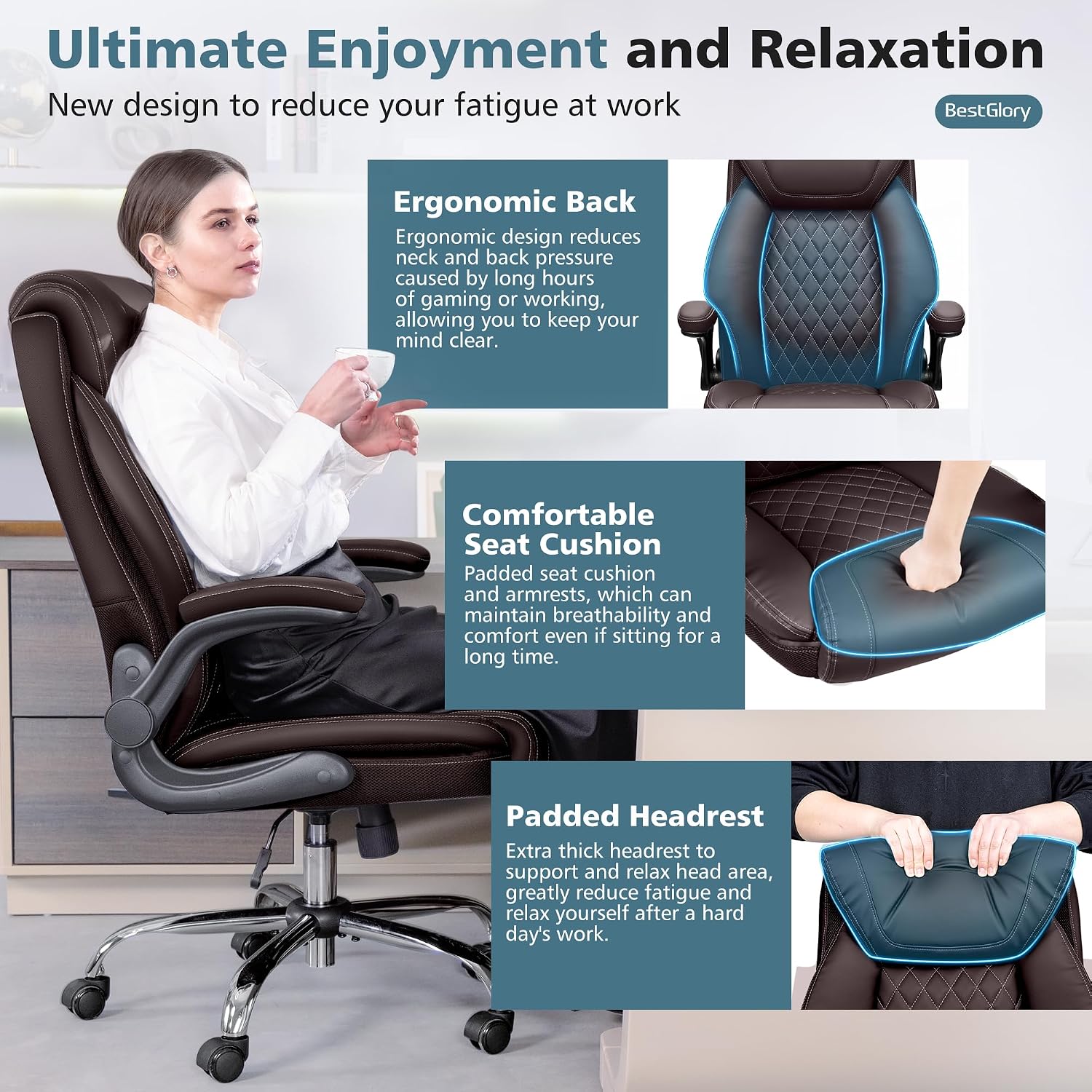
Image: Ultimate Enjoyment and Relaxation detailing ergonomic back, comfortable seat cushion, and padded headrest.

Image: Double Padded Seat Cushion showcasing waterproof leather, double layer seat, and high-density sponge construction.
Maintenance
To maintain the appearance and functionality of your BestGlory office chair, follow these simple care instructions:
- Wipe clean with a damp cloth. Avoid harsh chemicals or abrasive cleaners.
- Regularly check and tighten all screws and bolts to ensure stability.
- Keep the chair away from direct sunlight and heat sources to prevent material degradation.
- Clean casters periodically to ensure smooth rolling.
Troubleshooting
If you encounter any issues with your chair, please refer to the following common solutions:
| Problem | Possible Cause | Solution |
|---|---|---|
| Chair does not adjust height. | Gas lift not properly installed or damaged. | Ensure gas lift is fully inserted. Contact customer service if issue persists. |
| Chair wobbles or is unstable. | Loose screws or uneven assembly. | Check and tighten all assembly screws. Ensure chair is on a flat surface. |
| Casters do not roll smoothly. | Debris in casters or damaged casters. | Clean casters of any hair or debris. Replace if damaged. |
For further assistance, please contact BestGlory customer service.
Specifications
| Feature | Detail |
|---|---|
| Brand | BestGlory |
| Model Name | Executive Office Chair |
| Model Number | 5200H |
| Color | Coffee |
| Product Dimensions | 25"D x 29"W x 50"H |
| Maximum Weight Recommendation | 400 pounds (181.44 Kilograms) |
| Material | PU Leather, High Density Sponge |
| Special Features | Adjustable Backrest (90-135 degrees), Adjustable Height, Flip-Up Armrests, Ergonomic Lumbar Support, Padded Headrest |
| Furniture Base Movement | Swivel, 360-degree Multi-Directional Wheels |
| Certifications | SGS-certified level 3 cylinder |
Warranty and Support
BestGlory is committed to providing high-quality products and excellent customer service. If you have any questions regarding your product, delivery, or require support, please contact us directly.
- Online Support: Log in to your Amazon Account, navigate to "Your Orders," find the product, and click "Contact Seller."
- Email: cs@bestglorys.com
- Phone: +1(970)866-1010
- User Guide (PDF): Download PDF Manual
Please retain your purchase receipt for warranty claims.
Ask a question about this manual
Ask about setup, troubleshooting, compatibility, parts, safety, or missing instructions. Manuals+ will review the question and use this page’s manual context to help answer it.