
1. Product Overview
The Sotion HY-8639 Full Body Massage Mat provides a unique 3D stretching and lumbar traction experience, complemented by back heating. Unlike traditional shiatsu, vibration, or rolling massagers, this mat uses inflatable air cells to gently stretch, traction, and twist the body, offering a comfortable and quiet relaxation.

Image 1.1: The Sotion Full Body Massage Mat, showcasing its design and integrated remote control.
2. Safety Information
- This product is designed for users between 5'1" (155cm) and 6'0" (183cm) in height.
- Do not use this massage mat on chairs or recliners. It is intended for use on flat, stable surfaces such as a bed, sofa, or floor.
- Before first use, it is recommended to review the product video to understand the unique massage method.
- Statements regarding dietary supplements have not been evaluated by the FDA and are not intended to diagnose, treat, cure, or prevent any disease or health condition.
3. Setup Guide
- Unpack the Mat: Carefully remove the massage mat from its packaging.
- Choose a Flat Surface: Lay the mat flat on a bed, sofa, or floor. Ensure the surface is stable and provides adequate support.
- Adjust Neck Pillow: The neck pillow is adjustable to accommodate users between 5'1" and 6'0". Position it to comfortably support your neck.
- Connect Power: Plug the power adapter into a standard electrical outlet and connect it to the mat's control unit.
- Position Yourself: Lie down on the mat, ensuring your body is aligned with the designated massage areas (neck, back, waist, hip, leg).
4. Operating Instructions
The Sotion HY-8639 massage mat features a user-friendly handheld remote control to customize your massage experience.

Image 4.1: Handheld remote controller for the Sotion Full Body Massage Mat, showing various function buttons.
- Power On/Off: Press the power button to turn the mat on or off.
- Mode Selection: Choose from 4 program modes:
- Auto: Provides a combination of all massage techniques.
- Stretch: Focuses on full body stretching.
- Twist: Engages left and right twisting motions.
- Flow: Offers a gentle, flowing massage experience.
- Intensity Levels: Select from 3 intensity levels (Low, Mid, High) to suit your preference.
- Heat Levels: Activate the optional back heating function with 3 temperature levels:
- Heat 1: 115℉ (46℃)
- Heat 2: 130℉ (54℃)
- Heat 3: 149℉ (65℃)
- Targeted Massage Parts: Select specific areas for massage: Neck, Back, or Hip.
- Pause Function: Use the pause button to temporarily stop the stretching and traction movements.
5. Key Features
- 3D Body Stretching & Lumbar Traction: The mat provides comprehensive stretching and traction for the neck, back, waist, hip, and legs. It includes traction up & down, curve stretching, and left & right twisting motions. The lumbar area offers additional support and relaxation.
- Back Heating Therapy: The back section of the mat offers an optional heating function to help relieve stress, tension, and fatigue.
- Comfortable, Quiet, and Gentle: This mat offers a distinct massage experience that is generally more comfortable than shiatsu, quieter than vibration, and gentler than rolling massage techniques.
- Foldable & Portable Design: The mat is designed with Velcro fasteners, allowing it to be easily folded for storage. A built-in handle makes it convenient to carry, weighing approximately 10 lbs (4.84 kg).
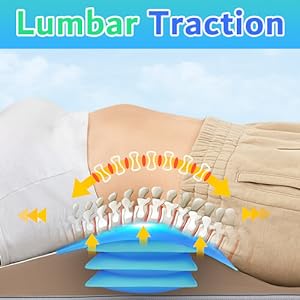
Image 5.1: Visual representation of the lumbar traction feature, showing how the mat supports and stretches the lower back.

Image 5.2: A user experiencing the soothing heat function on the massage mat, targeting the back area.

Image 5.3: The massage mat being folded and carried, highlighting its portable design.
6. Official Product Video
Video 6.1: An official video from Sotion store explaining the benefits and functionality of the 3D Body Stretching & Lumbar Traction feature of the massage mat.
7. Maintenance
- Cleaning: Wipe the PU leather surface with a soft, damp cloth. Do not use abrasive cleaners or harsh chemicals.
- Storage: When not in use, fold the mat and store it in a cool, dry place away from direct sunlight and extreme temperatures.
- Avoid Punctures: Keep sharp objects away from the mat to prevent damage to the inflatable air cells.
8. Troubleshooting
- Mat Not Powering On:
- Ensure the power adapter is securely plugged into both the mat and a working electrical outlet.
- Check if the power button on the remote control is pressed.
- No Massage/Stretching Function:
- Verify that a massage mode (Auto, Stretch, Twist, Flow) is selected on the remote.
- Ensure the mat is laid flat on a suitable surface and not obstructed.
- No Heat Function:
- Confirm that a heat level (Heat 1, Heat 2, or Heat 3) is selected on the remote.
- Allow a few minutes for the heating elements to warm up.
9. Specifications
| Feature | Detail |
|---|---|
| Model Number | HY-8639 |
| Product Dimensions | 10 x 2 x 5 inches (25.4 x 5.08 x 12.7 cm) |
| Item Weight | 10.67 Pounds (4.84 kg) |
| Material | Acrylic, PU Leather |
| Power Source | Corded Electric |
| Recommended User Height | 5'1" - 6'0" (155-183 cm) |
| Massage Modes | 4 (Auto, Stretch, Twist, Flow) |
| Massage Intensities | 3 (Low, Mid, High) |
| Heat Levels | 3 (115℉, 130℉, 149℉) |
10. Warranty and Support
For warranty information or technical support, please refer to the documentation included with your purchase or contact Sotion customer service directly through their official website or the retailer where the product was purchased.