
Coolbull GLX060
Coolbull 20-inch Outdoor Ceiling Fan with Light (Model GLX060) User Manual
Model: GLX060 | Brand: Coolbull
1. Introduction
This manual provides detailed instructions for the safe installation, operation, and maintenance of your Coolbull 20-inch Outdoor Ceiling Fan with Light, Model GLX060. Please read this manual thoroughly before using the product and retain it for future reference.

Image 1.1: Coolbull 20-inch Outdoor Ceiling Fan with Light, showcasing its black caged design, integrated light, and included remote control and app interface.
2. Safety Information
To reduce the risk of fire, electric shock, or personal injury, always follow these basic safety precautions:
- Read all instructions before installing and operating the fan.
- Ensure the power supply is disconnected before installation or maintenance.
- This fan is wet-rated (IP63) for outdoor use, but it is recommended not to place it in an unsheltered outdoor location for extended periods.
- Do not insert fingers or any objects into the fan blades while the fan is operating.
- Ensure the mounting structure can support the fan's weight (approximately 16.27 lbs).
- Use only the provided components and accessories.
- Keep the remote control and fan away from water and extreme temperatures.

Image 2.1: Examples of fan placement in a gazebo, porch, and dining room, with a reminder about optimal outdoor placement.
3. Package Contents
Verify that all components are present and undamaged before proceeding with installation.
- Coolbull 20-inch Outdoor Ceiling Fan with Integrated Light
- Remote Control
- Power Cord (16 ft)
- Downrods (2 sizes: 13.8" and 6.7")
- Mounting Hardware (hook, screws, etc.)
- User Manual (this document)
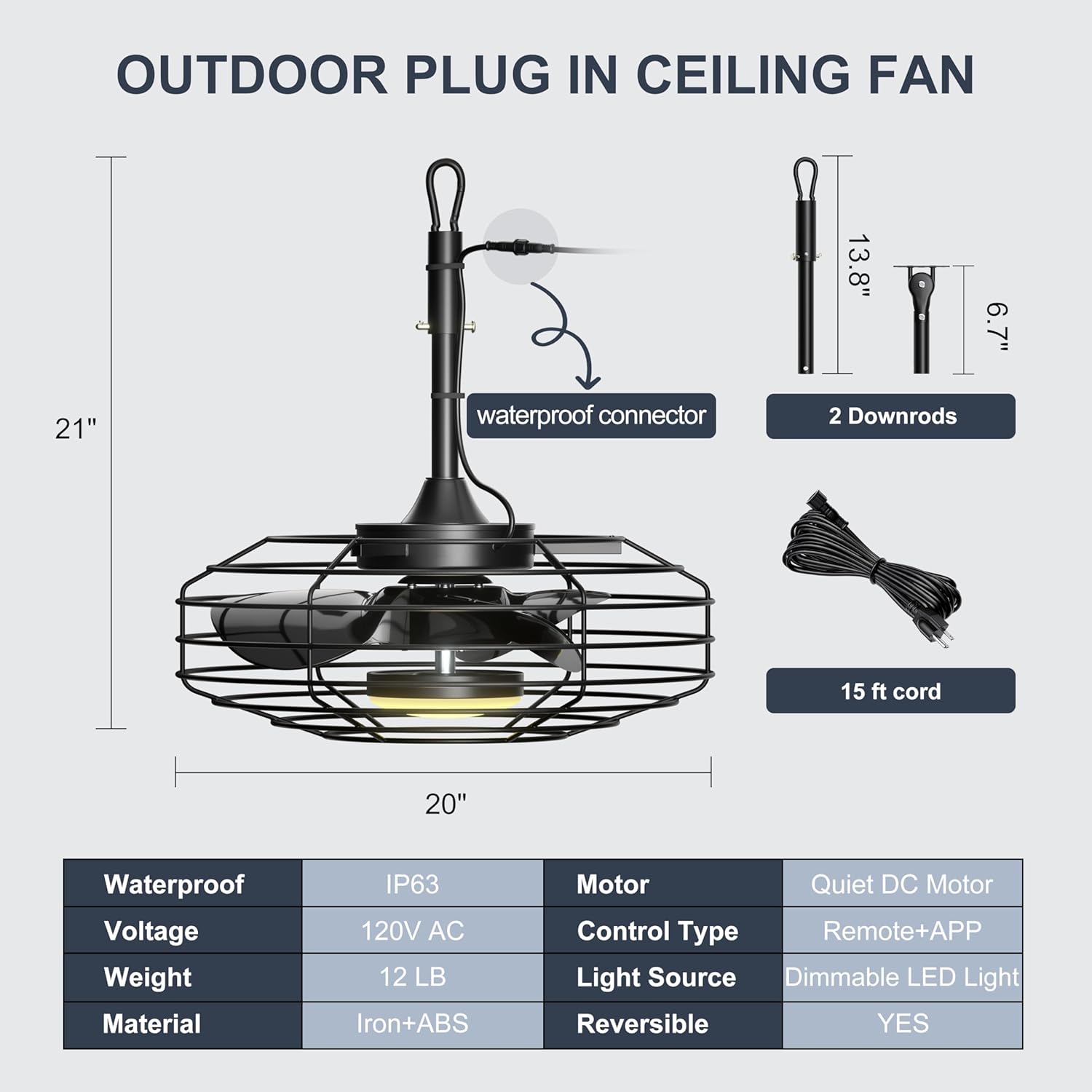
Image 3.1: Visual representation of the fan's dimensions (20" diameter, 21" height) and included accessories like downrods and power cord.
4. Product Features
- 20-inch Diameter: Compact size suitable for various outdoor spaces.
- Wet-Rated & IP63 Waterproof: Designed for outdoor use, resistant to dust and water splashes.
- Plug-in Design: Easy setup with a 16 ft power cord, no complex wiring required.
- Remote & App Control: Convenient operation via included remote or a dedicated smartphone application.
- Dimmable LED Light: Integrated light with 3 color temperatures (3000K Warm, 4500K Neutral, 6000K Cold) and 10%-100% smooth dimming.
- 6 Fan Speeds: Adjustable airflow from a gentle breeze to a strong cooling effect.
- Reversible DC Motor: Allows for downward airflow in summer and upward circulation in winter.
- Ultra-Quiet Operation: Operates at less than 35 dB for minimal noise disturbance.
- Timer Function: Set the fan to turn off automatically after 2, 4, or 8 hours.
- Sturdy Construction: Features a thickened metal cage frame (5mm diameter) for enhanced durability and stability.
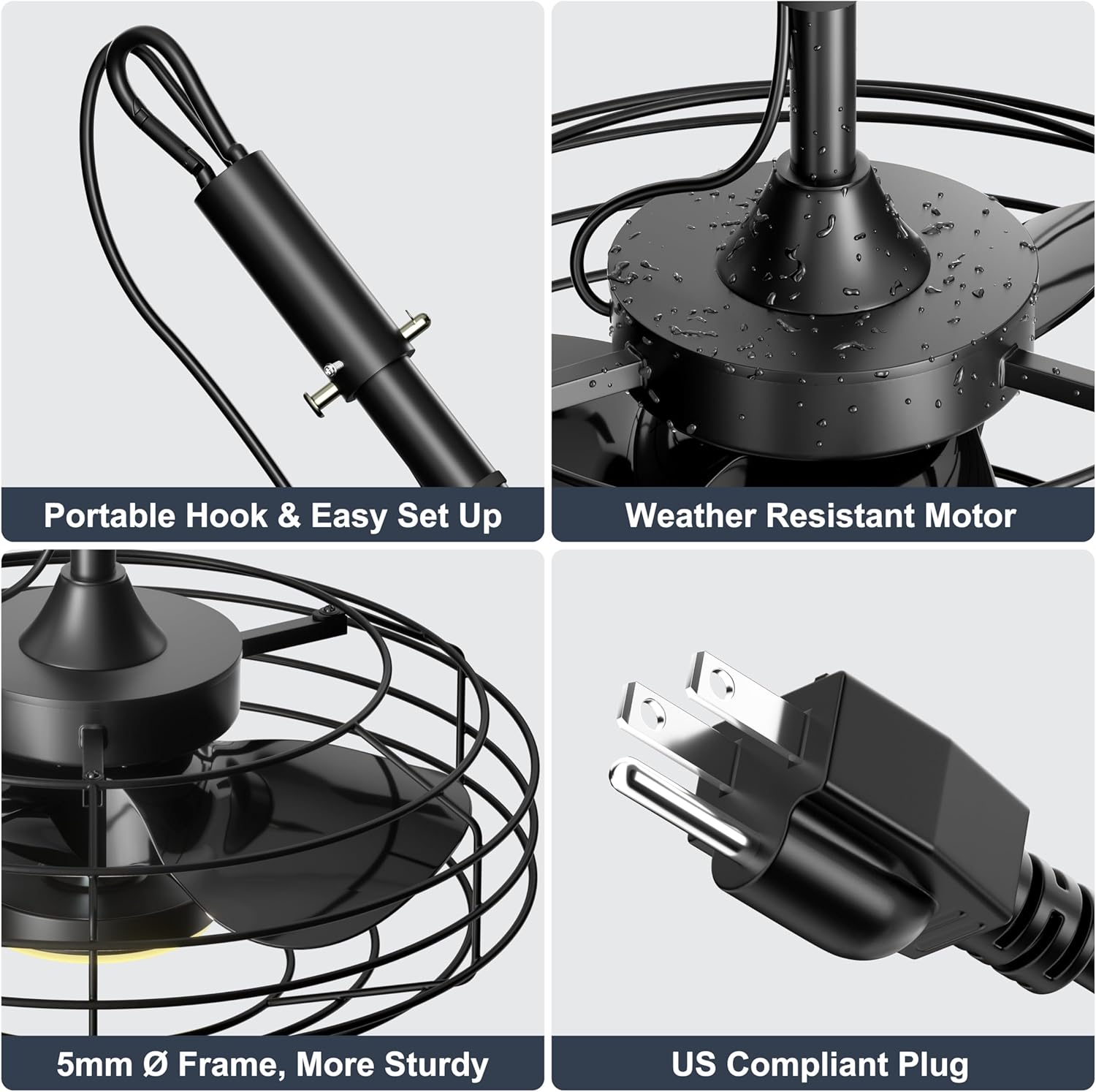
Image 4.1: Detailed views highlighting the portable hook, weather-resistant motor, 5mm thick metal frame, and the US-compliant plug.
5. Setup and Installation
The Coolbull outdoor ceiling fan offers two primary installation methods:
5.1. Hanged on Hook (Recommended)
This method provides effortless setup and allows for flexible placement.
- Identify a sturdy overhead structure (e.g., pergola beam, gazebo frame) capable of supporting the fan's weight.
- Securely install a hook into the chosen structure. Ensure the hook is rated for the fan's weight.
- Attach the fan's hanging rod to the installed hook.
- Plug the 16 ft power cord into a suitable outdoor electrical outlet. Ensure the outlet is protected from direct water exposure.
5.2. Ceiling Mounted
This method provides a more permanent installation but may be less convenient for relocation.
- Ensure the ceiling structure is robust enough to support the fan.
- Mount the fan's ceiling bracket directly to the ceiling using appropriate hardware.
- Connect the fan's wiring to the electrical supply according to local electrical codes. (Note: This fan is designed for plug-in use; hardwiring may require professional installation and modification).
- Secure the fan body to the ceiling bracket.

Image 5.1: Illustrates the "Hanged on Hook" method for easy setup and the "Ceiling Mounted" method for a more fixed installation.
6. Operating Instructions
Your Coolbull fan can be controlled using the included remote control or a smartphone application.
6.1. Remote Control Operation
The remote control provides full functionality for the fan and light.
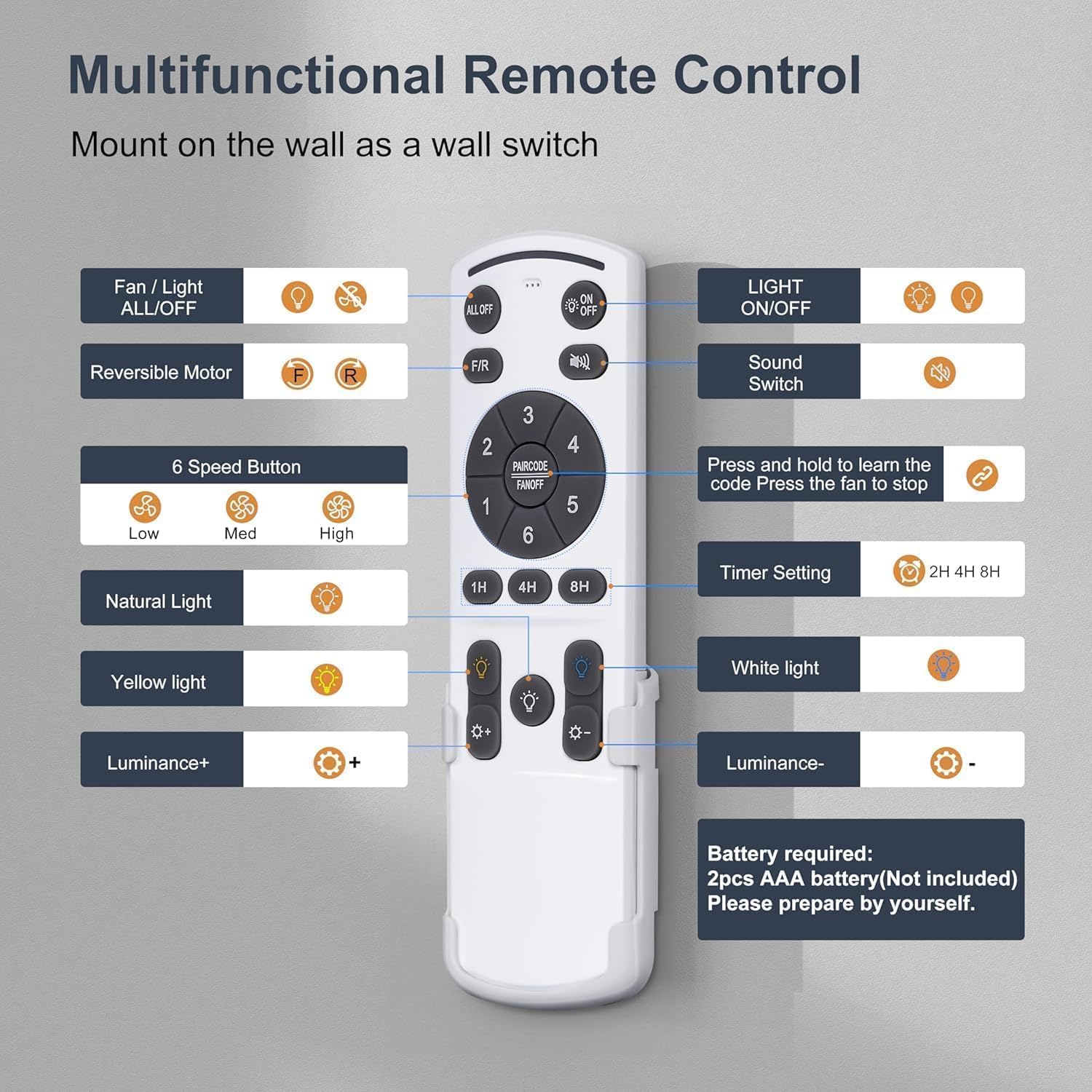
Image 6.1: Detailed diagram of the remote control buttons and their functions. Requires 2 AAA batteries (not included).
- Fan / Light ALL ON/OFF: Turns both fan and light on or off.
- LIGHT ON/OFF: Controls the light independently.
- Reversible Motor (F/R): Changes fan direction for summer (downward airflow) or winter (upward circulation).
- Sound Switch: Toggles audible feedback for button presses.
- 6 Speed Button: Adjusts fan speed from 1 (low) to 6 (high).
- Timer Setting (1H, 4H, 8H): Sets the fan to turn off after the selected duration.
- Natural Light, Yellow Light, White Light: Cycles through 3000K, 4500K, and 6000K color temperatures.
- Luminance +/-: Adjusts the brightness of the light (10%-100% dimmable).
- Pairing Button: Press and hold to learn the code (pair the remote). Press to stop the fan.
Note: The remote requires 2 AAA batteries (not included).
6.2. Smartphone App Control
The fan can also be controlled via the "FanLamp Pro" smartphone application.
- Download the App: Scan the QR code provided on the product packaging or in the image below, or search for "FanLamp Pro" in your device's app store. Download Link
- Enable Bluetooth: Ensure Bluetooth is enabled on your smartphone.
- Pairing:
- Open the FanLamp Pro app.
- Unplug the fan from the power source.
- In the app, ensure the light is set to ON and the fan is set to OFF.
- Plug the fan back into the power source.
- Immediately tap the Bluetooth pairing button in the app (you may need to tap it multiple times). You should hear a beep from the fan indicating successful pairing.
- Once paired, you can control fan speed, light settings, and other functions directly from the app interface.
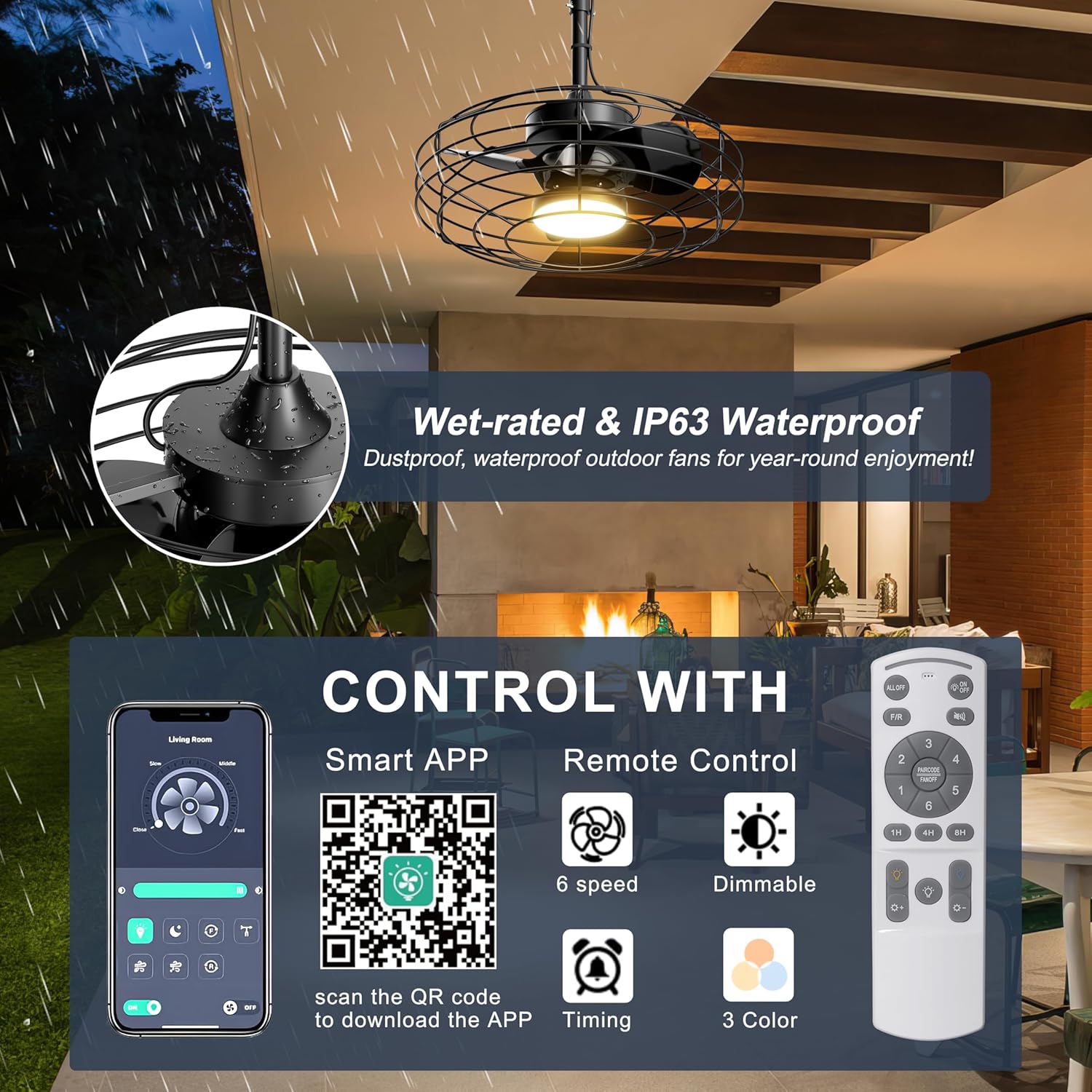
Image 6.2: Displays the FanLamp Pro app interface and the physical remote control, highlighting options for 6 speeds, dimming, timing, and 3 light colors.

Image 6.3: A smartphone screen showing the FanLamp Pro app and a QR code for direct download.
6.3. Fan and Light Functions
- Fan Speed: Choose from 6 speeds to customize airflow. Speeds 1-2 offer a comfortable breeze, 3-4 a natural breeze, and 5-6 a high cooling breeze.
- Reversible Motor: Use the 'F/R' button on the remote or the app to switch between summer mode (downward airflow for cooling) and winter mode (upward airflow for circulating warm air).
- Dimmable Light: Adjust light brightness from 10% to 100%.
- Color Temperature: Select between Warm Light (3000K), Neutral Light (4500K), and Cold Light (6000K) to suit your preference.
- Timer: Set the fan to operate for 1, 4, or 8 hours before automatically turning off.

Image 6.4: Demonstrates the 10%-100% smooth dimming capability and the three color temperature options (3000K, 4500K, 6000K) controlled by the remote.

Image 6.5: Highlights key operational features including the reversible DC motor, ultra-quiet operation (below 35dB), and the 2-hour timer function.
7. Maintenance
Regular maintenance ensures optimal performance and longevity of your fan.
- Cleaning: Disconnect power before cleaning. Use a soft, damp cloth to wipe down the fan's exterior. Do not use abrasive cleaners or solvents.
- Inspection: Periodically check all connections and mounting hardware to ensure they are secure.
- Storage: If storing the fan for an extended period, especially during harsh weather, it is recommended to remove it from its outdoor location and store it in a dry, protected area.
8. Troubleshooting
| Problem | Possible Cause | Solution |
|---|---|---|
| Fan does not turn on. | No power supply; Remote batteries low/dead; Fan not paired. | Check power outlet and cord connection. Replace remote batteries. Re-pair remote/app (refer to Section 6.2). |
| Light does not work. | Light turned off; Remote batteries low/dead. | Press the LIGHT ON/OFF button. Replace remote batteries. |
| Remote/App not controlling fan. | Not paired; Obstruction between remote and fan; Bluetooth off (for app). | Re-pair the remote/app. Ensure clear line of sight for remote. Enable Bluetooth on your device for app control. |
| Fan makes unusual noise. | Loose components; Obstruction. | Ensure all mounting hardware is tight. Check for any foreign objects near the blades. |
9. Specifications
| Model Name | GLX060 |
| Brand | Coolbull |
| Product Dimensions | 20"D x 20"W x 21"H |
| Item Weight | 16.27 pounds |
| Material | Iron + ABS |
| Power Source | AC |
| Voltage | 120 Volts |
| Control Method | Remote, App |
| Number of Blades | 3 |
| Fan Speeds | 6 |
| Air Flow Capacity | 3670 Cubic Feet Per Minute (CFM) |
| Noise Level | 35 dB |
| Light Source | Dimmable LED Light |
| Color Temperature | 3000K, 4500K, 6000K |
| Special Features | App Operable, Dimmable Light, IP63 Waterproof, Plug and Play, Portable, Reversible DC Motor |
| Indoor/Outdoor Usage | Outdoor |
| Recommended Coverage Area | Up to 10x10 ft |
10. Warranty and Support
For warranty information or technical support, please refer to the product packaging or contact Coolbull customer service. Contact details are typically available on the manufacturer's website or through your purchase platform.
Please have your model number (GLX060) and purchase date available when contacting support.
Related Documents - GLX060
 |
COOLBULL GLX-060 Ceiling Fan With Light User Manual | Installation, Operation & Troubleshooting Comprehensive user manual for the COOLBULL GLX-060 Ceiling Fan With Light. Includes safety rules, installation guides, operation instructions, remote functions, troubleshooting tips, and maintenance advice. |
 |
COOLBULL GLX101-D Ceiling Fan With Light User Manual User manual for the COOLBULL GLX101-D Ceiling Fan With Light, covering installation, operation, maintenance, and troubleshooting. Includes safety guidelines, tools required, package contents, and warranty information. |
Ask a question about this manual
Ask about setup, troubleshooting, compatibility, parts, safety, or missing instructions. Manuals+ will review the question and use this page’s manual context to help answer it.