
Yclty PFJG Shop
Yclty Folding Standing Desk (Model PFJG Shop) Instruction Manual
Your guide to setup, operation, and maintenance
1. Introduction
Thank you for choosing the Yclty Folding Standing Desk. This manual provides essential information for the safe and efficient use of your new desk. Please read these instructions carefully before using the product and retain them for future reference.
2. Safety Information
Important Safety Warnings:
- Weight Limit: Do not exceed a maximum weight of 70 lbs (31.75 kg) on the desktop. Overloading can cause instability and damage.
- Stability: Always ensure the desk is fully unfolded and stable on a flat, level surface before placing items on it or using it.
- Pinch Points: Exercise caution when folding or unfolding the desk to avoid pinching fingers or hands in the moving parts.
- Children and Pets: Keep children and pets away from the desk during assembly (unfolding) and folding operations.
- Placement: Do not place the desk near heat sources, open flames, or in direct sunlight for prolonged periods, as this may damage the materials.
3. Product Overview
The Yclty Folding Standing Desk is designed for versatility and convenience in small spaces. It features a robust construction and a user-friendly folding mechanism.
Key Features:
- No Assembly Required: Ready to use in seconds.
- Foldable Design: Folds flat for easy storage, with a thickness of approximately 4.5 cm when folded.
- Height Adjustable: Suitable for both standing and sitting positions (fixed height of 40.7 inches).
- Durable Construction: Features a waterproof, scratch-resistant MDF board desktop and powder-coated carbon steel tube legs.
- Enhanced Stability: X-shaped fixing frame and reinforced crossbar structure.
- Safety Design: Polished, smooth, and rounded desktop corners to prevent injury.
Product Components:
The package includes the fully assembled folding standing desk. No additional components are required for setup.

Figure 3.1: Yclty Folding Standing Desk (Black Legs, Walnut Top)
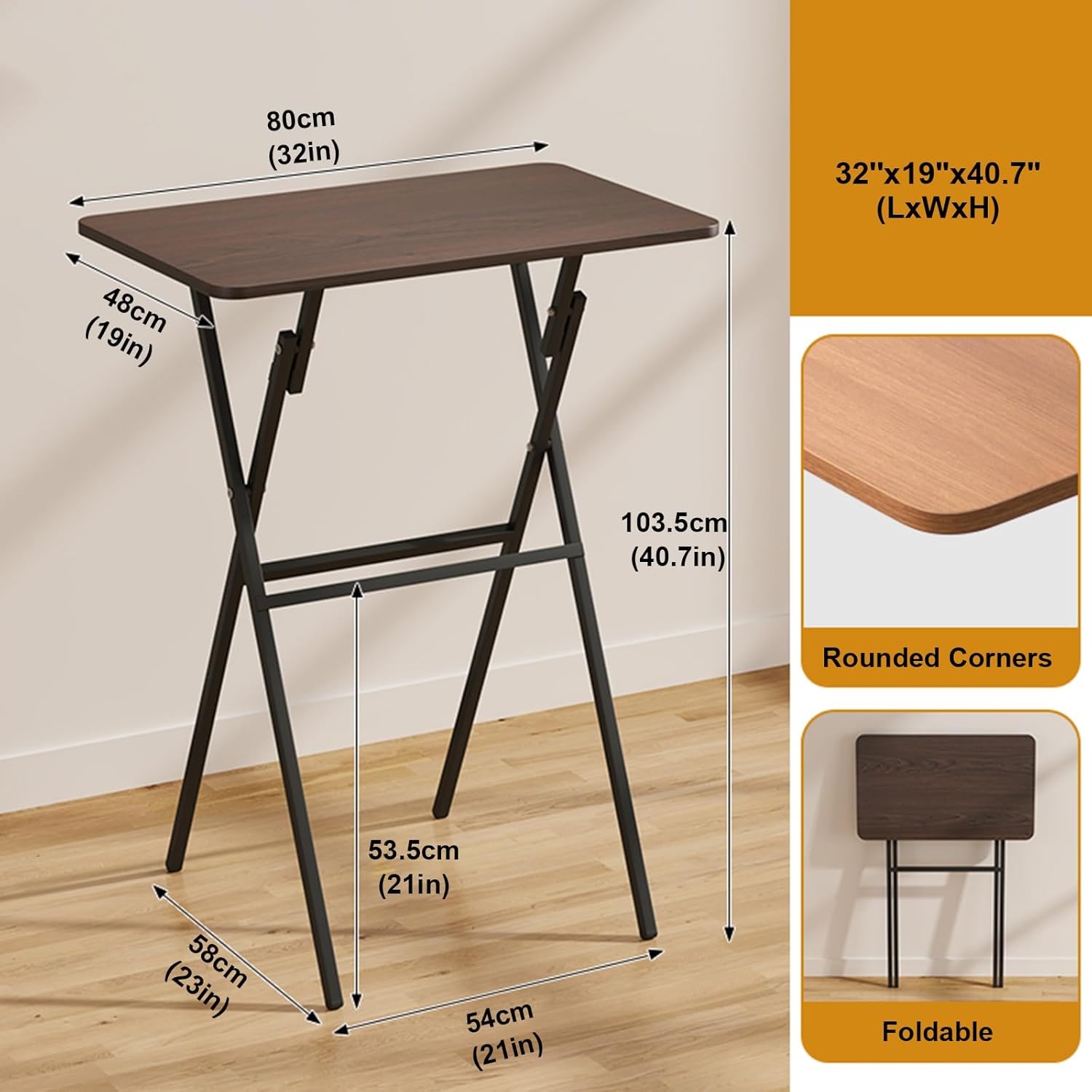
Figure 3.2: Desk dimensions (32"x19"x40.7" / 80x48x103.5cm) with black legs and walnut top.

Figure 3.3: Detail of the desk's edge banding process and rounded corner design (shown with white legs, feature applies to all variants).
4. Setup
The Yclty Folding Standing Desk requires no assembly. It is designed for quick and easy deployment.
Unfolding the Desk:
- Carefully remove the desk from its packaging.
- Place the folded desk on a flat surface or hold it upright.
- Gently pull the legs outwards until they fully extend and lock into place. Ensure all four legs are securely locked.
- Verify the desk is stable and level before placing any items on the desktop.

Figure 4.1: The desk fully unfolded and ready for use (shown with white legs, setup process is identical).
5. Operating Instructions
Using the Desk:
- The desk is designed for use in both standing and sitting configurations, providing a fixed height of 40.7 inches.
- Place your laptop, monitor, or other work items on the desktop, ensuring the total weight does not exceed 70 lbs.
- The desk is suitable for various activities including writing, studying, computer work, gaming, and as a temporary dining surface.
Folding the Desk for Storage:
- Remove all items from the desktop.
- Locate the folding mechanisms on the underside of the desktop or along the leg structure.
- Carefully disengage the locking mechanisms and fold the legs inwards until the desk is flat.
- Store the folded desk in a safe place, such as behind a door or in a closet, utilizing its slim 4.5 cm folded profile.

Figure 5.1: The desk folded flat, demonstrating its compact storage capability (shown with black legs and light wood top).
6. Maintenance
Cleaning:
- The desktop is made of waterproof and scratch-resistant MDF board. Clean with a soft, damp cloth and mild detergent if necessary.
- Avoid using abrasive cleaners or harsh chemicals, as these can damage the finish.
- Wipe the metal legs with a damp cloth to remove dust and dirt.
Inspection:
- Periodically check all connections and moving parts to ensure they are secure and functioning correctly.
- If any parts appear damaged or loose, discontinue use and contact customer support.
7. Troubleshooting
Common Issues and Solutions:
- Issue: Desk feels unstable or wobbly.
- Solution: Ensure the desk is placed on a completely flat and level surface. Verify that all four legs are fully extended and the locking mechanisms are engaged. Check for any loose connections in the X-shaped frame.
- Issue: Difficulty folding or unfolding the desk.
- Solution: Ensure no obstructions are preventing the legs from moving freely. Apply gentle, even pressure. If the mechanism feels stiff, check for any debris or damage. Do not force the mechanism.
- Issue: Desktop surface appears damaged (scratches, watermarks).
- Solution: While the desktop is scratch and waterproof, extreme conditions can still cause damage. For minor issues, a furniture repair kit might be used. For significant damage, contact customer support.
8. Specifications
| Feature | Detail |
|---|---|
| Brand | Yclty |
| Model Number | PFJG Shop |
| Product Dimensions (L x W x H) | 32'' x 19'' x 40.7'' (80cm x 48cm x 103.5cm) |
| Color | Black Legs, Walnut Top |
| Weight Capacity | Up to 70 lbs (31.75 kg) |
| Top Material Type | Engineered Wood (MDF), Walnut Wood |
| Base Material | Metal (Carbon Steel) |
| Finish Type | Powder Coated |
| Assembly Required | No |
| Folded Thickness | Approx. 4.5 cm |
| Item Weight | 7600 Grams (approx. 16.75 lbs) |
9. Warranty Information
This product comes with a limited warranty. For specific details regarding warranty coverage, duration, and terms, please refer to the product packaging or contact the seller directly. Please retain your proof of purchase for any warranty claims.
10. Customer Support
If you have any questions, require assistance, or encounter issues not covered in this manual, please contact the seller or manufacturer through the platform where the product was purchased. Provide your product model number (PFJG Shop) and purchase details for efficient support.
Ask a question about this manual
Ask about setup, troubleshooting, compatibility, parts, safety, or missing instructions. Manuals+ will review the question and use this page’s manual context to help answer it.