
1. Introduction
Thank you for choosing the penaover Portable Charger, Model TW1006-B. This device is a versatile 10000mAh power bank designed for convenient and fast charging of your electronic devices. It features built-in charging cables and an integrated AC wall plug, making it an ideal companion for travel and daily use. Please read this manual carefully to ensure proper use and to maximize the lifespan of your product.
2. Product Features
- All-in-One Design: Features built-in USB-C, Micro-USB, and iPhone cables, along with a USB-A port and USB-C port. An integrated AC wall plug allows direct recharging from an outlet.
- Universal Compatibility: Compatible with a wide range of devices including iPhones, iPads, Samsung phones, Google Pixel devices, tablets, and Bluetooth headphones.
- Fast Charging: Supports up to PD 22.5W fast charging technology, capable of charging compatible phones up to 60% in approximately 30 minutes.
- Compact & Portable: Measures 5.76 x 2.72 x 0.68 inches and weighs 7.6 ounces, designed for easy portability. Includes a lanyard for convenient carrying. TSA-approved for airline travel.
- Smart Digital LED Display: Provides an accurate real-time display of the remaining battery percentage.
- Superior Safety: Equipped with an intelligent safety chip offering protection against overcharging, overvoltage, overcurrent, overheating, and short circuits.

Image: Overview of the penaover portable charger, highlighting its built-in cables (USB-C, Micro, iPhone), USB-A port, USB-C port, AC wall plug, and smart LED display.
3. Package Contents
- penaover Portable Charger (Model TW1006-B)
- User Manual
4. Setup
4.1 Initial Charging of the Power Bank
Before first use, fully charge your penaover Portable Charger. The device can be recharged using two methods:
- Using the Built-in AC Wall Plug: Fold out the integrated AC wall plug and insert it directly into a standard wall outlet. The LED display will show the charging progress. A full charge typically takes approximately 5 hours.
- Using the USB-C Input Port: Connect a USB-C cable (not included) to the power bank's USB-C input port and the other end to a compatible USB wall adapter. A full charge typically takes approximately 3 hours.

Image: Two methods for recharging the power bank. One shows the built-in AC plug inserted into a wall outlet, and the other shows a USB-C cable connected to the power bank's input port.

Image: The penaover portable charger with its AC wall plug extended and inserted into a power outlet for recharging.
5. Operating Instructions
5.1 Charging Your Devices
The penaover Portable Charger offers multiple options for charging your electronic devices:
- Using Built-in Cables: Extend the appropriate built-in cable (USB-C, Micro-USB, or iPhone cable) and connect it directly to your device.
- Using USB-A Output Port: Connect your device's USB-A charging cable to the power bank's USB-A output port.
- Using USB-C Output Port: Connect your device's USB-C charging cable to the power bank's USB-C output port.
The smart digital LED display will show the remaining battery percentage of the power bank during charging and discharging.

Image: The penaover portable charger connected to a smartphone via its built-in cable, indicating fast charging in progress.
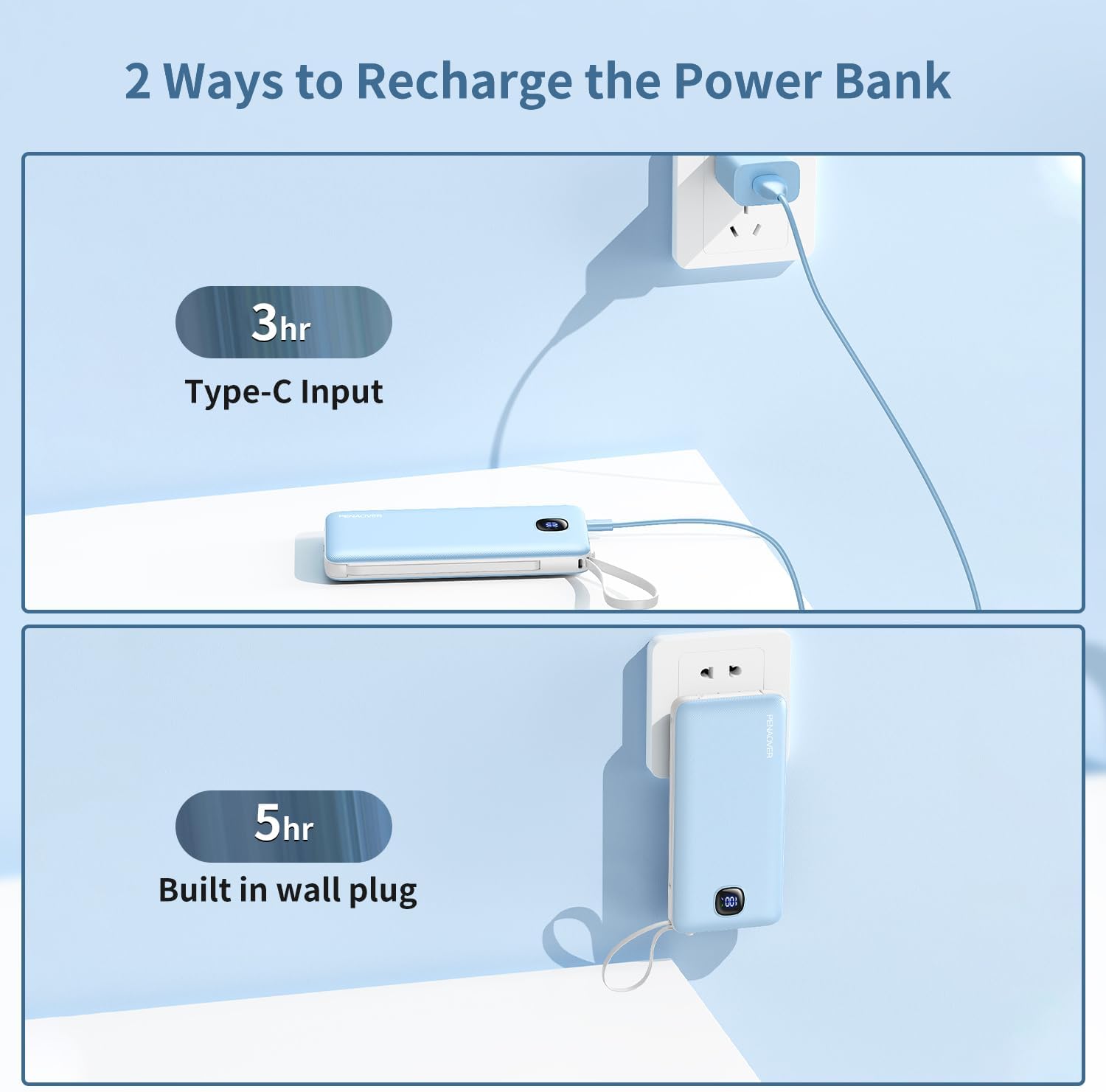
Image: The penaover portable charger simultaneously charging five different electronic devices using its various output options.
5.2 Video Demonstration
Video: An official product video demonstrating the features and usage of the penaover 10000mAh Power Bank with built-in cables and wall plug.
6. Safety Information
To ensure safe operation and prevent damage to the device or injury, please observe the following safety guidelines:
- Do not expose the power bank to extreme temperatures (above 60°C/140°F or below 0°C/32°F).
- Avoid dropping, disassembling, or attempting to repair the device yourself.
- Keep the power bank away from water, moisture, and flammable materials.
- Do not use the power bank if it is damaged, swollen, or leaking.
- Use only compatible charging cables and adapters.
- Keep out of reach of children.
- Dispose of the power bank responsibly according to local regulations.
7. Maintenance
- Clean the power bank with a soft, dry cloth. Do not use harsh chemicals or abrasive cleaners.
- Store the power bank in a cool, dry place when not in use.
- For optimal battery life, fully charge and discharge the power bank at least once every three months if stored for extended periods.
8. Troubleshooting
8.1 Power Bank Not Charging
- Ensure the AC wall plug is fully inserted into a live outlet or the USB-C input cable is securely connected to a working power source.
- Check if the power outlet is functional.
- Verify that the USB-C cable (if used) is not damaged and is compatible.
8.2 Device Not Charging from Power Bank
- Check the power bank's LED display to ensure it has sufficient charge.
- Ensure the built-in cable or external charging cable is securely connected to both the power bank and your device.
- Try a different built-in cable or external port/cable to rule out a faulty connection.
- Confirm your device is compatible with the power bank's output specifications.
8.3 Slow Charging
- Ensure your device supports fast charging and that you are using a compatible cable.
- Some devices may limit charging speed if they are in heavy use or if their battery is nearly full.
9. Specifications
| Feature | Specification |
|---|---|
| Model Number | TW1006-B |
| Battery Capacity | 10000 Milliamp Hours |
| Fast Charging | PD 22.5W |
| Input (AC Wall Plug) | 5 Volts (AC) |
| Input (USB Type C) | USB Type C |
| Output Ports | USB-A, USB-C, Built-in USB-C, Built-in Micro-USB, Built-in iPhone cable |
| Number of Ports | 2 (USB-A, USB-C) + 3 Built-in Cables |
| Battery Charge Time | Approx. 6 Hours (via AC), Approx. 3 Hours (via USB-C) |
| Dimensions (L x W x Th) | 5.7 x 2.7 x 1.08 inches |
| Weight | 7.6 ounces (254 Grams) |
| Battery Cell Type | Lithium Ion |
| Manufacturer | Shenzhen Tuwei Technology Co.,LTD |
10. Warranty and Support
The penaover Portable Charger (Model TW1006-B) comes with a 1 Year Warranty from the date of purchase. This warranty covers manufacturing defects and malfunctions under normal use. It does not cover damage caused by misuse, accidents, unauthorized modifications, or natural disasters.
For warranty claims, technical support, or any inquiries regarding your product, please contact penaover customer service through the retailer where you purchased the product or visit the official penaover brand store online.