
SignalBrick BuildingForce-XD
SignalBrick Cell Phone Booster Instruction Manual
Model: BuildingForce-XD
1. Introduction
This manual provides detailed instructions for the installation, operation, and maintenance of your SignalBrick Cell Phone Booster.
This system is designed to enhance cellular signal coverage within buildings, supporting all major U.S. carriers and providing high data speeds for multi-room and multi-floor environments. The SignalBrick BuildingForce-XD kit features an innovative all-weather on-roof booster, minimizing cable transmission loss and optimizing data communication capabilities. It includes two interior dome antennas to double coverage ability, making it ideal for large homes or offices, especially those with building materials that may block cell signals.
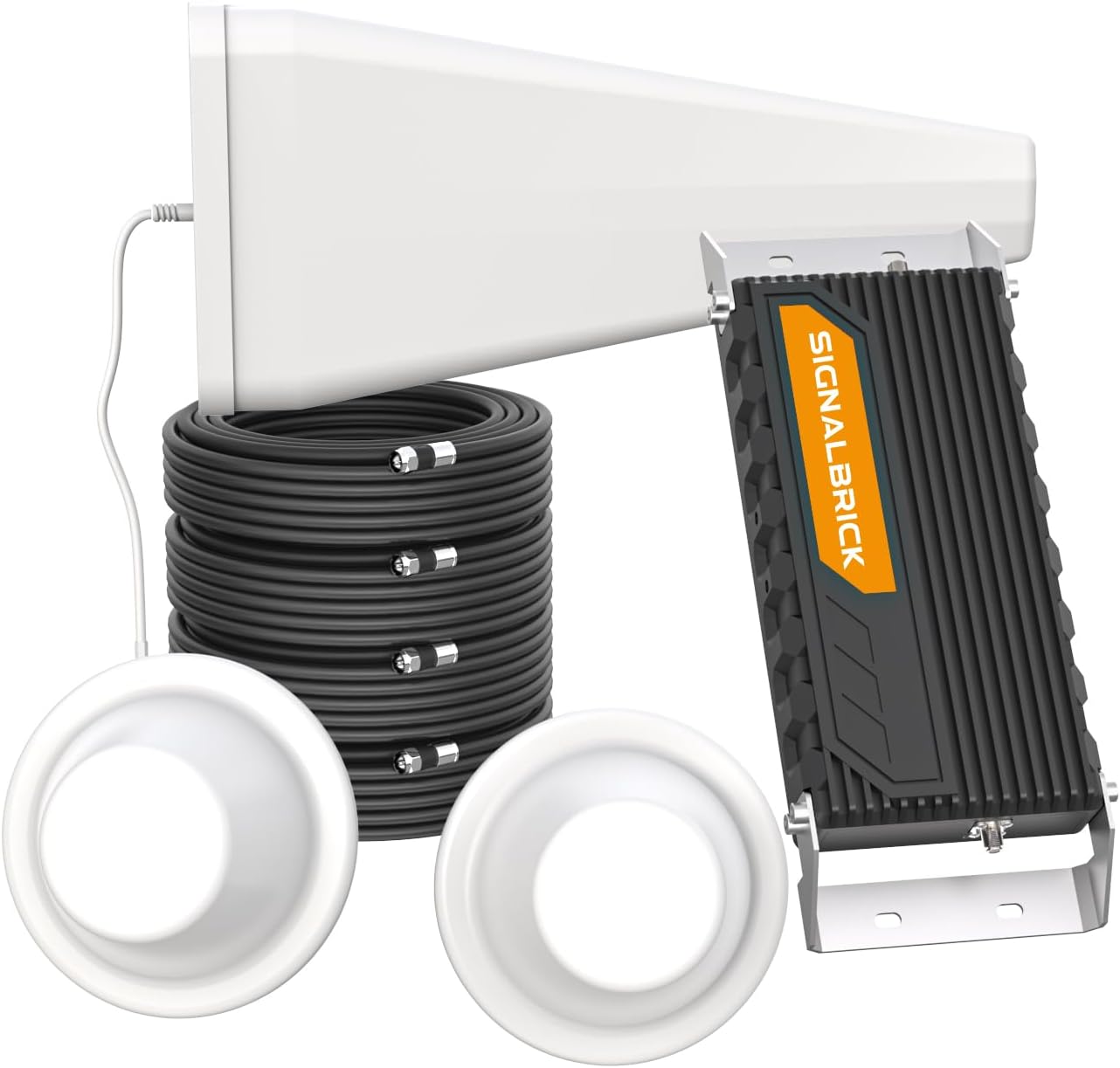
Figure 1: SignalBrick Cell Phone Booster System Components
2. Product Features
- Revolutionary All-Weather On-Roof Booster: Designed for outdoor placement to minimize signal loss, offering ultra-low noise floor and maximum data communication speeds up to 80 Mbps (download) / 40 Mbps (upload).
- Wide Carrier Compatibility: Works with Band 12/13/5/2/4/25, compatible with all major U.S. carriers including AT&T, Verizon, T-Mobile, Sprint, and U.S. Cellular.
- Extensive Coverage: Professional high gain (72dB) picks up weak signals over long distances (6-10 miles), enhancing signal up to 1500X with a coverage area of up to 12,000 sq ft. Coverage varies based on outdoor signal strength.
- Unique Tru5 Technology: Separates into 10 circuit channels, including dedicated Band 12 and Band 13 support for optimized AT&T/T-Mobile and Verizon data speeds. Boosts voice, text, and data signals for multiple simultaneous users.
- Improved Signal Effect: Reduces cell phone transmission power and electromagnetic radiation exposure. Also conserves phone battery life by up to 2 hours in standby mode.
- Easy Setup: Automatically adjusts system gain and power level for optimal performance, requiring no manual intervention. Installation can typically be completed by two persons in approximately 3 hours.
- FCC Approved: FCC ID: A7V-SR75702001. Compliant with applied standards, ensuring no interference with cellular carrier signals.
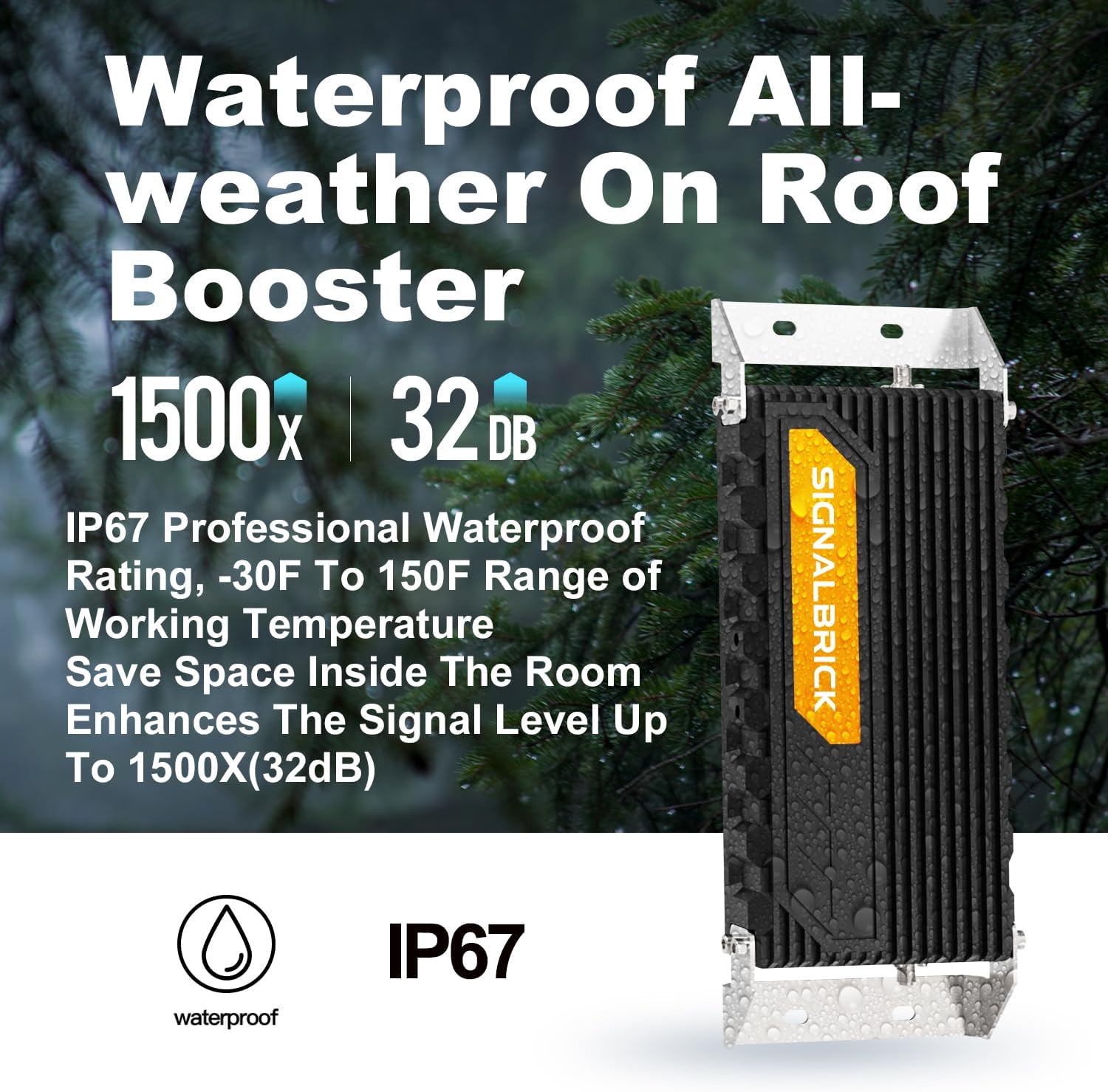
Figure 2: Waterproof and All-Weather Design

Figure 3: All Operators Signal Compatibility
3. Package Contents
Verify that all items listed below are included in your package:
- 1 x SignalBrick Outdoor Antenna
- 1 x SignalBrick Signal Booster (Main Unit)
- 4 x 45ft RG11 Cables
- 1 x 15ft RG11 Cable
- 1 x Installation Kit (mounting brackets, screws, etc.)
- 1 x SignalBrick Splitter
- 2 x Dual Interior Dome Antennas
- 1 x Power Supply
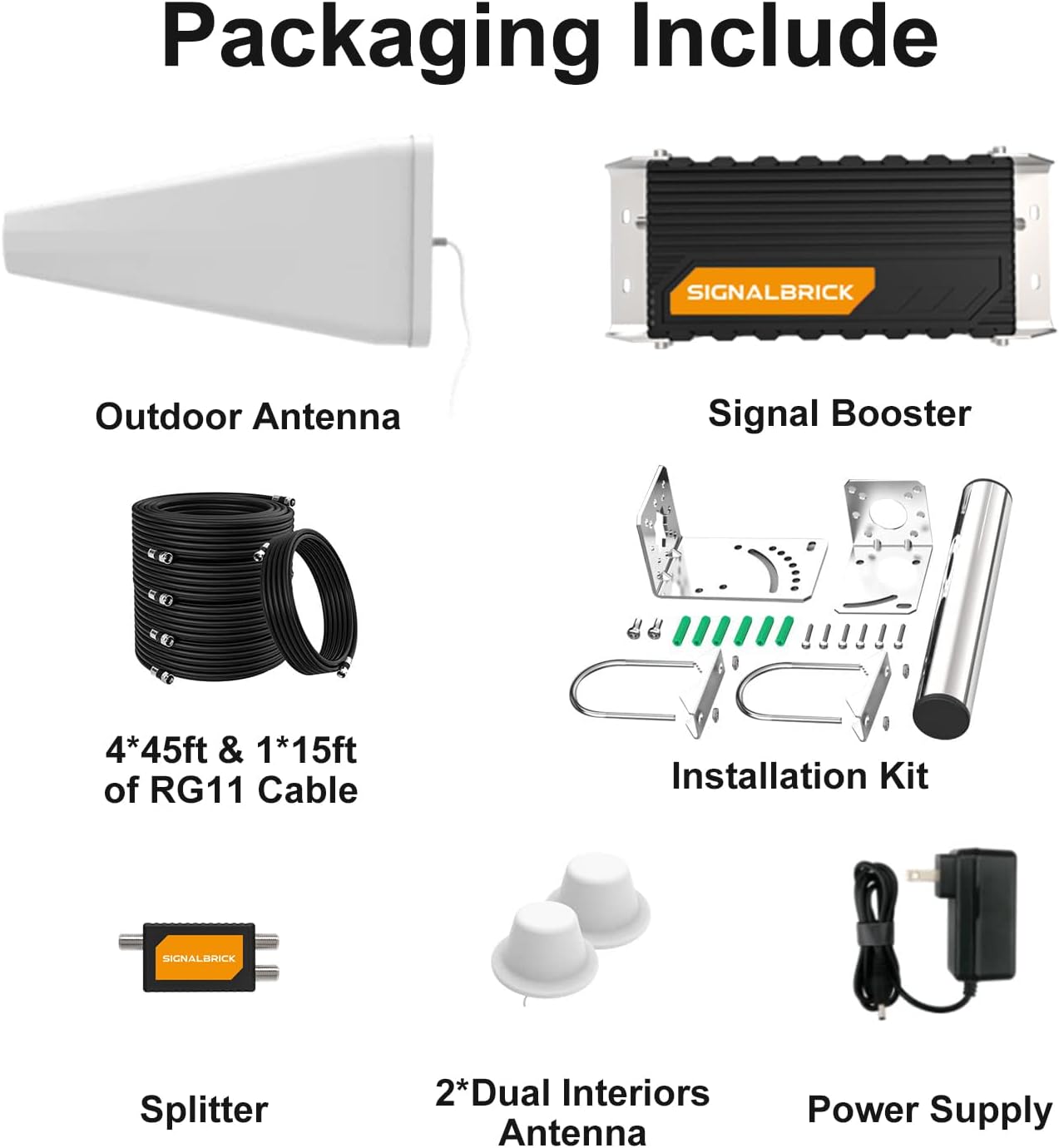
Figure 4: Contents Included in Packaging
4. Setup Guide
Proper installation is crucial for optimal performance. The system is designed for easy setup, typically completed by two individuals within three hours.
4.1 Pre-Installation Signal Check
Before installation, determine if the booster will work for your phone by checking your current signal band and dBm reading. The booster supports Band 12/17/13/5/25/2/4. A dBm reading greater than -120 dBm is generally required.
- For iOS Devices:
- Dial: *3001#12345#* then press call.
- Choose "LTE", "UMTS" or "GSM".
- Check Band: "Serving Cell Info" → "Freq_Band_Ind".
- Check dBm Reading: "Serving Cell Meas" → "rsrp0".
- For Android Devices:
- Download a third-party app like "LTE Discovery".
- Select "SIGNALS".
- Check "EARFCN".
- Check Band Number and dBm Reading.
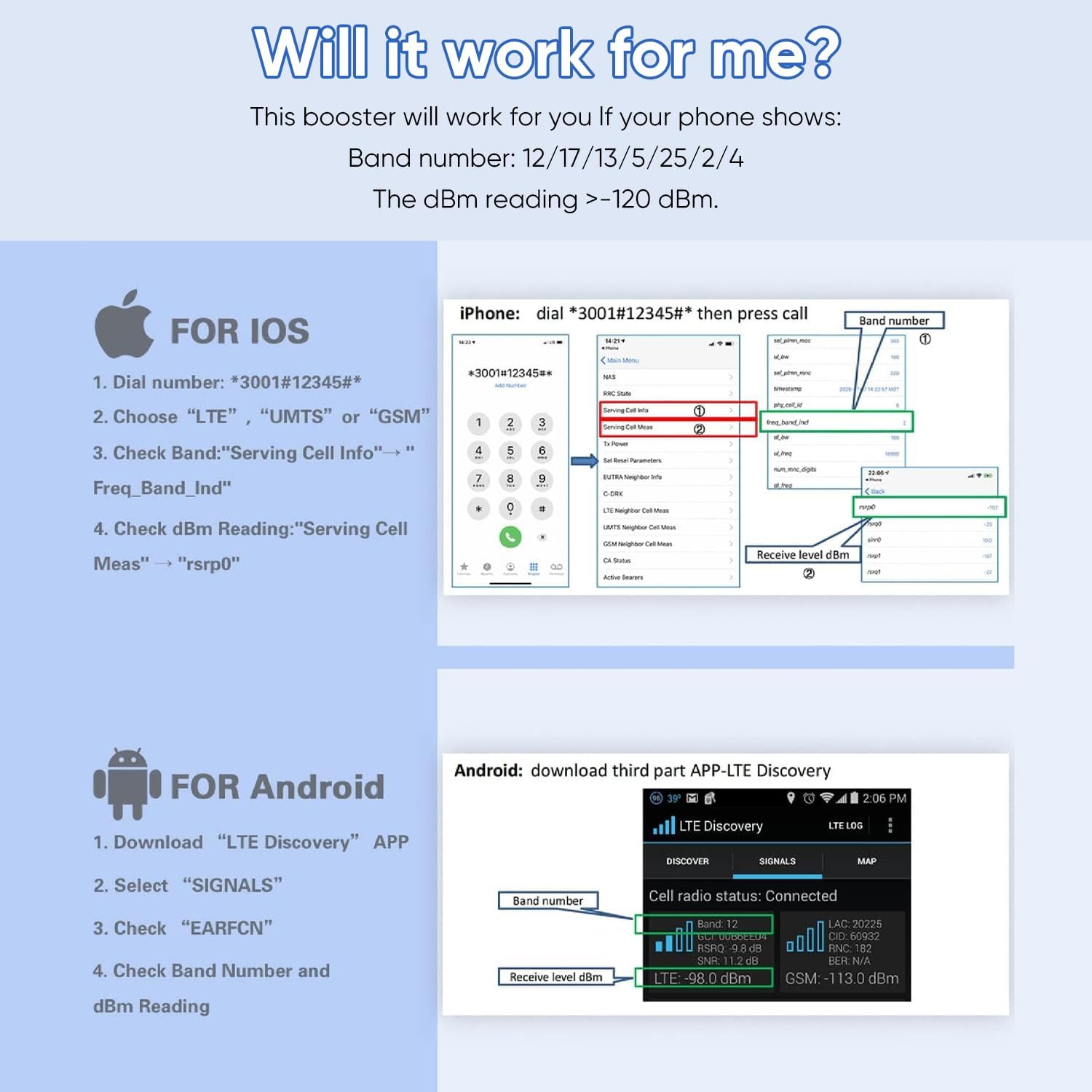
Figure 5: How to Check Your Phone's Signal Strength
4.2 Installation Steps Overview
The system involves an outdoor antenna, the main booster unit (designed for on-roof placement), a splitter, and two indoor dome antennas.
- Outdoor Antenna Placement: Install the outdoor antenna in a location with the strongest possible signal, typically on the roof or a high point, facing the nearest cell tower. Ensure it is securely mounted using the provided installation kit.
- Booster Unit Installation: The main booster unit is designed to be installed outdoors, preferably near the outdoor antenna, to minimize cable loss. Mount it securely and ensure it is protected from direct exposure to extreme elements, although it is IP67 rated for water and weather resistance.
- Cable Routing: Route the RG11 cables from the outdoor antenna to the booster unit, and then from the booster unit to the splitter. Ensure all cable connections are tight and secure.
- Indoor Antenna Placement: The two dome antennas should be placed in the areas requiring signal coverage. For multi-floor buildings, place one antenna on each floor or in different zones to maximize coverage. Ensure a minimum installation distance between the outdoor booster and the indoor antennas to prevent oscillation.
- Power Connection: Connect the power supply to the booster unit and plug it into a standard electrical outlet.
- System Activation: Once all components are connected, power on the system. The booster will automatically adjust its gain and power levels.
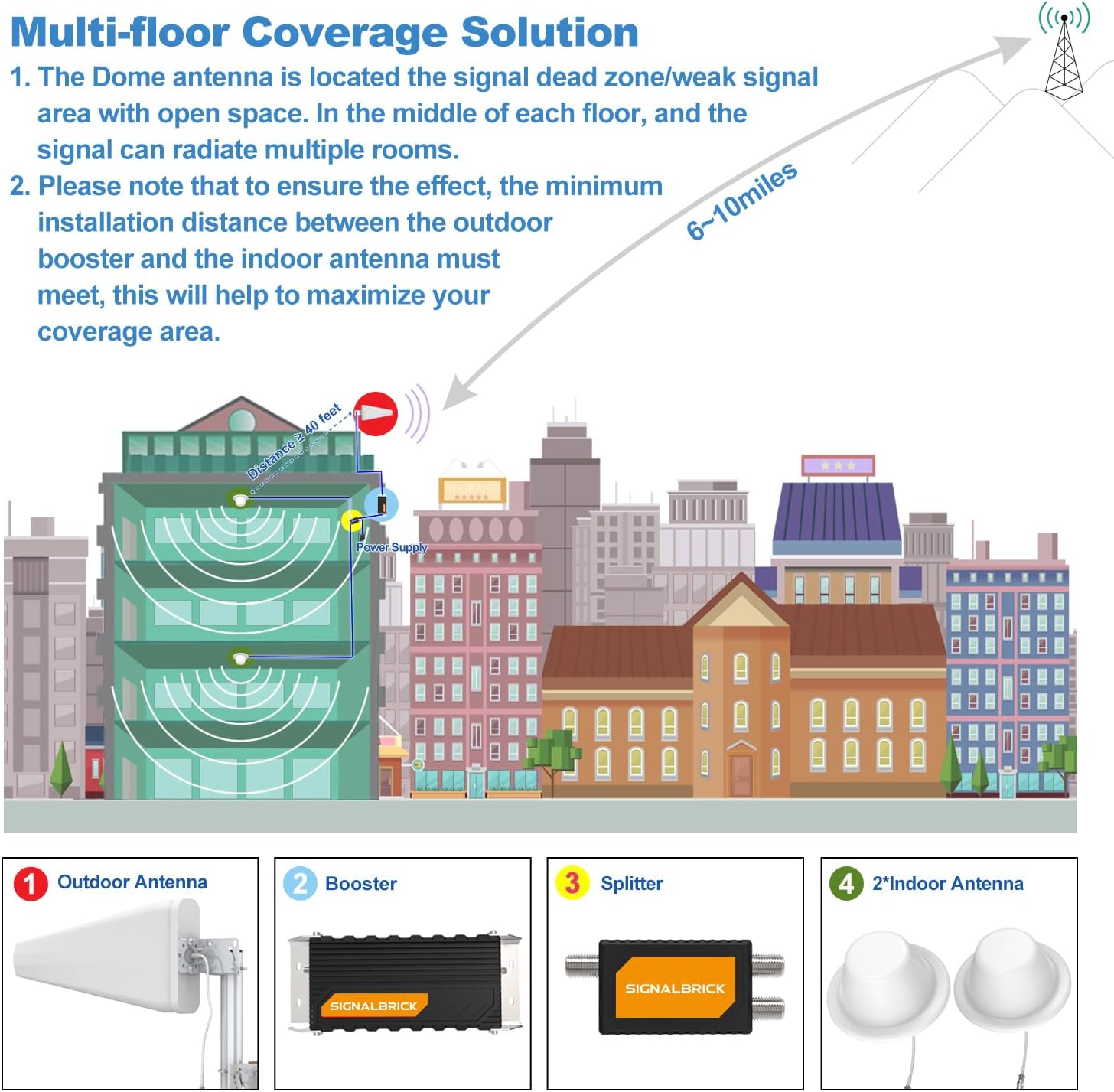
Figure 6: Multi-floor Coverage Solution Diagram
Important Note: This is a CONSUMER device. You MUST REGISTER THIS DEVICE with your wireless provider and have your provider’s consent. Most wireless providers consent to the use of signal boosters. If you are unsure, contact your provider. You MUST operate this device with approved antennas and cables as specified by the manufacturer. Antenna MUST be installed at least 20 cm (8 inches) from any person. You MUST cease operating this device immediately if requested by the FCC or a licensed wireless service provider.
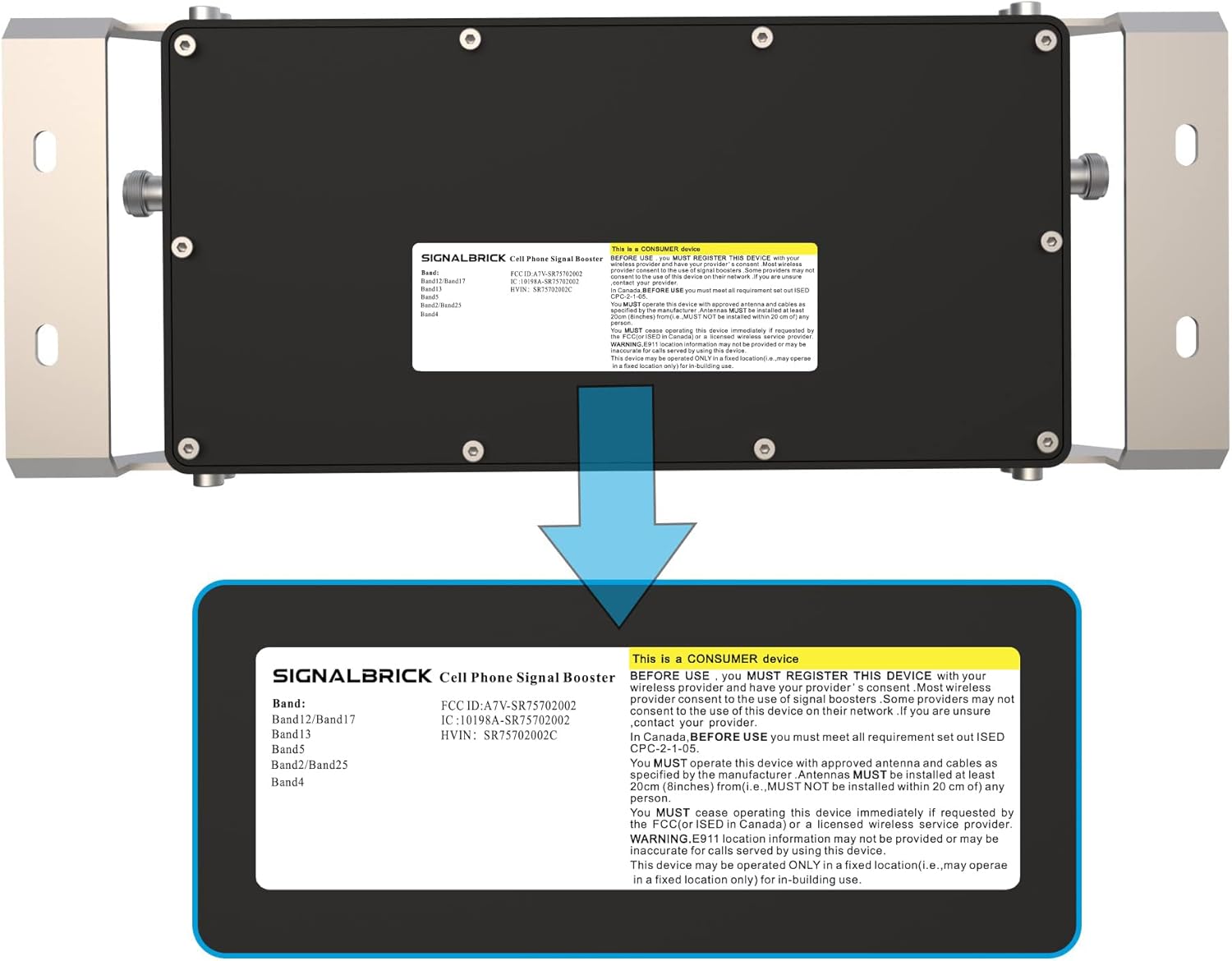
Figure 7: FCC Compliance Label
5. Operating Instructions
Once properly installed and powered on, the SignalBrick Cell Phone Booster operates automatically. The system continuously monitors incoming signal levels and adjusts its gain and power output to provide optimal signal enhancement without manual intervention.
- Automatic Optimization: The booster's intelligent circuitry automatically adapts to changing signal conditions to maintain consistent performance.
- Multi-User Support: The system supports simultaneous connectivity for multiple devices, including smartphones, tablets, modems, and Wi-Fi hotspots.
- Signal Indicators: While the booster operates automatically, some models may feature LED indicators to show power status or signal activity. Refer to the booster unit itself for specific indicator meanings if present.
6. Maintenance
The SignalBrick Cell Phone Booster is designed for minimal maintenance. However, periodic checks can ensure long-term optimal performance.
- Cable Connections: Annually inspect all cable connections (outdoor antenna to booster, booster to splitter, splitter to indoor antennas) to ensure they remain tight and free from corrosion.
- Antenna Cleanliness: Periodically clean the outdoor antenna and booster unit to remove any accumulated dirt, dust, or debris that might obstruct signal reception. Use a soft, damp cloth.
- Physical Inspection: Check the outdoor components for any physical damage, such as cracks, loose mounts, or signs of wear from weather exposure.
- Power Supply: Ensure the power supply unit is in good condition and the power outlet is functioning correctly.
7. Troubleshooting
If you experience issues with your SignalBrick Cell Phone Booster, refer to the following common problems and solutions:
| Problem | Possible Cause | Solution |
|---|---|---|
| No Signal Improvement |
|
|
| Intermittent Signal |
|
|
| Coverage Area Smaller Than Expected |
|
|
8. Specifications
| Brand | SignalBrick |
| Model | BuildingForce-XD |
| ASIN | B0CQXBDD37 |
| Supported Bands | 12/13/5/2/4/25 |
| Gain | 72 dB |
| Coverage Area | Up to 12,000 sq ft (dependent on outdoor signal) |
| Data Transfer Rate | Up to 80 Mbps (download) / 40 Mbps (upload) |
| Waterproof Rating | IP67 |
| Operating Temperature | -30°F to 150°F |
| Package Dimensions | 19.5 x 15.5 x 8 inches |
| Item Weight | 23.8 pounds |
| FCC ID | A7V-SR75702001 |
9. Warranty and Support
For warranty information or technical support, please contact SignalBrick customer service. Refer to the product packaging or the official SignalBrick website for the most current contact details.
Online Resources: For additional support, FAQs, and updated information, visit the official SignalBrick store on Amazon: SignalBrick Store.
Related documentsBuildingForce-XD

Ask a question about this manual
Ask about setup, troubleshooting, compatibility, parts, safety, or missing instructions. Manuals+ will review the question and use this page’s manual context to help answer it.