
1. Introduction
The Allteq 2-Port HDMI Splitter allows you to connect a single HDMI source device to two HDMI display devices simultaneously. This device supports high-resolution video up to 4K@60Hz and 3D content, ensuring a clear and vibrant viewing experience. It is designed for various applications, including meeting rooms, presentations, and home cinema setups.
2. Package Contents
Please check the package contents upon unboxing. If any items are missing or damaged, contact your retailer.
- Allteq 2-Port HDMI Splitter
- Power Adapter (may vary by region)
- User Manual (this document)
3. Product Overview
The Allteq HDMI Splitter features one HDMI input port and two HDMI output ports. It includes a built-in amplifier to maintain signal quality over longer cable distances.
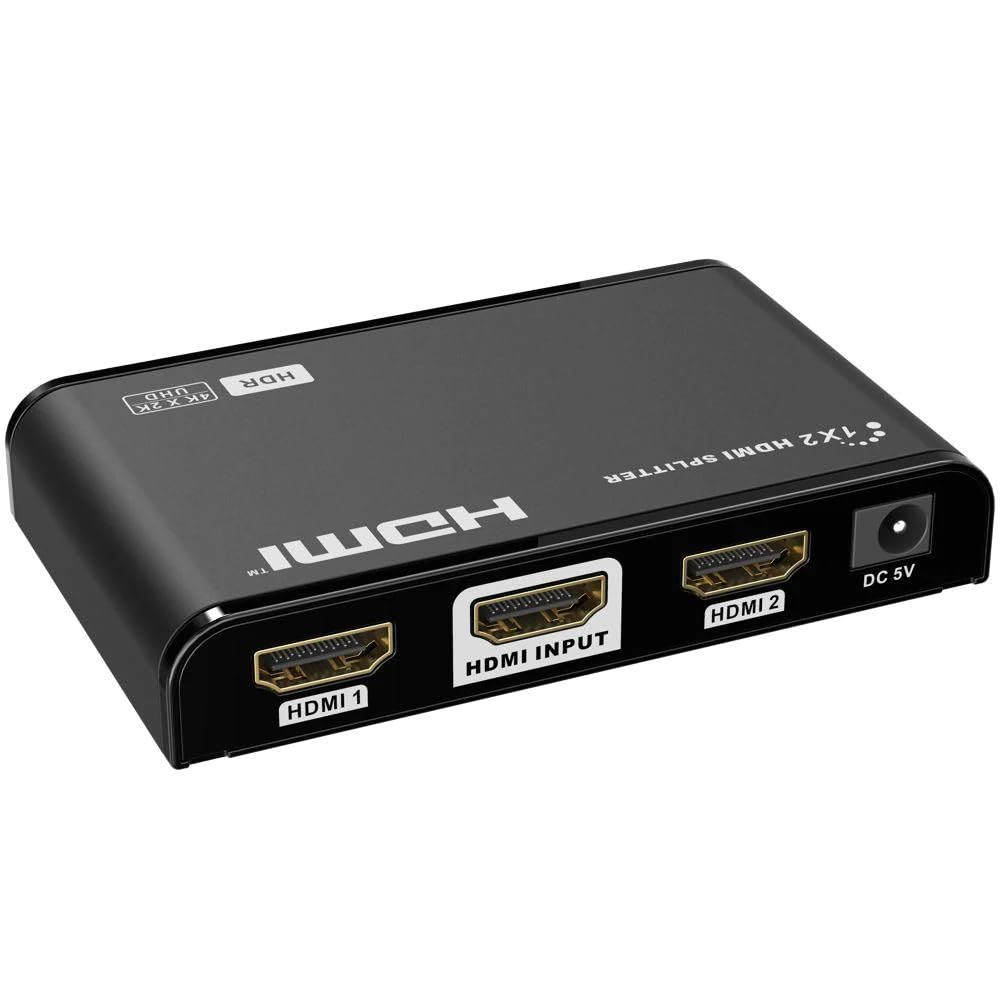
Image 1: Front and back view of the Allteq 2-Port HDMI Splitter. The front typically features status indicators, while the back includes the HDMI input, two HDMI output ports, and the power input.
4. Setup
Follow these steps to set up your Allteq HDMI Splitter:
- Power Off Devices: Ensure all source devices (e.g., Blu-ray player, game console) and display devices (e.g., TV, monitor) are powered off before making connections.
- Connect HDMI Source: Connect an HDMI cable from your source device's HDMI output to the HDMI IN port on the Allteq splitter.
- Connect HDMI Displays: Connect HDMI cables from the HDMI OUT 1 and HDMI OUT 2 ports on the splitter to the HDMI input ports on your two display devices.
- Connect Power: Connect the provided power adapter to the DC 5V power input on the splitter, then plug the adapter into a power outlet.
- Power On Devices: Power on your display devices first, then your HDMI source device. The splitter will automatically detect the signal.
5. Operating
The Allteq HDMI Splitter operates automatically once all connections are made and devices are powered on. It duplicates the HDMI signal from your source to both connected displays.
- Signal Distribution: The splitter will send the same audio and video signal to both connected displays.
- Resolution Matching: The splitter will output the highest common resolution supported by both connected displays and the source. If displays have different resolutions, the output resolution will be limited by the display with the lower capability.
- Amplification: The built-in amplifier ensures signal integrity for HDMI cables up to 30 meters in length.
6. Maintenance
To ensure the longevity and optimal performance of your Allteq HDMI Splitter, follow these maintenance guidelines:
- Cleaning: Use a soft, dry cloth to clean the device. Do not use liquid cleaners or aerosols.
- Environment: Keep the splitter in a cool, dry place, away from direct sunlight, heat sources, and excessive moisture.
- Ventilation: Ensure proper ventilation around the device to prevent overheating.
- Handling: Avoid dropping or subjecting the device to strong impacts.
7. Troubleshooting
If you encounter issues with your Allteq HDMI Splitter, refer to the following common problems and solutions:
- No Picture/Sound:
- Ensure all HDMI cables are securely connected to both the splitter and the devices.
- Verify the power adapter is correctly connected to the splitter and a working power outlet.
- Check that the correct HDMI input is selected on your display devices.
- Try connecting the source directly to a display to confirm the source and display are working correctly.
- Test with different HDMI cables.
- Poor Picture Quality/Flickering:
- Ensure you are using high-quality HDMI cables, especially for 4K resolutions or longer distances.
- Reduce the cable length if possible. The splitter supports up to 30 meters, but shorter cables often provide better signal integrity.
- Check the resolution settings on your source device.
- Only One Display Working:
- Verify the HDMI cable for the non-working display is properly connected and functional.
- Test the non-working display with a different HDMI source or cable.
8. Specifications
| Brand | Allteq |
| Model | B0CQW4KCZ2 |
| Color | Black |
| Connector Type | HDMI |
| Number of Ports | 1 Input, 2 Outputs |
| HDMI Version | 1.4 (compatible) |
| Max Resolution | 4K@60Hz |
| 3D Support | Yes |
| Max Cable Length | 30 meters (with amplifier) |
| Compatible Devices | Monitor, Television |
| Specific Use | Meeting rooms, presentations, home cinemas, connecting multiple devices to one screen |
9. Warranty and Support
The Allteq HDMI Splitter comes with a 5-year warranty. For warranty claims or technical support, please contact your retailer or the manufacturer directly. Keep your proof of purchase for warranty validation.