
Night Owl CM-FTD8LS-B
Night Owl FTD8 Indoor/Outdoor Add On Wired 4K Deterrence Camera User Manual
Model: CM-FTD8LS-B
Brand: Night Owl
Product Overview
The Night Owl FTD8 Add-On Wired 4K Deterrence Camera is designed to enhance your existing Night Owl Flex Protect DVR security system. This camera features 4K resolution for clear video, 2-way audio for communication, and built-in deterrence features like a spotlight and siren to deter unwanted activity. It is suitable for both indoor and outdoor use, built to withstand various weather conditions.

Image: Front view of the Night Owl FTD8 4K Deterrence Camera, showcasing its sleek white and black design with an integrated spotlight.
Key Features:
- Innovative 2-Way Audio Technology: Utilizes a single BNC cable for both 2-way audio and video, compatible with select Night Owl DVRs.
- Built-in Bright Spotlight: Activates upon motion detection to illuminate the area and deter intruders.
- Full Color Recording: Provides clear, full-color video day or night with ambient light.
- Indoor/Outdoor Rated: Designed for durability and reliable performance in various indoor and outdoor environments.
- Wired Connection: Ensures a secure and reliable connection for 24/7 local viewing and recording without requiring internet.
What's in the Box
Upon unboxing your Night Owl FTD8 camera, please ensure all the following components are present:
- 1 x Night Owl FTD8 Add-On Camera
- 1 x 60' BNC Cable
Setup and Installation
1. Pre-installation Considerations
- Ensure you have a compatible Night Owl Flex Protect DVR (sold separately) to connect this add-on camera.
- Plan the camera's location carefully, considering the desired viewing area, proximity to the DVR, and power source. The camera is designed for wall mounting.
- Verify the 60' BNC cable length is sufficient for your chosen installation path.
2. Mounting the Camera
The FTD8 camera is designed for wall mounting. Choose a sturdy surface that provides a clear view of the area you wish to monitor.
- Mark the desired mounting points for the camera base.
- Drill pilot holes if necessary, suitable for the mounting screws (not included, typically provided with DVR kit or purchased separately).
- Securely attach the camera base to the wall using appropriate screws.
- Adjust the camera's angle to cover the desired surveillance area.

Image: The Night Owl FTD8 camera positioned against a backdrop of an American flag, emphasizing its design and readiness for deployment.
3. Wiring and Connection
The FTD8 camera uses a single BNC cable for video, power, and 2-way audio transmission, simplifying installation.
- Connect one end of the provided 60' BNC cable to the BNC port on the camera.
- Route the cable securely from the camera to your Night Owl DVR. Ensure the cable is protected from damage and extreme weather conditions.
- Connect the other end of the BNC cable to an available BNC input port on your Night Owl DVR.
- Ensure the DVR is powered on and properly configured according to its own user manual.

Image: The Night Owl FTD8 camera mounted outdoors, with an inset showing the BNC cable connection to a DVR, illustrating the wired setup.
Operating the Camera
Once connected to a compatible Night Owl DVR, the FTD8 camera integrates seamlessly into your security system. Operation is primarily managed through your DVR interface and the Night Owl mobile application.
1. 2-Way Audio Communication
The 2-way audio feature allows you to listen and speak through the camera using the free Night Owl mobile app.
- Open the Night Owl mobile application on your smartphone or tablet.
- Select the FTD8 camera from your device list.
- Activate the microphone icon to speak and the speaker icon to listen.
- You can use this feature to communicate with visitors, delivery personnel, or to deter suspicious individuals.
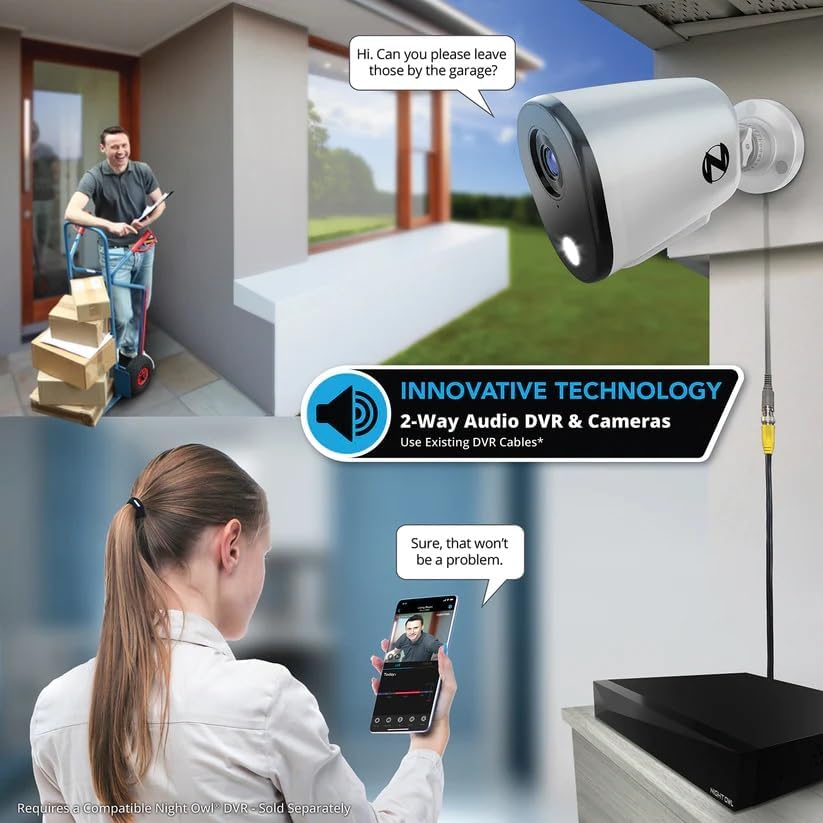
Image: A visual representation of the 2-way audio feature, showing a user interacting with a delivery person via the Night Owl mobile app and the camera.
2. Deterrence Features (Spotlight & Siren)
The FTD8 camera is equipped with active deterrence features to enhance security.
- Built-in Spotlight: The bright spotlight will automatically activate when motion is detected in the camera's field of view, illuminating the area and drawing attention.
- Preset Audio Alerts & Camera Siren: You can configure the system to play preset voice messages or activate a loud siren when motion is detected. These can also be manually triggered from the Night Owl mobile app.
3. Recording and Night Vision
- Full Color Recording: The camera records in full color during daylight hours and in areas with sufficient ambient light.
- Infrared Night Vision: In complete darkness, the camera automatically switches to infrared night vision, providing clear black and white video up to 100 feet away.
- Local Storage: Video footage is recorded and stored locally on your compatible Night Owl DVR, ensuring continuous recording even without an internet connection.
Maintenance
Regular maintenance ensures optimal performance and longevity of your Night Owl FTD8 camera.
- Cleaning: Periodically clean the camera lens and housing with a soft, damp cloth. Avoid abrasive cleaners that could scratch the lens.
- Cable Inspection: Regularly inspect the BNC cable for any signs of wear, damage, or loose connections. Ensure all connections are secure.
- Environmental Considerations: The camera is designed to be weather-resistant (IP65 rated) and can operate in temperatures from -4°F to 140°F. However, avoid direct exposure to high-pressure water jets or prolonged submersion.
Troubleshooting
If you encounter issues with your Night Owl FTD8 camera, refer to the following common troubleshooting steps:
- No Video Feed:
- Ensure the BNC cable is securely connected to both the camera and the DVR.
- Verify the DVR is powered on and functioning correctly.
- Check if the camera is receiving power through the BNC cable.
- Confirm the camera is connected to a compatible Night Owl DVR.
- No 2-Way Audio:
- Ensure the camera is connected to a DVR that supports 2-way audio over BNC.
- Check audio settings on your DVR and in the Night Owl mobile app.
- Verify your mobile device's microphone and speaker are enabled for the app.
- Spotlight Not Activating:
- Check motion detection settings on your DVR.
- Ensure there are no obstructions blocking the camera's view or motion sensor.
- Test manual activation via the Night Owl mobile app.
- Poor Night Vision:
- Ensure the camera lens is clean and free of smudges or dirt.
- Check for any reflective surfaces close to the camera that might interfere with infrared illumination.
For more detailed troubleshooting or issues not covered here, please refer to your Night Owl DVR's user manual or visit the official Night Owl support website.
Specifications
| Feature | Detail |
|---|---|
| Model Number | CM-FTD8LS-B |
| Indoor/Outdoor Usage | Indoor, Outdoor |
| Compatible Devices | Select Night Owl DVR |
| Power Source | 110V |
| Connectivity Technology | BNC |
| Mounting Type | Wall Mount |
| Video Capture Resolution | 4K |
| Effective Still Resolution | 8 MP |
| Night Vision Range | 100 Feet |
| International Protection Rating | IP65 |
| Item Weight | 1.39 pounds |
| Package Dimensions | 6.38 x 6.26 x 4.61 inches |
| Special Feature | Active Deterrence (Spotlight, 2-Way Audio) |
Warranty and Support
For detailed warranty information regarding your Night Owl FTD8 camera, please refer to the documentation included with your product or visit the official Night Owl website. Warranty terms and conditions may vary.
Should you require technical assistance, customer support, or have questions not addressed in this manual, please visit the Night Owl support section on their official website. You may find FAQs, troubleshooting guides, and contact information for direct support.
Ask a question about this manual
Ask about setup, troubleshooting, compatibility, parts, safety, or missing instructions. Manuals+ will review the question and use this page’s manual context to help answer it.