
1. Introduction
1.1 Product Overview
This manual provides instructions for the DOUMENSHIQU Replacement Remote Control, designed for use with various TOTO Washlet Bidet Toilet Seat models. This remote offers a full range of functions to control your bidet toilet seat.
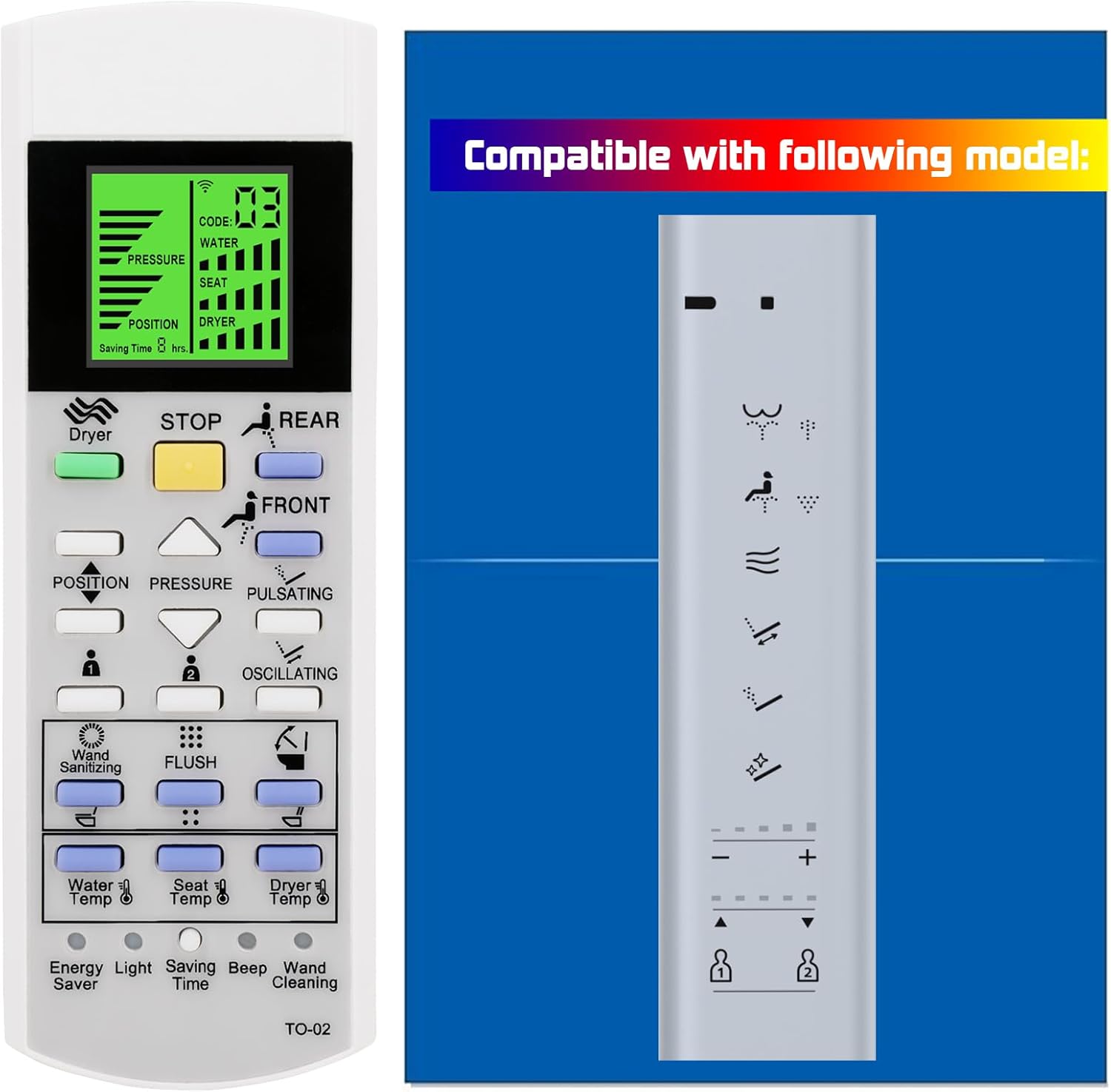
Image 1.1: Front view of the DOUMENSHIQU Replacement Remote Control, displaying its LCD screen and various control buttons.
1.2 Compatibility
This replacement remote control is compatible with the following TOTO Washlet Bidet Toilet Seat models:
- SW3054AT40
- SW3054
- TCF4911E series
- TCF491 series
- TCF4914E series
- TCF4914 series
- TCF802 series
- TCF803 series
- TCF801 series
- TCF804 series
- TCF9575 series

Image 1.2: Various TOTO Washlet bidet control panels, illustrating the range of compatible models for this replacement remote.
2. Setup Guide
2.1 Battery Installation
- Locate the battery compartment cover on the back of the remote control.
- Slide the cover downwards or press the latch to open it.
- Insert two AAA batteries (not included), ensuring the correct polarity (+/-) as indicated inside the compartment.
- Replace the battery compartment cover, ensuring it clicks securely into place.

Image 2.1: Multiple views of the remote control, highlighting the rear side where the battery compartment is located for installation.
2.2 Initial Use
The remote control uses infrared technology. Once batteries are installed, it is ready for use with compatible TOTO Washlet bidet toilet seats. Point the remote directly at the bidet's receiver for optimal performance.
2.3 Wall Mount Installation
The remote control includes a wall mount for convenient storage.
- Choose a suitable location near your bidet toilet seat, ensuring easy access.
- Use screws (not included) to securely attach the wall mount to the desired surface.
- Place the remote control into the installed wall mount.

Image 2.2: The replacement remote control shown alongside its dedicated wall mount for convenient storage and accessibility.
3. Operating Instructions
The remote control provides comprehensive functionality for your TOTO Washlet bidet toilet seat. Refer to the image below for button identification.

Image 3.1: Detailed close-up of the remote control's interface, showing the LCD screen and individual button labels for various functions.
3.1 Basic Functions
- DRYER: Activates or deactivates the warm air dryer function.
- STOP: Halts all active bidet functions (wash, dry, etc.).
- REAR: Initiates the rear wash function.
- FRONT: Initiates the front (feminine) wash function.
- POSITION (▲/▼): Adjusts the nozzle position forward or backward during a wash cycle.
- PRESSURE (▲/▼): Increases or decreases the water spray pressure.
- PULSATING: Changes the wash spray to a pulsating stream.
- OSCILLATING: Moves the nozzle back and forth for a wider cleaning area.
3.2 Temperature and Special Functions
- WATER TEMP (▲/▼): Adjusts the water temperature for washing.
- SEAT TEMP (▲/▼): Adjusts the heated seat temperature.
- DRYER TEMP (▲/▼): Adjusts the warm air dryer temperature.
- WAND SANITIZING: Initiates a self-cleaning cycle for the bidet nozzle.
- FLUSH: Activates the toilet flush function (if supported by the bidet model).
- ENERGY SAVER: Activates or deactivates the energy-saving mode.
- LIGHT: Controls the bidet's night light or illumination.
- SAVING TIME: Sets or adjusts the energy saving timer.
- BEEP: Toggles the audible feedback (beep sound) of the remote.
- WAND CLEANING: Initiates a cleaning cycle for the bidet wand.

Image 3.2: The remote control shown in a bathroom setting, demonstrating its wireless communication with a bidet toilet seat.
4. Care and Maintenance
4.1 Cleaning the Remote Control
To maintain the remote control's appearance and functionality:
- Wipe the surface with a soft, dry cloth.
- For stubborn marks, lightly dampen the cloth with water or a mild, non-abrasive cleaner.
- Avoid using harsh chemicals, abrasive cleaners, or excessive moisture, as these can damage the remote.
4.2 Battery Replacement
Replace batteries when the remote's performance diminishes or the LCD screen becomes dim. Always replace both batteries simultaneously with new ones of the same type (AAA).
5. Troubleshooting
5.1 Remote Not Responding
- Check Batteries: Ensure batteries are correctly inserted with the proper polarity and are not depleted. Replace if necessary.
- Line of Sight: Confirm there are no obstructions between the remote control and the bidet toilet seat's infrared receiver.
- Distance: Ensure you are within the effective operating range of the bidet.
5.2 LCD Screen is Dim or Blank
- Battery Level: This often indicates low battery power. Replace the batteries.
- Damage: If new batteries do not resolve the issue, the screen may be damaged.
6. Product Specifications
| Feature | Specification |
|---|---|
| Model Number | 801542927783 |
| Product Dimensions | 1 x 1 x 0.99 inches |
| Item Weight | 0.704 ounces |
| Connectivity Technology | Infrared |
| Special Feature | Backlit LCD Screen |
| Max Number of Supported Devices | 9999 (compatible TOTO Washlet models) |
| Compatible Devices | TOTO Washlet Bidet Toilet Seats |
7. Warranty and Support
For any questions, concerns, or support regarding your DOUMENSHIQU Replacement Remote Control, please refer to the retailer's return policy or contact the manufacturer directly through your purchase platform. Please retain your proof of purchase for any warranty claims.