
Introduction
This manual provides detailed instructions for the installation, operation, and maintenance of your Generic FR-A786N-47 Ceiling Fan Remote Control Receiver. Please read this manual thoroughly before installation and use to ensure proper function and safety.
Important Compatibility Note: The FR-A786N-47 receiver is specifically designed to replace an existing FR-A786N-47 receiver. It is not a universal replacement and will not function correctly if used to replace a receiver with a different dash number (e.g., -46, -48, etc.). Verify your existing receiver's model number before installation.
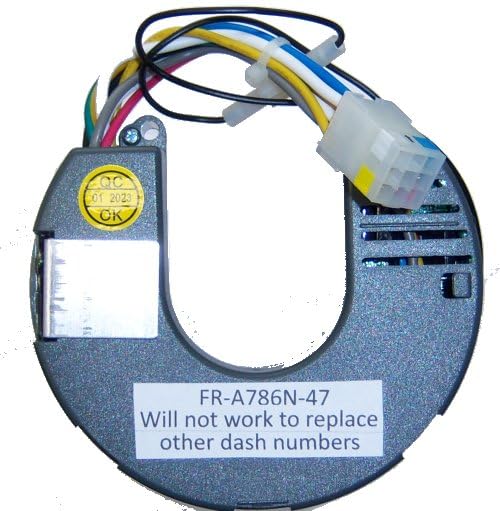
Figure 1: The Generic FR-A786N-47 Ceiling Fan Remote Control Receiver. This image shows the compact design of the receiver unit, typically installed within the ceiling fan canopy.
Safety Information
- WARNING: Risk of Electric Shock. Disconnect power at the circuit breaker or fuse box before installing or servicing the receiver.
- All wiring must be performed by a qualified electrician or in accordance with local electrical codes.
- Ensure all connections are secure and properly insulated.
- Do not use this receiver with solid-state speed controls.
- This receiver is for indoor use only.
Setup and Installation
Follow these steps carefully to install the FR-A786N-47 receiver into your ceiling fan.
- Disconnect Power: Before beginning any work, ensure the power supply to the ceiling fan is completely disconnected at the main circuit breaker or fuse box.
- Access Fan Canopy: Carefully lower the ceiling fan canopy to expose the wiring connections.
- Remove Old Receiver: Disconnect the wiring from the existing FR-A786N-47 receiver and remove it from the fan canopy. Note the wiring configuration for reference.
- Install New Receiver:
- Connect the Black wire from the receiver to the Black (Live/Hot) wire from the ceiling.
- Connect the White wire from the receiver to the White (Neutral) wire from the ceiling.
- Connect the Blue wire from the receiver to the Blue (Light) wire of the fan.
- Connect the Brown wire from the receiver to the Brown (Fan Motor) wire of the fan.
- Ensure all ground wires are securely connected.
- Secure Receiver: Carefully tuck the new receiver and all wiring into the fan canopy, ensuring no wires are pinched.
- Reattach Canopy: Securely reattach the fan canopy to the ceiling.
- Restore Power: Restore power at the circuit breaker.
- Test Functionality: Use the compatible remote control to test the fan and light functions.
Note: This receiver does not typically require pairing if replacing an identical model. If issues arise, refer to the troubleshooting section or the remote control's manual for pairing instructions.
Operating Instructions
The FR-A786N-47 receiver works in conjunction with a compatible remote control (sold separately or part of your existing fan system). The receiver itself does not have direct controls.
Typical remote control functions include:
- Fan Speed Control: Buttons to adjust the fan speed (e.g., Low, Medium, High).
- Fan On/Off: A button to turn the fan motor on or off.
- Light On/Off/Dimming: Buttons to control the fan's light kit, including turning it on/off and potentially dimming functions if supported by your light kit and remote.
Refer to your specific remote control's user manual for detailed operating instructions and button functions.
Maintenance
The FR-A786N-47 receiver requires minimal maintenance.
- Cleaning: Ensure the fan canopy area is kept clean and free of dust to prevent overheating. Do not use liquid cleaners directly on the receiver or wiring.
- Battery Replacement (Remote): If your remote control stops responding, check and replace its batteries. Refer to your remote control's manual for battery type and replacement instructions.
- Periodic Inspection: Periodically check the wiring connections within the fan canopy to ensure they remain secure. Always disconnect power before inspection.
Troubleshooting
If you encounter issues with your FR-A786N-47 receiver, consult the following troubleshooting guide:
| Problem | Possible Cause | Solution |
|---|---|---|
| Fan or light does not respond to remote. |
|
|
| Fan operates, but light does not. |
|
|
| Fan operates, but at incorrect speeds. |
|
|
Specifications
| Feature | Detail |
|---|---|
| Model Name | FR-A786N-47 |
| Brand | Generic |
| Manufacturer | Rhine |
| Compatible Devices | Fan |
| Connectivity Technology | Infrared (for compatible remote) |
| Max Number of Supported Devices | 1 (one fan/light unit) |
| Color | Blue (referring to the receiver's casing or internal components) |
| Special Feature | Ergonomic (This feature typically applies to the compatible remote control, not the receiver itself.) |
Warranty and Support
Specific warranty information for the Generic FR-A786N-47 receiver may vary depending on the retailer and purchase date. Please retain your proof of purchase for warranty claims.
For technical support, troubleshooting assistance beyond this manual, or warranty inquiries, please contact the retailer where the product was purchased or the manufacturer, Rhine, directly. Contact information can typically be found on the product packaging or the retailer's website.