
1
Generic TRIXIG FIXA IK.EA 25PCS Torq-Set Screwdriver Set User Manual
Model: 1 | Brand: Generic
Introduction
This user manual provides essential information for the safe and effective use of your Generic TRIXIG FIXA IK.EA 25PCS Torq-Set Screwdriver Set. This comprehensive kit is designed for various DIY tasks, particularly for precision work on small items such as clocks, glasses, small games, and electronics. Please read this manual thoroughly before using the product.
Product Overview
The TRIXIG FIXA IK.EA screwdriver set includes a handle and 25 interchangeable Torq-Set screwdriver bits, neatly organized in a compact case.

Figure 1: The 25-piece Torq-Set Screwdriver Set, showing the handle and various bits stored in their compact case.
Components:
- 1 x Screwdriver Handle
- 25 x Assorted Torq-Set Screwdriver Bits
- 1 x Storage Case
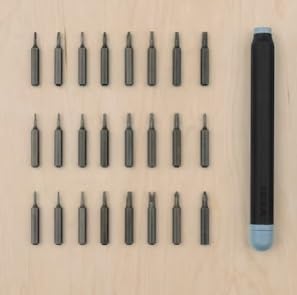
Figure 2: All components of the screwdriver set, including the handle and the full array of 25 interchangeable bits, displayed outside their case.
Setup
The screwdriver set requires minimal setup. Simply open the case and select the appropriate bit for your task.
- Open the storage case by gently lifting the lid.
- Identify the required Torq-Set bit from the organized compartments.
- Carefully remove the chosen bit from its slot.
- Insert the base of the bit firmly into the tip of the screwdriver handle until it clicks securely into place.
Operating Instructions
This screwdriver set is ideal for precision tasks requiring Torq-Set fasteners. Always ensure you use the correct bit size to prevent damage to the fastener or the bit.
- Select the Correct Bit: Match the Torq-Set bit to the size and type of the screw head you intend to work with. Using the wrong size can strip the screw or damage the bit.
- Secure the Bit: Ensure the selected bit is fully inserted and securely seated in the screwdriver handle.
- Position the Screwdriver: Place the tip of the bit squarely into the screw head, applying firm, even pressure.
- Turn the Screw: Rotate the screwdriver handle clockwise to tighten screws or counter-clockwise to loosen them. Maintain consistent pressure to prevent cam-out.
- Remove the Bit: After use, gently pull the bit out of the handle. Return it to its designated slot in the storage case to keep the set organized.

Figure 3: Demonstrating the use of the precision screwdriver set for delicate tasks, such as tightening screws on eyeglasses.
Maintenance
Proper maintenance will extend the life of your screwdriver set.
- Cleaning: Wipe down the handle and bits with a clean, dry cloth after each use to remove dirt, grease, or debris. For stubborn grime, a slightly damp cloth can be used, followed by immediate drying.
- Storage: Always store the bits and handle in their original case. This protects them from damage, prevents loss, and keeps them organized. Store the case in a dry environment to prevent rust.
- Inspection: Periodically inspect the bits for signs of wear, such as rounded edges or cracks. Replace any damaged bits to ensure optimal performance and prevent damage to fasteners.
Troubleshooting
Here are some common issues and their solutions:
| Problem | Possible Cause | Solution |
|---|---|---|
| Bit slips from screw head | Incorrect bit size; insufficient pressure; worn bit | Ensure correct bit size is used. Apply firm, consistent pressure. Replace worn bits. |
| Bit does not fit into handle | Debris in handle opening; bit inserted incorrectly | Check handle opening for obstructions and clear if necessary. Ensure bit is inserted straight and fully. |
| Screws are difficult to turn | Screw is seized; incorrect bit size; insufficient leverage | Apply penetrating oil to seized screws. Verify bit size. Ensure good grip on handle. |
Specifications
| Feature | Detail |
|---|---|
| Brand | Generic |
| Model Name | 1 |
| Number of Items | 25 |
| Head Style | Torq-Set |
| Included Components | Screwdriver Bits |
| Item Weight | 1 Kilograms |
| Package Dimensions | 20 x 12 x 5 cm |
| Recommended Uses | Household repairs, Electronic device maintenance |
| Manufacturer | I.K.E.A |
| Date First Available | 21 December 2023 |
Warranty and Support
Information regarding specific warranty terms or customer support contacts for this Generic product is not provided in the product details. For any inquiries or support, please refer to the retailer or point of purchase.
Related documents1


Ask a question about this manual
Ask about setup, troubleshooting, compatibility, parts, safety, or missing instructions. Manuals+ will review the question and use this page’s manual context to help answer it.