
1. Overview
The LISEN MagSafe Car Mount (Model LISEN-LK2M-BS) is a versatile phone holder designed for secure attachment in your vehicle. It offers two primary mounting options: a vent clip and a dashboard adhesive base. Equipped with strong N55 magnets, it ensures your smartphone remains stable even on uneven roads. The mount is specifically designed for MagSafe-compatible iPhones (iPhone 12-17 series) and can also be used with other smartphones by utilizing the included metal ring.
Key features include a 2-in-1 mounting design, powerful magnetic hold, a flexible dual-pad 3M adhesive base for curved dashboards, and an ultra-stable metal hook for air vents. The mount also allows for multi-angle adjustment and 360-degree rotation for optimal viewing.
2. What's in the Box
- 1x LISEN MagSafe Car Mount (Magnetic Head)
- 1x Vent Hook Attachment
- 1x 3M Adhesive Dashboard Base
- 1x MagSafe Ring (for Android or non-MagSafe cases)
- 1x 1 Year Warranty Information
3. Setup
The LISEN MagSafe Car Mount offers two installation methods: Vent Mount and Dashboard Mount. Choose the method that best suits your vehicle and preference.
3.1. Vent Mount Installation
- Attach the Vent Hook: Screw the vent hook attachment onto the magnetic head until secure.
- Secure to Air Vent: Locate a suitable horizontal or vertical air vent. Ensure the vent blades are 10mm-35mm in depth and under 4.2mm in thickness. Note: Not compatible with round air vents.
- Tighten the Hook: Insert the hook into a vent blade and twist the knob to extend the hook, securely gripping the vent. Ensure it is firmly attached and does not wobble.
- Adjust Angle: Adjust the magnetic head to your desired viewing angle.
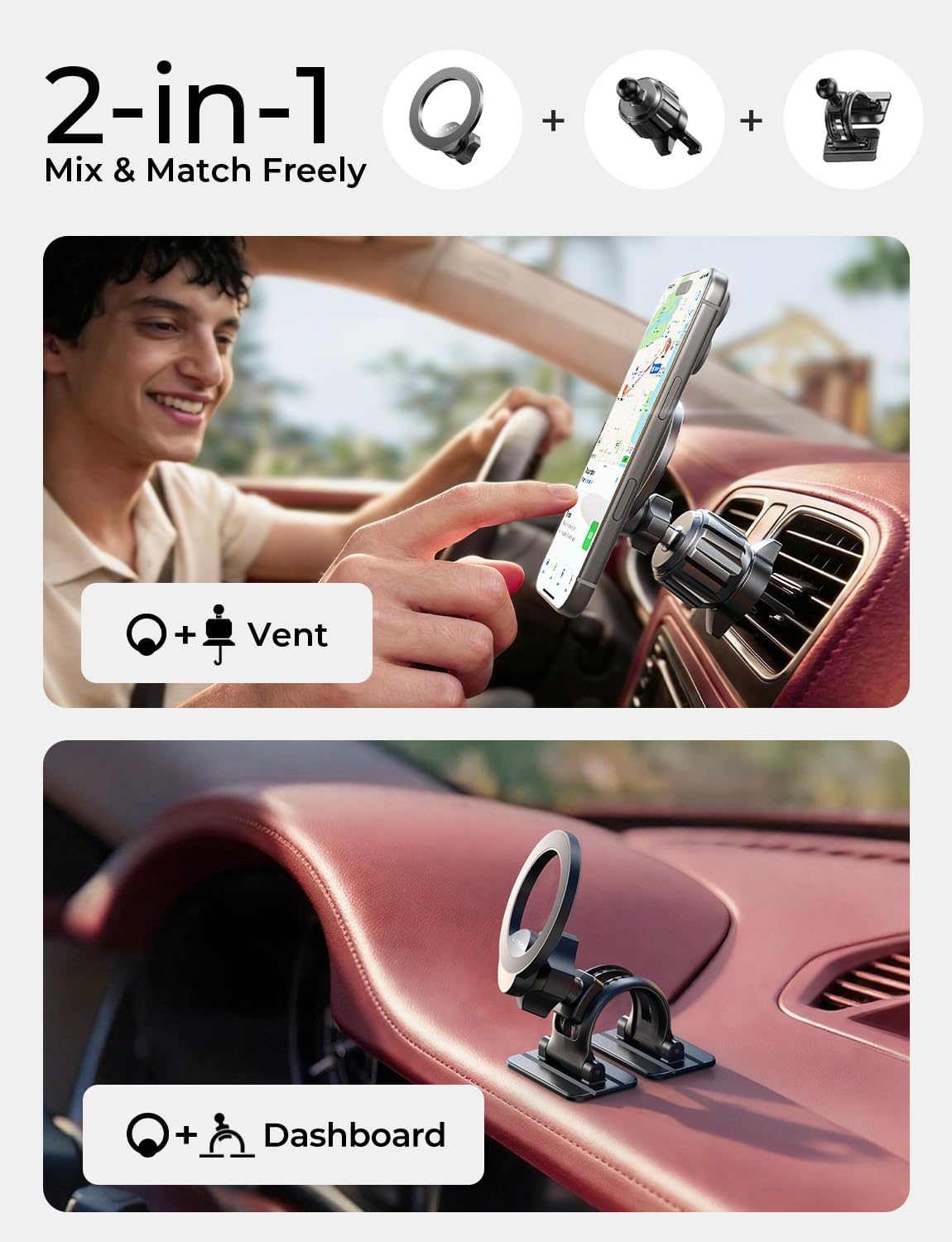
Figure 1: Overview of 2-in-1 mounting options for the LISEN MagSafe Car Mount.
Video 1: Official LISEN video demonstrating the 2-in-1 mounting options and magnetic strength.
3.2. Dashboard Mount Installation
- Prepare Surface: Clean the desired dashboard surface thoroughly with an alcohol wipe and let it dry completely. For best performance, install on smooth, flat surfaces. Avoid textured materials like leather or suede.
- Attach the Dashboard Base: Ensure the magnetic head is securely attached to the dashboard base.
- Apply Adhesive: Peel off the protective film from the dual-pad 3M adhesive base.
- Position and Press: Firmly press the adhesive base onto the cleaned dashboard surface for at least 30 seconds. Apply pressure to ensure maximum adhesion.
- Cure Time: Allow the adhesive to cure for 24 hours before attaching your phone to ensure optimal bonding strength.
- Adjust Angle: Adjust the magnetic head to your desired viewing angle. The flexible silicone base adapts to curved dashboards.

Figure 2: The flexible design of the mount allows for installation on various dashboard surfaces.

Figure 3: Illustration of the upgraded dual-pad 3M Nano Gel adhesive base for enhanced stability.
3.3. Phone Compatibility
The LISEN MagSafe Car Mount is designed for direct attachment with MagSafe-compatible iPhones (iPhone 12, 13, 14, 15, 16, 17 series) and official MagSafe cases.
For Android phones or iPhones without MagSafe capabilities, an included metal ring must be used. Attach this metal ring to the back of your phone or phone case to enable magnetic attachment to the mount.
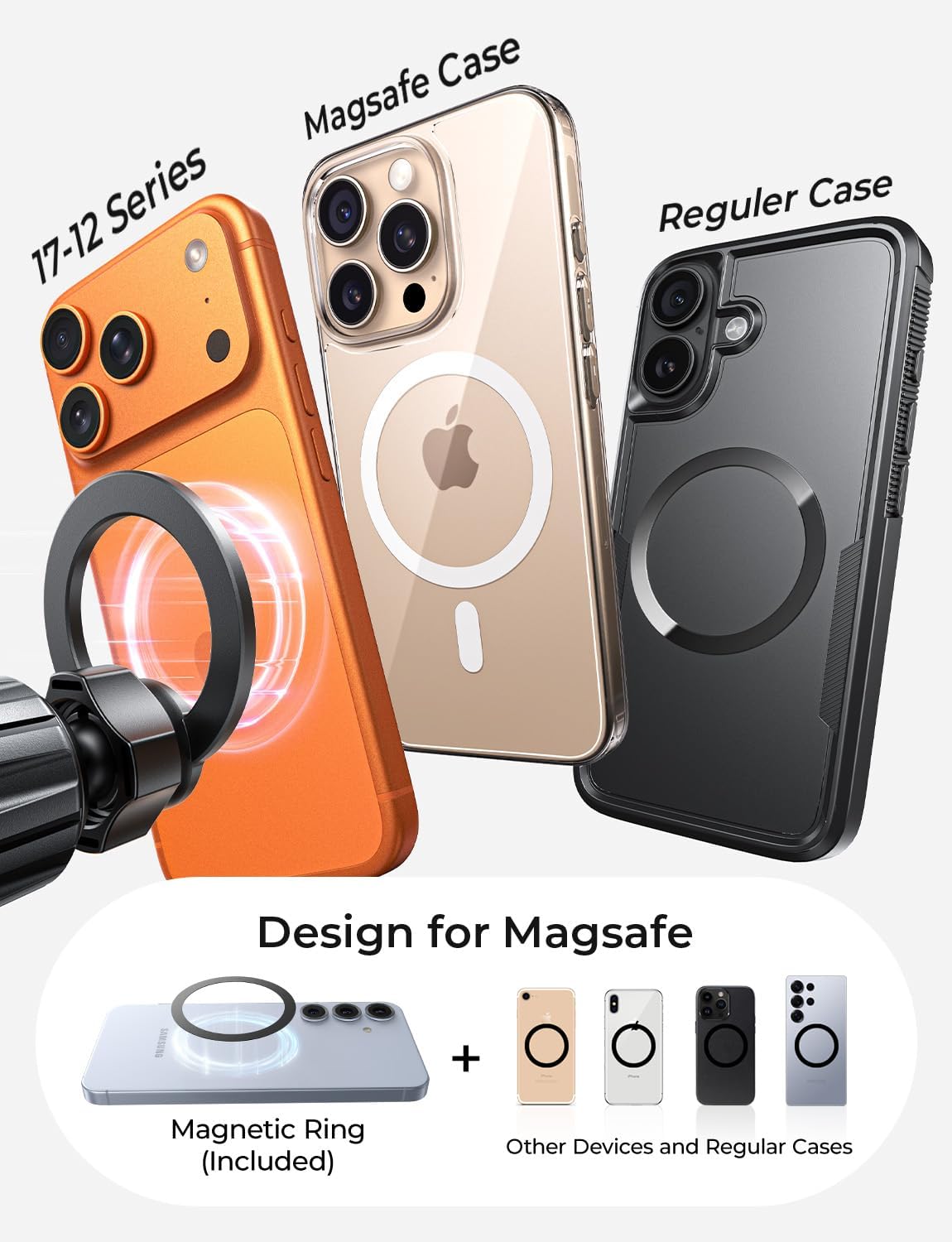
Figure 4: Compatibility with MagSafe iPhones and the use of the included magnetic ring for other smartphones.
4. Operating Instructions
4.1. Attaching Your Phone
Once the mount is securely installed, simply bring your MagSafe-compatible iPhone (or a phone with the attached metal ring) close to the magnetic head. The strong N55 magnets will automatically align and securely hold your device in place.

Figure 5: The mount features powerful N55 magnets for a secure hold.
4.2. Adjusting Viewing Angle
The magnetic head is designed for 360-degree rotation and multi-angle adjustment. Gently pivot or rotate your phone to achieve the optimal viewing angle for navigation or hands-free use. The mount maintains stability once adjusted.
5. Maintenance
- Cleaning: Use a soft, damp cloth to wipe down the mount and remove any dust or debris. Avoid harsh chemicals that may damage the material.
- Adhesive Care: If using the dashboard mount, ensure the adhesive area remains clean and free from oils or dirt to maintain strong adhesion.
- Vent Hook Check: Periodically check the tightness of the vent hook to ensure it remains securely fastened to the air vent.
- Magnetic Ring: If using the metal ring, ensure it is firmly attached to your phone or case.
6. Troubleshooting
| Problem | Solution |
|---|---|
| Phone is not securely attaching to the mount. |
|
| Dashboard mount is not sticking or becomes loose. |
|
| Vent mount is wobbly or unstable. |
|
7. Specifications
| Feature | Detail |
|---|---|
| Product Dimensions | 4.33 x 2.48 x 4.13 inches |
| Item Weight | 4.2 ounces |
| Model Number | LISEN-LK2M-BS |
| Mounting Type | Vent & Dashboard (2-in-1) |
| Compatible Devices | Smartphones (MagSafe compatible iPhones, Android with metal ring) |
| Special Features | Adjustable, Hands-Free, Lightweight, One-Hand Operation, Rotatable |
| Magnet Type | N55 High-Performance Magnets |
| Adhesive Type | Dual-Pad 3M Nano Adhesive |
8. Warranty & Support
Warranty: The LISEN MagSafe Car Mount comes with a 1-year warranty. Please refer to the warranty information included in your package for details on coverage and claims.
Customer Support: LISEN offers a dedicated expert support team available 24/7 online to assist with any questions or issues you may encounter. For support, please visit the official LISEN website or contact their customer service as per the contact information provided in your product documentation.


