
Introduction
This manual provides detailed instructions for the assembly, safe use, and maintenance of your ALEEIK Study Table with Hutch. Please read all instructions carefully before beginning assembly and retain this manual for future reference.
The ALEEIK Study Table with Hutch is designed to maximize workspace and storage capacity in compact areas. It features a spacious desktop, multiple drawers, display shelves, and a storage top cabinet with glass doors.
Safety Information
- Always assemble the desk according to the provided instructions.
- Use caution when lifting and moving the desk to prevent injury.
- Ensure the desk is properly anchored to the wall or floor to prevent tipping, especially when using the top shelves or drawers. An anti-toppling device is included for safety.
- Do not place heavy objects on the top shelves if the desk is not anchored.
- Keep small parts away from children during assembly.
Setup and Assembly
Assembly of the ALEEIK Study Table with Hutch is required. It is recommended that one person performs the assembly, which typically takes approximately 50 minutes. All necessary accessories and detailed instructions are included in the packaging.
- Unpack Components: Carefully remove all parts from the packaging. Verify that all components listed in the parts list (provided in the box) are present and undamaged.
- Prepare Workspace: Choose a clean, flat, and spacious area for assembly. Lay out a blanket or cardboard to protect the floor and furniture parts.
- Assemble Base Desk: Follow the step-by-step instructions in the included manual to assemble the main desk frame, including the desktop and drawers.
- Attach Hutch: Once the base desk is stable, attach the hutch unit to the top of the desk, ensuring all connections are secure.
- Install Drawers and Doors: Insert the five drawers into their respective compartments and attach the glass doors to the hutch cabinet.
- Secure Anti-Toppling Device: For safety, install the anti-toppling device to secure the desk to a wall, especially if heavy items will be stored in the hutch.
- Final Check: Ensure all screws and fasteners are tightened, and the desk is stable before use.
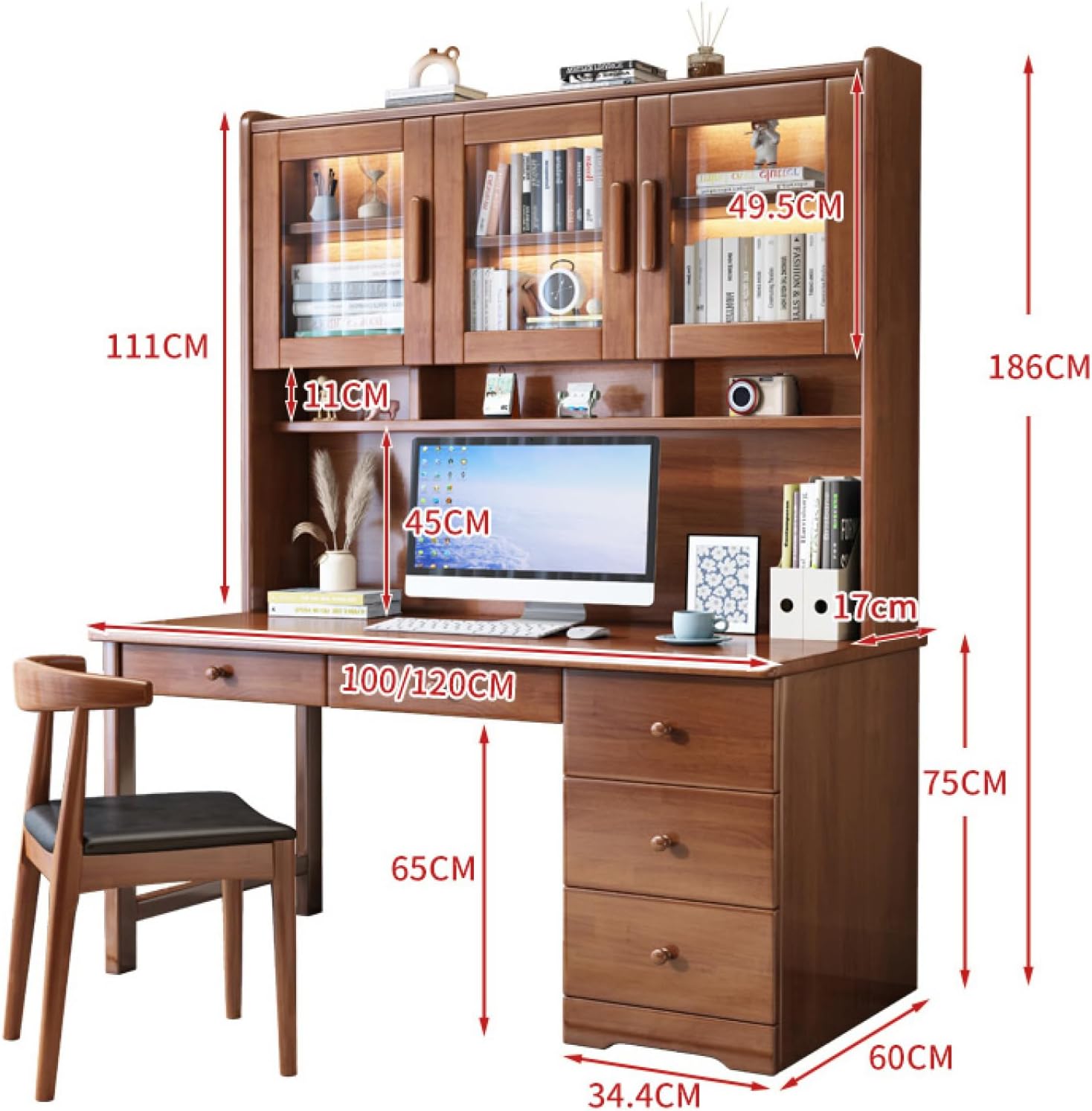
Figure 1: Overall dimensions of the ALEEIK Study Table with Hutch. The desk measures 120x60x186cm (Width x Depth x Height). The hutch adds significant vertical storage.
Operating Instructions
The ALEEIK Study Table with Hutch is designed for versatile use in home offices, bedrooms, or living rooms. Its features are optimized for organization and functionality.
- Desktop Usage: The spacious desktop provides ample room for a computer, monitor, keyboard, mouse, and other work or study essentials.
- Drawer Storage: Utilize the five drawers located under the desktop for organized storage of office supplies, documents, and personal items.
- Hutch Shelves: The open display shelves above the desktop are suitable for books, decorative items, or frequently accessed materials.
- Glass Door Cabinet: The top cabinet with glass doors offers enclosed storage, protecting contents from dust while allowing visibility.

Figure 2: Detail of the five drawers, providing ample storage for various items.

Figure 3: The hutch features a glass door cabinet for dust-protected storage and display.
Maintenance and Care
Proper care will ensure the longevity and appearance of your study table.
- Cleaning: The desktop is coated with high-quality, waterproof paint. Wipe surfaces with a damp cloth for easy cleaning and daily maintenance. Avoid abrasive cleaners.
- Spills: Promptly wipe up any spills to prevent damage to the finish.
- Protection: Use coasters for drinks and placemats for hot items to protect the desktop surface.
- Inspection: Periodically check all fasteners and tighten them if necessary to maintain stability.
Troubleshooting
If you encounter any issues with your ALEEIK Study Table with Hutch, please refer to the following common solutions:
- Instability: Ensure all assembly screws are fully tightened. Verify the desk is on a level surface. If the desk is not anchored, consider installing the anti-toppling device.
- Drawers Sticking: Check for any obstructions in the drawer slides. Ensure drawers are correctly aligned and inserted.
- Missing Parts: If any parts were missing upon unboxing, please contact customer support immediately.
For problems not addressed here, or for further assistance, please contact ALEEIK customer support.
Product Specifications
| Brand | ALEEIK |
| Model Number | 6731325 |
| Desk Design | Computer Desk with Hutch |
| Overall Dimensions (L x W x H) | 120 x 60 x 186 cm (for 120cm variant) |
| Base Material | Wood |
| Top Material Type | Glass (for cabinet doors) |
| Finish Type | Painted |
| Number of Drawers | 5 |
| Number of Shelves | 2 (open) + 3 (enclosed in hutch) |
| Required Assembly | Yes |
| Recommended People for Assembly | 1 |
| Product Care Instructions | Wipe with Damp Cloth |
Warranty Information
Specific warranty details for the ALEEIK Study Table with Hutch are not provided in this manual. For information regarding product warranty, including coverage duration and terms, please refer to the documentation included with your purchase or contact ALEEIK customer support directly.
Customer Support
If you have any questions, require assistance with assembly, or need support for your ALEEIK Study Table with Hutch, please do not hesitate to contact our customer support team. Have your model number (6731325) and purchase details ready when contacting support.
Contact information can typically be found on the product packaging, the seller's website, or your purchase invoice.