
1. Introduction
The AIOMEST TS58 is a professional digital megohmmeter tester designed for measuring insulation resistance and voltage. It features a wide measurement range, easy-to-read LCD display, and various functions for efficient electrical testing. This manual provides detailed instructions for safe and effective use of the device.
2. Safety Information
Always adhere to safety precautions when operating electrical testing equipment. Failure to do so may result in electric shock, injury, or damage to the device.
- Do not use the device if it appears damaged or if the test leads are compromised.
- Ensure proper battery installation before use.
- Do not exceed the maximum input ratings specified for the device.
- Avoid touching exposed wiring or circuit components during testing.
- Always disconnect power to the circuit under test before connecting or disconnecting test leads for insulation resistance measurements.
- Wear appropriate personal protective equipment (PPE), such as insulated gloves and safety glasses.
- The device is designed for use in environments up to 35 degrees Celsius.
3. Product Overview
3.1 Components
Familiarize yourself with the various parts of your AIOMEST TS58 tester:
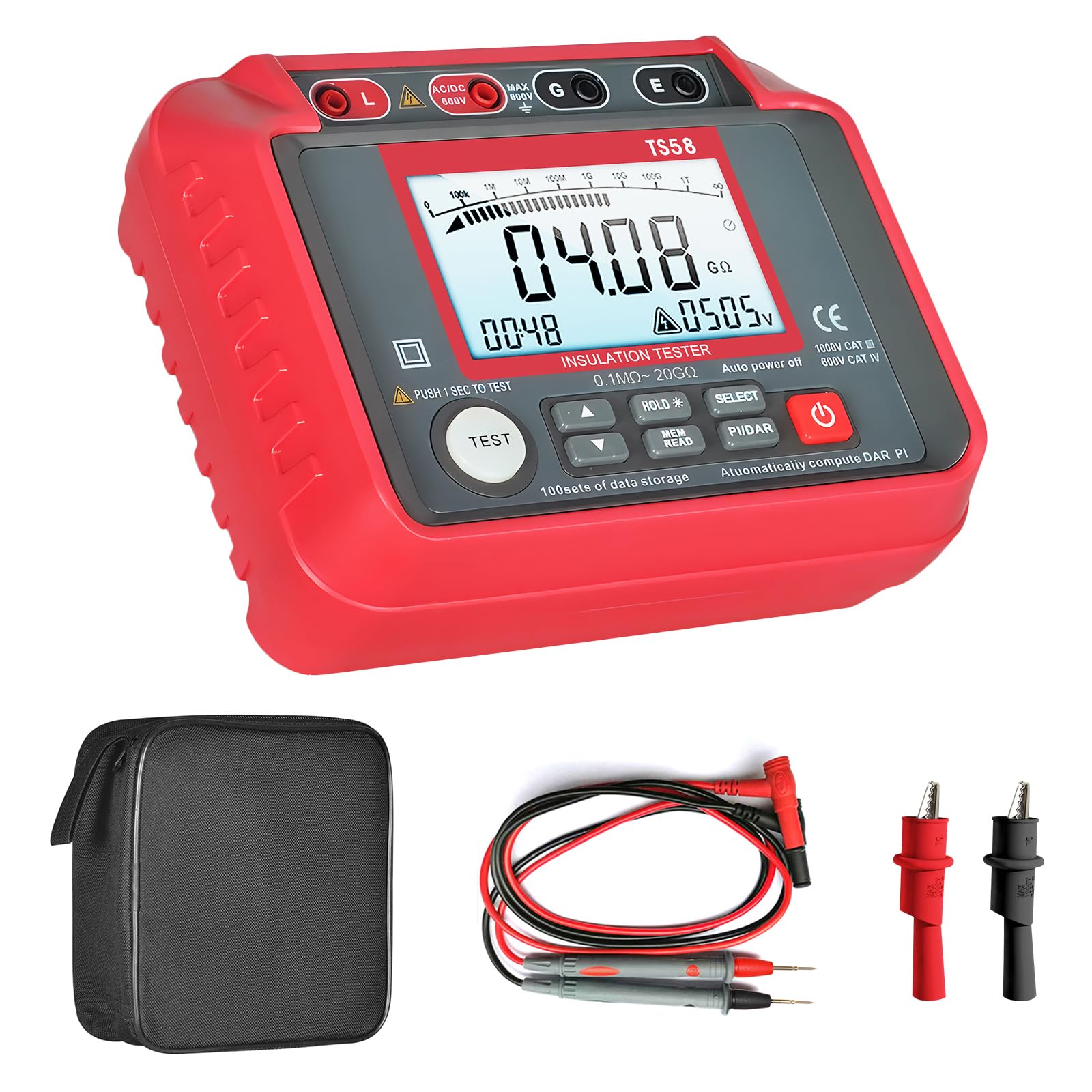
Figure 1: AIOMEST TS58 Digital Megohmmeter Tester with labeled components.
- Insulation Resistance Output (L)
- AC/DC Positive Voltage Terminal
- Voltage Measurement Shield (G)
- Insulation Resistance Sampling (E)
- LCD Screen Display
- High Voltage Start
- Voltage Selection Up Button
- Voltage Selection Down Button
- Data Hold/Backlight Button
- Data Read/Save Button
- Function Selection (Insulation/AC/DC Voltage)
- PI and DAR Buttons (Polarization Index and Absorption Ratio)
- Power Switch
3.2 Display Features
The large LCD screen provides clear readings and indicators:

Figure 2: Detailed view of the AIOMEST TS58's large LCD backlight display.
- Large LCD Backlight Display: Ensures easy readability in various lighting conditions.
- Auto Range: Automatically selects the appropriate measurement range.
- Data Hold (HOLD): Freezes the current measurement on the display.
- Data Storage (REC): Supports storing up to 100 sets of measurement data.
- Low Battery Indication: An icon appears when battery power is low.
- Voltage Measurement: Displays AC/DC voltage.
- Polarization Index (PI) and Absorption Ratio (DAR): For advanced insulation testing.

Figure 3: Low Battery Warning indicator on the display.
4. Setup
4.1 Battery Installation
The AIOMEST TS58 requires 8 x 1.5V AA batteries for operation.
- Ensure the device is powered off.
- Locate the battery compartment on the back of the tester.
- Use a screwdriver to open the battery compartment cover.
- Insert 8 x 1.5V AA batteries, observing the correct polarity (+/-).
- Replace the battery compartment cover and secure it with the screw.

Figure 4: Battery compartment location on the AIOMEST TS58.
4.2 Connecting Test Leads
Connect the test leads to the appropriate terminals on the tester.
- For insulation resistance measurements, connect the red test lead to the 'L' (Insulation Resistance Output) terminal and the black test lead to the 'E' (Insulation Resistance Sampling) terminal.
- For AC/DC voltage measurements, connect the red test lead to the 'AC/DC 600V' terminal and the black test lead to the 'G' (Voltage Measurement Shield) terminal.
5. Operating Instructions
5.1 Power On/Off
Press the Power Switch (13) to turn the device on or off. The device features an automatic shutdown function after 25 minutes of inactivity to conserve battery life.
5.2 Function Selection
Use the Function Selection button (11) to cycle through measurement modes: Insulation Resistance and AC/DC Voltage.
5.3 Insulation Resistance Measurement
- Select the Insulation Resistance mode using the Function Selection button.
- Use the Voltage Selection Up (7) and Down (8) buttons to choose the desired test voltage (e.g., 250V, 500V, 1000V).
- Connect the test leads to the circuit under test (L and E terminals). Ensure the circuit is de-energized.
- Press the TEST button (located near 6) to initiate the measurement. The High Voltage Start indicator (6) will illuminate.
- The insulation resistance value will be displayed on the LCD screen.
- The device has an automatic discharge design after the test is complete.

Figure 5: Automatic discharge design for safety after testing.
5.4 AC/DC Voltage Measurement
- Select the AC/DC Voltage mode using the Function Selection button.
- Connect the test leads to the circuit where voltage needs to be measured (AC/DC 600V and G terminals).
- The voltage value will be displayed on the LCD screen.
5.5 Data Hold and Storage
- Press the HOLD button (9) to freeze the current reading on the display. Press again to release.
- To save data, press the REC (Data Read/Save) button (10). The device supports storing up to 100 sets of data.
- To recall saved data, press the REC button repeatedly.

Figure 6: Display indicating data storage functionality.
5.6 PI and DAR Measurement
The TS58 can calculate Polarization Index (PI) and Absorption Ratio (DAR) for comprehensive insulation analysis. Refer to advanced electrical testing guides for detailed procedures on using these functions.
- Press the PI/DAR button (12) to initiate these measurements.
6. Maintenance
6.1 Cleaning
Wipe the device with a dry, soft cloth. Do not use abrasive cleaners or solvents.
6.2 Battery Replacement
Replace batteries when the low battery indicator appears on the display. Follow the battery installation steps in Section 4.1.
6.3 Storage
When not in use for extended periods, remove the batteries to prevent leakage. Store the device in a cool, dry place, preferably in its protective storage bag.

Figure 7: The included storage bag for protection and portability.
7. Troubleshooting
| Problem | Possible Cause | Solution |
|---|---|---|
| Device does not power on. | Dead or incorrectly installed batteries. | Check battery polarity and replace with new batteries if necessary. |
| Inaccurate readings. | Poor test lead connection, dirty terminals, or incorrect mode selection. | Ensure test leads are securely connected. Clean terminals. Verify the correct measurement mode is selected. |
| Display shows 'OL' (Overload). | Measurement exceeds the device's range. | Ensure the test voltage is appropriate for the expected resistance. The device has an auto-range feature, but extreme values may still exceed its limits. |
| Data cannot be saved. | Memory full. | Clear existing data to free up memory. (Refer to the full user manual for data clearing instructions if not covered here). |
8. Specifications
| Parameter | Value |
|---|---|
| Brand | AIOMEST |
| Model Number | TS58 |
| Measurement Type | Ohmmeter (Insulation Resistance) |
| Insulation Resistance Range | 0.1 MΩ to 20 GΩ |
| Output Voltage (Insulation Test) | 250V, 500V, 1000V |
| AC/DC Voltage Measurement | Up to 600V |
| Power Source | Battery-Powered (8 x 1.5V AA) |
| Item Weight | 800 Grams |
| Package Dimensions | 20.6 x 19.2 x 8.2 cm |
| Operating Temperature | Up to 35 Degrees Celsius |
| Compliance | CE, RoHS |
| Data Storage | 100 sets |
9. Package Contents
The AIOMEST TS58 package includes the following items:

Figure 8: Package contents of the AIOMEST TS58.
- AIOMEST TS58 Insulation Resistance Tester x 1
- Test Leads x 2
- Alligator Clips x 2
- Screwdriver x 1
- 1.5V AA Batteries x 8
- User Manual x 1
- Storage Bag x 1
10. Warranty and Support
For warranty information or technical support, please refer to the contact details provided in the separate warranty card or contact the seller directly. Keep your purchase receipt as proof of purchase.


