
1. Introduction
Thank you for choosing the SecuraLen FZ-82 Body Camera. This compact and versatile device is designed for capturing high-definition video and audio in various scenarios, from personal security to outdoor adventures. Featuring a 180-degree rotatable lens, 120-degree wide-angle view, night vision, and OTG connectivity, it provides reliable and convenient recording capabilities. Please read this manual thoroughly to understand the camera's functions and ensure optimal performance.
2. Product Overview
2.1 Package Contents
- 1 x Portable Camcorder
- 1 x Type-C Cable
- 1 x Tripod
- 1 x Clip
- 1 x Lanyard
- 1 x Multi-language User Manual (English, German, French, Italian, Spanish)

This image displays the complete set of accessories included with the SecuraLen Body Camera: the portable camcorder itself, a Type-C charging cable, a mini tripod, a clip for attachment, and a lanyard for carrying.
2.2 Key Features
- 1080P HD Video & Audio Recording: Captures clear and detailed footage.
- 180° Rotatable Lens: Allows flexible recording angles, ensuring optimal perspective.
- 120° Wide-Angle View: Captures expansive scenes and more of the environment.
- Automatic Screen Rotation: The display adjusts automatically to maintain correct orientation regardless of camera position.
- Night Vision: Equipped with 4 infrared lights for clear recording in low-light or dark conditions.
- Motion Detection: Automatically starts recording when motion is detected, conserving storage space.
- OTG Connectivity: Direct connection to compatible mobile devices for quick file transfer and viewing.
- One-Button Operation: Separate buttons for video, photo, audio, and alarm flash for ease of use.
- Long Battery Life: Extended recording time on a single charge.
- Loop Recording: Overwrites the oldest footage when the memory card is full, ensuring continuous recording.
- Car Mode: Can be used as a dash cam, starting recording automatically with vehicle ignition.
- Supports up to 256GB Micro SD Card: (Micro SD card not included)

This image displays the SecuraLen Body Camera, highlighting its compact design, rotatable lens, and integrated screen. A smaller version of the camera and an included mini tripod are also visible, demonstrating its portability and versatile mounting options.
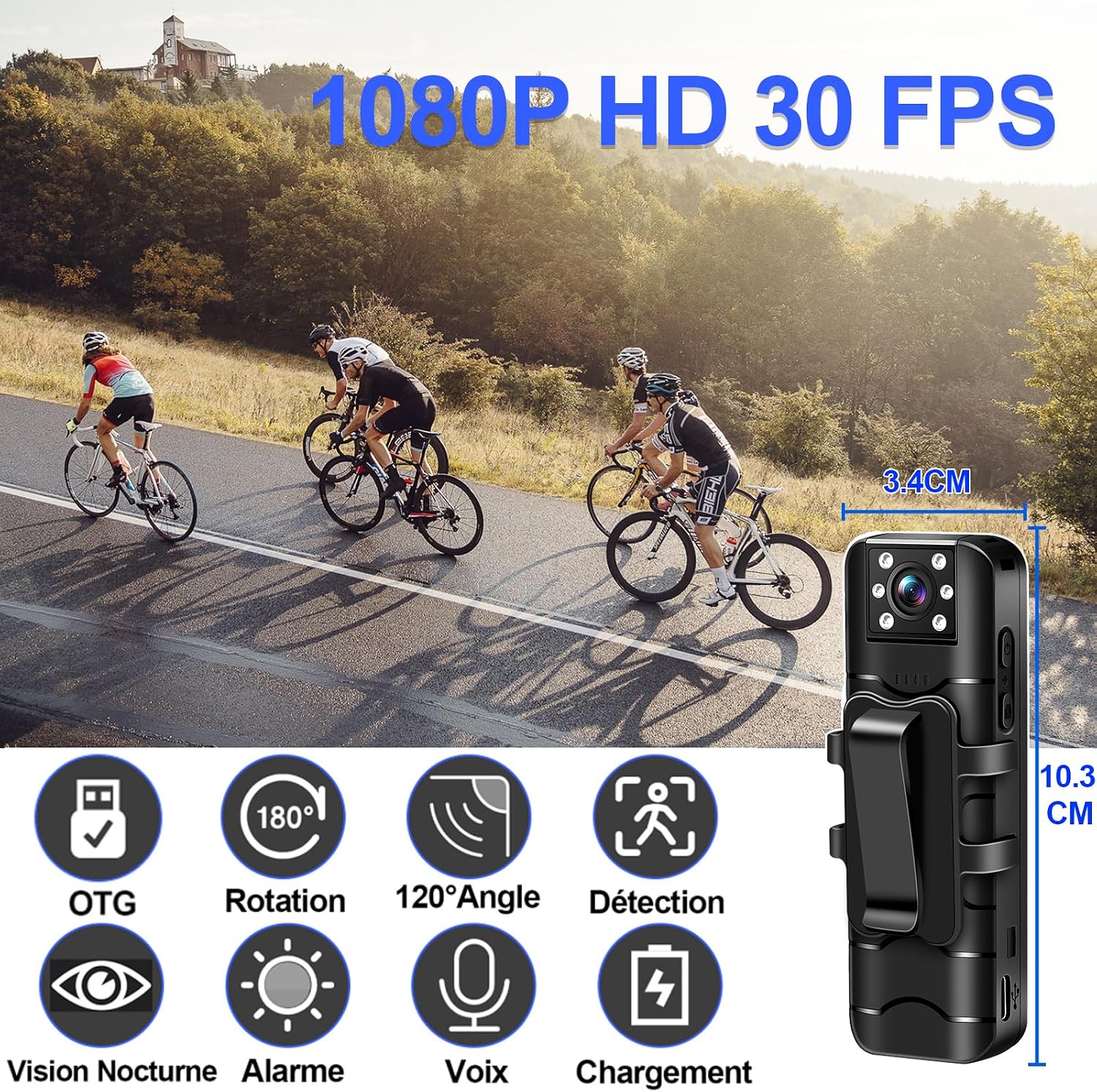
This image illustrates the physical dimensions of the SecuraLen Body Camera (10.3 cm height, 3.4 cm width) and visually represents its core functionalities through icons: OTG connectivity, 180-degree lens rotation, 120-degree wide-angle view, motion detection, night vision, alarm function, audio recording, and charging capability.

This image demonstrates the camera's 180-degree rotatable lens and the automatic screen orientation feature, ensuring the display remains upright regardless of the camera's physical position (horizontal or vertical).

This image details the separate, dedicated buttons on the SecuraLen Body Camera for simplified one-button operation, allowing quick access to video recording, photo capture, audio recording, and the alarm flash function.
3. Setup
3.1 Charging the Device
Before first use, fully charge the SecuraLen Body Camera. Connect the included Type-C cable to the camera's charging port and the other end to a USB power adapter (not included) or a computer's USB port. The charging indicator will show the charging status and turn off when fully charged.
3.2 Inserting a Micro SD Card
The camera requires a Micro SD card (up to 256GB, not included) for storing recordings. Locate the Micro SD card slot on the side of the camera. Gently insert the Micro SD card with the gold contacts facing down until it clicks into place. To remove, push the card in again until it springs out.
3.3 Powering On/Off
To power on the camera, press and hold the Power button until the screen lights up. To power off, press and hold the Power button again until the screen turns off.
4. Operating Instructions
4.1 Video Recording
Press the dedicated Video Record button once to start recording. The recording indicator will illuminate. Press the button again to stop recording. Videos are saved automatically to the Micro SD card.
4.2 Photo Capture
Press the dedicated Photo Capture button once to take a still photograph. The screen may flash briefly to indicate a photo has been taken. Photos are saved to the Micro SD card.
4.3 Audio Recording
Press the dedicated Audio Record button once to start audio-only recording. Press the button again to stop. Audio files are saved to the Micro SD card.
4.4 Night Vision Activation
The camera features automatic night vision. In low-light conditions, the infrared lights will activate automatically to provide clear black-and-white footage. Ensure the lens is unobstructed for optimal night vision performance.

This image highlights two advanced features: motion detection, indicated by a target over a moving subject (a child and a dog), and infrared night vision, showing a clear black-and-white recording in low-light conditions.
4.5 Motion Detection
To enable motion detection, navigate to the camera's settings menu. Once activated, the camera will automatically begin recording when movement is detected within its field of view and stop when motion ceases, helping to conserve battery and storage.
4.6 OTG Connection for File Transfer
The camera supports OTG (On-The-Go) functionality, allowing direct connection to compatible smartphones or tablets for viewing and transferring files. Use a compatible OTG cable (not included) to connect the camera to your mobile device. Your device should recognize the camera as external storage.

This image shows the SecuraLen Body Camera connected to a smartphone, illustrating the OTG (On-The-Go) function for direct and convenient file transfer of recorded videos, photos, and audio to compatible mobile devices.
4.7 Loop Recording
The loop recording feature ensures continuous recording by automatically overwriting the oldest files when the Micro SD card reaches its capacity. This function can typically be enabled or disabled in the camera's settings menu.
4.8 Alarm Flash
The camera includes an alarm flash function. Refer to the on-screen menu or the quick start guide for specific instructions on activating this feature, which typically involves a dedicated button press.
5. Maintenance
5.1 Cleaning
To clean the camera, gently wipe the exterior with a soft, dry cloth. For the lens, use a specialized lens cleaning cloth and solution to avoid scratches. Do not use harsh chemicals or abrasive materials.
5.2 Storage
Store the camera in a cool, dry place away from direct sunlight, extreme temperatures, and high humidity. When storing for extended periods, ensure the battery is partially charged (around 50%) to prolong its lifespan.
5.3 Battery Care
To maximize battery life, avoid fully discharging the battery frequently. Charge the camera regularly, even if not in use, to maintain battery health. Use only the provided charging cable or a certified equivalent.
6. Troubleshooting
6.1 Device Not Powering On
- Ensure the battery is charged. Connect the camera to a power source and try again.
- Press and hold the Power button for at least 5-10 seconds.
- If the issue persists, contact customer support.
6.2 Recording Issues (e.g., not recording, corrupted files)
- Check if a Micro SD card is properly inserted and has sufficient free space.
- Ensure the Micro SD card is formatted correctly (FAT32 is commonly recommended).
- Try using a different, high-quality Micro SD card.
- Ensure the battery level is adequate for recording.
6.3 Poor Image Quality
- Ensure the lens is clean and free from smudges or dust.
- Check the recording resolution settings in the camera menu; ensure it is set to 1080P.
- Ensure adequate lighting conditions. While the camera has night vision, extremely dark environments may still affect clarity.
- Avoid recording against strong light sources.
6.4 File Transfer Problems via OTG
- Ensure your mobile device supports OTG functionality.
- Use a compatible and functional OTG cable.
- Check if the camera is powered on when connected.
- Try restarting both the camera and your mobile device.
7. Specifications
| Feature | Specification |
|---|---|
| Brand | SecuraLen |
| Model Name | FZ-82 body cam |
| Video Recording Resolution | 1080p |
| Effective Video Resolution | 1080 |
| Frame Rate | 30 frames_per_second |
| Viewing Angle | 120 Degrees |
| Night Vision Range | 8 Meters |
| Special Features | Motion Detector, Portable, HD Resolution, Night Vision |
| Connectivity Technology | USB |
| Wireless Communication Technology | No Wi-Fi |
| Power Source | Battery Powered |
| Battery Type | Lithium-ion (1 included) |
| Material | Polycarbonate (PC) |
| Color | Black |
| Item Dimensions (L x W x H) | 35 x 17 x 104 millimeters (3.5 x 1.7 x 10.4 cm) |
| Weight | 64 Grams |
| Water Resistance Level | Not Waterproof |
| Recommended Uses | Espionage, Game and track, Pet monitoring, Baby monitoring, Outdoor security, Indoor security |
8. Warranty and Support
For information regarding product warranty, returns, or technical support, please refer to the documentation included with your purchase or contact the seller/manufacturer directly. Keep your proof of purchase for any warranty claims.