
1. Introduction
The EANOP M40 Head-Up Display (HUD) projects essential driving information directly onto your windshield, enhancing safety and convenience by allowing you to view data without diverting your eyes from the road. This manual provides detailed instructions for the installation, operation, and maintenance of your device.

Image 1.1: EANOP M40 HUD Head-Up Display unit.
2. Package Contents
Please verify that all items listed below are included in your package:
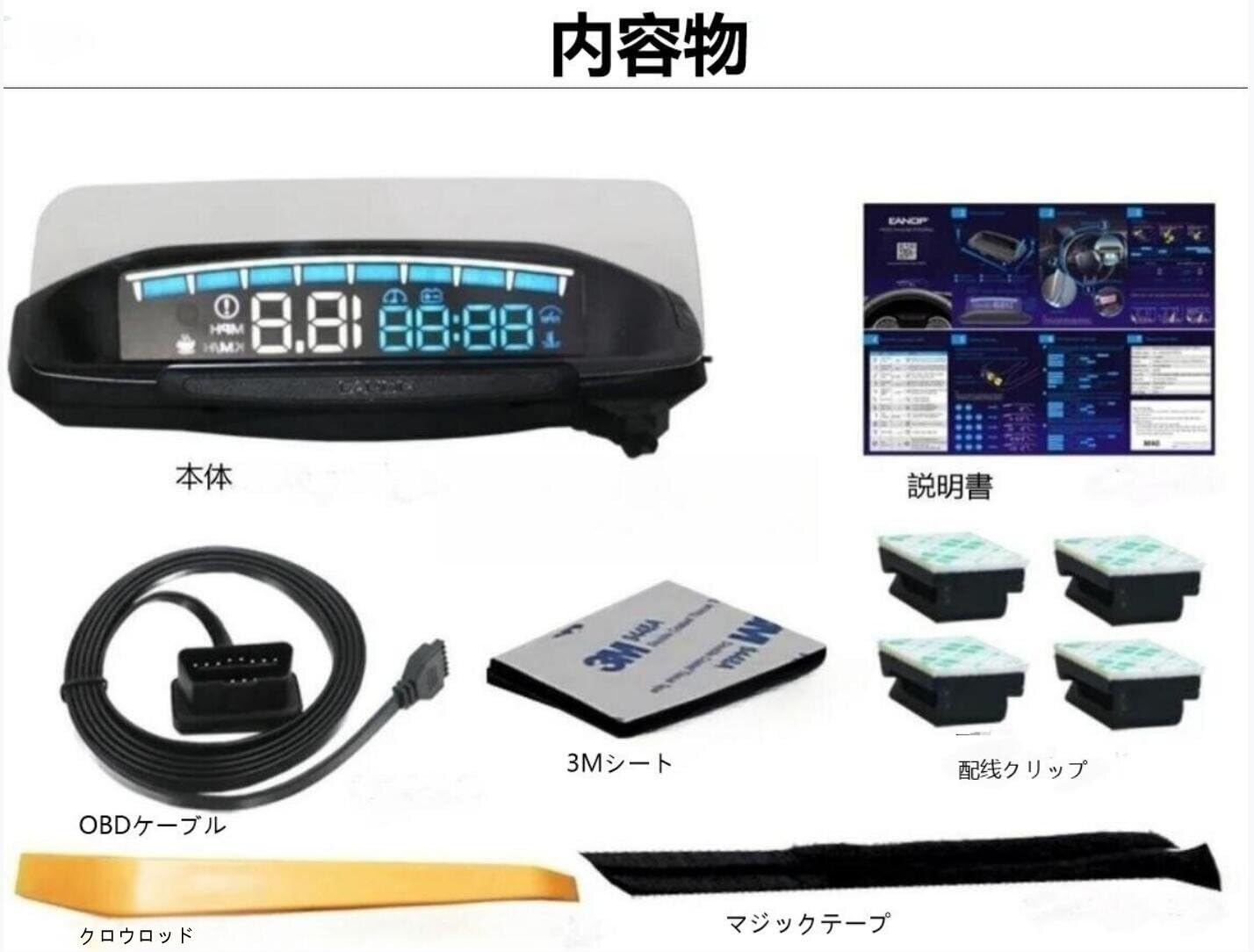
Image 2.1: All components included in the EANOP M40 HUD package.
- HUD Main Unit
- OBD Cable
- 3M Adhesive Sheet (for securing the unit)
- Wiring Clips (for cable management)
- Crowbar Tool (for trim removal during installation)
- Magic Tape (additional securing material)
- Instruction Manual (this document)
3. Installation Guide
Follow these steps to properly install your EANOP M40 HUD:

Image 3.1: Visual guide for the installation process.
- Connect OBD Cable: Locate your vehicle's OBD port (typically under the dashboard on the driver's side) and securely plug in the OBD cable connector.
- Route Cable: Carefully route the OBD cable along the vehicle's sealing strip or under interior trim panels to conceal it and prevent interference with driving. Use the provided wiring clips for a neat installation.
- Connect to HUD: Connect the other end of the OBD cable to the designated port on the EANOP M40 HUD unit.
- Position HUD: Place the HUD unit on your dashboard in a position that allows for clear projection onto the windshield without obstructing your view of the road. Use the 3M adhesive sheet to secure the unit firmly in place.
4. Product Overview
4.1 Display Elements
The EANOP M40 HUD features a wide screen display designed for clear visibility. Key information displayed includes:
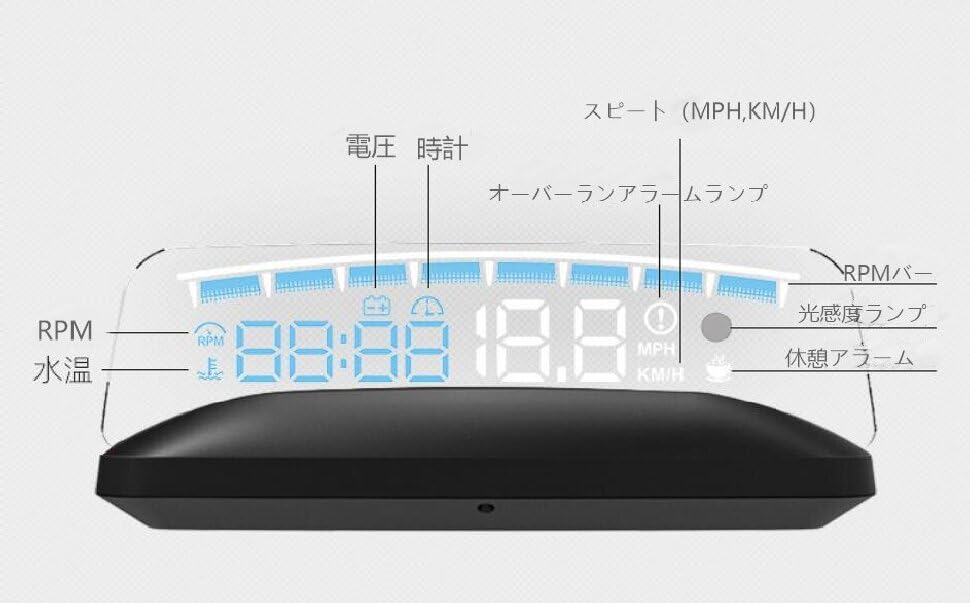
Image 4.1: Labeled diagram of the HUD display elements.
- Speed: Displays current vehicle speed in MPH or KM/H.
- RPM: Engine Revolutions Per Minute, indicated numerically and via an RPM bar.
- Water Temperature: Engine coolant temperature.
- Voltage: Vehicle battery voltage.
- Clock: Current time.
- Over-run Alarm Lamp: Illuminates when engine RPM exceeds a set limit.
- Light Sensor Lamp: Indicates the active light sensor for automatic brightness adjustment.
- Rest Alarm: Alerts for fatigue driving.
4.2 Control Buttons and Ports
The device is equipped with intuitive buttons for easy navigation and settings adjustment:
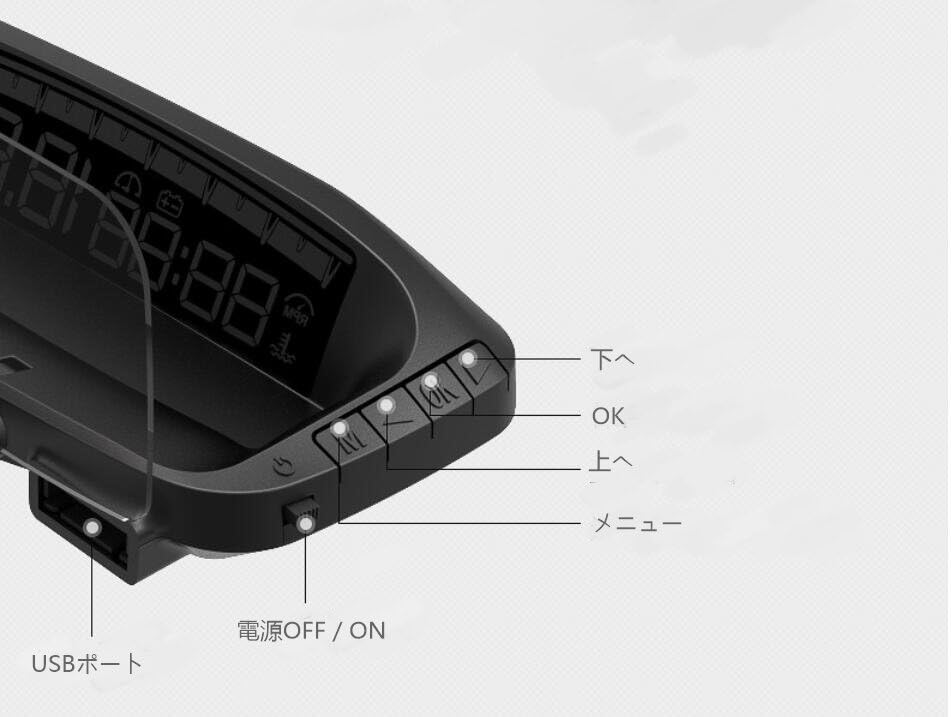
Image 4.2: Labeled diagram of the HUD control buttons and ports.
- Up Button: Navigates up in menus or increases values.
- OK Button: Confirms selections or enters sub-menus.
- Down Button: Navigates down in menus or decreases values.
- Menu Button: Accesses the main menu or cycles through display modes.
- Power ON/OFF Switch: Toggles the device power.
- USB Port: For firmware updates or alternative power input (if applicable).
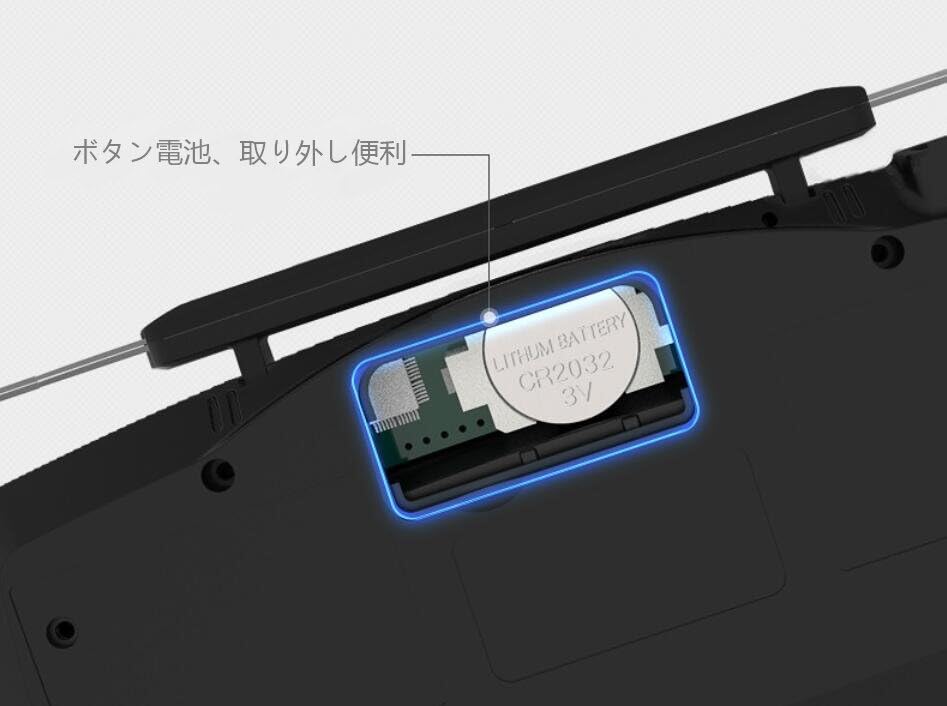
Image 4.3: Location of the CR2032 button battery.
The device uses a CR2032 3V lithium button battery, which is easily accessible for replacement.
5. Operating Instructions
5.1 Display Modes
The EANOP M40 offers 6 distinct display modes, allowing you to customize the information shown on your windshield. You can easily switch between these modes to suit your preferences or driving conditions.

Image 5.1: Examples of the 6 available display modes, showing various combinations of speed, RPM, water temperature, voltage, and time.
To change the display mode, press the Menu button. Each press will cycle to the next available mode. Select the mode that best provides the information you need.
5.2 Automatic Brightness Adjustment
The EANOP M40 features a built-in light sensor that automatically adjusts the display brightness. This ensures optimal visibility in various lighting conditions, from bright daylight to nighttime driving, without causing glare or being too dim.

Image 5.2: Comparison of HUD display clarity in bright daylight and at night, demonstrating automatic brightness adjustment.
5.3 Alarm Functions
The device includes five alarm functions designed to enhance driving safety by alerting the driver to potential issues:

Image 5.3: Icons representing the five alarm functions.
- Overspeed Alarm: Alerts the driver if the vehicle speed exceeds a user-defined limit.
- Water Temperature Alarm: Provides a warning if the engine coolant temperature becomes excessively high.
- Voltage Alarm: Notifies the driver of abnormal battery voltage (too low or too high).
- Engine Fault Alarm: Indicates an engine malfunction detected through the OBD2 system.
- Fatigue Driving Alarm: Reminds the driver to take a break after a prolonged period of continuous driving.
6. Specifications
Detailed technical specifications for the EANOP M40 HUD:
| Feature | Specification |
|---|---|
| Manufacturer | EANOP |
| Model Number | M40 |
| Product Weight | 150 g |
| Product Dimensions (L x W x H) | 17.3 x 8.5 x 6.2 cm |
| Material | Plastic |
| Measurement Accuracy | +/-0.1CM |
| ASIN | B0CQP56F41 |

Image 6.1: Diagram showing the physical dimensions of the EANOP M40 HUD.
7. Troubleshooting
If you encounter issues with your EANOP M40 HUD, please refer to the following common troubleshooting steps:
- No Power/No Display:
- Ensure the OBD2 cable is securely connected to both the HUD unit and your vehicle's OBD2 port.
- Verify that your vehicle's ignition is on.
- Check the power switch on the HUD unit to ensure it is in the 'ON' position.
- Inaccurate Readings:
- Confirm that the correct unit settings (e.g., KM/H vs. MPH) are selected in the HUD's menu.
- Some vehicles may require calibration for speed or other parameters. Refer to the advanced settings in the HUD menu if available.
- Display Not Clear/Double Image:
- Adjust the angle and position of the HUD unit on your dashboard.
- Ensure your windshield is clean.
- The device uses high-reflection lenses to minimize double imaging. If persistent, ensure the projection surface is suitable.
For persistent issues not resolved by these steps, please contact customer support.
8. Important Notes and Vehicle Compatibility
Please read the following compatibility information carefully before using the EANOP M40 HUD:
- This device is compatible only with vehicles manufactured after 2008 that support the OBD2 or EU-OBD protocol.
- The OBD mode is generally not compatible with hybrid vehicles, diesel vehicles, pickup trucks, MPVs, or RVs. Please verify your vehicle's compatibility before use.
9. Warranty and Support
For warranty information, technical support, or service inquiries regarding your EANOP M40 HUD, please refer to the specific warranty card or documentation included with your purchase. Alternatively, you may contact EANOP customer service directly through their official website or the retailer from whom you purchased the product.