
1. Product Overview
This manual provides instructions for the replacement remote control designed specifically for MLily Adjustable Bed Bases that utilize the Richmat HJC9 control box. It is crucial to verify compatibility before use.

Figure 1.1: Front view of the remote control, showing buttons for head up/down, foot up/down, memory (M), and flat.
The remote control allows for adjustment of the bed's head and foot sections, as well as memory and flat positions. Please note that batteries are not included with the remote.
2. Setup and Pairing
2.1 Battery Installation
The remote control requires 2 AAA batteries. To install, slide open the battery compartment cover on the back of the remote and insert the batteries, ensuring correct polarity (+/-). Replace the cover securely.

Figure 2.1: Battery compartment on the back of the remote control.
2.2 Pairing Instructions
This remote control is not universal and must be paired with your bed's control box. Ensure your bed base uses a Richmat HJC9 control box. Follow these steps carefully:
- Preparation: Unplug the bed base from the power outlet. Wait for 5 seconds, then plug it back in.
- Control Box Reset: Locate the control box under the bed (often near the battery backup box). Double-click the 'reset' button on the control box twice. This button may be labeled 'Learn' or 'Reset Coding'.
- Remote Pairing Initiation: On the remote, simultaneously press and hold the "head up" button and the "foot up" button for 10 seconds.
- Synchronization: While still holding the two buttons on the remote, press and release the 'reset' button on the control box once.
- Confirmation: Listen for beeps, which indicate that the remote is successfully synced. The pairing process must be completed within 15 seconds of the control box reset. If 15 seconds pass, you must unplug the power again and restart the process. Ensure the light on the control box is on during pairing, as it will go out if not paired within 15 seconds.
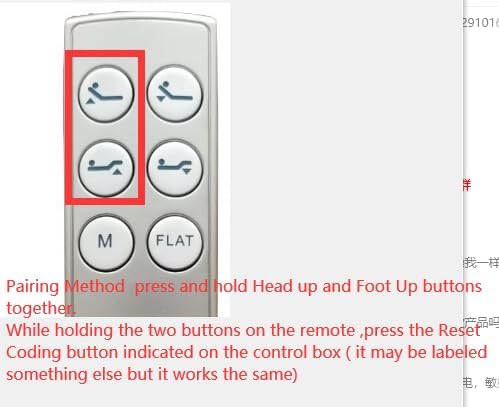
Figure 2.2: Remote buttons used for pairing.

Figure 2.3: Location of the control box under the bed.
3. Operating the Remote Control
Once paired, the remote control allows you to adjust your MLily adjustable bed base. The buttons typically include:
- Head Up/Down: Adjusts the head section of the bed.
- Foot Up/Down: Adjusts the foot section of the bed.
- M (Memory): Activates a pre-set memory position (if supported by your bed base).
- Flat: Returns the bed to a completely flat position.
Press and hold the desired button to move the bed to the desired position. Release the button to stop movement.
4. Maintenance
4.1 Battery Replacement
If the remote control's responsiveness decreases or it stops functioning, replace the AAA batteries as described in Section 2.1. Always use fresh batteries of the same type.
4.2 Cleaning
Wipe the remote control with a soft, dry cloth. Do not use liquid cleaners or abrasive materials, as they may damage the surface or internal components.
5. Troubleshooting
- Remote not responding:
- Check battery installation and replace batteries if necessary.
- Ensure the remote is within range of the bed base.
- Re-attempt the pairing process as described in Section 2.2.
- Remote does not pair:
- Verify that your bed base uses a Richmat HJC9 control box. This remote is only compatible with this specific control box model.
- Ensure your old remote was identical to this one, as different remotes may not pair.
- Confirm that the pairing steps are followed precisely within the 15-second window.
- If issues persist, it may indicate an incompatibility or a fault with the control box.
- Compatibility Issues:
- This remote is specifically for MLily NL300 models with a Richmat HJC9 control box. Do not purchase if your model number is not included or if your control box is different.
- If you are unsure about compatibility, it is recommended to send details of your bed's control box to the seller for verification before ordering.
6. Specifications
| Feature | Detail |
|---|---|
| Model Number | HJC9 |
| Compatible Devices | MLily Adjustable Bed Base (with Richmat HJC9 control box) |
| Batteries Required | 2 x AAA (not included) |
| Color | White |
| Manufacturer | SZHKHXD |
| Country of Origin | China |
7. Support
For further assistance or if you encounter issues not covered in this manual, please contact the seller or manufacturer, SZHKHXD. Providing clear pictures of your bed's control box and any relevant model numbers can help expedite support.

