
Introduction
This manual provides detailed instructions for the assembly, operation, maintenance, and troubleshooting of your CSZZD Full Bed Frame with 4 Storage Drawers and Bookcase Headboard. Please read this manual thoroughly before assembly and use to ensure safe and proper operation of your bed frame.
Safety Information
WARNING:
- Exceeding the weight capacity of 1100 lbs can cause injury or damage to the bed frame.
- Improperly secured storage drawers may lead to accidents. Ensure drawers are fully closed when not in use.
- Tampering with LED lights while they are on can cause injury or damage.
- Always follow all assembly instructions and precautions to ensure safe use and maintenance.
Package Contents
Your CSZZD Full Bed Frame package includes the following components:
- Bookcase Headboard components
- Bed Frame components (metal slats, metal legs)
- 4 Storage Drawers with wheels
- Installation Manual
- All necessary hardware and tools for assembly

Image: Overview of the CSZZD Full Bed Frame with key dimensions and components labeled. This image illustrates the overall structure including the headboard, frame, and under-bed drawers.
Setup and Assembly
The CSZZD Full Bed Frame is designed for straightforward assembly. All parts are labeled, and the necessary tools are included. It is recommended to assemble the bed frame with two adults.
- Unpack Components: Carefully unpack all components and verify against the parts list in the included installation manual. Ensure no parts are missing or damaged.
- Assemble Bed Frame: Follow the step-by-step instructions in the provided manual to connect the metal slats and frame components. Ensure all connections are secure. The frame features 13 heavy-duty metal slats and 11 metal legs (5 central supporting adjustable legs) for stability.
- Attach Headboard: Assemble the bookcase headboard according to the manual. This includes attaching the 3-tier open storage shelves and 2 private storage doors.
- Install LED Lights: Carefully install the RGB LED light strips into the designated channels on the headboard and footboard. Refer to the manual for specific routing and adhesive application.
- Install Charging Station: Integrate the built-in 2 AC outlets, 1 USB port, and 1 Type-C port into the headboard as instructed.
- Assemble Storage Drawers: Assemble the 4 under-bed storage drawers. Attach the smooth rollers (casters) to the bottom of each drawer. The drawers are designed to attach to the bed frame to prevent sliding.
- Place Mattress: Once the frame is fully assembled, place your mattress directly onto the slats. A box spring is not required. The frame includes a fixed drawer board to prevent the mattress from sliding.

Image: Illustration of a screw being inserted during assembly and a diagram demonstrating the fixed drawer board feature that prevents mattress sliding.
Operating Instructions
1. RGB LED Lights
The bed frame features integrated RGB LED lights in the headboard and footboard, controllable via a remote or a dedicated mobile application.
- Power On/Off: Use the remote control or app to turn the LED lights on or off.
- Color Selection: Choose from over 60,000 colors to customize your lighting ambiance.
- Brightness Adjustment: Adjust the light intensity to your preference.
- Modes: Select various dynamic modes for different lighting effects.
- Music Sync: Activate the music sync mode to make the LED lights flash in rhythm with your audio.
- Timing Function: Set a timer for the lights to automatically turn off.

Image: The bed frame illuminated with RGB LED lights, showcasing the remote control and mobile application interface for light customization.
2. USB Charging Station
The headboard is equipped with a convenient charging station.
- AC Outlets: Two 125V/12A AC outlets are available for powering devices.
- USB Port: One 5V/2.1A USB port for charging compatible devices.
- Type-C Port: One 5V/2.1A Type-C port for charging compatible devices.
- Simply plug your devices into the appropriate port for charging.
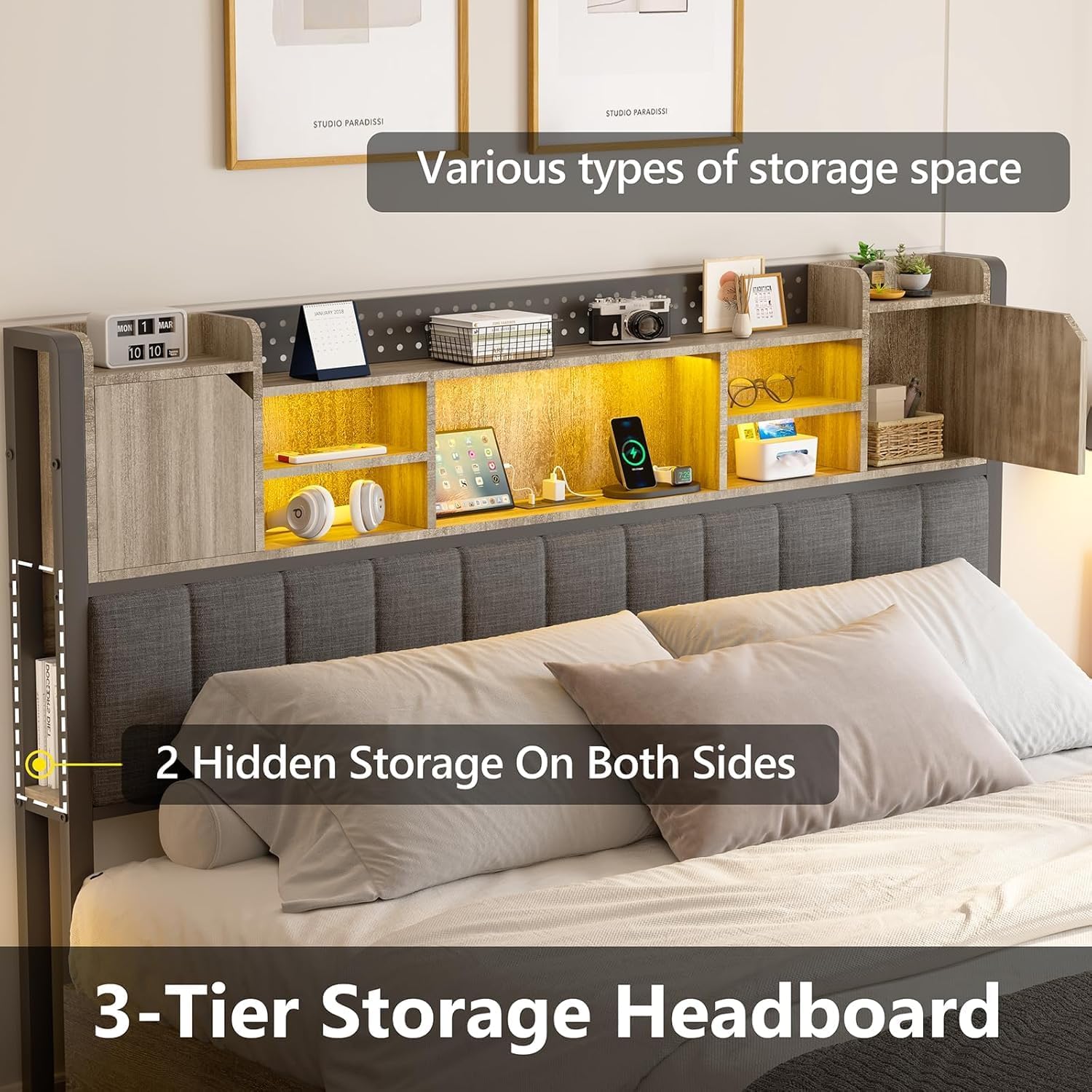
Image: Close-up view of the headboard's integrated charging station, highlighting the 2 AC outlets, 1 USB port, and 1 Type-C port.
3. Storage Drawers
The bed frame includes 4 under-bed storage drawers for organizing items.
- Access: Pull the drawers out from under the bed using their handles.
- Liners: Use the provided drawer liners to protect contents and prevent items from falling through.
- Closure: Push the drawers fully back into the frame until they are securely attached to prevent accidental sliding or tripping hazards.
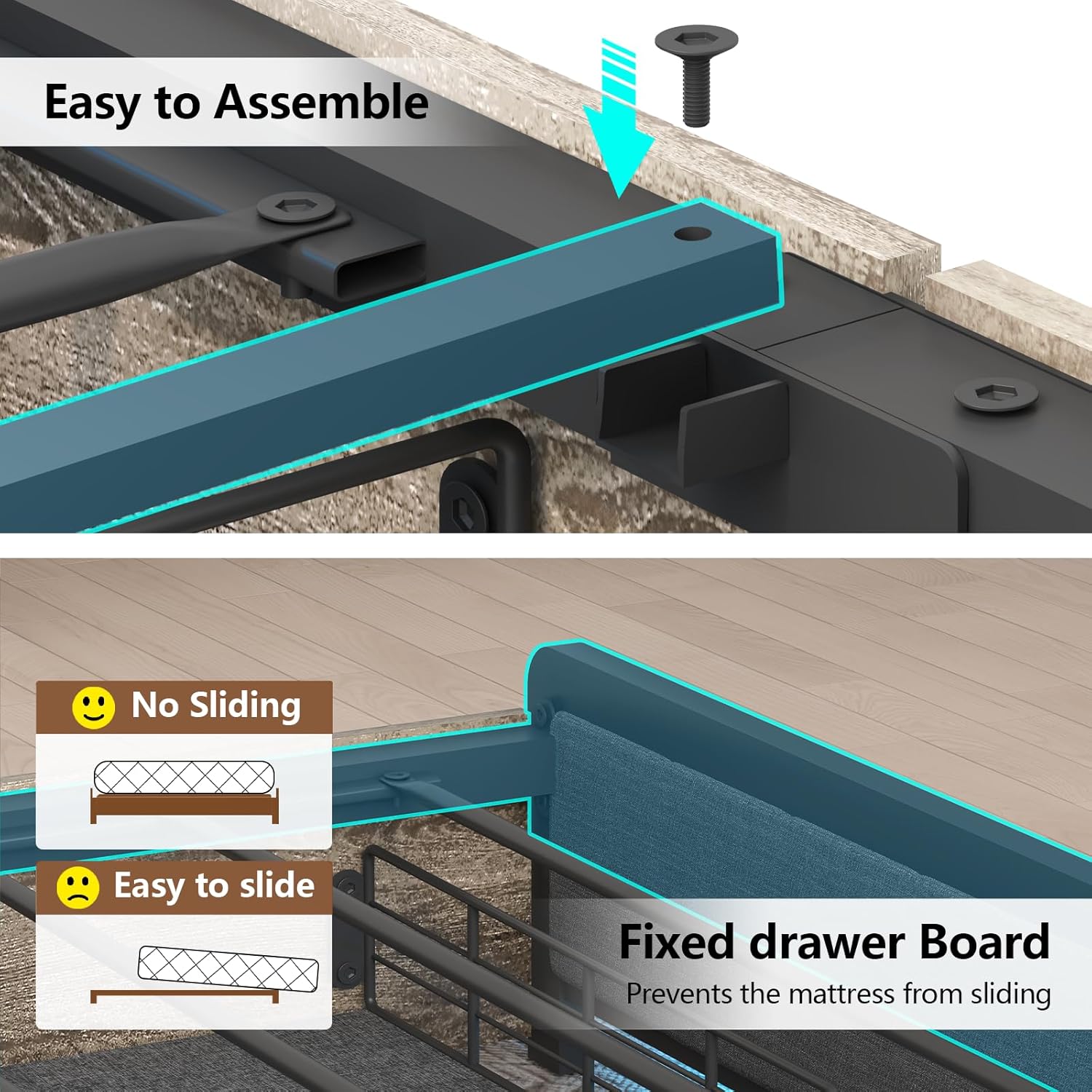
Image: View of the four large storage drawers on wheels, shown pulled out from under the bed frame, with items stored inside.
4. Bookcase Headboard Storage
The headboard offers various storage options for convenience.
- Open Shelves: Utilize the 3-tier open storage shelves for easy access to items like books, glasses, or decorative pieces.
- Private Storage: The 2 private storage doors provide concealed space for personal items.
- Side Storage: Two additional open storage spaces on the sides are suitable for reading materials.

Image: The bookcase headboard displaying its 3-tier open shelves, two hidden side storage compartments, and two private storage doors, with various items placed within.
Maintenance
- Cleaning: Wipe the bed frame surfaces with a soft, damp cloth. Avoid harsh chemicals or abrasive cleaners that may damage the finish or upholstery.
- LED Lights: Ensure the LED strips are free from dust. Do not attempt to clean the LED strips with liquids while they are powered on.
- Charging Station: Keep the charging ports free of dust and debris. Do not insert foreign objects into the ports.
- Drawer Rollers: Periodically check the drawer rollers for smooth operation. Clean any accumulated dust or hair.
- Fasteners: Periodically check all screws and fasteners to ensure they remain tight. Retighten if necessary to maintain structural integrity and prevent noise.
Troubleshooting
| Problem | Possible Cause | Solution |
|---|---|---|
| LED lights not working. | Power connection loose; remote/app issue; LED strip damage. | Check all power connections. Ensure the remote has fresh batteries or the app is correctly paired. Inspect LED strips for visible damage. |
| Charging ports (AC/USB/Type-C) not functioning. | Power cable disconnected; internal wiring issue; port damage. | Verify the main power cable for the charging station is securely plugged into a wall outlet. Ensure the internal wiring connections are secure (refer to assembly manual). If ports remain non-functional, they may require replacement. |
| Drawers do not slide smoothly or get stuck. | Obstruction in the path; damaged rollers; drawer not aligned. | Clear any objects from the drawer's path. Inspect rollers for damage or debris and clean if necessary. Ensure the drawer is properly aligned with the bed frame's attachment points. |
| Bed frame makes noise (squeaking/creaking). | Loose fasteners; metal-on-metal friction. | Tighten all screws and bolts on the frame. The frame includes EVA sound-absorbing strips; ensure they are correctly in place. If noise persists, check for any metal parts rubbing together and apply a small amount of lubricant if safe and appropriate. |
| Mattress slides on the frame. | Fixed drawer board not properly installed or engaged. | Ensure the fixed drawer board is correctly installed and positioned to prevent mattress movement. |
Specifications
| Feature | Detail |
|---|---|
| Model Number | B-005 |
| Size | Full |
| Product Dimensions (L x W x H) | 81.5" x 55.1" x 43" |
| Material | Engineered Wood, Metal, Upholstered Fabric |
| Color | Oak Gray |
| Weight Capacity | 1100 lbs |
| Number of Storage Drawers | 4 |
| Headboard Features | 3-tier open shelves, 2 private storage doors, 2 side storage spaces, Upholstered backrest |
| Charging Station | 2 AC Outlets (125V/12A), 1 USB Port (5V/2.1A), 1 Type-C Port (5V/2.1A) |
| LED Lights | RGB, Remote/APP Control, Multi-color, Dynamic Modes, Music Sync, Timing Function |
| Box Spring Required | No |
| Noise Reduction | EVA sound absorbing strips |
Warranty and Support
For specific warranty details, please refer to the documentation included with your purchase or contact the retailer where the product was acquired. CSZZD is committed to customer satisfaction.
If you encounter any problems during assembly or use, or if you have questions regarding your bed frame, please contact CSZZD customer support. Our team will assist you in resolving any issues.
Contact information for support is typically found on the product packaging, the included installation manual, or the manufacturer's official website.