
Daewoo 40DM62FA
Daewoo Smart TV 40DM62FA User Manual
Full HD 40" LED Smart Television
Introduction
This user manual provides comprehensive instructions for the setup, operation, and maintenance of your Daewoo Smart TV 40DM62FA. Please read this manual thoroughly before using your television to ensure proper functionality and safety. Keep this manual for future reference.

Image: Front view of the Daewoo 40DM62FA Smart TV, highlighting its display and integrated smart features.
Safety Information
Always observe the following safety precautions to prevent electric shock, fire, or damage to the television.
- Do not expose the TV to rain or moisture.
- Do not open the TV casing; refer all servicing to qualified personnel.
- Ensure proper ventilation around the TV.
- Use only the power cord supplied with the TV.
- Keep the TV away from direct sunlight, heat sources, and strong magnetic fields.
- Clean the TV with a soft, dry cloth. Do not use liquid or aerosol cleaners.
What's in the Box
Please check the contents of your product box. While specific components may vary, typical items included with your Daewoo Smart TV 40DM62FA are:
- Daewoo Smart TV 40DM62FA Unit
- Remote Control (requires 1 AA battery, not always included)
- Power Cord
- TV Stands (2 pieces) and Screws
- User Manual (this document)
- Quick Start Guide
Setup
1. Physical Setup
Before connecting any cables, decide whether you will place the TV on a stand or mount it on a wall.
Attaching the Stands:
- Carefully place the TV face down on a soft, clean surface to prevent screen damage.
- Align each stand with the corresponding slots on the bottom of the TV.
- Secure the stands using the provided screws. Ensure they are firmly attached.

Image: The Daewoo Smart TV 40DM62FA positioned on a media console, illustrating a common setup scenario.
2. Connections
Connect your devices to the TV using the appropriate ports.
- HDMI: For connecting external devices like Blu-ray players, game consoles, or set-top boxes. Your TV features multiple HDMI ports.
- USB 2.0: For connecting USB storage devices to play media files.
- Ethernet LAN: For a wired internet connection.
- Power: Connect the power cord to the TV's power input and then to a wall outlet.

Image: Side profile of the Daewoo Smart TV, illustrating its design and potential access points for connections.
3. Initial Power On and First-Time Setup
- Plug the power cord into a wall outlet.
- Press the power button on the TV or the remote control to turn on the TV.
- Follow the on-screen instructions to complete the initial setup, which typically includes:
- Language selection.
- Network connection (Wi-Fi or Ethernet).
- Channel scanning (for analog/digital tuner).
- Time zone and date settings.
- Accepting terms and conditions for Smart TV features.
Operating the TV
Remote Control
Familiarize yourself with the remote control buttons for easy navigation.
- Power Button: Turns the TV on or off.
- Number Buttons: For direct channel selection.
- Volume Up/Down: Adjusts the sound level.
- Channel Up/Down: Changes TV channels.
- Navigation Buttons (Arrow Keys, OK): For menu navigation and selection.
- Smart TV Buttons: Dedicated buttons for popular streaming services like Netflix, YouTube, and Amazon Prime Video.
- Source Button: Switches between input sources (HDMI, USB, TV).
- Menu Button: Accesses the main settings menu.
Smart TV Features
Your Daewoo Smart TV 40DM62FA comes with integrated Smart TV capabilities, allowing access to a variety of online content and applications.
- Pre-installed Apps: Enjoy popular streaming services such as Netflix, YouTube, and Amazon Prime Video directly from your TV.
- App Store: Access the Google Play Store to download and install additional applications.
- Web Browser: Browse the internet directly on your TV screen.

Image: The Daewoo Smart TV 40DM62FA showcasing its Android TV interface and a wide array of supported streaming applications.
Connectivity
- Wi-Fi: Connect to your home wireless network for internet access. Navigate to Network Settings to configure your Wi-Fi connection.
- Bluetooth: Pair Bluetooth-enabled devices such as headphones or speakers for a wireless audio experience.
Maintenance
Proper maintenance ensures the longevity and optimal performance of your TV.
- Cleaning the Screen: Gently wipe the screen with a soft, lint-free cloth. For stubborn marks, slightly dampen the cloth with water or a specialized screen cleaner (never spray directly onto the screen).
- Cleaning the Casing: Use a soft, dry cloth to clean the TV casing.
- Ventilation: Ensure the ventilation openings on the back of the TV are not blocked to prevent overheating.
- Power Off When Not in Use: For extended periods of inactivity, unplug the TV from the power outlet.
Troubleshooting
If you encounter issues with your TV, refer to the following common solutions before contacting support.
| Problem | Possible Solution |
|---|---|
| No Power | Check if the power cord is securely plugged into the TV and the wall outlet. Try a different outlet. |
| No Picture, But Sound is Present | Ensure the correct input source is selected. Check cable connections to external devices. |
| No Sound, But Picture is Present | Check volume level and mute status. Ensure audio cables are connected correctly. |
| Remote Control Not Working | Check battery orientation and replace batteries if necessary. Ensure no obstructions between remote and TV. |
| Cannot Connect to Wi-Fi | Verify Wi-Fi password. Restart your router and the TV. Ensure the TV is within range of the Wi-Fi signal. |
Specifications
Key technical specifications for the Daewoo Smart TV 40DM62FA.
- Model Number: 40DM62FA
- Screen Diagonal: 40 inches (101.6 cm)
- Display Technology: LED (DLED)
- Resolution: Full HD (1920 x 1080 px)
- Refresh Rate: 60 Hz
- Sound Output: 16 W (2 speakers)
- Tuner: Analog and Digital
- Connectivity: Wi-Fi, Bluetooth, HDMI (multiple ports), USB 2.0, Ethernet LAN
- Aspect Ratio: 16:9
- Compatible Internet Services: Netflix, YouTube, Amazon Prime Video
- Energy Efficiency Class: E
- Product Dimensions (W x H x D): Approximately 110 cm x 70 cm x 20 cm (with stand)
- Weight: Approximately 11 kg
- Manufacturer: Daewoo

Image: Dimensional overview of the Daewoo Smart TV 40DM62FA, illustrating its physical size.
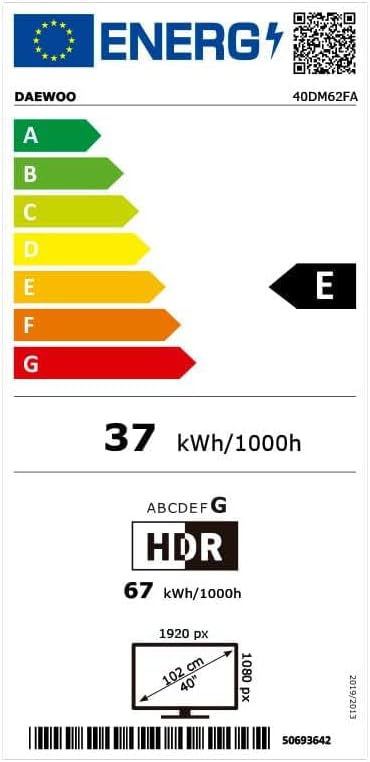
Image: The energy label for the Daewoo 40DM62FA, detailing its energy consumption and efficiency class. The barcode 50693642 is also shown.
Warranty and Support
For warranty information and technical support, please refer to the warranty card included with your product or visit the official Daewoo website. Do not attempt to repair the television yourself.
Ask a question about this manual
Ask about setup, troubleshooting, compatibility, parts, safety, or missing instructions. Manuals+ will review the question and use this page’s manual context to help answer it.