
1. Product Overview
The BALDR 359WH1 Weather Station (Model: VE-359WH3-new) is designed to provide comprehensive environmental monitoring for your home. It features a main display unit and three wireless remote sensors, allowing you to monitor temperature and humidity in up to four different locations (one indoor, three outdoor/remote). The station also offers a 12-24 hour weather forecast, time display, and alarm functions.

Image: The BALDR 359WH1 Weather Station, showing the main display unit and three wireless remote sensors. The main unit displays indoor and outdoor temperature, humidity, time, and a weather forecast.
2. Setup Guide
2.1 Unpacking and Powering On
- Carefully remove all components from the packaging: the main display unit and three wireless sensors.
- Main Display Unit: Connect the provided power adapter to the main unit and plug it into an electrical outlet. Insert the CR2032 backup battery (not included) into the designated slot. This battery serves as memory backup during power outages. The main unit requires continuous AC power for full functionality.
- Wireless Sensors: Each sensor requires 2x AAA batteries (not included). Open the battery compartment on the back of each sensor and insert the batteries, observing polarity.
2.2 Sensor Pairing
The main unit will automatically attempt to connect with the sensors upon power-up. This process may take a few minutes. Ensure sensors are within range during initial setup.
- Place the main unit and sensors close to each other during the initial pairing process.
- The main unit will display readings for each connected sensor (CH1, CH2, CH3).
- If a sensor does not connect, try removing and reinserting its batteries, then press the 'TX' button inside the battery compartment to force a signal transmission.

Image: The main display unit showing temperature and humidity readings for four locations (one indoor, three from wireless sensors). The image highlights the three remote sensors and their ability to transmit data up to 100 meters (328 feet).
2.3 Sensor Placement
For optimal performance, consider the following when placing your wireless sensors:
- Range: Sensors have a transmission distance of up to 100 meters (328 feet) in open air. Walls and obstacles may reduce this range.
- Environment: Place outdoor sensors in a shaded, dry location, protected from direct sunlight and rain, to ensure accurate temperature and humidity readings. Avoid placing them near heat sources or vents.
- Interference: Keep sensors away from large metal objects, electronic devices, and other sources of electromagnetic interference.
3. Operating Instructions
3.1 Main Display Functions
The main unit displays a variety of information:
- Indoor/Outdoor Temperature & Humidity: Current readings for the main unit's location and up to three remote sensors.
- Time & Date: Current time and day of the week.
- Weather Forecast: An icon-based forecast predicting weather conditions for the next 12-24 hours.
- Barometric Pressure: Displayed in inHg (inches of mercury).
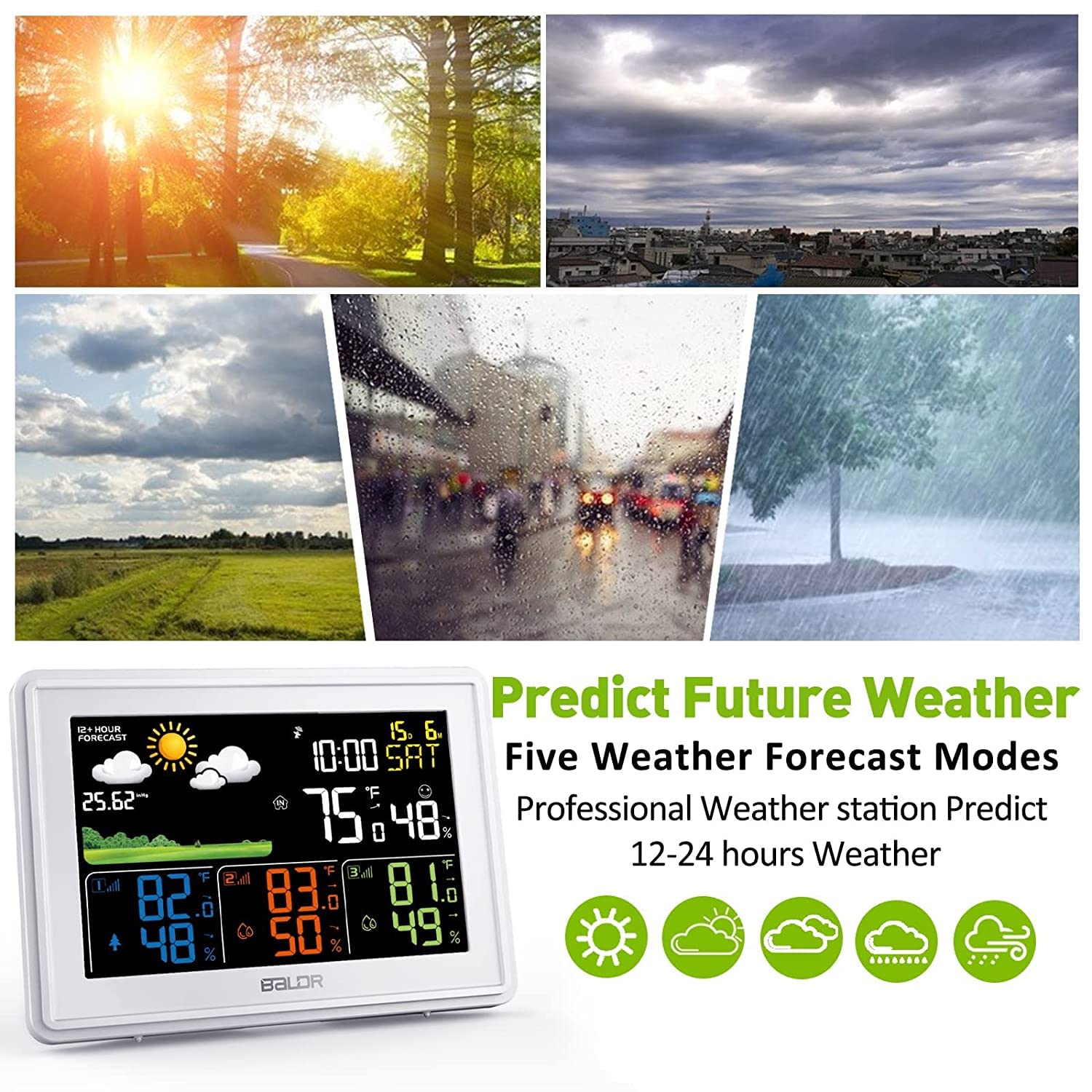
Image: The BALDR 359WH1 Weather Station main display unit, illustrating the five weather forecast modes (sunny, partly cloudy, cloudy, rainy, heavy rain) and its ability to predict weather for the next 12-24 hours.
3.2 Alarm and Snooze Function
The weather station includes an alarm clock with a snooze feature:
- Setting Alarm: Refer to the detailed instructions in the full manual for setting the alarm time.
- Snooze: When the alarm sounds, press the designated snooze button to temporarily silence it. The alarm will sound again after a set interval.

Image: Two children waking up and a person sleeping, illustrating the weather station's wake-up service and snooze function. The main unit is visible on a bedside table.
3.3 Adjustable Backlight
The main display unit features an adjustable backlight to suit various lighting conditions:
- The backlight can be adjusted through four levels: 100%, 50%, 3%, and Off.
- Use the dedicated button (refer to the full manual for button identification) to cycle through the backlight intensity levels.

Image: The BALDR 359WH1 Weather Station main unit shown with four different backlight intensity levels: 100%, 50%, 3%, and Off, demonstrating its adjustable display brightness.
4. Maintenance
4.1 Cleaning
- Wipe the main unit and sensors with a soft, damp cloth.
- Do not use abrasive cleaners or solvents, as these may damage the surfaces.
4.2 Battery Replacement
- Wireless Sensors: Replace AAA batteries when the low battery indicator appears on the main unit for a specific sensor channel.
- Main Unit: The CR2032 backup battery should be replaced periodically, or if the time/settings are lost during a power outage.
4.3 Environmental Considerations
- Ensure outdoor sensors are protected from extreme weather conditions to prolong their lifespan.
- Avoid exposing the main unit to direct sunlight or extreme temperatures.
5. Troubleshooting
- No Sensor Readings:
- Check if sensor batteries are correctly installed and not depleted.
- Ensure sensors are within the transmission range of the main unit.
- Try re-pairing the sensors by removing and reinserting batteries, then pressing the 'TX' button on the sensor.
- Initial setup may require some time for the main unit to find the wireless sensors.
- Inaccurate Readings:
- Ensure sensors are not exposed to direct sunlight, rain, or heat sources.
- Verify that the main unit is not near heat-emitting appliances.
- Display Not Working:
- Check if the power adapter is securely connected and the outlet is functional.
- Ensure the backlight is not set to 'Off'.
6. Product Specifications
| Feature | Detail |
|---|---|
| Model Number | VE-359WH3-new |
| Brand | BALDR |
| ASIN | B0CQLPBQPD |
| Package Dimensions | 19.7 x 12.8 x 6.7 cm; 490 grams |
| Main Unit Power | AC Adapter (primary), CR2032 battery (memory backup) |
| Sensor Power | 2x AAA batteries per sensor (not included) |
| Indoor Temperature Range | 14°F ~ 122°F (-10°C ~ 50°C) |
| Outdoor Temperature Range | -40°F ~ 140°F (-40°C ~ 60°C) |
| Humidity Display Range | 1% ~ 99% (values below 1% display "1%", above 99% display "99%") |
| Wireless Transmission Distance | Up to 100 meters (328 feet) in open air |

Image: The BALDR 359WH1 Weather Station main unit, highlighting its internal chips and providing details on indoor/outdoor temperature ranges and humidity display range.
7. Warranty and Support
For warranty information and technical support, please refer to the documentation included with your product or visit the official BALDR website. Keep your purchase receipt as proof of purchase for any warranty claims.
Manufacturer: BALDR
Contact: Please refer to the contact information provided on the product packaging or the manufacturer's official website for support inquiries.