
Canada-EXFO EXFO MAX-730D-SM1-OTDR
EXFO OTDR Maxtester MAX-730D-SM1 User Manual
Model: EXFO MAX-730D-SM1-OTDR | Brand: Canada-EXFO
1. Introduction
The EXFO MAX-730D with MAX-730D-SM1 OTDR module is a compact, lightweight, and rugged optical time-domain reflectometer designed for the installation and maintenance of optical networks. This device offers high resolution and a 4.3-inch widescreen color display, ensuring readability in various environments. Its modular platform supports a range of applications, including Optical Fault Location, Optical Channel Analysis for CWDM networks, Automated Ethernet Testing, and Micro OTDR functionalities.
Key features include:
- Touchscreen, color, 800 x 480 TFT, 178 mm (7 in) display.
- Two USB 2.0 ports for connectivity.
- Compact design, easily held with one hand, weighing less than 800g (2 lbs).
- Rugged, sealed construction for durability in challenging environments.
- Modular platform supporting various applications for maximum return on investment.
2. Setup and Initial Configuration
2.1 Unpacking and Inspection
Carefully unpack the EXFO MAX-730D-SM1 OTDR module and inspect all components for any signs of damage during transit. The package should include the main unit and any specified accessories, such as the SC/UPC interface connector.

Figure 2.1: Front view of the EXFO Maxtester MAX-730D-SM1 OTDR module, showing the display and control buttons.
2.2 Powering On the Device
Connect the appropriate power adapter to the device's power input port (8-16V 2A). Press and hold the power button located on the front panel until the display illuminates. The device will boot up and display the main menu.
2.3 Initial Settings
Upon first power-on or after a factory reset, you may need to configure basic settings such as date, time, region, and language. Navigate to the "Settings" or "System Information" menu on the touchscreen to adjust these parameters.

Figure 2.3: Screenshot of the EXFO Maxtester display, illustrating the software options menu where settings like OTDR application activation can be managed.
3. Operating Instructions
3.1 Connecting the OTDR Module
The MAX-730D-SM1 is a modular OTDR. Ensure the module is securely inserted into the main unit. Connect the fiber optic cable to be tested to the SC/UPC interface port on the OTDR module. Always ensure connectors are clean before connection to prevent damage and ensure accurate readings.

Figure 3.1: Rear view of the EXFO Maxtester, highlighting the installed OTDR module and the SC/UPC interface port for fiber connection.
3.2 Performing an OTDR Test
- From the main menu, select the "OTDR" application.
- Configure the test parameters such as wavelength (1310/1550nm for this model), pulse width, range, and averaging time as required for your specific fiber test.
- Initiate the test. The device will send light pulses into the fiber and analyze the reflected signals.
- Review the trace on the display. The trace will show events like splices, connectors, and fiber breaks.
- Use the analysis tools provided by the software to measure loss, reflectance, and distance to events.
3.3 Data Management
Test results can be saved internally on the device. Utilize the USB 2.0 ports to transfer data to an external storage device or a computer for further analysis and reporting. Refer to the device's software manual for detailed instructions on data export formats and compatibility.
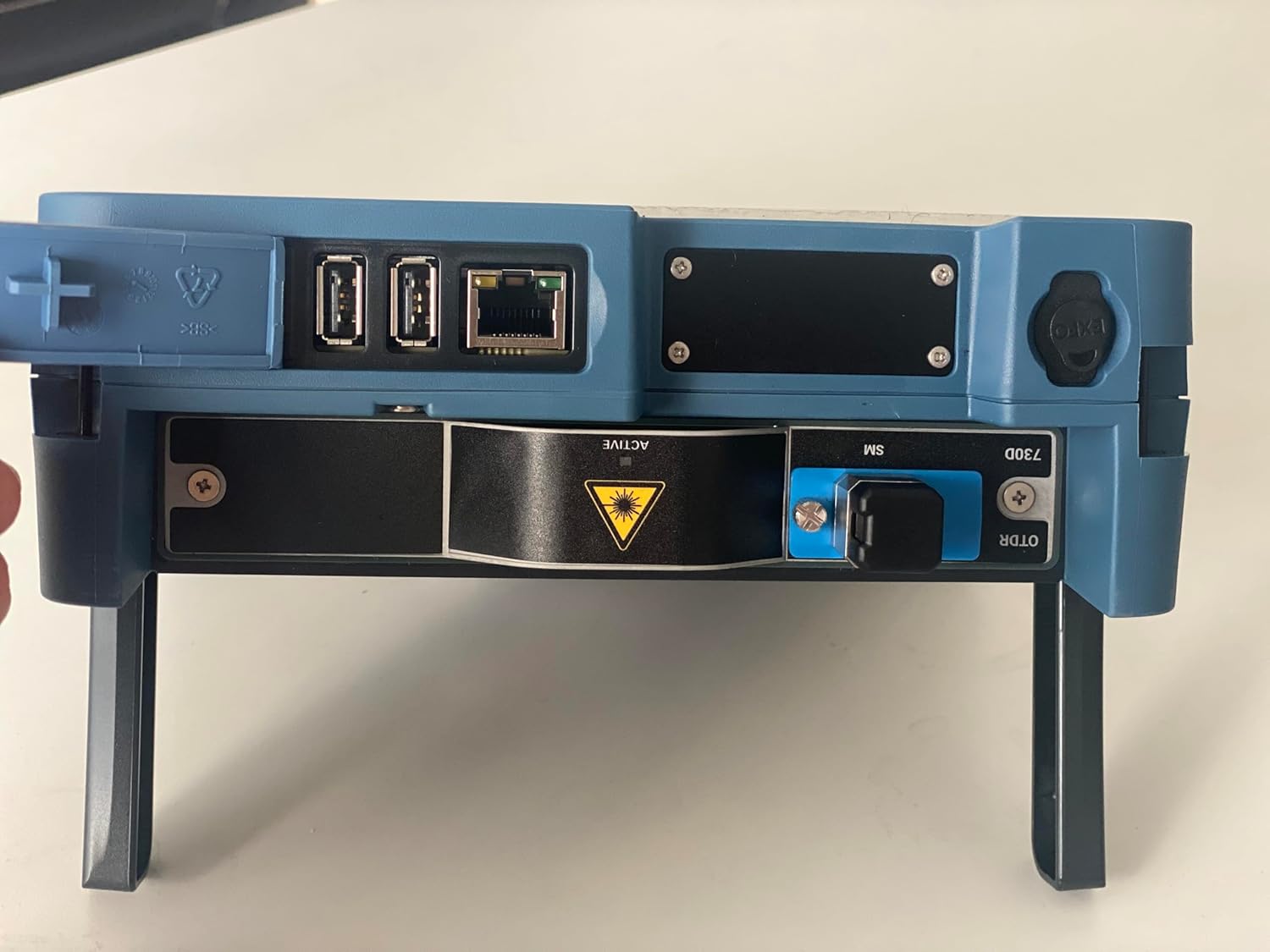
Figure 3.3: Side view of the EXFO Maxtester, illustrating the location of the USB ports and other connectivity options for data transfer.
4. Maintenance
4.1 Cleaning the Device
Regularly clean the exterior of the device with a soft, damp cloth. Avoid using abrasive cleaners or solvents. For the touchscreen, use a screen-specific cleaning solution and a microfiber cloth to prevent scratches.
4.2 Fiber Optic Connector Care
The most critical maintenance for an OTDR involves keeping the fiber optic connectors clean. Use only approved fiber optic cleaning tools and methods (e.g., lint-free wipes and isopropyl alcohol or specialized fiber cleaners). Contaminated connectors can lead to inaccurate measurements and damage to the device's optical port.
4.3 Software Updates
Periodically check for software updates from the manufacturer's website or through the device's "Software Updates" menu. Keeping the software updated ensures optimal performance, new features, and bug fixes.
5. Troubleshooting
5.1 Device Not Powering On
- Ensure the power adapter is correctly connected and functioning.
- Verify the power outlet is active.
- Check the device's battery level if operating on battery power.
5.2 Inaccurate OTDR Readings
- Clean the fiber optic connectors on both the device and the cable under test. This is the most common cause of poor readings.
- Ensure the correct test parameters (wavelength, pulse width, range) are selected for the fiber type and length.
- Verify the fiber connection is secure and free from bends or kinks.
- Perform a self-calibration if available in the device's settings.
5.3 Touchscreen Unresponsive
- Restart the device.
- Ensure the screen is clean and free from debris or moisture.
- If the issue persists, contact technical support.
6. Specifications
| Feature | Specification |
|---|---|
| Model | EXFO MAX-730D with MAX-730D-SM1 OTDR module, 1310/1550nm, 39/38db |
| Wavelengths | 1310nm / 1550nm |
| Dynamic Range | 39dB / 38dB |
| Interface | SC/UPC |
| Display | Touchscreen, color, 800 x 480 TFT, 178 mm (7 in) |
| Connectivity | Two USB 2.0 ports |
| Dimensions (L x W x H) | 8 x 6 x 3 inches |
| Item Weight | 11 pounds |
| Color | Blue |
| Manufacturer | Canada-EXFO |
| Country of Origin | Canada |
| UPC | 723907964373 |
Note: Specifications are subject to change without notice. Refer to the official product datasheet for the most current information.
7. Warranty and Support
7.1 Product Warranty
This EXFO product is covered by a manufacturer's warranty against defects in materials and workmanship. The specific terms and duration of the warranty may vary. Please refer to the warranty card included with your product or visit the official Canada-EXFO website for detailed warranty information.
7.2 Technical Support
For technical assistance, troubleshooting, or service inquiries, please contact Canada-EXFO customer support. Have your product model number and serial number ready when contacting support to expedite the process.
Official support channels can typically be found on the Canada-EXFO website. Online resources such as FAQs, knowledge bases, and software downloads may also be available.
Related documentsEXFO MAX-730D-SM1-OTDR


Ask a question about this manual
Ask about setup, troubleshooting, compatibility, parts, safety, or missing instructions. Manuals+ will review the question and use this page’s manual context to help answer it.