Introduction
Thank you for choosing the XINLEI Full Motion TV Wall Mount. This manual provides detailed instructions for the safe and proper installation, operation, and maintenance of your new TV wall mount. Please read this manual thoroughly before installation and keep it for future reference.
Safety Information
Improper installation or use of this product may result in serious injury or damage. Please adhere to the following safety guidelines:
- Ensure the mounting surface can safely support the combined weight of the mount and the television.
- WARNING: DO NOT install into drywall alone. This mount is designed for installation on single wood studs or solid concrete/brick walls.
- Always use appropriate safety equipment, such as safety glasses, during installation.
- Follow all installation steps carefully. If you are unsure about any part of the installation, seek professional assistance.
- Do not exceed the maximum weight capacity of 44 lbs (20 kg).
- Do not mount TVs smaller than 13 inches or larger than 42 inches.
- Keep children and pets away from the installation area.
- Regularly check the mount for any signs of wear, damage, or loose connections.
Package Contents
Verify that all components are present and undamaged before beginning installation. If any parts are missing or defective, please contact customer support.
- TV Wall Mount Assembly (Articulating Arm and Wall Plate)
- TV Plate (attaches to TV)
- Mounting Hardware Kit (various screws, anchors, washers, spacers for TV and wall)
- Instruction Manual
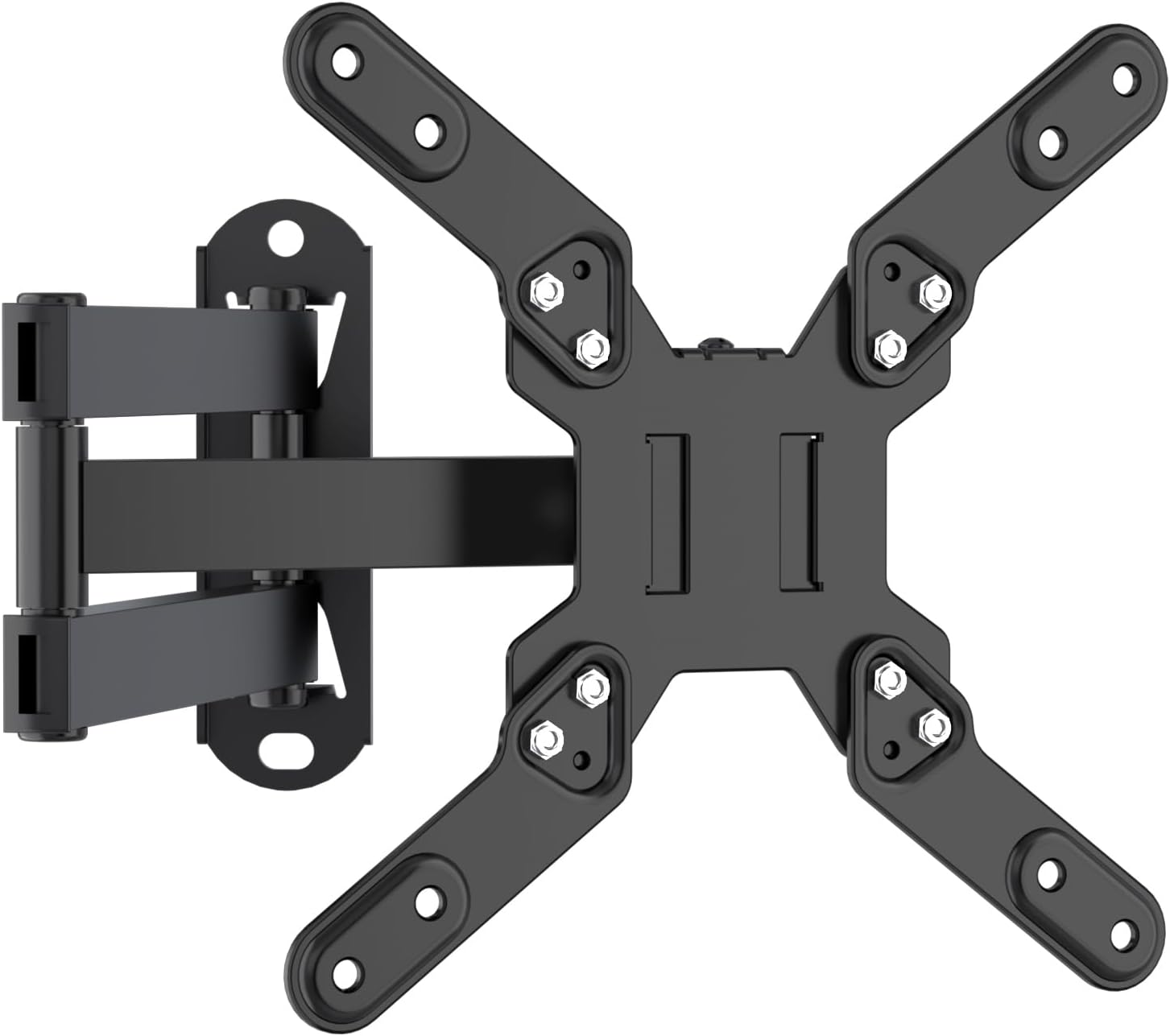
Image: Overview of the XINLEI Full Motion TV Wall Mount, showing the wall plate, articulating arm, and TV mounting plate.
Product Features
The XINLEI Full Motion TV Wall Mount offers versatile positioning and robust support for your television:
- Universal Compatibility: Ideal for most 13-42 inch monitors and TVs with VESA patterns from 75x75mm to 200x200mm, supporting up to 44 lbs. Compatible with brands such as SAMSUNG, SONY, LG, VIZIO, TCL, and more.
- Flexible Viewing Experience: Allows for Tilt +/-10°, Swivel +/-90°, Extension from 2.36” to 16”, and 360° Rotation, providing optimal viewing angles from various positions.
- Space-Saving Design: Retracts to a low profile of 2.36” from the wall and extends up to 16” for flexible viewing. The single-stud design is suitable for corner installations or areas with limited stud availability.
- Durable Construction: Made from heavy-duty steel with thickened arms, ensuring reliable support and long-lasting performance. All components pass strict testing procedures.

Image: Demonstrates the 360° rotation and 180° swivel capabilities of the TV mount, highlighting flexible viewing angles.

Image: Illustrates the mount's ability to retract to 2.36 inches and extend up to 16 inches, along with a +/-10° tilt adjustment for anti-glare viewing.
Specifications
| Brand Name | XINLEI |
| Model Number | MA1343 |
| Compatible TV Size | 13 - 42 Inches |
| Maximum Weight Capacity | 44 lbs (20 kg) |
| VESA Compatibility | 75x75mm, 100x100mm, 100x200mm, 200x100mm, 200x200mm |
| Movement Type | Articulating (Full Motion) |
| Tilt Angle | +/-10 Degrees |
| Swivel Angle | +/-90 Degrees |
| Rotation | 360 Degrees |
| Extension from Wall | 2.36 - 16 Inches |
| Material | Heavy-duty Steel |
| Item Weight | 2.77 pounds |
| Package Dimensions | 9.76 x 6.5 x 2.24 inches |

Image: Detailed diagrams illustrating various VESA mounting patterns supported by the mount, including 75x75mm, 100x100mm, 100x200mm, 200x100mm, and 200x200mm.

Image: Visual representation of the mount's key specifications, including maximum weight capacity (44 lbs), compatible TV size (13"-42"), tilt angle (±10°), swivel (±180°), rotation (360°), and arm dimensions.
Setup and Installation
This section guides you through the installation process. It is recommended to have a second person assist with hanging the TV.
Compatible Wall Types:
- Single Wood Stud
- Solid Concrete Wall
- Brick Wall
Important: Do not mount on drywall alone!

Image: Visual guide showing the compatible wall types for installation: wood studs, concrete walls, and brick walls, with a clear warning against drywall-only installation.
Installation Steps:
- Step 1: Install the TV Plate to your TV.
Carefully attach the TV plate to the back of your television using the appropriate screws and spacers from the hardware kit. Ensure the plate is centered and securely fastened to the VESA mounting holes on your TV.
- Step 2: Mount the Wall Plate to the Wall.
Locate a suitable mounting position on a wood stud, concrete, or brick wall. Use a stud finder if mounting to a wood stud. Mark the drilling points for the wall plate. Drill pilot holes and secure the wall plate using the provided lag bolts and anchors (for concrete/brick). Ensure the wall plate is level and firmly attached to the wall.
- Step 3: Hang the TV onto the Wall Mount.
With assistance, carefully lift the television with the attached TV plate and hook it onto the articulating arm assembly. Ensure the TV plate securely engages with the mount. Tighten any safety screws or locking mechanisms to prevent accidental dislodgement.

Image: A visual guide demonstrating the three main steps of installation: installing the TV plate, wall mounting the arm, and hanging the TV.
Operating Instructions
Once installed, your XINLEI Full Motion TV Wall Mount allows for various adjustments to achieve your desired viewing angle:
- Extension and Retraction: Gently pull the TV away from the wall to extend the arm up to 16 inches, or push it back towards the wall to retract it to a minimum of 2.36 inches.
- Swivel Adjustment: Pivot the TV left or right up to 90 degrees in either direction to direct the screen towards your viewing area.
- Tilt Adjustment: Loosen the tilt knobs on the TV plate, adjust the screen up or down by +/-10 degrees to reduce glare or optimize viewing, then re-tighten the knobs to secure the angle.
- Rotation: The TV plate allows for a full 360-degree rotation, enabling you to switch between landscape and portrait orientations if desired.


Images: Visual representations of the mount's swivel, tilt, and rotation capabilities, allowing for flexible TV positioning.
Maintenance
To ensure the longevity and safe operation of your TV wall mount, perform the following maintenance:
- Regular Inspection: Periodically check all screws and bolts to ensure they remain tight. Over time, vibrations or adjustments can cause fasteners to loosen.
- Cleaning: Wipe the mount with a soft, dry cloth to remove dust. For stubborn marks, a slightly damp cloth can be used, followed by drying. Avoid abrasive cleaners or solvents.
- Lubrication: If the articulating arm or swivel points become stiff, apply a small amount of silicone-based lubricant to the moving parts.
Troubleshooting
If you encounter issues with your TV wall mount, refer to the following common problems and solutions:
- Problem: TV is not level after installation.
Solution: Check the wall plate's levelness. If the wall plate is level, adjust the TV plate's rotation or tilt mechanism if available, or slightly loosen and re-tighten the TV mounting screws to allow for minor adjustments before securing them firmly.
- Problem: Mount feels loose or wobbly.
Solution: Immediately remove the TV. Re-check all wall mounting bolts and TV plate screws for tightness. Ensure the wall type is appropriate and that the anchors (if used) are properly installed. If mounting to a wood stud, verify the stud's integrity. If the issue persists, consult a professional installer.
- Problem: Difficulty adjusting the arm (stiff movement).
Solution: Apply a small amount of silicone-based lubricant to the joints of the articulating arm. Ensure no cables are snagged or obstructing movement. Check if any bolts on the arm joints are overtightened; loosen slightly if necessary, but ensure they remain secure enough to hold the TV's position.
Warranty and Support
XINLEI is committed to providing high-quality products. This product has undergone strict testing procedures to ensure its durability and safety.
For any questions, concerns, or assistance with your XINLEI Full Motion TV Wall Mount, please do not hesitate to contact our customer support team. We are available to help you with installation, troubleshooting, or any product-related inquiries.
Please refer to the product packaging or the retailer's website for specific warranty details and contact information.


