1. Introduction
The NOVOPAL 2500W Pure Sine Wave Inverter converts 12V DC power from a battery into 220V/230V AC household power. This device is designed for compatibility with most electronic devices and is suitable for various applications, including home, office, and mobile use. It provides a continuous output of 2500 watts and a peak surge capacity of 5000 watts, ensuring stable power for sensitive electronics.
Key features include two AC outlets, a 2.1A USB port, high current DC terminals, and a wired remote control for convenient operation. The inverter incorporates advanced protection features to ensure safety and longevity of both the unit and connected appliances.
2. Safety Instructions
Please read and understand all safety instructions before installing or operating the inverter. Failure to follow these instructions may result in electric shock, fire, or serious injury.
- Ventilation: Ensure the inverter is installed in a well-ventilated area. Do not block the ventilation openings.
- Dry Environment: Do not expose the inverter to water, rain, snow, or spray. Keep it away from flammable materials.
- Correct Polarity: Always connect the battery cables with correct polarity (positive to positive, negative to negative). Reversing polarity will damage the inverter and void the warranty. Refer to the image below for correct DC input connection.
- Secure Connections: Ensure all DC and AC connections are tight and secure to prevent overheating and arcing.
- Grounding: The inverter must be properly grounded.
- Load Capacity: Do not exceed the inverter's continuous power rating (2500W) or peak power rating (5000W). Overloading can cause damage to the inverter and connected devices.
- Children and Pets: Keep the inverter out of reach of children and pets.
- Maintenance: Only qualified personnel should service the inverter. There are no user-serviceable parts inside.

Image: Rear view of the NOVOPAL inverter showing the DC 12V input terminals. The red terminal is for positive (+) connection, and the black terminal is for negative (-) connection. Two cooling fans are visible, along with a warning against reverse polarity.
3. Product Overview and Features
The NOVOPAL Pure Sine Wave Inverter is equipped with several features designed for performance and safety.
- Pure Sine Wave Output: Provides clean and stable AC power, suitable for sensitive electronics like laptops, medical equipment, and audio systems.
- High Efficiency: Achieves ≥ 90% efficiency, minimizing power loss during conversion.
- LCD Display: Shows real-time operational status, including battery voltage, output voltage, load power, and error codes.
- Multiple AC Outlets: Features two 220V/230V AC outlets for connecting various appliances.
- USB Charging Port: Includes a 2.1A USB port for charging mobile devices.
- Remote Control: A wired remote control (5-meter cable) allows for convenient power management from a distance.
- Advanced Protection: Integrated multi-security protection against overvoltage, undervoltage, overload, overheating, short-circuit, and overcurrent.
- Intelligent Cooling Fan: Temperature and load-controlled fans ensure optimal operating temperature and quiet operation.
3.1. Multi-Security Protection

Image: Diagram illustrating the multi-security protection features of the NOVOPAL inverter, including overvoltage, undervoltage, short-circuit, high temperature, overload, and overcurrent protection.
3.2. Pure Sine Wave Output

Image: Illustration highlighting the stable and damage-free output of the Pure Sine Wave Inverter, showing a smooth sine wave compared to a modified wave. It also indicates 92% efficiency and 4 testing certifications.
3.3. Remote Control
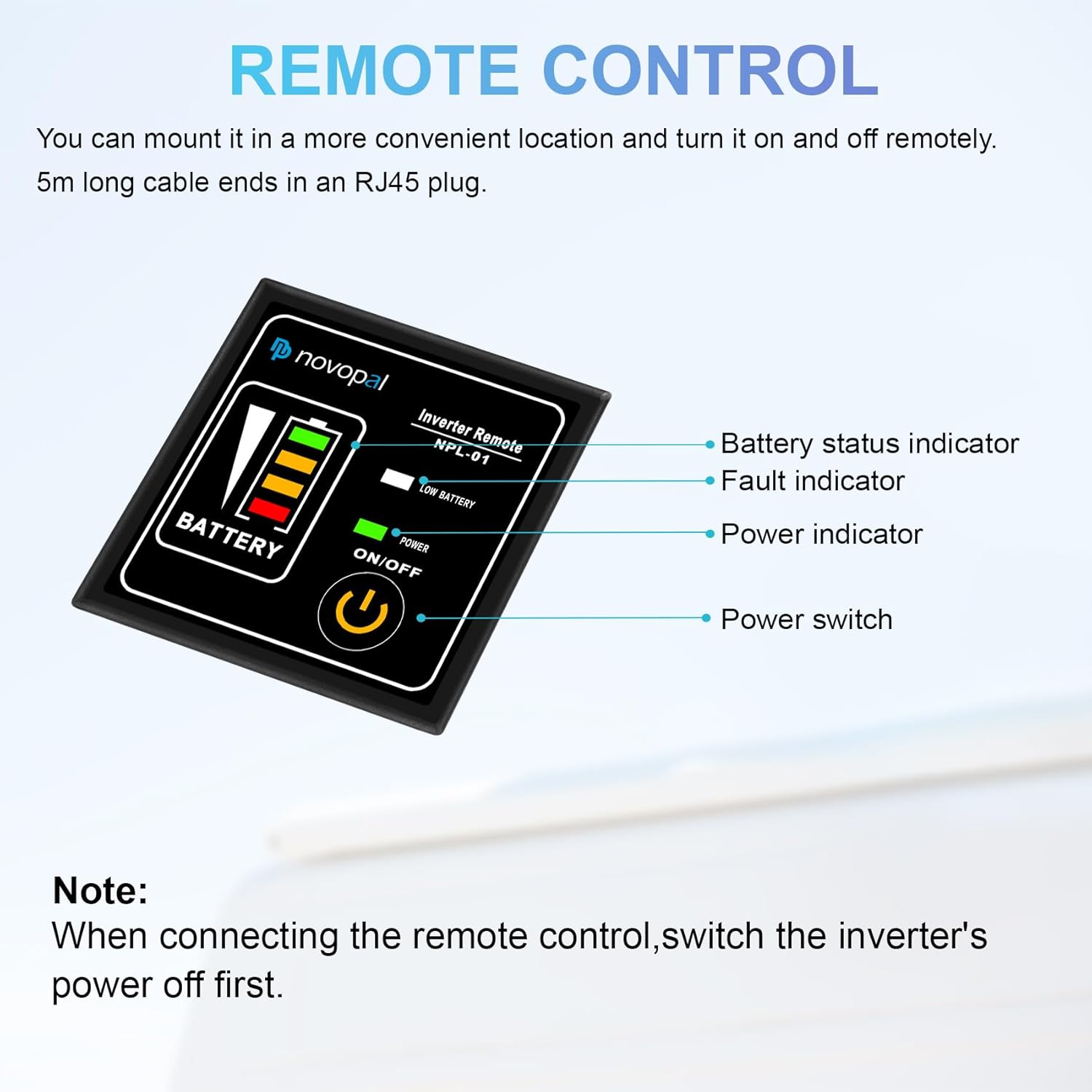
Image: The wired remote control for the NOVOPAL inverter, model NPL-01. It features a battery status indicator, fault indicator, power indicator, and a power switch. A note advises to switch off the inverter's power before connecting the remote control.
3.4. Versatile Applications

Image: Examples of applications for the NOVOPAL Pure Sine Wave Inverter, including household items (printer, sweeper, fan), consumer electronics (laptop, camera, drone), and tools (angle grinder, chainsaw, drill). Note: The image contains a warning stating "The maximum operating power of this equipment must not exceed 1500W." Users should always adhere to the inverter's specified continuous power rating, which is 2500W for this model, and ensure connected loads do not exceed this limit.
5. Operating Instructions
Once the inverter is properly installed, follow these steps for operation.
- Power On: Switch the inverter's main power switch to the "ON" position. The LCD screen will illuminate, displaying current battery voltage and other parameters.
- Connect Appliances: Plug your AC appliances into the inverter's AC outlets. For USB charging, connect your device to the USB port.
- Monitor Display: Observe the LCD screen for real-time information on input voltage, output voltage, and load power. This helps in managing power consumption.
- Fan Operation: The inverter features an intelligent cooling system:
- If the connected load is below 500W, the fans will activate only when the internal temperature reaches 45°C.
- If the connected load is greater than 500W, the fans will start immediately upon power-on to ensure adequate cooling.
- Using the Remote Control: If connected, the remote control can be used to turn the inverter ON/OFF and monitor basic status (battery level, fault, power indicator).
- Power Off: Before disconnecting any appliances or the inverter from the battery, switch the inverter's main power switch to the "OFF" position.

Image: Front panel of the NOVOPAL inverter, showing the LCD display, two AC output sockets, a USB charging port, and the main power switch.
9. Warranty and Support
For warranty information and technical support, please refer to the documentation included with your purchase or contact NOVOPAL customer service.
You can often find support resources and contact details on the official NOVOPAL website or through your retailer.