
1. Introduction
This manual provides detailed instructions for the safe and efficient operation of your novopal 1500W Pure Sine Wave Inverter. This device converts 24V DC battery power into 220V/230V AC household power, suitable for a wide range of electronic devices and appliances. Please read this manual thoroughly before use and retain it for future reference.

The novopal 1500W Pure Sine Wave Inverter, designed for reliable power on the go.
2. Safety Information
Your safety is paramount. The novopal inverter is equipped with comprehensive protection mechanisms. Adhere to the following safety guidelines:
- Do not connect directly to a solar panel.
- Connect the inverter only to a 24V battery using the standard cables provided.
- Do not use for devices exceeding 1500W continuous power. Avoid operating at maximum 1500W for extended periods to prolong product lifespan.
- Do not place the inverter in direct sunlight. Keep it in a cool, dry environment.
- The inverter has a built-in fuse; do not attempt to install additional fuses externally.
- Ensure proper ventilation around the unit.
- Keep out of reach of children.
The inverter features multiple protections including short-circuit protection, input overvoltage/undervoltage protection, output short-circuit protection, overload protection, overcurrent protection, and overheating protection. Its robust metal casing helps prevent drops and collisions.

Advanced protection features ensure safe operation.
3. Product Features
The novopal 1500W Pure Sine Wave Inverter is designed with user convenience and device protection in mind:
- Pure Sine Wave Output: Provides stable and clean power, ideal for sensitive electronics like laptops, cameras, and tablets, and suitable for high-power equipment such as drills, microwave ovens, and coffee machines.
- High Efficiency: Achieves 92% efficiency in power conversion.
- LCD Display: An easy-to-read LCD screen displays real-time operating conditions including input voltage, output frequency, and working status.
- Wired Remote Control: Includes a 5-meter wired remote control for convenient power on/off, allowing flexible installation of the inverter.
- Multiple AC Outlets & USB Port: Equipped with 2 EU AC outlets and a 2.1A USB port for versatile charging and power options.
- Smart Fan Cooling System: A temperature-controlled silent fan keeps the inverter cool and ensures smooth operation, minimizing noise.

The inverter provides a stable pure sine wave output for sensitive electronics.
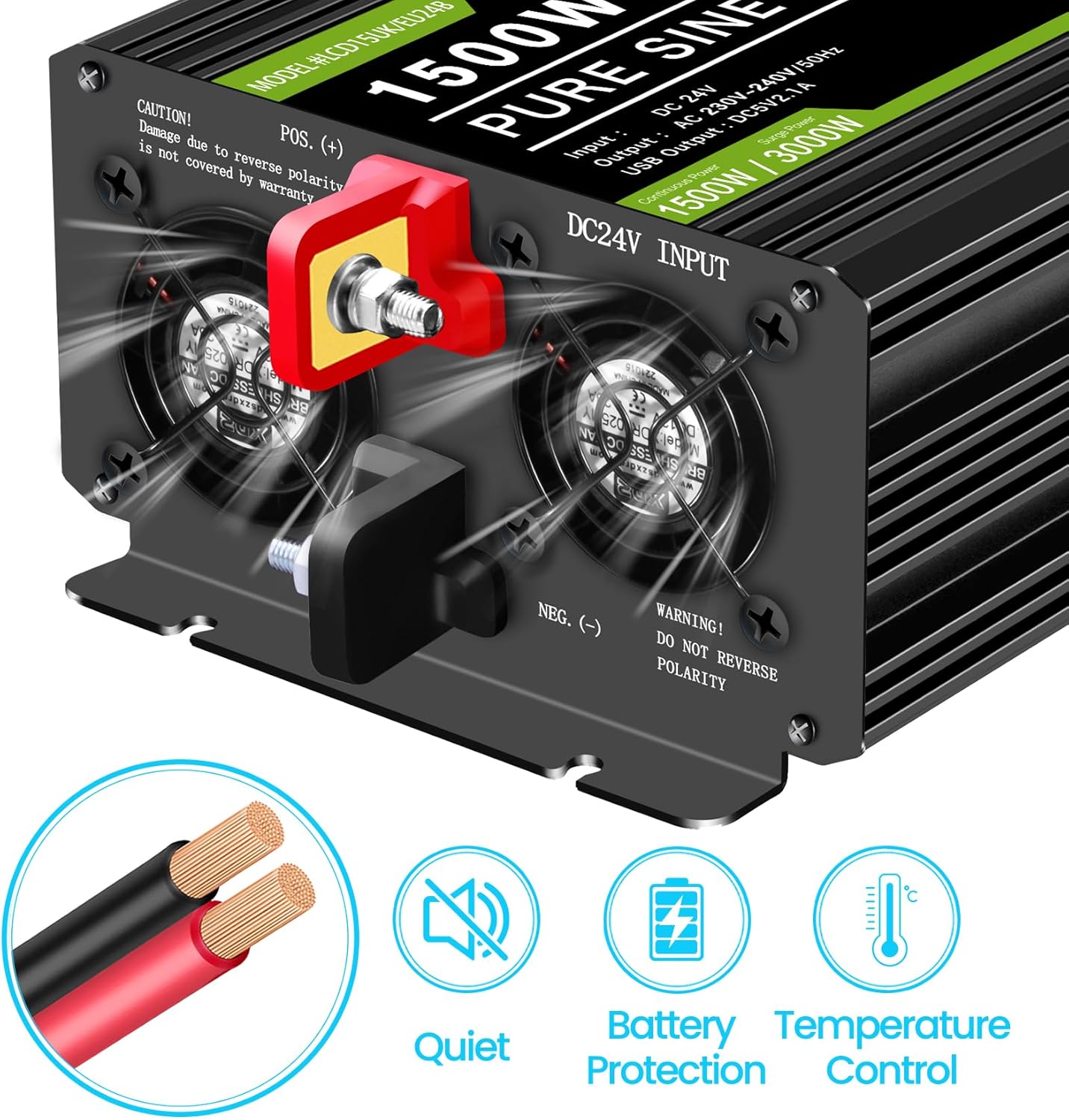
Efficient and quiet cooling system with battery protection features.
4. Setup Instructions
Follow these steps to set up your novopal inverter:
- Prepare the Battery: Ensure your 24V battery is fully charged and in good condition.
- Connect Battery Cables: Use the provided red and black battery cables. Connect the red cable to the positive (+) terminal of the inverter and the positive (+) terminal of the battery. Connect the black cable to the negative (-) terminal of the inverter and the negative (-) terminal of the battery. Ensure connections are tight and secure.
- Grounding: Connect the ground wire to a suitable ground point.
- Remote Control Connection (Optional): If using the wired remote control, ensure the inverter's power is OFF first. Plug the RJ45 end of the 5m remote cable into the designated port on the inverter.
- Placement: Place the inverter in a cool, dry, and well-ventilated area, away from direct sunlight and heat sources.

The inverter comes with necessary battery cables for connection.

High-quality battery cables ensure efficient power transfer.
5. Operating Instructions
Once the inverter is properly set up, you can begin operation:
- Power On: Flip the main power switch on the inverter to the 'ON' position. If using the remote control, ensure the inverter's main switch is ON, then press the power button on the remote.
- Monitor LCD Display: The LCD screen will illuminate, displaying the input DC voltage (battery voltage), output AC voltage, output frequency, and load percentage. This allows for real-time monitoring of the inverter's performance.
- Connect AC Devices: Plug your AC appliances into the 230V EU sockets on the inverter. For USB-powered devices, use the 2.1A USB port.
- Power Off: When finished, first turn off all connected AC devices, then flip the main power switch on the inverter to 'OFF' or use the remote control to power down.

The LCD screen provides essential real-time operational data.
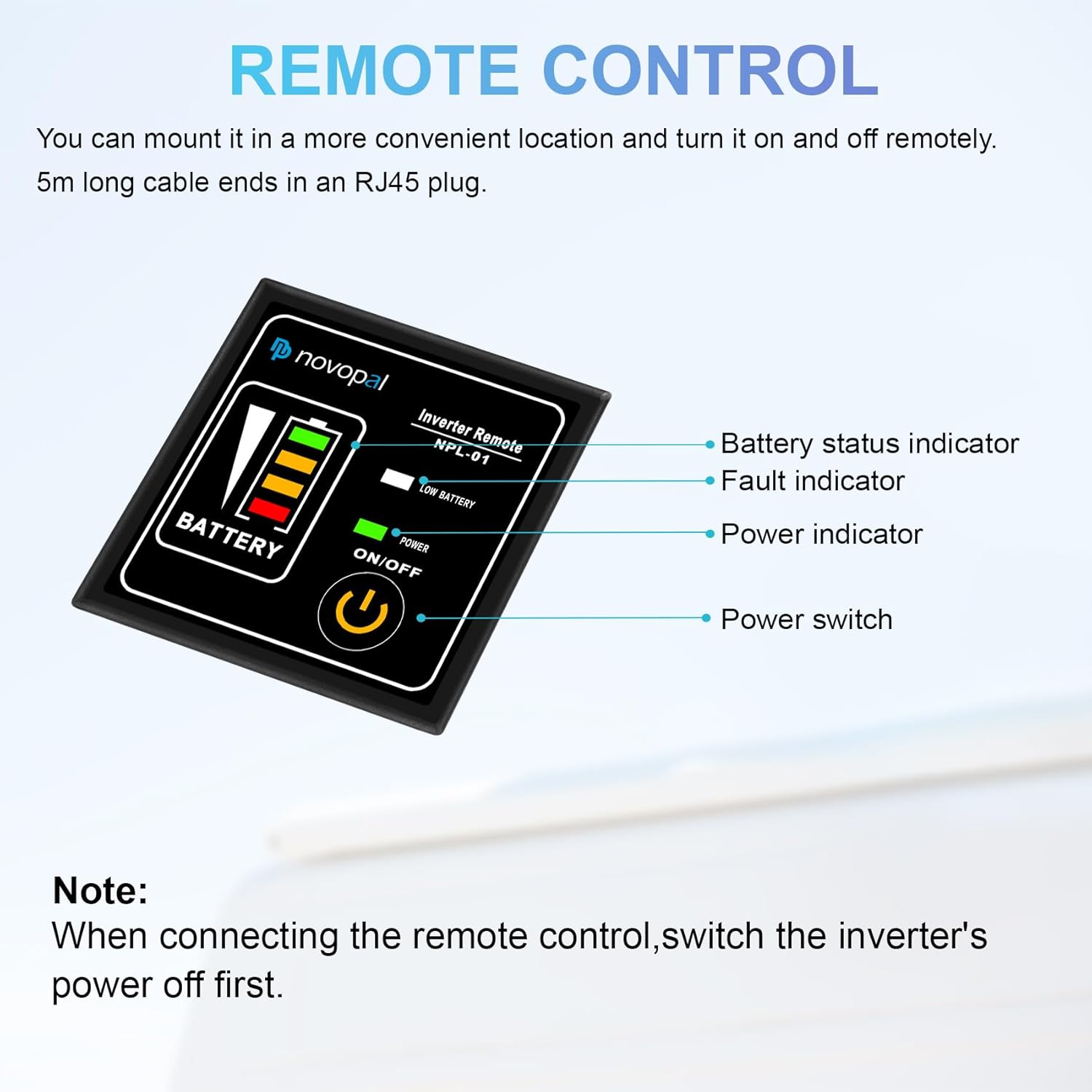
The wired remote control allows convenient operation from a distance.

Operate your inverter conveniently with the remote control.
6. Maintenance
Proper maintenance ensures the longevity and optimal performance of your inverter:
- Keep Clean: Regularly wipe the exterior of the inverter with a dry, soft cloth to remove dust and debris. Ensure ventilation openings are clear.
- Ventilation: Do not block the cooling fan vents. The smart fan system will activate as needed to maintain optimal operating temperature.
- Storage: If storing the inverter for an extended period, disconnect it from the battery and store it in a cool, dry place away from direct sunlight and moisture.
- Cable Inspection: Periodically inspect battery cables and connections for any signs of wear, corrosion, or looseness. Tighten connections as necessary.

The smart fan cooling system helps maintain optimal temperature and quiet operation.
7. Troubleshooting
If you encounter issues with your novopal inverter, refer to the following common problems and solutions:
| Problem | Possible Cause | Solution |
|---|---|---|
| No Power Output / Inverter Not Turning On | Loose battery connections; Battery voltage too low; Inverter switch off; Blown internal fuse. | Check and tighten battery cable connections; Recharge or replace battery; Ensure inverter switch is ON; Contact support if fuse is suspected. |
| Overload Protection Triggered | Connected appliance power exceeds inverter's continuous or surge rating. | Disconnect high-power appliances; Reduce total load to below 1500W; Restart inverter. |
| Over-temperature Protection Triggered | Poor ventilation; High ambient temperature; Excessive load. | Ensure clear airflow around inverter; Move to a cooler environment; Reduce load. Allow unit to cool before restarting. |
| Low Voltage Alarm / Shutdown | Battery voltage is too low (below 21V). | Recharge the 24V battery immediately. |
| High Voltage Shutdown | Input voltage too high (above 31V). | Check battery charging system; Ensure battery voltage is within 21-31V range. |
If the problem persists after attempting these solutions, please contact novopal customer support.
8. Specifications
Detailed technical specifications for the novopal LCD1500W 24V Pure Sine Wave Inverter:
| Specification | Value |
|---|---|
| Model | LCD1500W 24V |
| Rated Power | 1500 Watts |
| Surge Power | 3000 Watts |
| Input Voltage | DC 24V (21-31V) |
| Output Voltage | AC 220V/230V ±10% |
| Output Frequency | 50Hz |
| Output Waveform | Pure Sine Wave |
| USB Port Output | DC5V/2.1A |
| Operating Temperature | -10℃ to 40℃ |
| Cooling Method | Intelligent Air Cooling |
| Dimensions (L x W x H) | 34.5 x 11 x 16.5 cm |
| Weight | 4.2 Kilograms |
9. What's Included
Your novopal 1500W Pure Sine Wave Inverter package includes:
- 1 x novopal 24V 220V Pure Sine Wave Inverter 1500W
- 1 x User Manual (English)
- 2 x Battery Cables (1 red, 1 black)
- 1 x Wired Remote Control (with 5M power cable)
- 4 x Spare Fuses
- 1 x Wrench
- 1 x Ground Wire
10. Warranty and Support
novopal products are designed for reliability and performance. While specific warranty details are not provided in this manual, products typically come with a return policy. Please refer to your purchase documentation or the retailer's policy for details on returns and warranty coverage, which is generally 30 days from the date of purchase.
For technical support, troubleshooting assistance, or any inquiries regarding your novopal inverter, please contact the seller or manufacturer directly. Keep your purchase receipt or order number handy for faster service.
You can visit the official novopal store for more information and contact options: novopal Store