
1. Introduction
Thank you for purchasing the Retrotech Super 1000-in-1 Game Cartridge. This cartridge is designed to provide an extensive collection of classic 16-bit games for your Super Nintendo (SNES) compatible console. This manual provides essential information for setup, operation, and maintenance to ensure optimal performance and enjoyment.
2. Product Overview
The Retrotech Super 1000-in-1 Game Cartridge offers a vast library of games compatible with various 16-bit systems. Key features include:
- Extensive Game Library: Contains 1000 pre-loaded games.
- Multi-Region Compatibility: Works with SNES consoles from USA, Europe, and Japan.
- Broad System Support: Compatible with original SNES, Retron 2, Retron 3, Retro Trio, and other classic retro video game systems.
- Expandable Storage: Allows for adding your own game ROMs (advanced users).

Image 1: Front view of the Retrotech Super 1000-in-1 Game Cartridge.
3. Setup Instructions
Follow these steps to set up your Retrotech Super 1000-in-1 Game Cartridge:
- Power Off Console: Ensure your SNES or compatible console is powered off before inserting or removing the cartridge.
- Insert Cartridge: Gently insert the Retrotech game cartridge into the cartridge slot of your console. Apply even pressure until it is fully seated. Do not force the cartridge.
- Connect Peripherals: Connect your console to your television and ensure controllers are properly connected.
- Power On Console: Turn on your console. The game menu should appear on your screen.
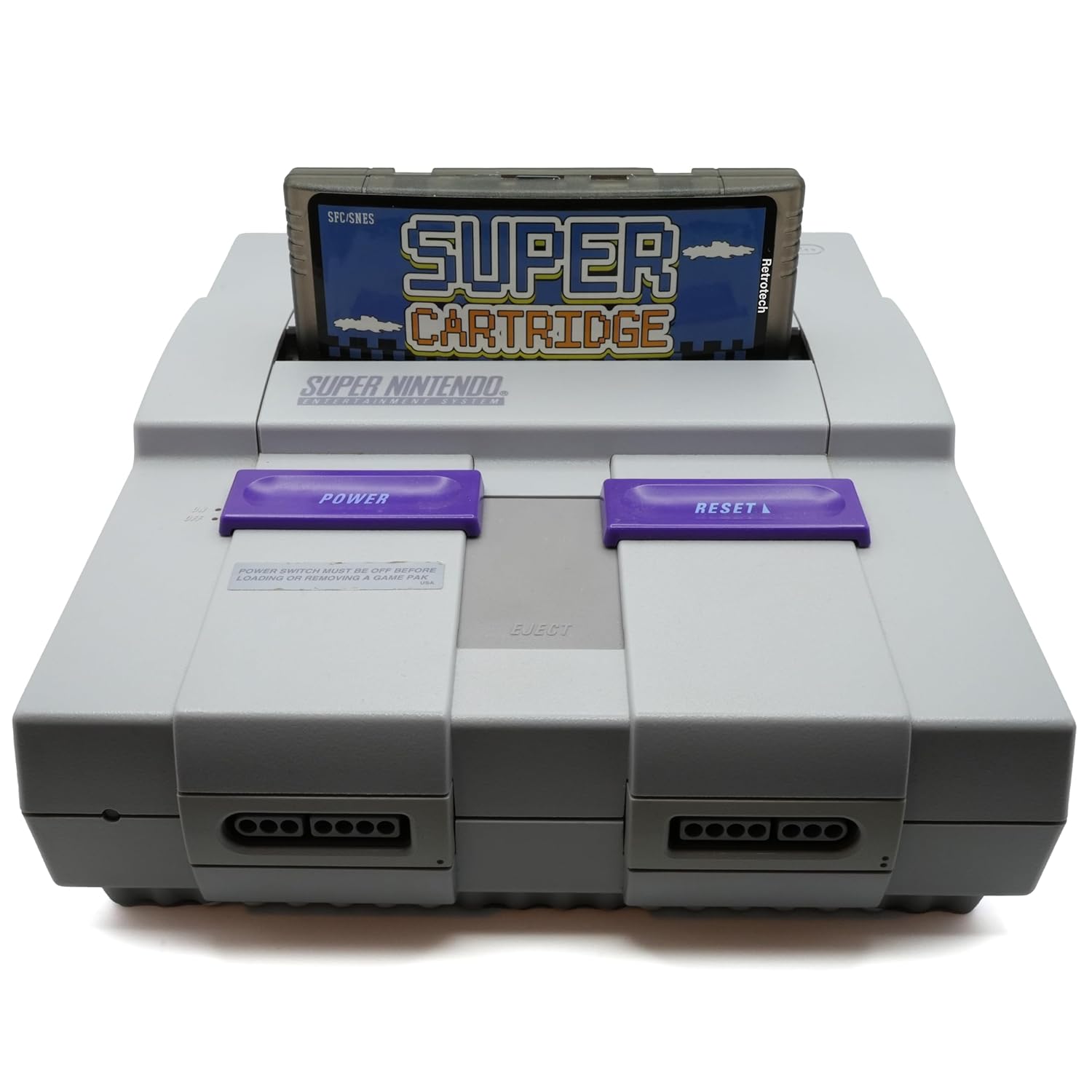
Image 2: The game cartridge properly inserted into a Super Nintendo console.
4. Operating Instructions
Once the cartridge is inserted and the console is powered on, you will be presented with the game selection menu.
- Navigating the Menu: Use the directional pad (D-pad) on your controller to scroll through the list of available games.
- Selecting a Game: Press the A button (or equivalent on your controller) to select and launch a game.
- Returning to Menu: To return to the game selection menu from an active game, you may need to reset your console. Some cartridges may have a specific button combination (e.g., START + SELECT + L + R) to return to the menu without resetting, but this functionality varies. Refer to the cartridge's on-screen instructions if available.
- Adding Games (Advanced): The cartridge supports adding additional game ROMs. This process typically involves connecting the cartridge to a computer via a compatible adapter (not included) and using specific software to transfer files. Detailed instructions for this advanced feature are beyond the scope of this basic manual and may require consulting online resources or specialized forums.
Note: Game language and region compatibility for individual games within the 1000-in-1 collection may vary.
5. Maintenance
Proper care will extend the life of your game cartridge:
- Storage: Store the cartridge in a cool, dry place away from direct sunlight and extreme temperatures. Keep it in its original packaging or a protective case when not in use.
- Cleaning Contacts: If games fail to load, the cartridge's gold contacts may need cleaning. Use a cotton swab lightly dampened with isopropyl alcohol to gently wipe the contacts. Allow to dry completely before reinserting into the console.
- Handling: Avoid touching the gold contacts with your fingers to prevent oil and dirt transfer. Handle the cartridge by its edges.
- Avoid Liquids: Keep the cartridge away from all liquids.
6. Troubleshooting
If you encounter issues, try the following solutions:
- Cartridge Not Recognized:
- Ensure the cartridge is fully and correctly seated in the console slot.
- Power off the console, remove the cartridge, reinsert it, and power on again.
- Clean the cartridge contacts as described in the Maintenance section.
- Test the cartridge on a different compatible console if available to rule out console issues.
- Game Freezes or Crashes:
- Reset the console.
- Ensure the console's power supply is stable.
- Some older consoles may require a brief warm-up period.
- Display Issues (No Picture/Garbled Graphics):
- Check all video cables connecting the console to the television.
- Ensure the television input is set to the correct source.
- Clean cartridge contacts.
7. Specifications
| Model Name | Super 1000-in-1 Game Cartridge |
| Manufacturer | Retrotech |
| ASIN | B0CQKP5PVL |
| Dimensions | Approximately 7 x 5 x 2 inches |
| Weight | Approximately 4 ounces |
| Compatibility | SNES, Retron 2, Retron 3, Retro Trio, and other 16-bit retro game systems |
8. Warranty and Support
For warranty information or technical support, please refer to the retailer where the product was purchased or visit the official Retrotech website. Keep your proof of purchase for warranty claims.
Note: Unauthorized modification or misuse of the cartridge may void the warranty.