
YS-8100
User Manual: YS-8100 Digital Stopwatch
Model: YS-8100
Introduction
Thank you for purchasing the YS-8100 Digital Stopwatch. This device is designed for precise timekeeping in various activities, including track and field training, running, and general timing needs. It features multiple functions such as simple timekeeping, total timekeeping, split timekeeping, and a countdown timer. Please read this manual carefully to ensure proper use and maintenance of your stopwatch.
Product Overview

Figure 1: Front view of the YS-8100 Digital Stopwatch. It shows the main display, the 'RECALL', 'START/STOP', 'LAP SET RESET', and 'MODE' buttons, and the attached lanyard.
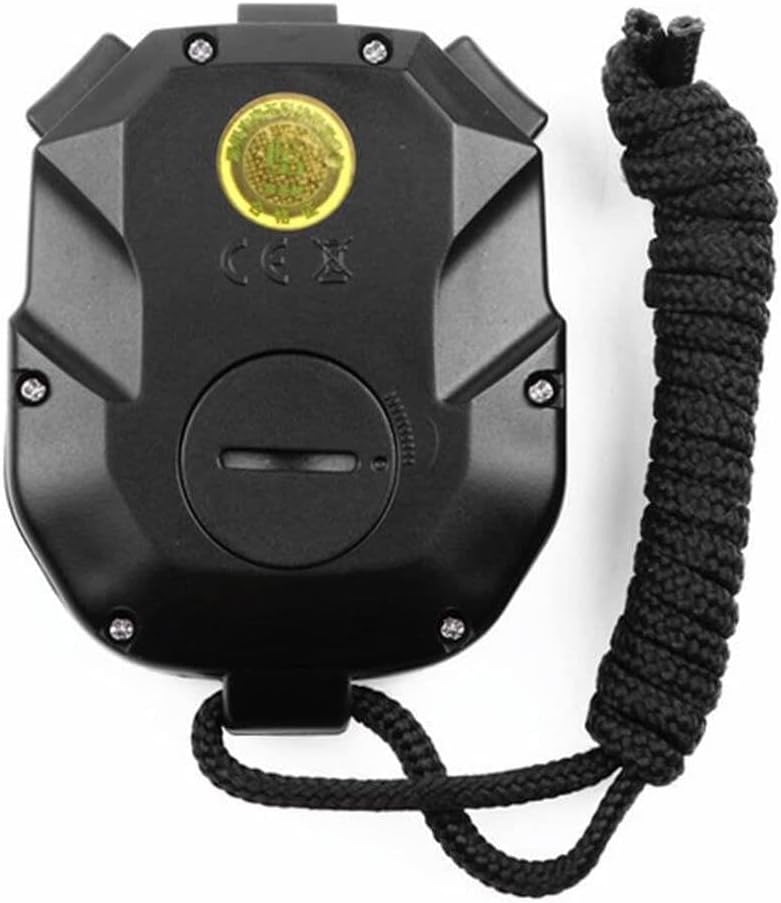
Figure 2: Rear view of the YS-8100 Digital Stopwatch. This view highlights the battery compartment cover and the overall ergonomic design of the back casing.
Key Components:
- Display Screen: Shows time, lap, split, and other measurement data.
- START/STOP Button: Initiates and pauses timing.
- LAP/SET/RESET Button: Records lap times, enters settings, or resets the timer.
- RECALL Button: Accesses stored memory data.
- MODE Button: Switches between different operating modes (Stopwatch, Timer, Time).
- Lanyard: For convenient carrying.
Setup
Battery Installation:
The YS-8100 Stopwatch uses one CR2032 button cell battery. If the display is dim or blank, the battery may need replacement.
- Locate the battery compartment on the back of the stopwatch (refer to Figure 2).
- Using a small screwdriver or coin, carefully turn the battery compartment cover counter-clockwise to unlock it.
- Remove the old battery, noting its polarity (+ side up).
- Insert a new CR2032 battery with the positive (+) side facing up.
- Replace the battery compartment cover and turn it clockwise to secure it.
Initial Time and Date Setting:
Upon first use or after battery replacement, you may need to set the current time and date.
- Press the MODE button repeatedly until the time display mode is shown (usually indicated by 'TIME' on the screen).
- Press and hold the LAP/SET/RESET button until the digits start flashing.
- Use the START/STOP button to adjust the flashing digit (e.g., hours, minutes, seconds, year, month, day).
- Press the LAP/SET/RESET button to move to the next digit or setting.
- Once all settings are correct, press the MODE button to exit the setting mode.
Operating Instructions
Switching Modes:
Press the MODE button to cycle through the available modes:
- STOP-W (Stopwatch Mode): For timing events.
- TIMER (Countdown Timer Mode): For setting a countdown.
- TIME (Time/Calendar Mode): Displays current time and date.
Stopwatch Mode (STOP-W):
This mode is used for measuring elapsed time, lap times, and split times.
- Ensure the stopwatch is in STOP-W mode.
- Press START/STOP to begin timing.
- Press LAP/SET/RESET to record a lap time (the display will show the lap time while the main timer continues running).
- Press START/STOP again to pause the timer.
- Press START/STOP to resume timing, or LAP/SET/RESET to reset the timer to zero.
The YS-8100 features a 3-row display for 100 tracks and segmented memory storage, allowing for detailed lap and split time recording.

Figure 3: Display showing three rows of time data, indicating lap, split, and total chrono times.
Recalling Memory:
To view stored lap and split times:
- In Stopwatch mode, ensure the timer is stopped.
- Press the RECALL button.
- Use the START/STOP or LAP/SET/RESET buttons to scroll through the recorded data.
- Press RECALL again to exit memory recall mode.
Countdown Timer Mode (TIMER):
This mode allows you to set a specific time to count down from.
- Press the MODE button until TIMER is displayed.
- Press and hold the LAP/SET/RESET button to enter setting mode.
- Use START/STOP to adjust the hours, minutes, and seconds.
- Press LAP/SET/RESET to move between time units.
- Once the desired countdown time is set, press MODE to exit setting mode.
- Press START/STOP to begin the countdown.
- Press START/STOP again to pause/resume the countdown.
- When the countdown reaches zero, an alarm will sound (if enabled). Press any button to stop the alarm.
Maintenance
- Cleaning: Wipe the stopwatch with a soft, dry cloth. Do not use abrasive cleaners or solvents.
- Water Resistance: The YS-8100 is not waterproof. Avoid exposing it to water or high humidity.
- Storage: Store the stopwatch in a cool, dry place away from direct sunlight and extreme temperatures.
- Battery: Replace the battery (CR2032) when the display becomes dim or unresponsive. Dispose of old batteries responsibly.
Troubleshooting
| Problem | Possible Cause | Solution |
|---|---|---|
| Display is blank or dim. | Low or dead battery. | Replace the CR2032 battery. |
| Buttons are unresponsive. | Battery issue or internal malfunction. | Replace battery. If problem persists, contact support. |
| Incorrect time/date displayed. | Time/date not set correctly or battery removed. | Refer to "Initial Time and Date Setting" section to reset. |
| Stopwatch does not start/stop. | Not in Stopwatch mode or button malfunction. | Ensure you are in STOP-W mode. Press START/STOP firmly. |
Specifications
- Model: YS-8100 (Manufacturer Model: KL615QY5VG5Z20QLDB01FMSC)
- Material: ABS Environmental protection material / Acrylonitrile Butadiene Styrene
- Battery: 1 x CR2032 (included)
- Dimensions: 75 mm x 62 mm x 21 mm (approx. 2.1D x 7.5W x 2.1H Centimetres)
- Weight: 70 g (product) / 93 g (item weight as listed)
- Functions: Simple timekeeping, total timekeeping, split timekeeping, 12/24 hour time display, countdown timer, calendar display, mute function.
- Display: 3-row display, 100 tracks, segmented memory storage.
Warranty and Support
This product is covered by the standard warranty provided by the retailer or manufacturer. Please retain your proof of purchase for any warranty claims.
For technical support or further inquiries, please refer to the contact information provided by your retailer or visit the official Generic brand website (if available).
Note: As this is a generic product, specific warranty and support details may vary.
Related Documents - YS-8100
 |
PULIVIA YS-8100 Sports Stopwatch User Manual Comprehensive user manual for the PULIVIA YS-8100 Digital Sports Stopwatch, detailing features like split time, lap time, memory, countdown timer, alarm, and pace function. |
 |
YS-802C Stopwatch User Manual User manual for the YS-802C stopwatch, detailing its features, operating modes, and battery replacement instructions. |
 |
YS-166 Magnetic Kitchen Timer: User Manual and Features Detailed guide to the YS-166 magnetic kitchen timer, featuring 4 channels, stopwatch, countdown, customizable alerts, and easy operation for home and kitchen use. |
 |
FROM 家庭用ディスポーザ 取扱説明書・保証書付 (YS-8100, YS-7000L, YS-7000LB) FROM製 家庭用ディスポーザ (モデル: YS-8100, YS-7000L, YS-7000LB) の取扱説明書および保証書。設置、操作、安全上の注意、お手入れ、トラブルシューティング、仕様について詳述。 |
 |
VEVOR Office Chair Base Operating Instructions Detailed operating and installation instructions for VEVOR Office Chair Bases, including product specifications and model details. |
 |
VEVOR Commercial Electric Griddle User Manual and Safety Guide Comprehensive user manual and safety guide for VEVOR Commercial Electric Griddles, covering models YS-360 through YS-730B-EU. Includes operating instructions, maintenance, electrical connection, and safety precautions. |