
1. Introduction
The Ddidbi P66 Smart Watch is designed to enhance your daily life with its advanced features, including Bluetooth calling, comprehensive health monitoring, and various sports modes. This manual will guide you through the essential steps to get the most out of your device.
2. What's Included
Verify that all items are present in your package:
- Smartwatch (1 unit)
- Watch Strap (1 unit)
- Magnetic Charging Cable (1 unit)
- User Manual (1 unit)

Image: The Ddidbi P66 Smart Watch package contents, showing the watch, magnetic charging cable, and user manual.
3. Setup Guide
3.1 Charging the Smart Watch
Before first use, fully charge your Ddidbi P66 Smart Watch. Connect the magnetic charging cable to the charging points on the back of the watch and plug the USB end into a power adapter (not included) or a computer's USB port. The watch display will indicate charging status.
3.2 App Installation
To unlock all features, download and install the HryFine app on your smartphone. Search for "HryFine" in your device's app store (Google Play Store for Android or Apple App Store for iOS). Install the app and grant necessary permissions.
3.3 Device Pairing
- Ensure Bluetooth is enabled on your smartphone.
- Open the HryFine app and follow the on-screen instructions to add your device.
- On the watch, swipe up to find the Bluetooth icon and ensure "Dual Mode" is selected or Bluetooth is active.
- Select your Ddidbi P66 Smart Watch from the list of available devices in the app to complete the pairing process.

Image: The Ddidbi P66 Smart Watch, ready for setup and use.
4. Operating Instructions
4.1 Display and Navigation
The Ddidbi P66 features a 1.85-inch HD full-touch color screen. Navigate through menus by swiping left, right, up, or down, and tap to select options.
4.2 Bluetooth Calling
Once paired with your phone, you can make and receive calls directly from your watch. The watch uses its built-in microphone and speaker for communication.

Image: A user demonstrating the calling feature on the Ddidbi P66 Smart Watch.
4.3 Smart Notifications
Receive notifications for calls, SMS messages, and social media apps (e.g., Facebook, WhatsApp, Instagram, Twitter) directly on your wrist. Notifications are accompanied by vibration alerts.

Image: The Ddidbi P66 Smart Watch displaying notifications from various social media platforms.
4.4 Customizing Watch Faces
The HryFine app offers over 100 personalized dial wallpapers. You can also customize your watch face using your own photos through the app.

Image: Examples of customizable watch faces on the Ddidbi P66 Smart Watch's 1.85-inch HD display.
4.5 Sports Modes
The watch supports 112 indoor and outdoor sports modes, including walking, running, cycling, skipping, basketball, and football. It records exercise data such as steps, heart rate, calories, and distance, generating a health report in the app.

Image: The Ddidbi P66 Smart Watch tracking various sports activities with its 112 sports modes.
4.6 Health Monitoring
- Heart Rate Monitoring: The built-in optical sensor monitors your heart rate 24 hours a day.
- Sleep Tracking: Automatically monitors your sleep status, including deep sleep, light sleep, and awake time, providing a comprehensive sleep quality analysis.

Image: The Ddidbi P66 Smart Watch monitoring health metrics during exercise and sleep.
4.7 Other Smart Features
The watch includes practical functions such as:
- Alarm clock
- Stopwatch
- Timer
- Music control
- Weather forecast (requires phone connection for syncing)
- Sedentary reminder
- Find phone
- Camera control

Image: The Ddidbi P66 Smart Watch displaying weather information.
5. Maintenance
5.1 Water Resistance
The Ddidbi P66 Smart Watch has an IP68 waterproof rating, meaning it is resistant to dust and can withstand immersion in water up to 1.5 meters for 30 minutes. It can be used during rainy days or while swimming. Avoid hot water, steam, or prolonged immersion.
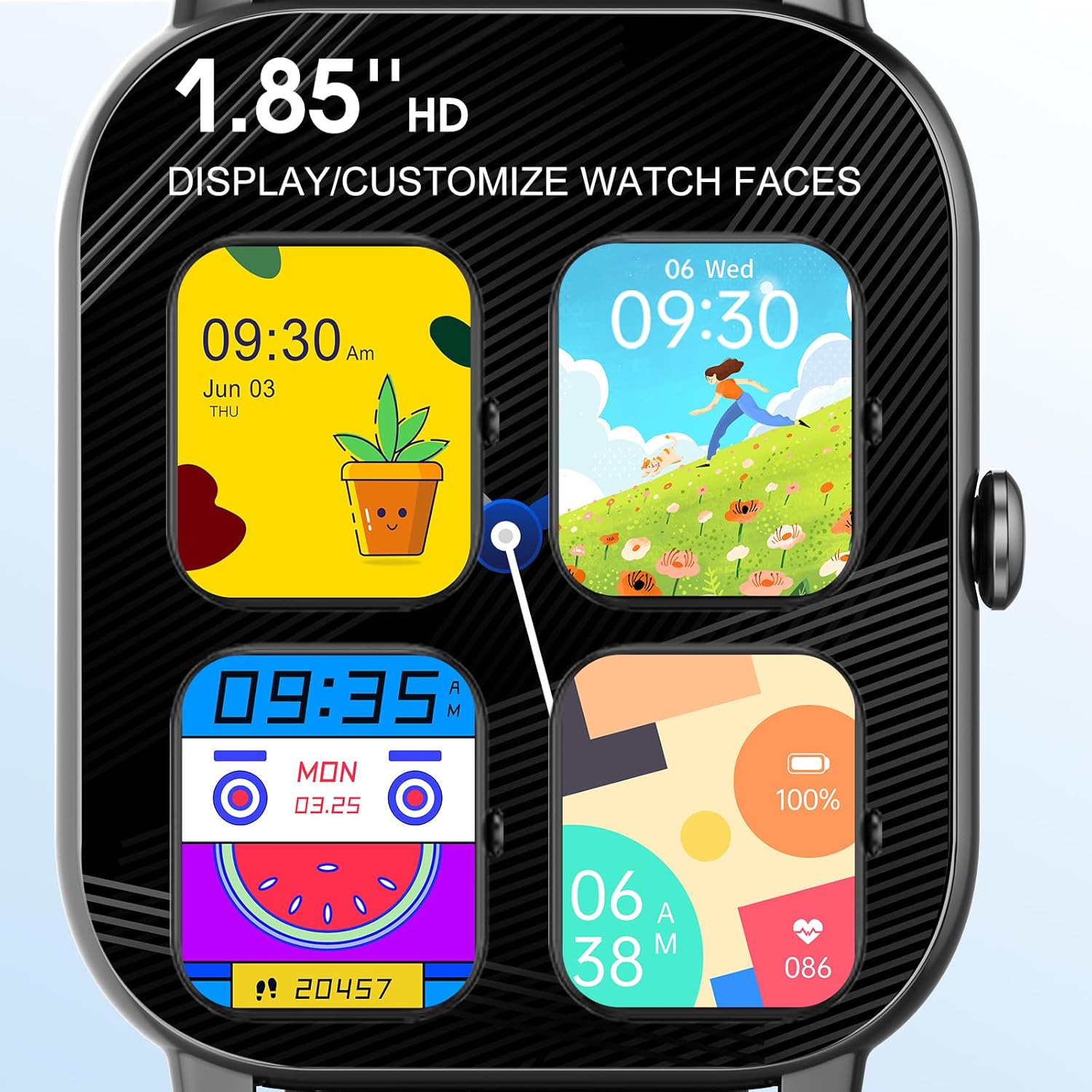
Image: The Ddidbi P66 Smart Watch demonstrating its IP68 waterproof, dustproof, and shockproof design.
5.2 Cleaning
Wipe the watch and strap regularly with a soft, dry cloth. If necessary, use a slightly damp cloth and then dry thoroughly. Avoid harsh chemicals or abrasive materials.
5.3 Battery Care
The watch is equipped with a 280mAh lithium polymer battery. A full charge typically provides about 7 days of daily use and up to 15 days on standby. To prolong battery life, avoid extreme temperatures and fully discharge/recharge periodically.
Image: The Ddidbi P66 Smart Watch highlighting its long battery life.
6. Troubleshooting
- Issue: Watch does not power on or charge.
- Solution: Ensure the magnetic charging cable is correctly aligned with the charging points. Try a different USB power source. Allow the watch to charge for at least 30 minutes before attempting to power it on.
- Issue: Cannot pair with smartphone or maintain connection.
- Solution: Verify Bluetooth is enabled on both devices. Ensure the HryFine app is installed and has necessary permissions. Restart both the watch and the phone. If issues persist, unpair the device from your phone's Bluetooth settings and re-attempt pairing through the HryFine app.
- Issue: Inaccurate health or activity data.
- Solution: Ensure the watch is worn snugly on your wrist, about one finger's width above the wrist bone. Clean the sensor on the back of the watch. For GPS-related activities, ensure your phone's GPS is active and connected to the watch.
- Issue: Short battery life.
- Solution: Reduce screen brightness, disable unnecessary notifications, and limit continuous heart rate monitoring if not required. Ensure the watch is fully charged. Battery performance can degrade over time.
- Issue: Screen scratches easily.
- Solution: Consider purchasing a screen protector for added durability and scratch resistance.
- Issue: App setup difficulties or incorrect app download.
- Solution: Download the HryFine app directly from your phone's official app store (Google Play Store or Apple App Store). Avoid scanning QR codes that may lead to unofficial or gaming sites. Ensure all necessary permissions are granted to the app in your phone's security settings.
7. Specifications
| Feature | Specification |
|---|---|
| Brand | Ddidbi |
| Model | P66 |
| Display Size | 1.85 Inches |
| Display Type | LCD, Digital |
| Resolution | 240 x 240 |
| Operating System | Android (Compatible with Android/iOS) |
| Connectivity | Bluetooth |
| Battery Capacity | 280 mAh |
| Battery Type | Lithium Polymer |
| Water Resistance | IP68 |
| Human Interface Input | Touchscreen |
| Compatible Devices | Smartphone |
8. Warranty and Support
For warranty information or technical support, please refer to the contact details provided with your purchase or visit the official Ddidbi website. Keep your purchase receipt as proof of purchase.
