
1. Introduction
This document serves as the official instruction manual for the Hotsmtbang Replacement Remote Control, specifically designed for compatibility with various adjustable bed bases, including the MLily NU203CB model. This remote control is a dedicated replacement unit and requires specific pairing procedures to function correctly with your adjustable bed system.
Important Note: This remote is designed to work with control boxes from Richmat. If your control box is not Richmat, or if you are unsure about compatibility, please verify your control box model (e.g., 127780C180036A NU203CB) before attempting to use this remote.
2. Package Contents
- 1 x Hotsmtbang Replacement Remote Control
Note: Batteries and printed instructions are not included in the package. This manual provides the necessary instructions.
3. Setup
3.1 Battery Installation
The remote control requires 2 AAA batteries (not included) for operation. Follow these steps to install the batteries:
- Locate the battery compartment cover on the back of the remote control.
- Slide the cover downwards or press the latch (if present) to open the compartment.
- Insert two AAA batteries, ensuring the positive (+) and negative (-) terminals align correctly with the indicators inside the compartment.
- Replace the battery compartment cover by sliding it back into place until it clicks securely.
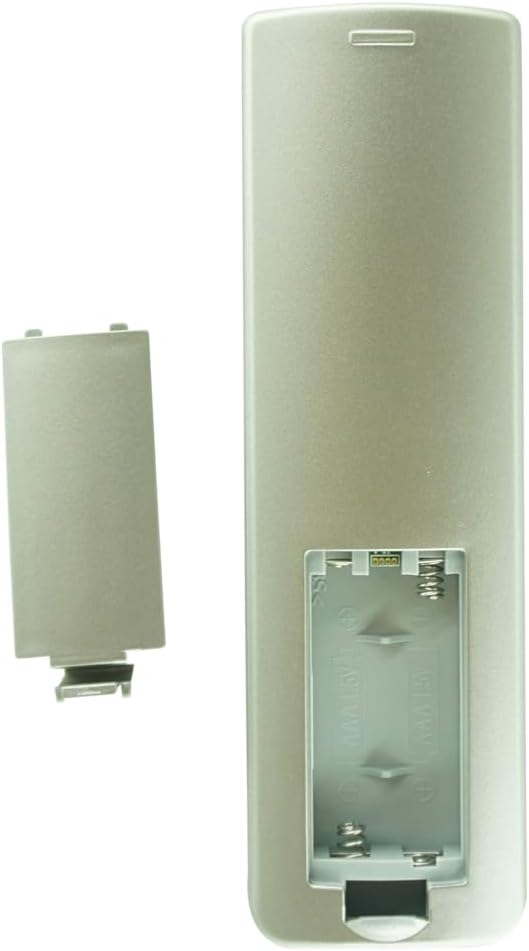
Figure 3.1: Rear view of the remote control with the battery cover open, illustrating the battery insertion area.
3.2 Initial Pairing
Before using the remote control, it must be paired with your adjustable bed base. The pairing method can vary slightly between different models, but a common method is as follows:
- Ensure your adjustable bed base is plugged into a power outlet.
- On the remote control, simultaneously press and hold the Head Up button (upper left icon, showing a person with their head raised) and the Feet Up button (upper right icon, showing a person with their feet raised).
- Hold both buttons until the bed base responds or a light on the remote/bed base indicates successful pairing. This typically takes a few seconds.
If this method does not work, consult your adjustable bed base's original manual for specific pairing instructions, or contact the manufacturer of your bed base for assistance.

Figure 3.2: Front view of the remote control, highlighting the Head Up and Feet Up buttons used for pairing.
4. Operating Instructions
Once paired, the remote control allows you to adjust your bed base to various positions. The buttons are intuitively designed for ease of use.
Figure 4.1: Overview of the remote control buttons.
| Button Icon/Label | Function | Description |
|---|---|---|
| (Upper Left) | Head Up | Raises the head section of the bed base. |
| (Upper Right) | Feet Up | Raises the foot section of the bed base. |
| (Middle Left) | Head Down | Lowers the head section of the bed base. |
| (Middle Right) | Feet Down | Lowers the foot section of the bed base. |
| M (Lower Left) | Memory/Massage | Activates a pre-set memory position or massage function, depending on your bed base model. Refer to your bed base manual for specific functionality. |
| FLAT (Lower Right) | Flat Position | Returns the bed base to a completely flat position. |
5. Maintenance
Proper care and maintenance will extend the life of your remote control.
- Cleaning: Use a soft, dry cloth to clean the remote control. Do not use abrasive cleaners, solvents, or harsh chemicals, as these can damage the surface and internal components.
- Liquid Exposure: Avoid exposing the remote control to water or other liquids. If it gets wet, immediately remove the batteries and allow it to dry completely before reinserting them.
- Battery Replacement: Replace batteries when the remote's response becomes sluggish or stops working. Always replace both batteries at the same time with new ones of the same type (AAA). Dispose of old batteries according to local regulations.
- Storage: When not in use for extended periods, remove the batteries to prevent leakage, which can damage the remote. Store the remote in a cool, dry place away from direct sunlight and extreme temperatures.
6. Troubleshooting
If you experience issues with your remote control, try the following troubleshooting steps:
- Remote Not Responding:
- Check if the batteries are inserted correctly with the correct polarity (+/-).
- Replace the batteries with fresh ones.
- Ensure there are no obstructions between the remote and the bed base's receiver.
- Remote Not Pairing:
- Re-attempt the pairing process as described in Section 3.2. Ensure you hold the Head Up and Feet Up buttons simultaneously until the bed responds.
- Verify that your bed base's control box is a Richmat model and matches the compatible models listed (e.g., 127780C180036A NU203CB). This remote is specifically designed for these systems.
- Ensure the bed base is powered on and receiving electricity.
- Intermittent Functionality:
- This could indicate low battery power. Replace the batteries.
- Ensure you are within the effective range of the bed base's receiver.
If the issue persists after attempting these steps, it may indicate a problem with the bed base's receiver or the remote control itself. In such cases, contact the manufacturer of your adjustable bed base for further assistance.
7. Specifications
| Feature | Detail |
|---|---|
| Model Compatibility | MLily NU203CB and other specified adjustable bed bases with Richmat control boxes (e.g., 127780C180036A NU203CB) |
| Power Source | 2 x AAA Batteries (not included) |
| Connectivity Technology | Wireless (Specific type not specified, typically RF) |
| Special Feature | No additional programming required (after initial pairing) |
| Manufacturer | Hotsmtbang |
| First Available Date | August 19, 2023 |
8. Warranty and Support
For any issues not covered in this manual, or for warranty inquiries, please contact the manufacturer of your adjustable bed base or the seller of this replacement remote control. Ensure you have your purchase details and the model number of your bed base and control box readily available.
Manufacturer: Hotsmtbang
For specific product support or to inquire about ordering a remote for a model not listed, you may contact Hotsmtbang directly.