
Introduction
The Bolyguard BG410M is a high-performance 4G trail camera designed for wildlife monitoring and outdoor surveillance. It captures detailed 33-megapixel still images and records 2.7K high-definition video. Equipped with advanced night vision capabilities and motion activation, this waterproof camera is built to operate reliably in various environmental conditions. This manual provides essential instructions for setting up, operating, maintaining, and troubleshooting your BG410M trail camera.
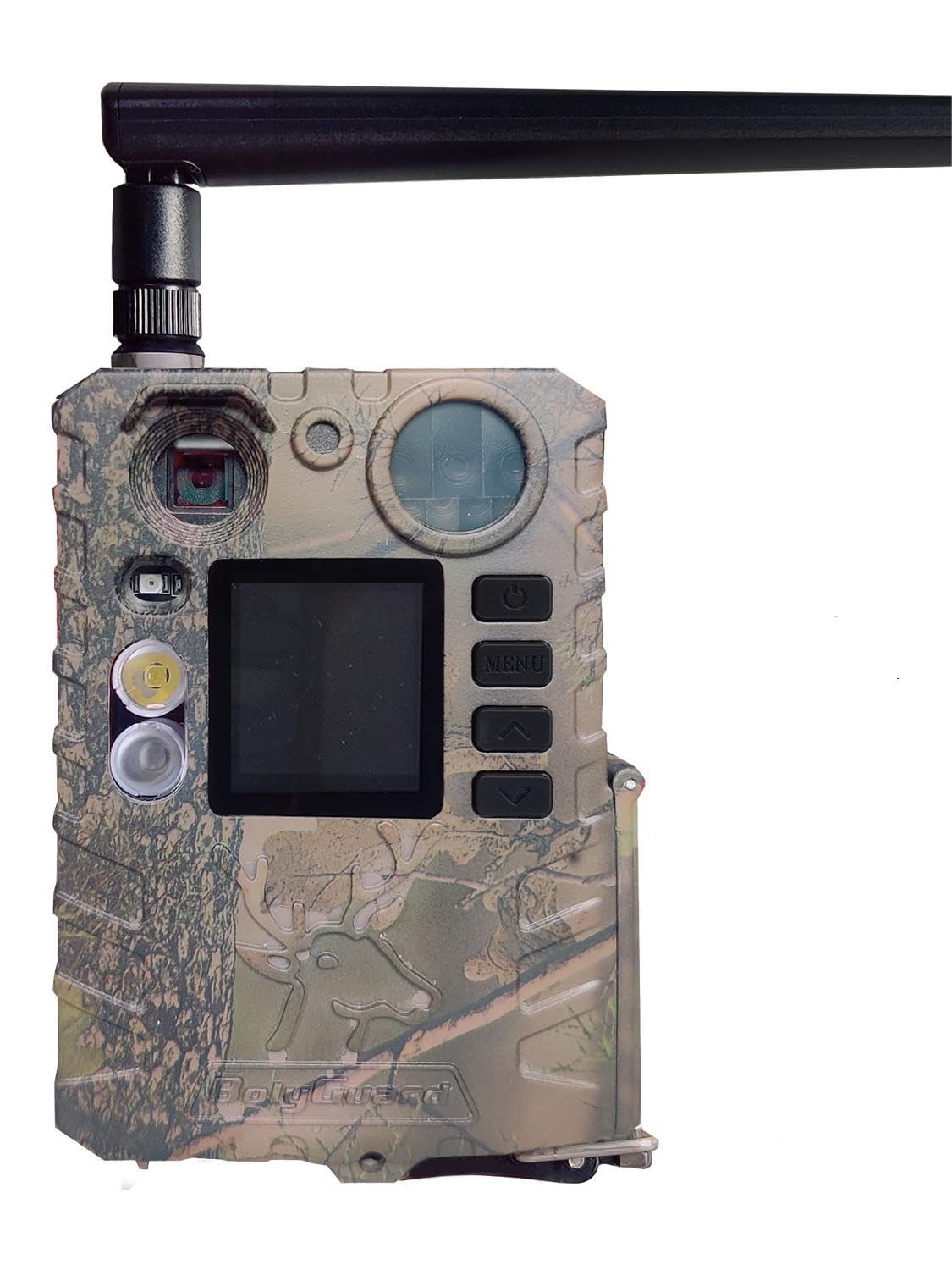
Figure 1: Bolyguard BG410M 4G Trail Camera overview, highlighting its 4G connectivity, 33MP photo resolution, 2.7K video capability, solar panel compatibility, 100ft detection range, and 940nm black infrared night vision.
Setup
Follow these steps to prepare your Bolyguard BG410M trail camera for operation.
1. Component Identification
Figure 2: Detailed internal view of the camera, showing the location of the lens, microphone, PIR sensor, power button, menu navigation buttons, USB port, TF card slot, SIM card slot, battery compartment, IR LED flash, LCD screen, and LED indicator.
2. Battery Installation
The camera is powered by batteries. Open the battery compartment (refer to Figure 2) and insert the required number of batteries, ensuring correct polarity.
3. SIM Card and TF Card Insertion
Locate the SIM card slot and TF (microSD) card slot inside the camera (refer to Figure 2). Insert a compatible 4G SIM card for cellular connectivity and a formatted TF card (up to 32GB, Class 10 or higher recommended) for storing photos and videos.
4. Mounting the Camera
The camera supports wall mount fixation. Use the provided strap or mounting bracket to secure the camera to a tree or other stable surface. Ensure the camera is positioned to capture the desired area without obstructions.

Figure 3: The trail camera securely mounted to a tree, demonstrating a typical deployment scenario in a natural environment.
5. Initial Power-On and Configuration
After inserting batteries and cards, switch the camera to the ON position. Use the LCD screen and navigation buttons (Up, Down, Menu) to access the settings. Configure date, time, capture mode (photo, video, or hybrid), resolution, and other preferences. For advanced settings and remote control, download the official Bolyguard application on your smartphone and follow the in-app instructions to connect via Wi-Fi.
Operating Instructions
Capture Modes
- Photo Mode: Captures still images at resolutions up to 33MP.
- Video Mode: Records video clips at 2.7K HD resolution at 30 frames per second, with audio recording.
- Hybrid Mode: Captures both a still image and a video clip per trigger.

Figure 4: Example of a squirrel captured in 2.7K HD video, illustrating the camera's capability for clear and smooth video recording, supported by its LCD screen and audio recording function.
Motion Detection
The camera utilizes a Passive Infrared (PIR) sensor to detect motion. When motion is detected within the sensor's range (up to 100 feet), the camera will trigger and capture images or videos according to your configured settings. Adjust the PIR sensitivity in the settings menu to suit your environment and reduce false triggers.
Night Vision
The BG410M features dual flash technology for night vision:
- 940nm No-Glow Red IR: Provides invisible infrared illumination for discreet night captures, resulting in clear black and white photos and videos.
- White LED: Offers visible white light illumination for vivid color pictures and videos at night.

Figure 5: The camera's dual flash system in action, capturing a deer. The 940nm No-Glow Red IR produces clear black and white images, while the White LED allows for vivid color captures during nighttime.

Figure 6: A visual comparison illustrating the difference between White LED and 940nm Black IR night vision, showing how the White LED captures images in color and the 940nm Black IR captures them in black and white.
4G Connectivity and App Control
With a compatible 4G SIM card, the camera can transmit images and videos to your smartphone via the Bolyguard application. This allows for remote monitoring, changing settings, and receiving real-time alerts. Ensure your camera has sufficient cellular signal for optimal performance.
Maintenance
Cleaning
Regularly clean the camera lens, PIR sensor, and housing with a soft, dry cloth. Avoid using abrasive cleaners or solvents. Ensure no dirt or debris obstructs the lens or sensors.
Battery Management
Check battery levels periodically. Replace batteries when they are low to ensure continuous operation. For extended use, consider connecting a compatible solar panel (sold separately) to the camera.
Waterproofing
The BG410M is rated IP66 waterproof, providing protection against dust and strong jets of water. Ensure all latches and covers are securely closed to maintain its waterproof integrity, especially in rainy or snowy conditions.

Figure 7: The camera operating reliably in a rainy environment, showcasing its IP66 waterproof design which protects it from rain and snow.
Storage
When not in use, store the camera in a cool, dry place. Remove batteries if storing for an extended period to prevent leakage.
Troubleshooting
- Camera not powering on:
- Ensure batteries are inserted correctly and fully charged.
- Check if the power switch is in the ON position.
- Poor image/video quality:
- Clean the camera lens.
- Ensure the camera is stable and not shaking during capture.
- Check night vision settings (IR vs. White LED) for desired output.
- No motion detection:
- Verify PIR sensitivity settings.
- Ensure no obstructions are blocking the PIR sensor.
- Check the detection range and angle.
- No 4G transmission:
- Ensure a compatible and active 4G SIM card is inserted.
- Check cellular signal strength in the camera's location.
- Verify APN settings in the camera or app.
- Confirm data plan is active on the SIM card.
- TF card error:
- Ensure the TF card is correctly inserted.
- Try formatting the TF card in the camera's settings.
- Test with a different, known-good TF card.
Specifications
| Model | BG410M |
| Image Resolution | Up to 33 Megapixels |
| Video Resolution | 2.7K HD (30fps) |
| Night Vision | 940nm No-Glow IR, White LED |
| Detection Range | Up to 100 feet (30.5 meters) |
| Connectivity | 4G LTE, Wi-Fi (for app control) |
| Power Source | Battery Powered (type not specified, typically AA or 18650), supports external solar panel |
| Waterproof Rating | IP66 |
| Control Method | Application, On-camera buttons |
| Material | Plastic |
| Mounting Type | Wall Mount Fixation |
| Package Dimensions | 10 x 8 x 5 cm |
| Package Weight | 470 grams |
| Manufacturer | Boly Media Communications |
Note: Specifications are subject to change without notice.
Warranty and Support
For warranty information, please refer to the documentation included with your product or visit the official Bolyguard website. If you encounter any issues not covered in this manual or require further assistance, please contact Bolyguard customer support.
Bolyguard Official Store: Seller Information