
1. Product Overview
The VBESTLIFE D400 is a versatile Bluetooth 5.3 HiFi audio receiver designed to upgrade your existing stereo systems and speakers with wireless audio streaming capabilities. It supports multiple audio inputs and outputs, including AUX, optical, and coaxial, and features NFC for quick pairing. This device allows you to stream high-fidelity audio from your Bluetooth-enabled devices to your home audio setup.
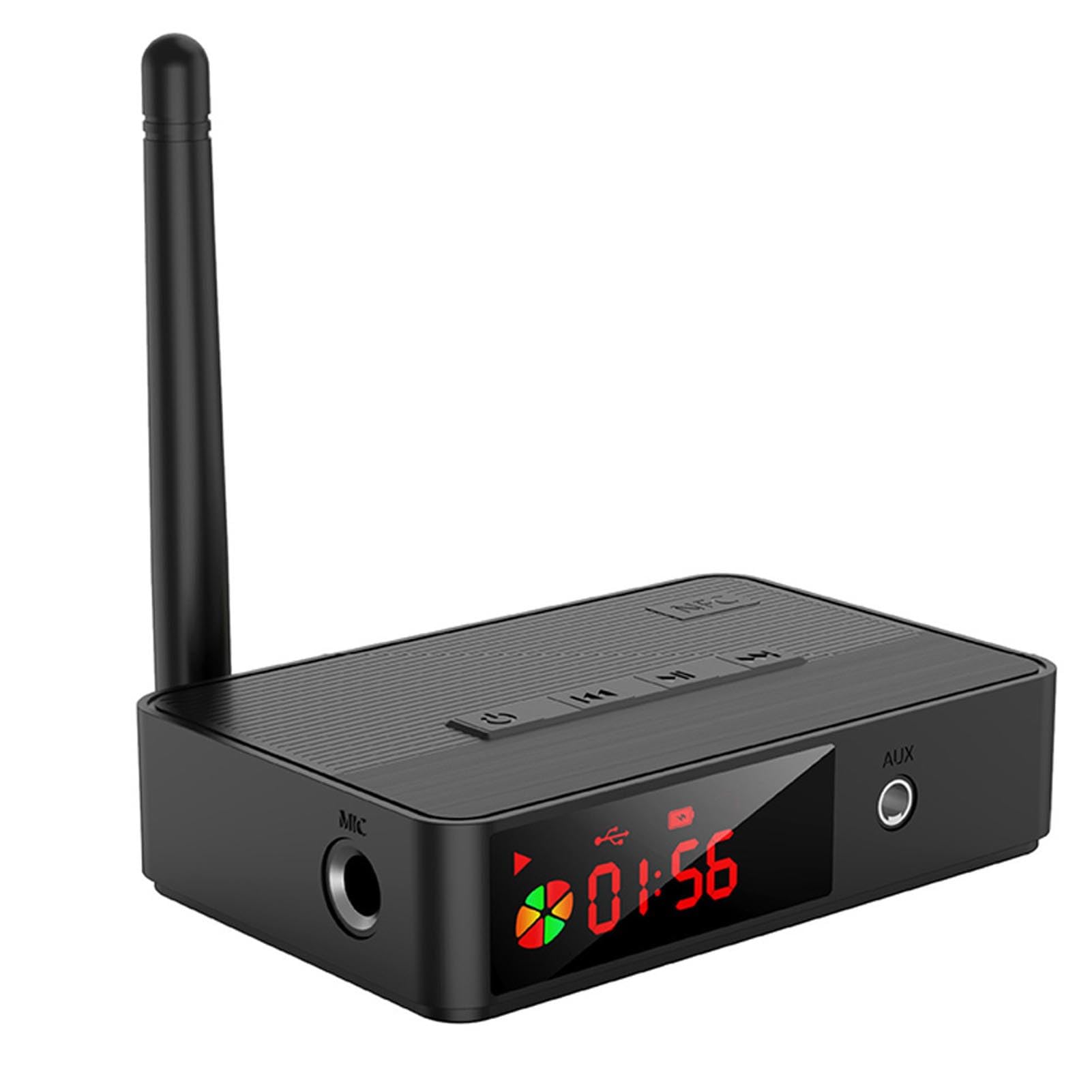
Image 1.1: VBESTLIFE D400 Bluetooth 5.3 HiFi Audio Receiver. This image shows the front view of the compact black audio receiver with various ports and controls visible.
2. Package Contents
Please check the box for the following items:
- 1 x VBESTLIFE D400 Bluetooth Receiver
- 1 x Remote Control
- 1 x USB-C Charging Cable
- 1 x Audio Cable (e.g., RCA or 3.5mm)
- 1 x Auxiliary Cable (3.5mm to 3.5mm)
- 1 x User Manual
3. Specifications
- Model: D400 (VBESTLIFEtomd83pync)
- Bluetooth Version: V5.3
- Audio Decoding: SBC
- Bluetooth Protocol Support: A2DP, AVRCP
- Supported File Formats (USB/SD): MP3, WAV, WMA, FLAC, APE
- Frequency Range: 2400MHz to 2483.5MHz
- Frequency Response: 20Hz to 20KHz
- Output Load: 16 to 320 Ω Adaptive
- Transmission Distance: Approx. 10-30m / 32.8-98.4ft (open area)
- Audio Input: Bluetooth Audio, USB, Memory Card (up to 32GB, not included)
- Audio Output: AUX (3.5mm), Optical Audio, Coaxial Audio
- Battery Capacity: 500mAh Lithium Battery (built-in)
- Remote Control Battery: CR2025 x 1 (not included)
- Power Interface: USB C 5V
- Compatibility: Android, iOS mobile phones, tablets, TVs, game consoles, and other Bluetooth devices, as well as audio equipment with audio input interface.
- Weight: 204 Grams
- Number of Channels: 2
- Material: ABS
4. Setup
4.1. Power Connection
- Connect the provided USB-C charging cable to the "USB C 5V" port on the receiver.
- Plug the other end of the USB-C cable into a 5V USB power adapter (not included) or a compatible USB port on a computer or wall charger.
- The device will power on automatically or can be turned on using the power button.
4.2. Audio Output Connection
Choose one of the following methods to connect the receiver to your audio system:
- AUX Output: Use the 3.5mm auxiliary cable to connect the receiver's AUX output port to the AUX input of your stereo system, active speakers, or headphones.
- Optical Output: Use an optical audio cable (not included) to connect the receiver's optical output port to the optical input of your amplifier or sound system.
- Coaxial Output: Use a coaxial audio cable (not included) to connect the receiver's coaxial output port to the coaxial input of your amplifier or sound system.
5. Operating Instructions
5.1. Bluetooth Pairing
- Ensure the receiver is powered on.
- The receiver will automatically enter Bluetooth pairing mode, indicated by a flashing LED indicator (if present).
- On your Bluetooth-enabled device (smartphone, tablet, computer), go to the Bluetooth settings.
- Search for available devices and select "D400" (or similar name) from the list.
- Once connected, the LED indicator will become solid, and you can now stream audio wirelessly.
5.2. NFC Pairing (Near Field Communication)
For NFC-enabled mobile devices:
- Ensure NFC is enabled on your mobile device.
- Gently tap your NFC-enabled device on the NFC area of the D400 receiver.
- Your device will automatically connect to the receiver without manual pairing.
5.3. USB Drive / Memory Card Playback
- Insert a USB flash drive or a memory card (up to 32GB, formatted with supported file systems like FAT32) containing audio files (MP3, WAV, WMA, FLAC, APE) into the respective port on the receiver.
- The receiver should automatically detect the storage and begin playing audio.
- Use the remote control to navigate tracks, adjust volume, and control playback.
5.4. Remote Control Functions
The included remote control allows for convenient operation of the receiver. Functions typically include:
- Power On/Off
- Volume Up/Down
- Play/Pause
- Next/Previous Track
- Input Mode Selection (Bluetooth, USB, Memory Card)
Note: The remote control requires 1 x CR2025 battery (not included). Please insert the battery before use, observing polarity.
6. Maintenance
- Cleaning: Use a soft, dry cloth to clean the surface of the receiver. Do not use liquid cleaners or abrasive materials.
- Storage: Store the device in a cool, dry place away from direct sunlight and extreme temperatures when not in use for extended periods.
- Battery: If the remote control will not be used for a long time, remove the CR2025 battery to prevent leakage.
7. Troubleshooting
| Problem | Possible Solution |
|---|---|
| No power | Ensure the USB-C power cable is securely connected to a working 5V power source. Check the power adapter. |
| Cannot pair via Bluetooth | Ensure the receiver is in pairing mode (LED flashing). Turn off and on Bluetooth on your source device. Move closer to the receiver. Clear previous Bluetooth connections on your device. |
| No sound output | Verify the audio cable (AUX, Optical, Coaxial) is correctly connected to both the receiver and your audio system. Check the input selection on your audio system. Adjust volume on both the receiver and your source device. |
| NFC pairing not working | Ensure NFC is enabled on your mobile device. Make sure your device is tapping the correct NFC area on the receiver. |
| USB/Memory card not playing | Ensure the USB drive or memory card is inserted correctly. Check if the files are in a supported format (MP3, WAV, WMA, FLAC, APE). Ensure the memory card is not larger than 32GB and is formatted correctly. |
8. Warranty and Support
This VBESTLIFE D400 Bluetooth 5.3 HiFi Audio Receiver comes with a 1 Year Warranty Against Manufacturer Defects from the date of purchase.
For technical support or warranty claims, please refer to the contact information provided by your retailer or the official VBESTLIFE support channels. Keep your purchase receipt as proof of purchase for warranty services.


