
TOYTENSI 40A 2-4S SBEC ESC
TOYTENSI 40A 2-4S RC Brushless Motor ESC Instruction Manual
Model: 40A 2-4S SBEC ESC
1. Introduction
This manual provides detailed instructions for the TOYTENSI 40A 2-4S RC Brushless Motor Electronic Speed Controller (ESC). Designed specifically for RC fixed-wing airplanes, this ESC offers reliable performance and precise throttle control. Please read this manual thoroughly before operation to ensure proper setup and safe use.
2. Safety Information
Please read the entire instruction manual carefully to become familiar with the features of the product before operating. Improper use can lead to damage to the product, property, or serious injury.
3. Features
- Super smooth and accurate throttle linearity.
- Selectable high voltage switching BEC (Battery Eliminator Circuit).
- Support for most motors, including high RPM motors.
- Utilizes new MOSFET technology for low heat and high reliability.
- Power on protection, over-heat protection, low-voltage protection, and lost-signal protection.
- Programmable via LCD Program Box or transmitter.
4. Specifications
General Specifications
- Product Name: TOYTENSI 40A 2-4S SBEC ESC
- Continuous/Peak Current: 40A/60A
- Input Voltage: 2-4S LiPo
- BEC Output: 5V/6V 4A
- Input Connectors: XT60 (Male)
- Output Connectors: 3.5mm Gold Connectors (Female)
Physical Dimensions & Performance
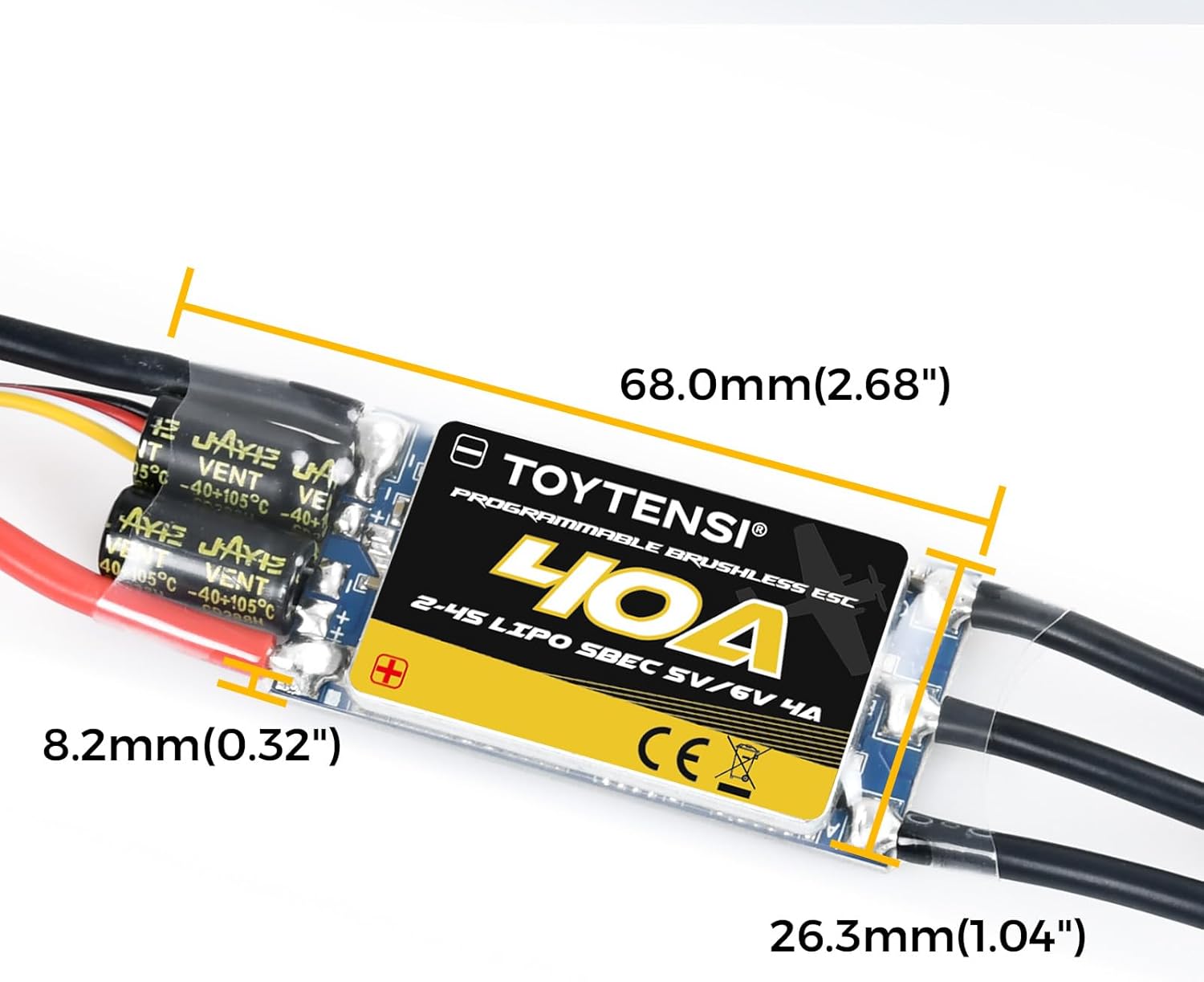
- Length: 68mm (2.68in)
- Width: 26.3mm (1.04in)
- Height: 8.2mm (0.32in)
- Weight: 44.2g (1.76 ounces)
- Max Speed: 200000 RPM
- Max Horsepower: 672 Watts
- Material: PCB (Printed Circuit Board)

5. Setup
Follow these steps to correctly connect your ESC to your RC system:
- Motor Connection: Connect the three motor wires from the ESC to the brushless motor. The order of connection may affect motor rotation direction; this can be adjusted later if needed.
- Receiver Connection: Connect the servo cable (BEC output) from the ESC to the throttle channel (usually channel 3) on your RC receiver.
- Battery Connection: Ensure your RC transmitter is turned on and the throttle stick is at the lowest (minimum) position. Then, connect the battery to the XT60 input connector of the ESC.

Remark: The Reverse Brake Signal Wire (Yellow) must be plugged into any vacant channel on the receiver (when using the SMR function) to control the ON/OFF of the SMR function.
6. Operating Instructions
Once the ESC is properly installed and connected, follow these steps for operation:
- Power On Transmitter: Turn on your RC transmitter. Ensure the throttle stick is at the lowest position.
- Connect Battery: Connect the battery to the ESC. The ESC will emit a series of tones indicating the detected battery cell count and readiness.
- Throttle Control: Gradually increase the throttle stick on your transmitter to control the motor speed. The motor should respond smoothly.
- Power Off: Always disconnect the battery from the ESC first, then turn off the transmitter. This sequence prevents accidental motor activation.
7. Programming
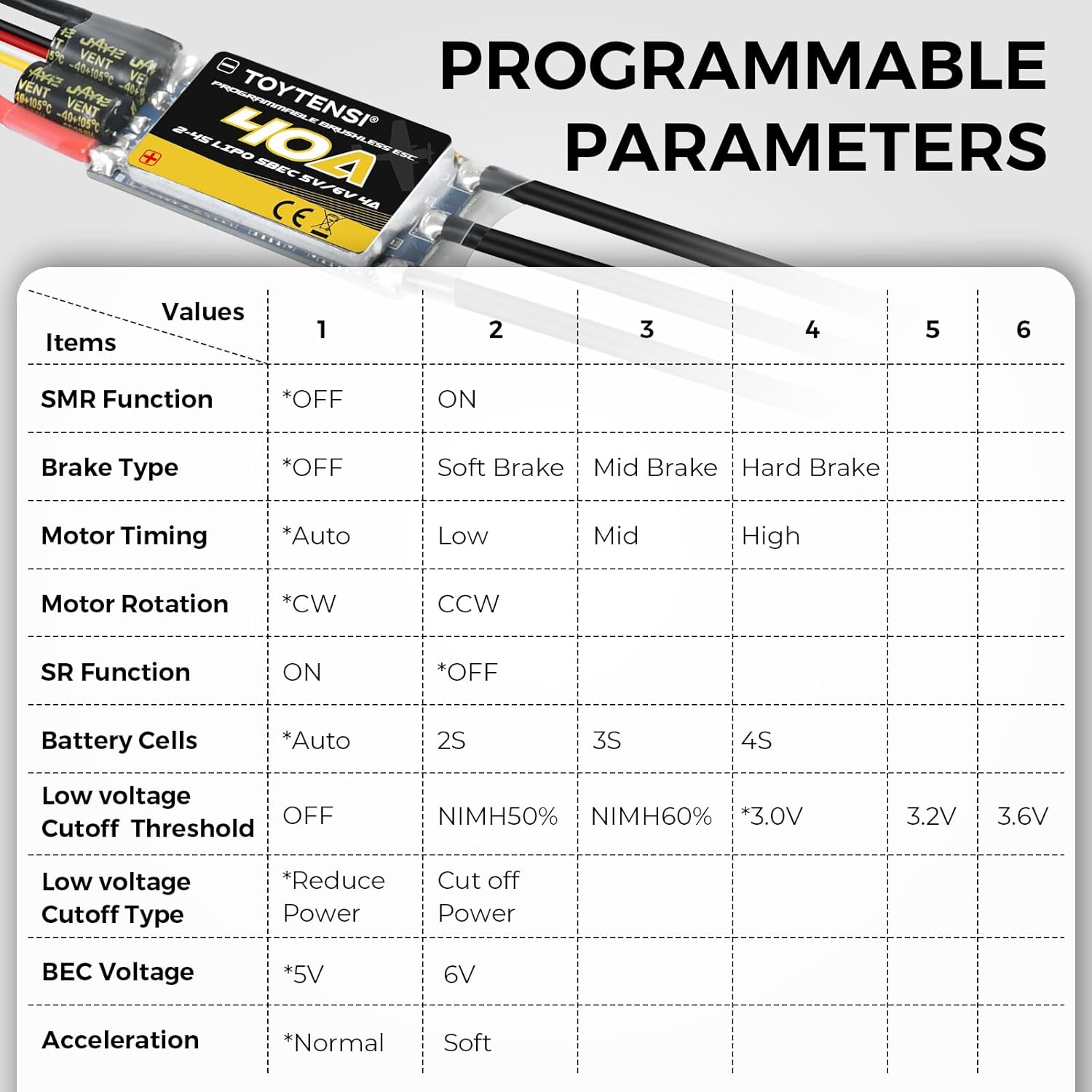
The TOYTENSI ESC can be programmed using your RC transmitter or an optional LCD Program Box. The options marked with an asterisk (*) are the factory default settings.
7.1. Programming via Transmitter
This method uses a series of audible tones from the motor to guide you through the programming options.
- Enter Programming Mode:
- Turn on your transmitter and move the throttle stick to the top (maximum) position.
- Connect the battery to the ESC.
- The ESC will emit a series of tones. After the initial battery cell count tones, it will emit a long "B" tone followed by a short "B" tone, indicating entry into programming mode.
- Select Parameter:
- Listen to the tones. Each parameter has a unique tone sequence (e.g., "B" for SMR Function, "B-B" for Brake Type).
- When you hear the tone sequence for the desired parameter, move the throttle stick to the bottom (minimum) position. This selects the parameter.
- Select Value:
- The ESC will then emit tone sequences for the available values for that parameter (e.g., for Brake Type: "B" for OFF, "B-B" for Soft Brake, "B-B-B" for Middle Brake, "B-B-B-B" for Hard Brake).
- When you hear the tone sequence for the desired value, move the throttle stick to the top (maximum) position. This saves the value.
- Exit Programming Mode:
- After saving a value, the ESC will return to the parameter selection mode.
- To exit programming mode, disconnect the battery from the ESC. The new settings will be saved.
7.2. Programmable Parameters
The following table lists the programmable parameters and their available values:
| Item | Values | Tone (Short 'B's) | Tone (Long 'B's) |
|---|---|---|---|
| SMR Function | *OFF, ON | 1 | |
| Brake Type | *OFF, Soft Brake, Middle Brake, Hard Brake | 1, 2, 3, 4 | |
| Motor Timing | *Auto, Low, Mid, High | 1, 2, 3, 4 | |
| Motor Rotation | *CW, CCW | 1, 2 | |
| SR Function | ON, *OFF | 1, 2 | |
| Battery Cells | *Auto, 2S, 3S, 4S | 1, 2, 3, 4 | |
| Low Voltage Cutoff Threshold | OFF, NIMH50%, NIMH60%, *3.0V, 3.2V, 3.6V | 1, 2, 3, 4, 5, 6 | |
| Low Voltage Cutoff Type | *Reduce Power, Cut off Power | 1, 2 | |
| BEC Voltage | *5V, 6V | 1, 2 | |
| Acceleration | *Normal, Soft | 1, 2 |
Note: Options marked with "*" are the factory default settings.
7.3. Programming via LCD Program Box
For easier programming, an optional TOYTENSI LCD Program Box can be used:
- Connect the servo cable from the ESC to the designated port on the TOYTENSI LCD Program Box.
- The Program Box will display "ESC Connect..." and then show the current settings.
- Use the buttons on the Program Box to navigate through the parameters and select desired values.
- Changes are typically saved automatically or upon exiting the menu.
8. Maintenance
- Keep the ESC clean and free from dust, dirt, and debris.
- Regularly inspect all wires and connectors for signs of wear, fraying, or damage. Replace any damaged components immediately.
- Ensure adequate airflow around the ESC during operation to prevent overheating. Avoid covering the ESC with insulating materials.
- Store the ESC in a dry, cool environment when not in use, away from direct sunlight or extreme temperatures.
9. Troubleshooting
If you encounter issues with your ESC, refer to the following common troubleshooting tips:
- Motor not spinning or erratic behavior:
- Check all battery and motor connections for secure contact.
- Verify the ESC's servo cable is correctly plugged into the receiver's throttle channel.
- Ensure the transmitter is on and the throttle stick is at the lowest position before connecting the battery.
- Recalibrate the throttle range if necessary (refer to your transmitter's manual).
- ESC overheating:
- Ensure sufficient airflow around the ESC.
- Check if the motor and propeller combination is appropriate for the ESC's current rating. An oversized propeller or motor can draw excessive current.
- Verify battery voltage and condition.
- Continuous beeping from ESC:
- This often indicates a low voltage cutoff or a lost signal. Check battery charge and receiver connection.
- Refer to the programming section for specific tone interpretations related to error states.
10. What's in the Box
- 1 x TOYTENSI 40A 2-4S SBEC ESC
11. Warranty and Support
For warranty information and technical support, please refer to the TOYTENSI official website or contact customer service through your retailer. Keep your purchase receipt for warranty claims.
Related Documents - 40A 2-4S SBEC ESC
 |
DYS Airplane ESC User Manual: Features, Specifications, and Programming Guide Comprehensive user manual for DYS Brushless Electronic Speed Controllers (ESC) for model aircraft. This guide details features, specifications, throttle calibration, programming options, and essential safety precautions. |
 |
Volta Electronic Speed Controller (ESC) Operating Instructions & Guide Comprehensive operating instructions and specifications for the Volta Electronic Speed Controller (ESC) series, including 15A and 30A models, designed for RC model airplanes. Learn about wiring, mounting, calibration, and usage. |
 |
SUNNYSKY Electronic Speed Controller (ESC) User Manual User manual for SUNNYSKY Electronic Speed Controllers (ESC), detailing features, specifications, wiring, calibration, parameter settings, and protection functions for RC aircraft. Includes guidance on setup, operation, and troubleshooting. |
 |
SUNNYSKY Electronic Speed Controller (ESC) User Manual User manual for SUNNYSKY Electronic Speed Controllers (ESC), detailing features, specifications, programming, calibration, and protection functions for RC aircraft. |
 |
ZTW SkyHawk Series ESC User Manual User manual for the ZTW SkyHawk series of brushless electronic speed controllers (ESCs), detailing features, specifications, and troubleshooting for RC aircraft and helicopters. |
 |
FEXhobby C400 Model Airplane Instruction Manual Comprehensive instruction manual for the FEXhobby C400 Radio Control Model Airplane. Covers introduction, safety guidelines, specifications, kit contents, assembly steps, flying techniques, and spare parts list. Suitable for intermediate to experienced pilots. |
Ask a question about this manual
Ask about setup, troubleshooting, compatibility, parts, safety, or missing instructions. Manuals+ will review the question and use this page’s manual context to help answer it.