1. Introduction
This manual provides essential instructions for the safe and effective use of your Yinleader Type E/F Travel Plug Adapter. Please read this manual thoroughly before using the product and retain it for future reference.
2. Product Overview
The Yinleader Type E/F Travel Plug Adapter is designed to provide power conversion for US-standard devices in countries utilizing Type E/F outlets. It features multiple charging ports for convenience.
Key Features:
- 5-in-1 Charging: Includes 1 standard US AC outlet, 3 USB-A ports, and 1 USB-C port.
- High Capacity: AC outlet supports up to 2500 Watts (Max 250 Volt, 10 Ampere).
- Fast USB Charging: USB-A ports deliver up to 2.4A, USB-C port delivers up to 3A.
- Compact and Lightweight: Designed for portability, weighing only 3.5 ounces.
- Wide Compatibility: Suitable for use in many European countries and South Korea.

This image displays the Yinleader Type E/F Travel Plug Adapter from the front and side. It features a single US-style AC outlet, three USB-A charging ports, one USB-C charging port, and a Type E/F European plug on the side.
Compatible Countries (Type E/F Outlets):
This adapter is compatible with Type E/F outlets found in countries such as France, Germany, Spain, Iceland, Portugal, South Korea, Greece, Russia, Croatia, Romania, Norway, Belgium, Poland, Finland, Austria, and others. Always verify the local plug type before travel.

This image illustrates the Type E/F Power Adapter's compatibility with various European countries including Germany, France, Spain, and Korea, and highlights its CE certification.
3. Setup
- Verify Device Voltage: Ensure your electronic devices (laptops, phones, tablets, cameras, etc.) are dual voltage (100V-250V). This adapter does NOT convert voltage. Using non-dual voltage devices may cause damage.
- Insert Adapter: Plug the Yinleader Type E/F Travel Plug Adapter firmly into a compatible Type E/F wall outlet.
- Connect Devices: Plug your US-standard AC device into the adapter's AC outlet, or connect your USB-powered devices to the USB-A or USB-C ports using appropriate cables.

This image demonstrates the adapter's capability to charge multiple devices concurrently. It shows the adapter plugged into a wall, with cables extending to charge a smartwatch, a smartphone, and a tablet.
4. Operating Instructions
Once the adapter is plugged into a wall outlet and your devices are connected, power will be supplied. The integrated LED indicator light will illuminate when the adapter is receiving power.
Simultaneous Charging:
You can charge up to five devices simultaneously: one via the AC outlet, three via USB-A ports, and one via the USB-C port. Ensure the total power consumption does not exceed 2500W for AC devices and the specified current limits for USB ports.

This image provides a close-up view of the adapter's front panel, clearly labeling the AC outlet (100-250V 10A), three USB-A ports (5V 2.4A Max), one USB-C port (5V 3A Max), and the LED indicator light.
5. Important Safety Information
- NOT a Voltage Converter: This adapter does not convert voltage. It only adapts the plug shape. Your devices must be dual voltage (100V-250V) to be compatible.
- High-Power Appliances: Do not use with high-power appliances that require voltage conversion, such as hair dryers, hair straighteners, curling irons, electric toothbrushes, or electric razors, unless they explicitly state 100V-250V dual voltage compatibility.
- Indoor Use Only: This product is intended for indoor use in dry locations only. Do not expose to moisture or extreme temperatures.
- Avoid Overloading: Do not exceed the maximum load of 2500W (10A at 250V) for the AC outlet.
- Do Not Disassemble: Do not attempt to open or modify the adapter. This will void the warranty and may pose a safety risk.
- Keep Away from Children: Store the adapter out of reach of children.
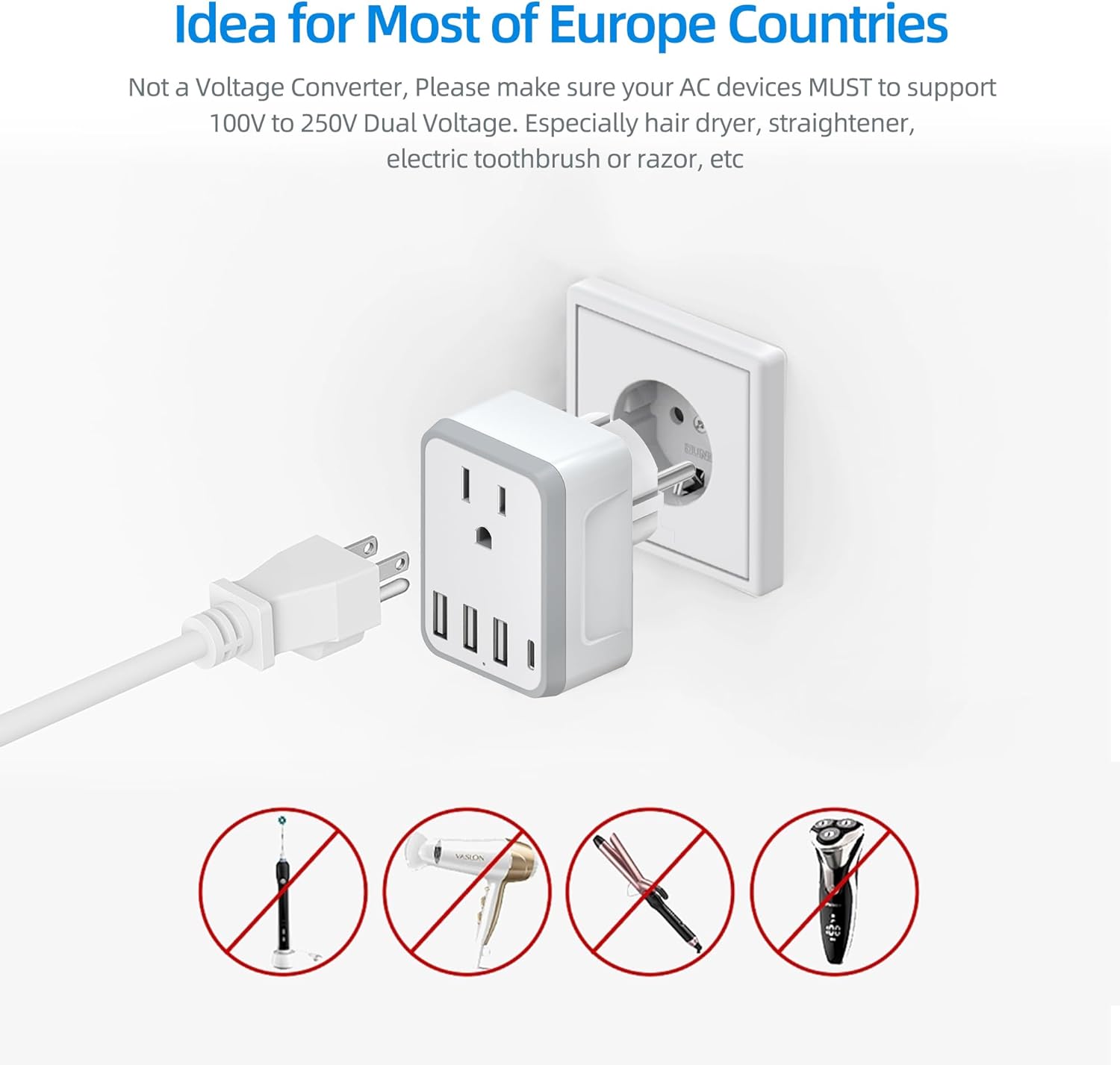
This image shows the adapter connected to a European wall socket. A critical note emphasizes that it is not a voltage converter. Below, icons of a toothbrush, hair dryer, hair straightener, and electric razor are crossed out, indicating that high-power devices requiring voltage conversion are not compatible.

This diagram highlights the comprehensive safety protections integrated into the adapter, such as short-circuit protection, over-voltage protection, over-current protection, over-heating protection, fire-resistance protection, and grounded protection, ensuring safe operation.
6. Specifications
| Feature | Specification |
|---|---|
| Model | Yinleader 5-in-1 Type E/F Travel Adapter |
| AC Input/Output | 100-250V~, 10A Max, 2500W Max |
| USB-A Output | 5V/2.4A Max per port |
| USB-C Output | 5V/3A Max |
| Total USB Output | 5V/3.4A Max (shared across all USB ports) |
| Plug Type | Type E/F (European Schuko) |
| Dimensions | Approx. 2.0" x 2.7" x 2.0" (5.08 cm x 6.86 cm x 5.08 cm) |
| Weight | 3.5 ounces (99.2 grams) |

This image showcases the compact and lightweight design of the adapter, providing its dimensions (2.0 inches wide, 2.7 inches high, 2.0 inches deep) and weight (3.5 oz).
7. Troubleshooting
- Device Not Charging:
- Ensure the adapter is firmly plugged into the wall outlet and the LED indicator is lit.
- Verify your device's power cable is securely connected to the adapter.
- Check if your device is dual voltage (100V-250V). If not, it is incompatible with this adapter.
- Test with another device or cable to rule out a faulty device/cable.
- Adapter Feels Warm:
- It is normal for the adapter to feel slightly warm during operation. If it becomes excessively hot, unplug it immediately and discontinue use.
- Ensure you are not exceeding the maximum wattage (2500W) or current limits.
- No Power:
- Check the wall outlet with another appliance to confirm it is functional.
- Ensure the adapter is fully inserted into the wall outlet.
8. Maintenance
- Cleaning: Disconnect the adapter from the power outlet before cleaning. Use a dry, soft cloth to wipe the surface. Do not use liquid cleaners or sprays.
- Storage: Store the adapter in a cool, dry place away from direct sunlight and moisture when not in use.
- Inspection: Periodically inspect the adapter for any signs of damage, such as frayed cables or cracked casing. Discontinue use if damage is found.
9. Warranty and Support
For warranty information or technical support, please refer to the product packaging or contact Yinleader customer service directly. Please have your product model number and purchase details available when contacting support.