
1. Introduction and Overview
The EASYGUARD EC002-HY-NFC is a smart key Passive Keyless Entry (PKE) car alarm system designed to enhance vehicle security and convenience. This system upgrades your standard key start vehicle with features such as passive keyless entry, push-button start/stop, remote engine start, and NFC lock/unlock functionality. It is compatible with most DC12V standard key start petrol cars, including those with automatic or manual transmissions.
The system utilizes rolling code and FSK technology for reliable performance and security.
2. Key Features
- Passive Keyless Entry (PKE): Automatically locks/unlocks car doors when approaching or walking away from the vehicle with the key fob.
- Push Start/Stop Button: Replaces the traditional key ignition with a convenient push-button engine start and stop.
- Remote Engine Start: Allows pre-cooling or pre-warming of the car engine from a distance.
- NFC Lock/Unlock: Provides an alternative method to lock or unlock the vehicle using an NFC card or a smartphone with NFC function.
- Remote Trunk Release: Opens the vehicle's trunk remotely.
- Central Door Locking Automation: Automatically locks doors when driving and unlocks when the engine is turned off. This feature can be enabled or disabled.
- Panic/Car Finding: Activates the alarm to locate the vehicle in a parking lot.
- Emergency Override: Provides a method to disarm the system in case of remote control malfunction.
- Optional Smartphone App Control & GPS Tracking: Requires an additional GPS002-AA 4G LTE module (sold separately).
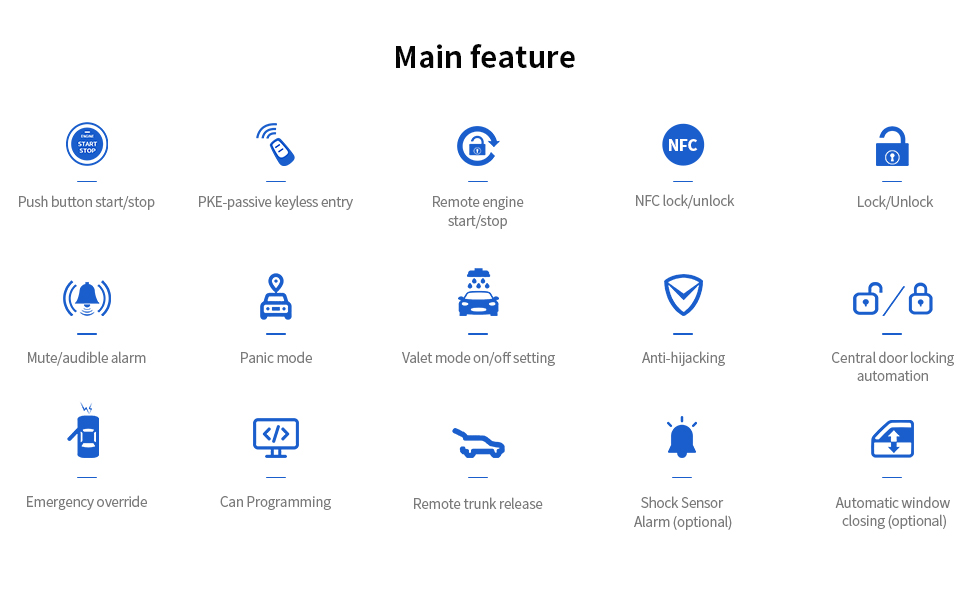
Figure 2.1: Overview of Main System Features
3. Important Notes and Compatibility
- Professional Installation Required: Installation of this system requires specialized knowledge and tools. It is strongly recommended to have it installed by a professional car alarm installer.
- Bypass Module: An extra bypass module (e.g., ASIN: B00MEHBVIC or B07NSLPBG7) is required if your factory OEM key fob contains a chip immobilizer.
- Compatibility: This product is not compatible with vehicles that already have an OEM push start button. It is not recommended for installation on luxury cars such as BMW or Benz.
- Shock Sensor: This specific model (EC002-HY-NFC) does not include a shock sensor. Shock sensor alarm functionality is only available in variants that explicitly include this feature.
4. Setup and Installation
Due to the complexity of automotive electrical systems, professional installation is mandatory for the EASYGUARD EC002-HY-NFC system. Incorrect installation can lead to vehicle damage or system malfunction.
4.1 PKE Antenna Installation Guidance
Proper placement of the PKE antennas is crucial for optimal passive keyless entry performance. The system typically includes front and rear PKE antennas.
Video 4.1: This video demonstrates the recommended installation locations for the PKE antennas within a vehicle, showing placement for both front and rear antennas to ensure proper passive keyless entry functionality.
5. Operating Instructions
5.1 Passive Keyless Entry (PKE)
With the PKE function enabled, the system automatically detects the presence of your key fob. When you approach the vehicle within 2-3 meters, the doors will automatically unlock. When you walk away from the vehicle, the doors will automatically lock after a few seconds.
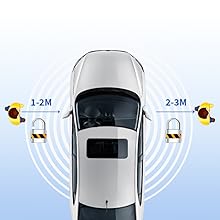
Figure 5.1: Passive Keyless Entry (PKE) Range
Video 5.1: This video demonstrates the PKE functionality, showing how the car automatically locks and unlocks as the user approaches and walks away with the key fob. It also shows remote engine start and NFC lock/unlock.
5.2 Push Start/Stop Button
To start the engine, ensure the vehicle is in Park (P) or Neutral (N) and press the brake pedal, then press the start/stop button. To turn off the engine, press the start/stop button while the vehicle is stationary.

Figure 5.2: Push Start/Stop Button Upgrade
5.3 Remote Engine Start
To remotely start the engine, press the designated button on your key fob. This feature allows you to pre-condition your vehicle's interior before entry, useful in extreme weather conditions. The engine will run for a preset duration and then shut off automatically if not entered.

Figure 5.3: Remote Engine Start Function
5.4 NFC Lock/Unlock
The system supports NFC (Near Field Communication) for locking and unlocking. You can use an NFC card or a compatible smartphone with NFC functionality. Simply tap the NFC device against the designated area on your vehicle's windshield to lock or unlock the doors. Up to 4 NFC cards can be added to the system.
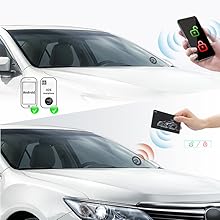
Figure 5.4: NFC Lock/Unlock Feature
5.5 Remote Trunk Release
To open the trunk remotely, press and hold the dedicated trunk release button on your key fob. Refer to your vehicle's specific trunk release mechanism for any additional steps.

Figure 5.5: Remote Trunk Release
5.6 Central Door Locking Automation
This feature automatically locks the vehicle doors once the engine starts and the vehicle begins moving, and unlocks them when the engine is turned off. This can be configured by the installer or user according to the detailed installation manual.

Figure 5.6: Central Door Locking Automation
5.7 Panic / Car Finding
To activate the panic mode or locate your car in a crowded parking area, press the lock button on your key fob once. The vehicle's horn will sound and lights will flash, helping you identify its location.
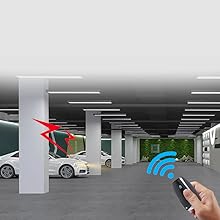
Figure 5.7: Panic/Car Finding Function
6. Troubleshooting
If you experience any issues with your EASYGUARD EC002-HY-NFC system, please refer to the comprehensive troubleshooting guide provided in the full installation manual. Common issues may include:
- Remote control not responding.
- PKE function not activating.
- Engine not starting via push button or remote.
- NFC lock/unlock not working.
For complex issues, it is highly recommended to contact a professional installer or EASYGUARD customer support.
7. Specifications
| Item Weight | 2.86 pounds |
| Package Dimensions | 11.02 x 6.69 x 3.94 inches |
| Item Model Number | EC002-HY-NFC |
| Batteries Required | 2 CR2 batteries |
| Wireless Remote | Yes |
| Noise Level | 30 Decibels |
| Remote Control Included | Yes |
| Manufacturer | ieasyguard.com |
| UPC | 769326453395 |
8. Warranty
The EASYGUARD EC002-HY-NFC PKE Passive Keyless Entry Car Alarm System comes with a 1-year warranty from the date of purchase. This warranty covers manufacturing defects under normal use. Please retain your proof of purchase for warranty claims. For detailed warranty terms and conditions, refer to the official EASYGUARD documentation or contact customer support.
9. Support
For technical assistance, installation inquiries, or customer service, please visit the official EASYGUARD website or contact their support team. You can also refer to the detailed installation manual included with your product for wiring diagrams and advanced settings.
EASYGUARD Store: Visit the EASYGUARD Store on Amazon


