
1. Introduction
The GuliTech UC96 Bluetooth USB Voltage Tester is a multifunctional device designed for precise measurement and analysis of USB power delivery. It can monitor voltage, current, wattage, capacity, and other parameters for various USB and Type-C devices. This manual provides instructions for its proper use, setup, and maintenance.
2. Safety Information
- Do not disassemble or modify the device.
- Avoid exposing the device to extreme temperatures, moisture, or direct sunlight.
- Keep out of reach of children.
- Use only with compatible USB and Type-C power sources and devices.
- Ensure proper ventilation during use to prevent overheating.
3. Product Overview
The UC96 tester features multiple input and output ports, a display screen, and control buttons for navigation and settings. It supports both USB-A and Type-C connections.
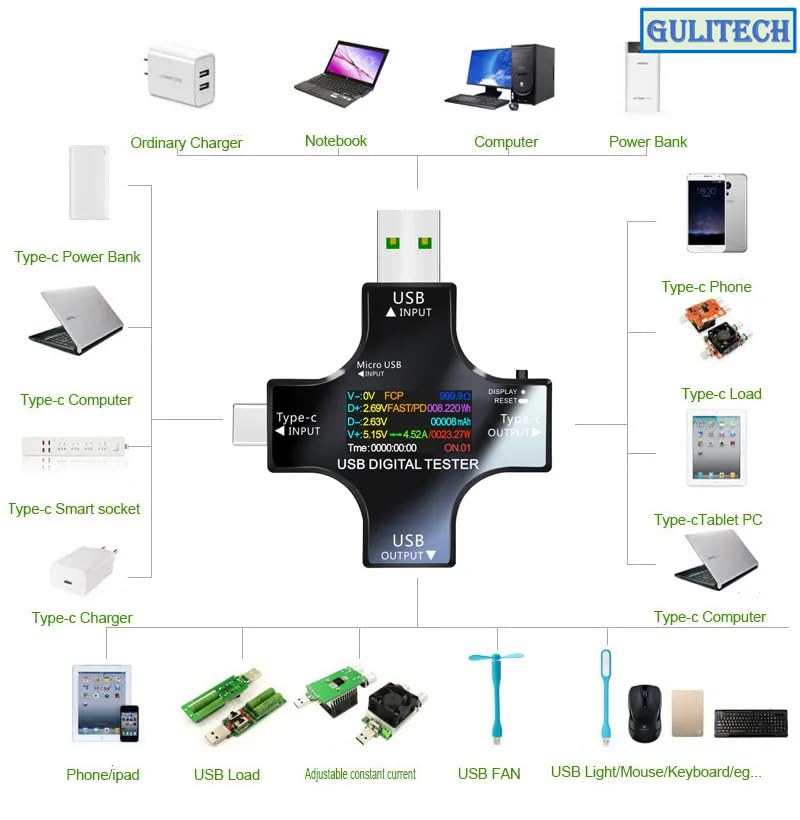
Image 3.1: Overview of the GuliTech UC96 USB Digital Tester showing its USB and Type-C input/output ports and various compatible devices such as chargers, notebooks, computers, power banks, phones, and USB loads.
The device includes:
- USB Input: For connecting to USB-A power sources.
- Type-C Input: For connecting to Type-C power sources.
- USB Output: For connecting devices to be tested via USB-A.
- Type-C Output: For connecting devices to be tested via Type-C.
- Micro USB Input: For auxiliary power or data (if applicable).
- Display Screen: Shows real-time measurement data.
- Control Button: Used for navigating menus and changing settings.
4. Setup
To begin using the UC96 tester, follow these steps:
- Connect to Power Source:
- For USB-A power sources: Insert the USB input of the tester into a USB charger or power bank.
- For Type-C power sources: Insert the Type-C input of the tester into a Type-C charger or power bank.
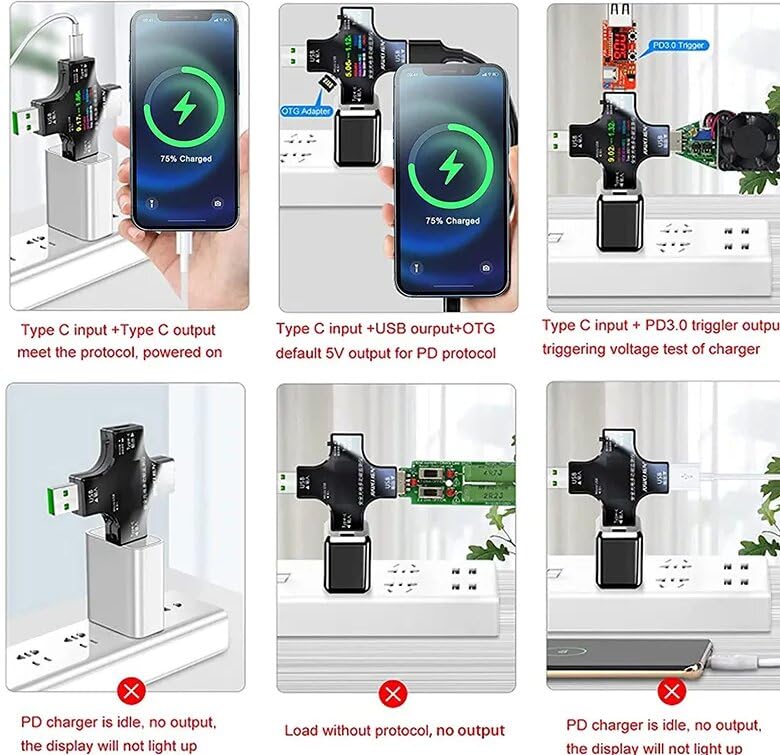
Image 4.1: Various connection scenarios for the GuliTech UC96, including Type-C input to Type-C output for charging, Type-C input with USB output and OTG adapter, and Type-C input with PD 3.0 trigger for voltage testing.
Note: When using a PD charger, ensure it is actively supplying power. If the PD charger is idle or without protocol, the display may not light up or provide output.
- Connect Device to be Tested:
- For USB-A devices: Connect your device's USB cable to the USB output port of the tester.
- For Type-C devices: Connect your device's Type-C cable to the Type-C output port of the tester.
- Power On: The device will automatically power on and display measurement data once connected to a power source.
- Bluetooth Connectivity (UC96 Bluetooth version):
To use the Bluetooth features, download the "E-test" app on your smartphone:
- iOS APP: Search for "E-test" on the Apple App Store.
- Android APP: Search for "E-test" on Google Play or download from this link.
Follow the in-app instructions to pair your UC96 Bluetooth tester with your smartphone.
5. Operating Instructions
5.1 Key Operations
The single control button on the device allows for various functions:
- Short Press: Switches between different display screens (e.g., Voltage/Current, Capacity, Power).
- Quick Double-Click: Resets the cumulative capacity (mAh) to zero.
- Quick Triple-Click: Resets the cumulative power (Wh) to zero.
- Quick Four-Click: Resets the timer (00:00:00) and clears the current data group.
- Quick Five-Click: Changes the cumulative data storage group number (NO.X, up to 10 groups).
- Long Press: Enters or exits system settings, or turns the screen off/on.
5.2 Display Interfaces
The UC96 tester provides several display interfaces to show different measurement parameters.
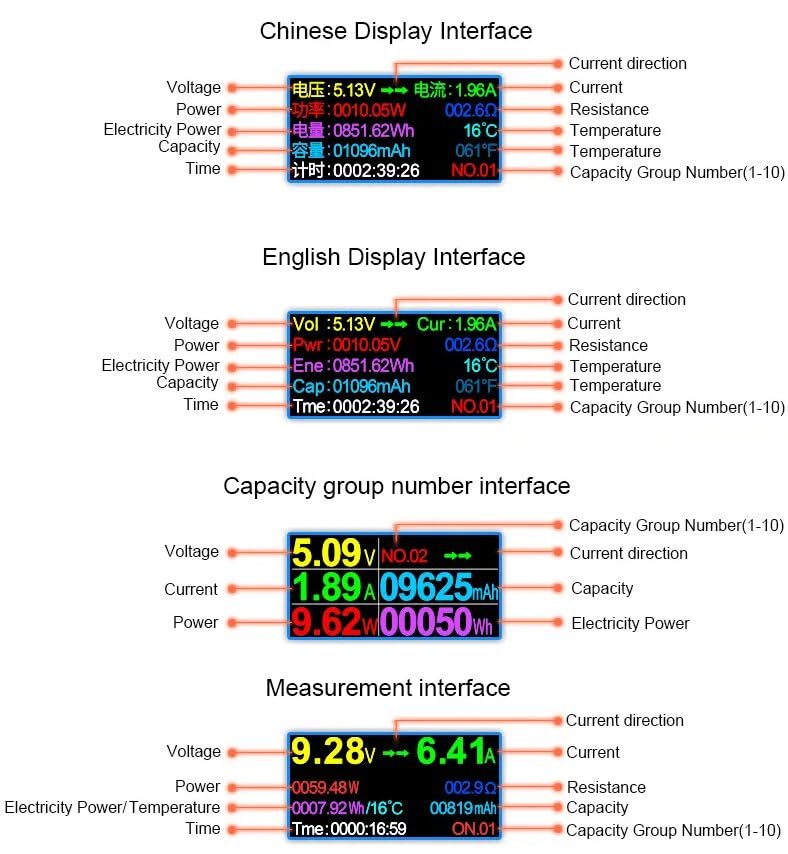
Image 5.1: Examples of the GuliTech UC96 display interfaces, including the Chinese display, English display, capacity group number interface, and the main measurement interface, showing various parameters like Voltage, Current, Power, Capacity, and Time.
- Main Measurement Interface: Displays real-time Voltage (V), Current (A), Power (W), Resistance (Ω), Temperature (°C/°F), Capacity (mAh), Energy (Wh), and Time (H:M:S).
- Capacity Group Interface: Shows accumulated capacity and energy for the selected data group.
- USB Four-Wire Detection Interface: Provides detailed information on USB D+/D- voltage, fast charge protocol recognition (e.g., FCP, FAST), and supply voltage.
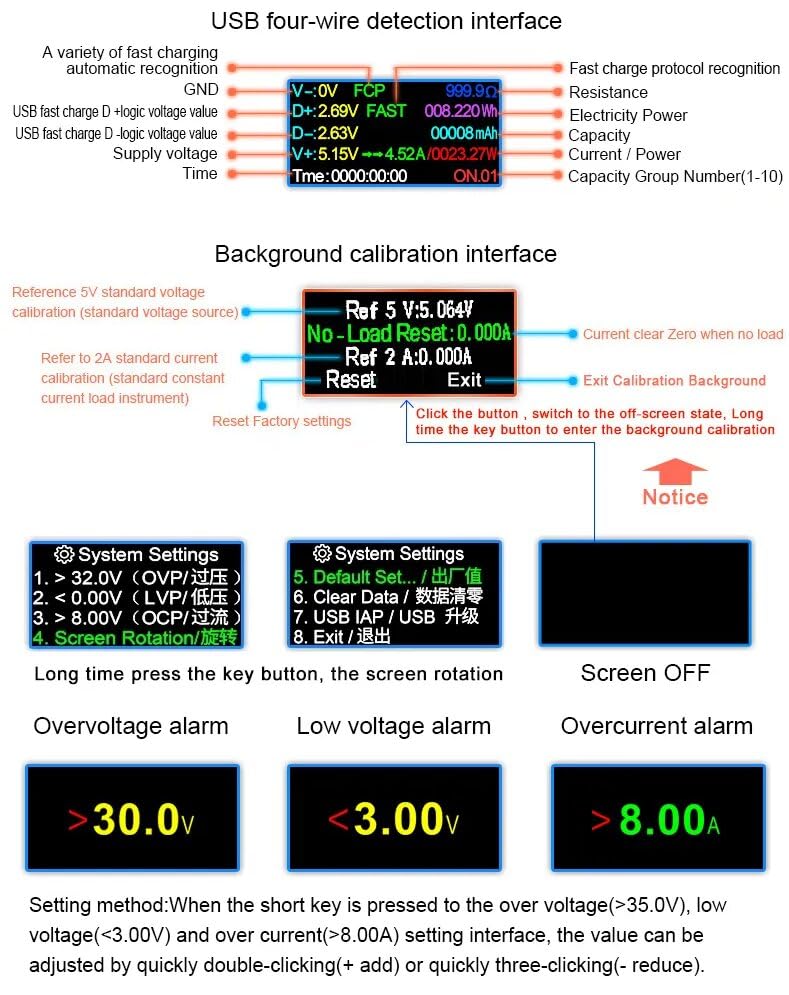
Image 5.2: Detailed view of the GuliTech UC96's USB four-wire detection interface, background calibration options, and system settings menu, including overvoltage, low voltage, and overcurrent alarm settings.
5.3 System Settings
To access system settings, long press the control button. Use short presses to navigate and quick double/triple clicks to adjust values.
- Overvoltage Alarm (OVP): Set the maximum voltage threshold. If exceeded, an alarm will sound.
- Low Voltage Alarm (LVP): Set the minimum voltage threshold. If voltage drops below this, an alarm will sound.
- Overcurrent Alarm (OCP): Set the maximum current threshold. If exceeded, an alarm will sound.
- Screen Rotation: Adjust display orientation.
- Default Settings: Reset all settings to factory defaults.
- Clear Data: Erase all stored measurement data.
- USB IAP / USB Upgrade: For firmware updates.
- Exit: Exit the system settings menu.
To adjust alarm values (e.g., overvoltage >35.0V, low voltage <3.00V, overcurrent >8.00A), short press to select the setting, then quickly double-click to increase (+) or quickly triple-click to decrease (-) the value.
5.4 Bidirectional Current Test
The UC96 supports bidirectional current testing, allowing you to measure current flow in both directions, which is useful for devices that can both charge and discharge.
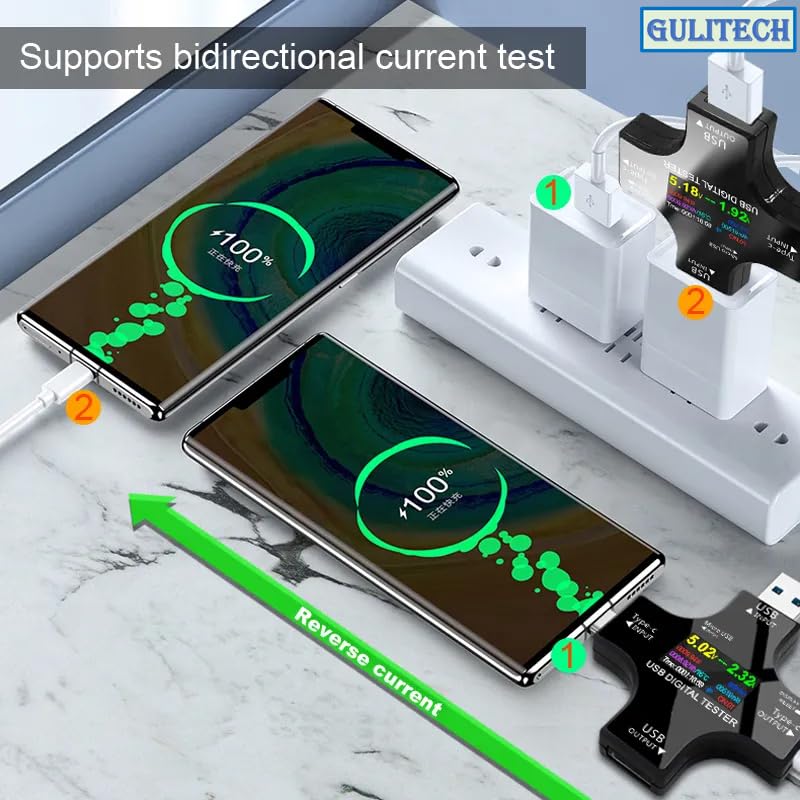
Image 5.3: The GuliTech UC96 performing a bidirectional current test, showing current flowing in both directions between a power source and two connected phones, indicating charging status.
6. Specifications
| Parameter | Value | Resolution Precision |
|---|---|---|
| Voltage Measuring Range | 3.6V ~ 32.0V | 0.01V |
| Current Measuring Range | 0.00 ~ 5.10A | 0.01A |
| Capacity Cumulative Range | 0 ~ 99999mAh | 0.001Ah |
| Power Cumulative Range | 0 ~ 999999mWh | 0.001Wh |
| Power Metering Range | 000.00 ~ 150.00W | 0.01W |
| Impedance Measuring Range | 1 ~ 999.9Ω | 0.1Ω |
| Temperature Measuring Range | 0 ~ 80℃ | 1℃ |
| Maximum Timing | 999 Hours 59 Minutes 59 Seconds | 1s |
| USB D+ Voltage Range | 0V ~ 2.999V | 0.001V |
| USB D- Voltage Range | 0V ~ 2.999V | 0.001V |
| Time to Refresh | 500mS/times | N/A |
| Measurement Rate | 0.5 times/s | N/A |
| Alarm Mode | Siren Sound + Display Hints | N/A |
| Product Size | 61mm x 68mm x 10.8mm | N/A |
| Self-consumable Flow | <0.02A | N/A |
| Working Temperature | -10 ~ +60℃ | N/A |
| Working Humidity | 10 ~ 80% (no condensation) | N/A |
| Working Pressure | 80 ~ 106kPa | N/A |
| Certificates | RoHS, CE | N/A |
7. Maintenance
- Cleaning: Wipe the device with a soft, dry cloth. Do not use abrasive cleaners or solvents.
- Storage: Store the device in a cool, dry place away from direct sunlight and extreme temperatures.
- Battery: The device contains a Lithium-metal battery. Do not attempt to replace it yourself.
8. Troubleshooting
| Problem | Possible Cause | Solution |
|---|---|---|
| Device display does not light up. | No power input; PD charger is idle or not providing power. | Ensure the tester is properly connected to an active power source. Check if the PD charger is supplying power. |
| Inaccurate readings. | Loose connection; device malfunction. | Check all connections. Try resetting the device to factory defaults via system settings. |
| Bluetooth connection issues. | App not installed; device not discoverable; interference. | Ensure the "E-test" app is installed. Restart the tester and your phone. Check for other Bluetooth devices causing interference. |
| Alarm sounds frequently. | Voltage/current exceeding set alarm thresholds. | Check the power source and connected device. Adjust alarm thresholds in system settings if necessary. |
9. Warranty and Support
The GuliTech UC96 Bluetooth USB Voltage Tester comes with a 1-year warranty from the date of purchase. This warranty covers manufacturing defects and material faults under normal use.
For technical support, warranty claims, or further assistance, please contact your retailer or the manufacturer directly. Please have your purchase receipt and product model number (UC96 Bluetooth) available when contacting support.
Manufacturer: ATORCH