
1. Introduction
This manual provides essential information for the safe and effective operation of the FNNEMGE MY2600D Digital Clamp Meter. This versatile instrument is designed for precise measurement of AC/DC voltage, AC/DC current, resistance, capacitance, frequency, duty cycle, diode, continuity, and temperature. It features True RMS measurement, Non-Contact Voltage (NCV) detection, Low Pass Filter (LPF), and Low Impedance (LowZ) functions, making it suitable for industrial, automotive, household, and educational applications.

Image 1.1: The FNNEMGE MY2600D Digital Clamp Meter, including test leads and a protective carrying case.
2. Safety Information
To ensure safe operation and prevent damage to the meter, please read and follow all safety instructions carefully. This device complies with IEC 61010-1, CAT III 600V, and CE standards.
- General Safety: Always use the meter according to the instructions. Do not operate the meter if it appears damaged or if the insulation is compromised.
- Voltage Limits: Do not apply more than the rated voltage, as marked on the meter, between the terminals or between any terminal and earth ground. The maximum operating voltage is 600 Volts.
- Current Measurement: Ensure the circuit is de-energized before connecting the clamp meter for current measurements, especially when measuring high currents.
- Test Leads: Use only the test leads provided with the meter. Inspect test leads for damage before each use.
- Live Circuits: Exercise extreme caution when working with live circuits. Avoid contact with bare conductors or terminals.
- Environment: Do not use the meter in explosive gas, vapor, or dusty environments.
- Overload Protection: The meter features overload protection, double ceramic fuses, and thermistors to protect the circuit. However, always operate within specified ranges.
- Battery Replacement: Replace batteries promptly when the low battery indicator appears to ensure accurate readings.

Image 2.1: Illustration of the internal overload protection mechanism within the clamp meter, designed to prevent damage from misuse.
3. Product Overview
Familiarize yourself with the components of your FNNEMGE MY2600D Digital Clamp Meter:

Image 3.1: Detailed diagram of the clamp meter indicating its various parts and controls.
- Clamp: Used for non-contact AC/DC current measurement.
- Safety Barrier: Indicates the safe limit for hand placement.
- Function Range Switch: Rotary dial to select measurement functions.
- Data Hold Button (H): Freezes the current reading on the display.
- Flashlight Button: Activates the built-in LED flashlight.
- LCD Screen: Digital display for readings, units, and indicators.
- Input Terminal: Positive input for test leads.
- COM Input Terminal: Common (negative) input for test leads.
- Backlight Reset Button: Controls the display backlight.
- Function Selection Button (SEL): Toggles between functions within a rotary switch position (e.g., AC/DC, Diode/Continuity).
- Warning Indicator: Visual alert for certain conditions (e.g., NCV detection).
- Trigger: Opens and closes the clamp jaw.
- Illumination Lamp: Provides light for the measurement area.
- NCV Detection Probe: Area for Non-Contact Voltage detection.
4. Setup
4.1 Battery Installation
The FNNEMGE MY2600D requires two AAA batteries (included). To install or replace batteries:
- Ensure the meter is turned OFF.
- Locate the battery compartment cover on the back of the meter.
- Use a screwdriver to loosen the screw(s) and remove the cover.
- Insert two AAA batteries, observing the correct polarity (+ and -) as indicated inside the compartment.
- Replace the battery compartment cover and secure it with the screw(s).

Image 4.1: The clamp meter package contents, including the meter, manual, test leads, and AAA batteries.
5. Operating Instructions
Before operating, ensure the meter is in good condition and the batteries are properly installed.
5.1 Power On/Off
Rotate the Function Range Switch to any desired measurement function to turn the meter ON. Rotate it to the "OFF" position to turn the meter OFF. The meter features an automatic shutdown function to conserve battery life after a period of inactivity.
5.2 AC/DC Current Measurement (0-600A)
To measure current using the clamp:
- Rotate the Function Range Switch to the "600A" or "60A" position for AC/DC current.
- Press the "SEL" button to switch between AC and DC current measurement if necessary.
- Press the trigger to open the clamp jaw.
- Enclose only one conductor (not a cable with multiple conductors) within the clamp jaw.
- Release the trigger to close the jaw. The current reading will appear on the LCD.

Image 5.1: The clamp jaw open, demonstrating how to enclose a single conductor for current measurement. The jaw opening is 26mm.
5.3 AC/DC Voltage Measurement
To measure voltage:
- Insert the red test lead into the "INPUT" terminal and the black test lead into the "COM" terminal.
- Rotate the Function Range Switch to the "V~" (AC Voltage) or "V-" (DC Voltage) position. The meter may automatically detect AC or DC.
- Press the "SEL" button to switch between AC and DC voltage if needed.
- Connect the test leads in parallel to the circuit or component you wish to measure.
- Read the voltage value on the LCD.

Image 5.2: Measuring voltage by inserting test leads into a power outlet.
5.4 Resistance, Diode, Continuity, Capacitance, Frequency, Duty Cycle Measurement
For these measurements, connect the test leads as described for voltage measurement.
- Resistance (Ω): Rotate the switch to the "Ω" position. Connect leads across the component.
- Diode (→|): Rotate the switch to the "Ω" position and press "SEL" until the diode symbol appears. Connect leads across the diode.
- Continuity (🔊): Rotate the switch to the "Ω" position and press "SEL" until the continuity symbol appears. Connect leads across the circuit. An audible beep indicates continuity.
- Capacitance (F): Rotate the switch to the "F" position. Connect leads across the capacitor.
- Frequency (Hz) / Duty Cycle (%): Rotate the switch to the "Hz%" position. Press "SEL" to toggle between frequency and duty cycle. Connect leads to the signal source.

Image 5.3: Examples of various measurements including voltage, resistance, battery, and diode testing using the meter and its test leads.
5.5 Temperature Measurement
To measure temperature:
- Rotate the Function Range Switch to the "°C/°F" position.
- Insert the temperature probe into the "INPUT" and "COM" terminals, observing polarity.
- Place the tip of the temperature probe on or near the object whose temperature you wish to measure.
- Read the temperature on the LCD. Press "SEL" to switch between Celsius and Fahrenheit.
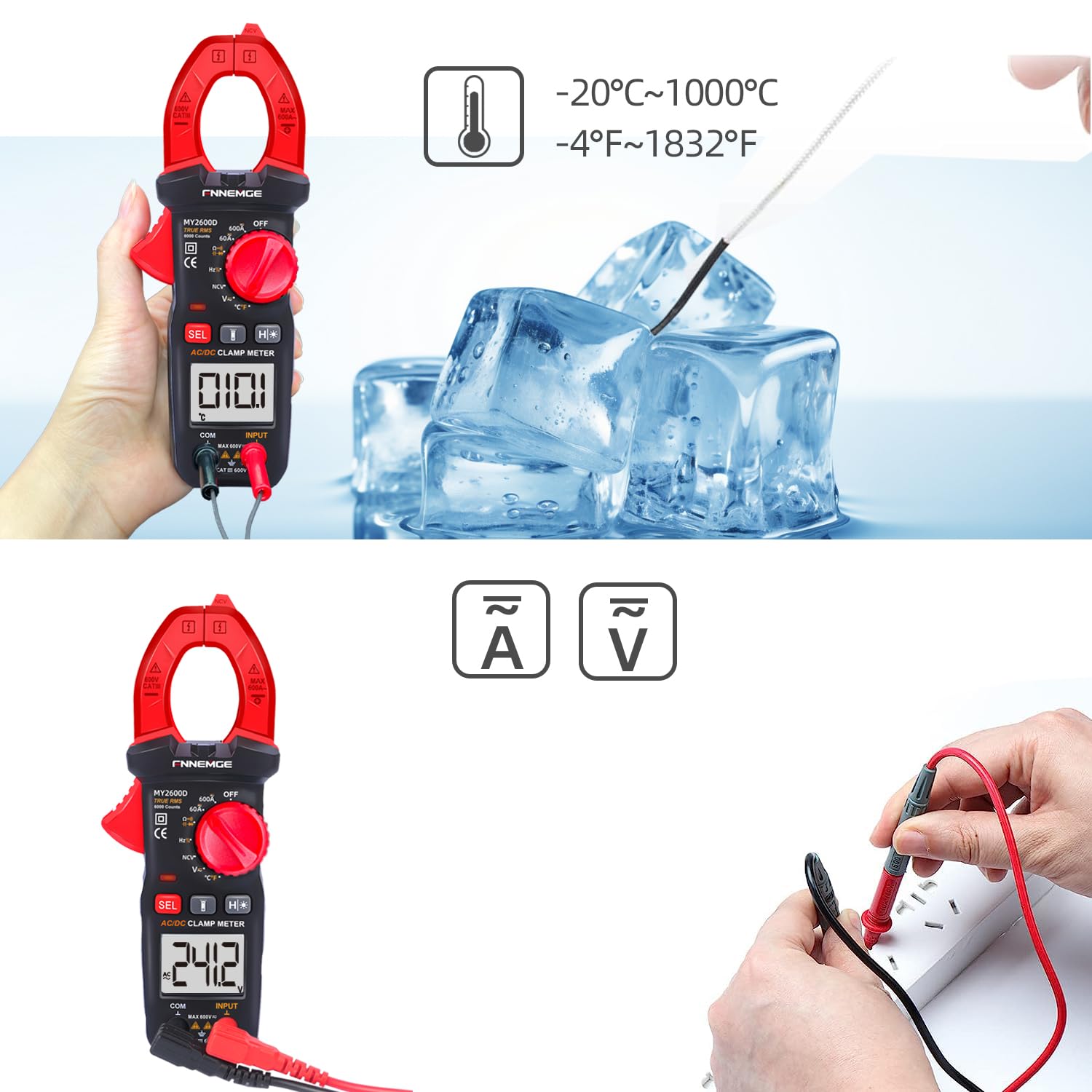
Image 5.4: Using the temperature probe to measure the temperature of ice, demonstrating the meter's temperature function.
5.6 Special Functions
- Non-Contact Voltage (NCV): Rotate the switch to the "NCV" position. Bring the NCV detection probe (top of the clamp jaw) near a live AC voltage source. The meter will indicate the presence of voltage with an audible alarm and visual warning.
- Low Pass Filter (LPF): When measuring AC voltage or current in circuits with variable frequency drives or other noise sources, activate LPF by pressing the dedicated button (if available, or via SEL in AC V/A mode). This filters out high-frequency interference for more accurate True RMS readings.
- Low Impedance (LowZ): This function helps prevent ghost voltages by providing a low impedance input, which drains away stray capacitance. Activate LowZ by selecting the appropriate function on the rotary switch or via the "SEL" button.
- True RMS (TRMS): The meter automatically measures True RMS for AC voltage and current, providing accurate readings for non-sinusoidal waveforms.
- Data Hold (H): Press the "H" button to freeze the current reading on the display. Press it again to release.
- Backlight/Flashlight: Press the backlight button to turn on the LCD backlight. Press the flashlight button to activate the LED flashlight for illuminating the measurement area.

Image 5.5: The clamp meter's flashlight in use, illuminating a dark area for easier measurement, with the NCV indicator visible.
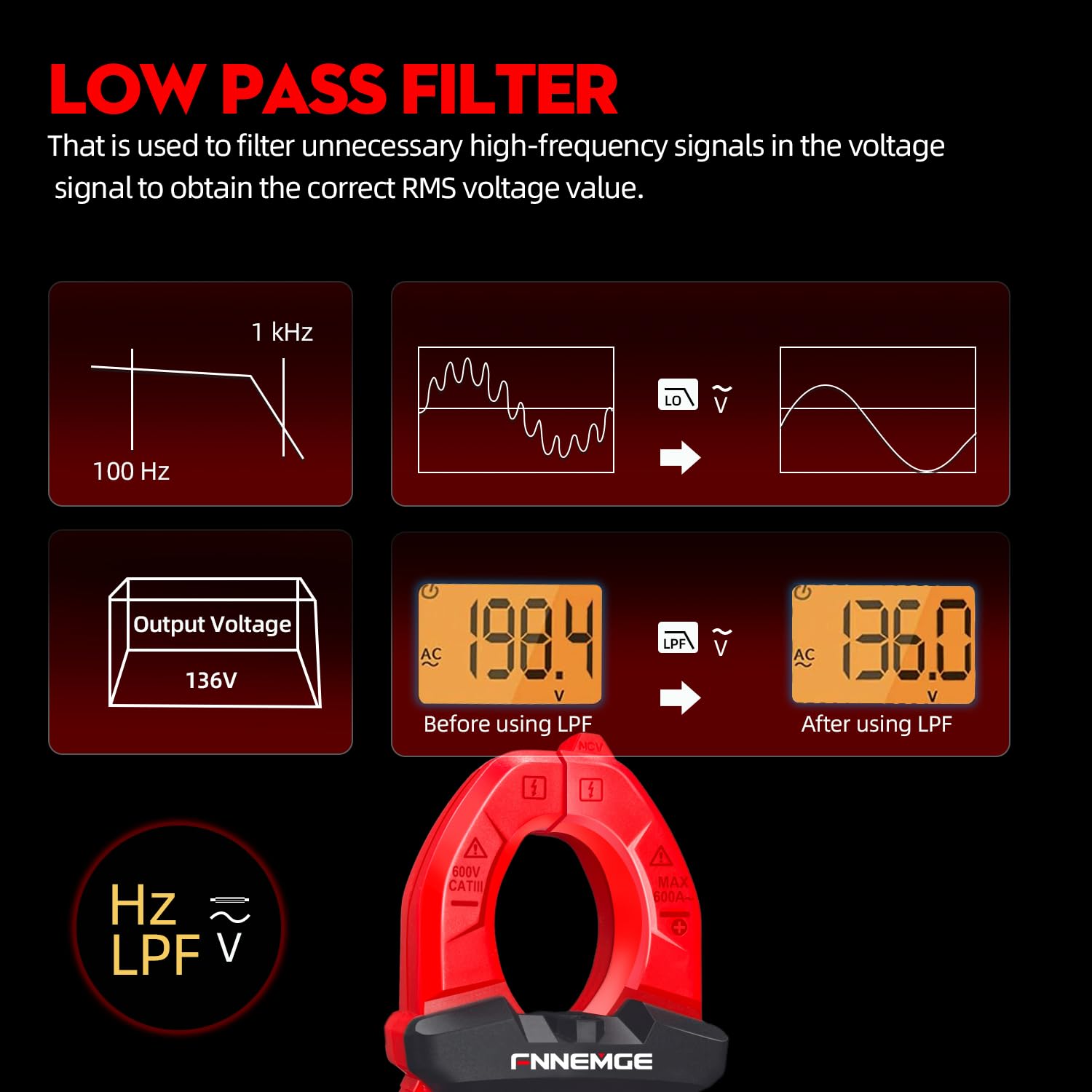
Image 5.6: An illustration detailing the function of the Low Pass Filter (LPF) in filtering out high-frequency noise for accurate voltage readings.
6. Maintenance
6.1 Cleaning
Wipe the meter with a dry, soft cloth. Do not use abrasives or solvents. Keep the terminals free of dirt and moisture.
6.2 Battery Replacement
When the low battery indicator appears on the LCD, replace the batteries as described in Section 4.1. Remove batteries if the meter is not used for an extended period.
6.3 Storage
Store the meter in a cool, dry place, away from direct sunlight and extreme temperatures. Use the provided carrying case for protection.
7. Troubleshooting
If you encounter issues with your FNNEMGE MY2600D, refer to the following common problems and solutions:
- No Display/Meter Not Turning On:
- Check battery installation and ensure correct polarity.
- Replace batteries if they are depleted.
- Ensure the Function Range Switch is not in the "OFF" position.
- Inaccurate Readings:
- Verify the correct measurement function is selected.
- Ensure test leads are properly connected and not damaged.
- For current measurement, ensure only one conductor is within the clamp jaw.
- Check for external interference or strong magnetic fields.
- For AC measurements, consider using the LPF function if high-frequency noise is suspected.
- "OL" or Overload Indication:
- The measured value exceeds the meter's range for the selected function. Switch to a higher range if available, or ensure the input is within the meter's capabilities.
- NCV Not Detecting Voltage:
- Ensure the NCV function is selected.
- Bring the NCV probe closer to the live AC source.
- Verify the voltage source is active.
If problems persist, contact customer support for assistance.
8. Specifications
| Feature | Specification |
|---|---|
| Brand | FNNEMGE |
| Model Number | MY2600D |
| Display | 6000 Counts |
| Measurement Type | True RMS Digital Clamp Meter |
| AC/DC Current Range | 0-600A |
| Max Operating Voltage | 600 Volts |
| Resistance Range | Up to 60 MΩ |
| Capacitance Range | Up to 100 mF |
| Temperature Range | -20°C to 1000°C (-4°F to 1832°F) |
| Special Functions | NCV, LowZ, LPF, Data Hold, Auto Ranging, Backlight, Flashlight |
| Safety Standards | IEC 61010-1, CAT III 600V, CE |
| Power Source | 2 x AAA Batteries (included) |
| Product Dimensions (L x W x H) | 18 x 6.4 x 3.4 cm |
| Product Weight | 400 grams |
| Country of Origin | China |
9. Warranty and Support
FNNEMGE provides a 36-month after-sales service and lifetime technical support for the MY2600D Digital Clamp Meter. If you have any questions, require technical assistance, or need to claim warranty service, please contact FNNEMGE customer support through your purchase platform or the official FNNEMGE website.