
1. Introduction
This manual provides detailed instructions for the installation, operation, and maintenance of your EKAT Android Car Radio. Please read this manual thoroughly before using the product to ensure proper functionality and to maximize your user experience.
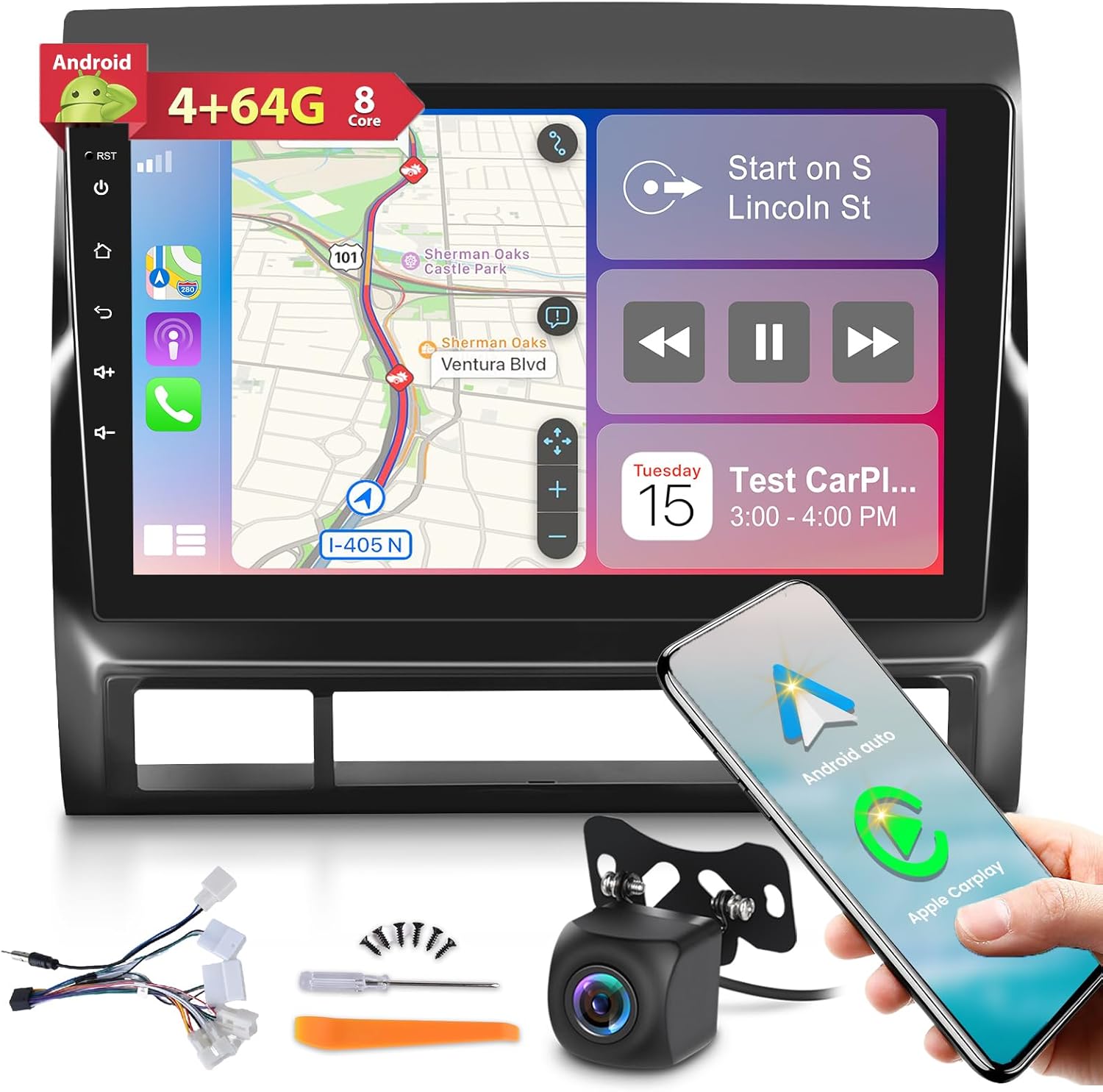
Image 1.1: EKAT Android Car Radio unit with included accessories such as wiring harnesses, GPS antenna, and a backup camera.
2. Vehicle Compatibility
This EKAT Android Car Radio is designed for specific Toyota Tacoma models manufactured between 2005 and 2013. It is crucial to verify your vehicle's dashboard configuration before installation.
- Compatible Models: Toyota Tacoma 2005, 2006, 2007, 2008, 2009, 2010, 2011, 2012, 2013.
- Important Note for JBL Amplifier: If your vehicle is equipped with a JBL amplifier, please contact customer support for specific power cable requirements.
- Original Car Screen: If your original car stereo system includes a factory screen, this radio may not be compatible. Refer to the adaptation diagram below for details.

Image 2.1: Compatibility check for Toyota Tacoma central control panels. This product supports Option A (Low Configuration) and is not compatible with Option B (High Configuration).

Image 2.2: Visual representation of the EKAT Android Car Radio installed in a Toyota Tacoma dashboard, showing the 'Before' and 'After' appearance.
3. Package Contents
Please check the package carefully to ensure all items are present:
- EKAT Android Car Radio Unit
- Power Cable
- RCA Input/Output Cables
- Reversing Camera Input Cable
- USB Cables (x2)
- GPS Antenna
- AHD Rear Camera
- Microphone (MIC)
- Installation Tool
- Original USB Cable (if applicable)

Image 3.1: Detailed view of all items included in the product package, along with the dimensions of the main head unit.
4. Installation
The EKAT Android Car Radio is designed for a plug-and-play installation. However, professional installation is recommended if you are unfamiliar with car audio systems.
4.1. Pre-Installation Checks
- Ensure your vehicle's ignition is off and the battery is disconnected before starting installation.
- Verify the shape of your car's center console matches the compatible configuration (Option A) as shown in Image 2.1.
- Confirm all package contents are present and undamaged.
4.2. Wiring Connections
Carefully connect the provided wiring harnesses to your vehicle's existing wiring. Refer to the connection reference diagram for proper connections.

Image 4.1: Connection reference diagram illustrating the power cable and RCA cable connections for the car radio.
4.3. Backup Camera Installation
If installing the optional AHD backup camera, follow these wiring instructions:
- Connect the red cable (1) to the positive pole of the car's reversing light cable.
- Connect the black cable (2) to the negative pole of the car's reversing light cable.
- The other two red extension cables (3) and (4) are typically not required for standard installation.

Image 4.2: Wiring instructions for connecting the backup camera to the vehicle's reversing light circuit and the head unit.
4.4. Steering Wheel Control Learning
After physical installation, you may need to configure the steering wheel controls:
- Navigate to "Settings" on the radio's interface.
- Access "Factory Setup" and enter the password "1234".
- Select "Party Control Learning" (or similar option) to program your steering wheel buttons.

Image 4.3: Interface for learning steering wheel control functions, allowing users to map vehicle buttons to radio commands.
5. Key Features
The EKAT Android Car Radio offers a range of advanced features to enhance your driving experience:
5.1. Android System & Performance
- Operating System: Latest Android System
- Processor: 8-Core CPU
- Memory: 4GB RAM + 64GB ROM
- Provides smooth and responsive performance for applications and navigation.

Image 5.1: Overview of the Android system's core specifications and connectivity options.
5.2. Display
- Screen Size: 9 Inches
- Resolution: 1280x720 IPS HD
- Type: 2.5D Tempered Glass Touch Screen
- Offers a clear, vibrant, and durable display.
5.3. DSP 32 EQ Audio
- Integrated Digital Sound Processor (DSP) with 32-band equalizer.
- Allows for precise audio customization to match personal preferences and vehicle acoustics.

Image 5.2: User interface for the DSP 32-band equalizer and sound settings.
5.4. CarPlay & Android Auto & Mirror Link
- Supports both Wireless and Wired Apple CarPlay and Android Auto.
- Enables seamless integration with your smartphone for navigation, calls, messages, and music.
- Mirror Link function allows mirroring your smartphone screen directly to the radio display.

Image 5.3: Examples of CarPlay and Android Auto functionality, including voice assistant integration.
5.5. GPS Navigation & WiFi
- Built-in GPS module supports online and offline navigation maps.
- WiFi/Hotspot connectivity allows downloading apps from the Play Store and accessing online services.
5.6. FM RDS Radio
- Supports FM radio with RDS (Radio Data System).
- Includes 30 preset radio stations for quick access.
5.7. Bluetooth 5.0
- Bluetooth 5.0 for stable and fast wireless connections.
- Supports hands-free calling and phonebook synchronization.
5.8. Other Functions
- Steering Wheel Controls (SWC): Compatible with existing steering wheel controls for safe operation.
- Split Screen: Allows running two applications simultaneously on the screen.
- AHD Reversing Camera Support: Displays high-definition video from a compatible backup camera.
- Dual USB Input: Provides multiple ports for media playback and device charging.
- Various UI Desktop Themes: Customizable user interface themes.

Image 5.4: Visual representation of FM RDS Radio, AHD Backup Camera, and Bluetooth 5.0 features.

Image 5.5: Examples of customizable UI themes, steering wheel control functionality, and GPS navigation.
6. Operation
The EKAT Android Car Radio operates similarly to a standard Android tablet, with intuitive touch controls and a customizable interface.
6.1. Basic Navigation
- Home Screen: Tap the home icon to return to the main desktop.
- App Drawer: Swipe up or tap the app icon to access all installed applications.
- Settings: Access system settings for display, sound, network, and device preferences.
6.2. Using CarPlay/Android Auto
- Connect your smartphone via USB or wirelessly (if supported by your phone and the unit).
- The CarPlay or Android Auto interface will automatically launch or can be selected from the main menu.
- Use voice commands or the touchscreen to navigate, make calls, send messages, and play music.
6.3. Split Screen Function
- To activate split screen, open an app, then long-press the recent apps button or drag another app from the app drawer to the side of the screen.
- This allows simultaneous use of two applications, such as navigation and music playback.
7. Maintenance
To ensure the longevity and optimal performance of your EKAT Android Car Radio, follow these maintenance guidelines:
- Screen Cleaning: Use a soft, lint-free cloth to gently wipe the screen. For stubborn smudges, slightly dampen the cloth with water or a screen-safe cleaner. Avoid harsh chemicals or abrasive materials.
- Software Updates: Periodically check for system updates via the settings menu to ensure you have the latest features and security patches.
- Environmental Conditions: Avoid exposing the unit to extreme temperatures, direct sunlight for prolonged periods, or excessive moisture.
- Cable Connections: Ensure all cables are securely connected and free from damage. Loose connections can lead to intermittent issues.
8. Troubleshooting
If you encounter issues with your EKAT Android Car Radio, refer to the following common problems and solutions:
8.1. Radio Does Not Power On
- Check Power Cable: Ensure the power cord is intact and correctly connected to the vehicle's power supply.
- Indicator Light: Verify if the indicator light on the radio button illuminates. If not, recheck all power connections.
- Interface Cord: Confirm that all corresponding interface cords are correctly connected to supply power to the unit.
- Vehicle Power: Ensure the vehicle is providing power to the stereo system.
8.2. No Sound Output
- Volume Level: Check the volume settings on the radio and ensure it is not muted.
- Speaker Connections: Verify that all speaker wires are correctly connected to the radio and are not short-circuited.
- Audio Source: Ensure the correct audio source (e.g., FM, Bluetooth, USB) is selected.
- JBL Amplifier: If your vehicle has a JBL amplifier, confirm you have the correct power cable as mentioned in the compatibility section.
8.3. GPS Signal Issues
- GPS Antenna: Ensure the GPS antenna is securely connected and placed in a location with a clear view of the sky (e.g., on the dashboard, away from metal obstructions).
- Map Data: Verify that your navigation maps are up-to-date and downloaded for offline use if needed.
8.4. Bluetooth Connectivity Problems
- Pairing Mode: Ensure both the radio and your device are in Bluetooth pairing mode.
- Device Visibility: Make sure your phone's Bluetooth is discoverable.
- Distance: Keep your device within close proximity to the radio.
- Clear Cache: On your phone, try forgetting the device and re-pairing.
9. Specifications
| Feature | Specification |
|---|---|
| Brand | EKAT |
| Model Name | EKAT Android Car Radio |
| ASIN | B0CQ799QP3 |
| Operating System | Android |
| CPU | 8-Core |
| RAM | 4GB |
| ROM | 64GB |
| Screen Size | 9 Inches |
| Display Resolution | 1280x720 IPS HD |
| Connectivity Technology | Bluetooth 5.0, WiFi |
| Special Features | Wireless/Wired CarPlay, Android Auto, Mirror Link, DSP 32 EQ Audio, GPS Navigation, FM RDS Radio, Steering Wheel Controls, Split Screen, AHD Camera Support, Dual USB Input |
| Audio Output Mode | Stereo |
| Mounting Type | Dashboard Mount |
| Item Weight | 3.16 pounds |
| Package Dimensions | 9.92 x 8.78 x 3.86 inches |
10. Warranty and Support
10.1. Warranty Information
This EKAT Android Car Radio comes with a 2-year warranty from the date of purchase. Additionally, a 30-day money-back service is offered.
10.2. Customer Support
For any questions, technical assistance, or warranty claims, please contact EKAT customer service:
- If you have not yet purchased the radio, visit the EKAT store page on Amazon (annianxishangmaoyo), click "Ask a question," and send a message to the seller.
- If you have already purchased the radio, contact us through your Amazon Order details.
Our customer support team is available 7 days a week, 24 hours a day to assist you.