
OAWMWAOA VHS-C100
OAWMWAOA VHS-C Cassette Adapter (Model VHS-C100) Instruction Manual
Model: VHS-C100 | Brand: OAWMWAOA
Introduction
The OAWMWAOA VHS-C Cassette Adapter is designed to allow VHS-C and S-VHS-C video cassettes to be played in a standard VHS VCR. This adapter facilitates the viewing of video content recorded on smaller format tapes by converting them to the larger VHS cassette size. It is motorized for automatic tape loading and unloading.
Important Note: This adapter is not compatible with 8mm, MiniDV, or Hi8 video tapes. It is specifically designed for VHS-C and S-VHS-C formats only.
Safety Information
- Do not attempt to force a tape into the adapter.
- Ensure the correct battery type and polarity are used.
- Keep the adapter away from water and extreme temperatures.
- Do not disassemble the adapter, as this may cause damage and void any potential warranty.
- This device contains moving parts; keep fingers clear during operation.
Package Contents
- 1 x OAWMWAOA VHS-C Cassette Adapter (Model VHS-C100)
- Note: AA battery is not included and must be purchased separately.
Product Features
- Compatibility: Supports VHS-C and S-VHS-C video tapes.
- Motorized Operation: Automatic loading and unloading of VHS-C tapes.
- Power Source: Requires one (1) AA dry battery (not included).
- Durable Construction: Manufactured using original material particles.
Setup Instructions
1. Install Battery
The adapter requires one AA battery to power its motorized mechanism. This battery is essential for opening the cassette door and loading/unloading the VHS-C tape.
- Locate the battery compartment on the side of the adapter.
- Slide open the battery compartment cover.
- Insert one (1) AA battery, ensuring correct polarity (+/-) as indicated inside the compartment.
- Close the battery compartment cover securely.

Figure 1: Inserting the AA battery into the adapter.
2. Insert VHS-C Tape
With the battery installed, the adapter is ready to accept a VHS-C tape.
- Gently press the "EJECT" button or slide the release mechanism (if present) on the adapter to open the front door. The motorized mechanism will open the door.
- Carefully insert your VHS-C or S-VHS-C tape into the adapter, ensuring the tape window faces upwards and the tape is oriented correctly.
- Once the tape is seated properly, gently close the adapter's front door. The motorized mechanism will automatically pull the tape into position. Do not force the door closed.

Figure 2: Inserting a VHS-C tape into the adapter.
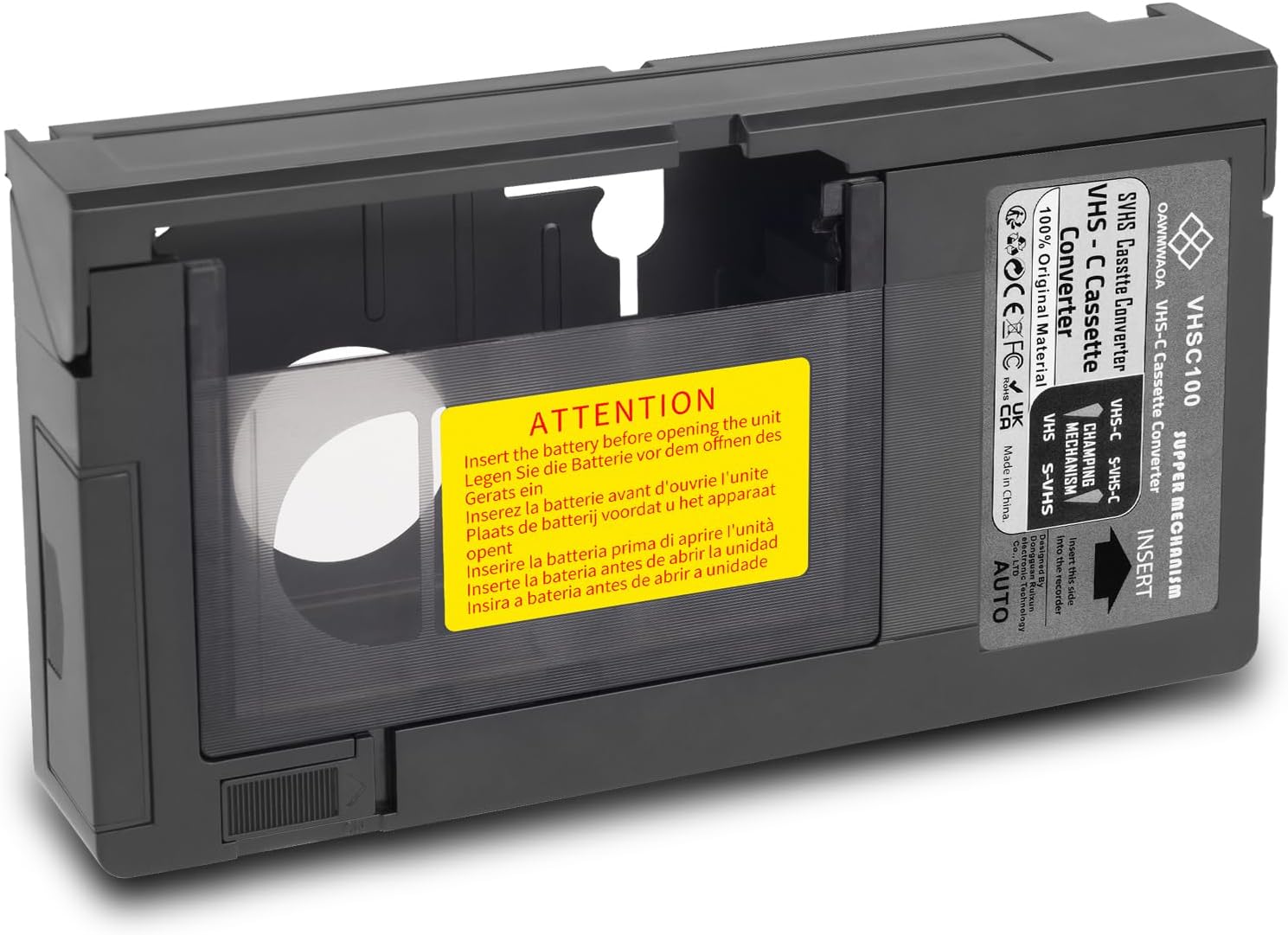
Figure 3: VHS-C tape fully inserted into the adapter.
Operating Instructions
After successfully inserting the VHS-C tape into the adapter, it can now be used like a standard VHS cassette.
- Insert the loaded VHS-C adapter into a standard VHS VCR.
- Operate your VCR as you normally would to play, fast forward, rewind, or stop the tape.
- To remove the VHS-C tape from the adapter, first eject the adapter from the VCR.
- Once the adapter is out of the VCR, press the "EJECT" button or slide the release mechanism on the adapter. The motorized mechanism will open the front door, allowing you to carefully remove the VHS-C tape.

Figure 4: The adapter with its lid open, ready for tape insertion.
Maintenance
- Cleaning: Use a soft, dry cloth to clean the exterior of the adapter. Do not use liquid cleaners or solvents.
- Battery Replacement: If the motorized mechanism becomes slow or unresponsive, replace the AA battery. Remove old batteries promptly to prevent leakage.
- Storage: Store the adapter in a cool, dry place away from direct sunlight and dust when not in use.
Troubleshooting
| Problem | Possible Cause | Solution |
|---|---|---|
| Adapter door does not open/close automatically. | Dead or low battery; incorrect battery insertion. | Replace the AA battery with a fresh one, ensuring correct polarity. |
| VHS-C tape does not load properly into the adapter. | Tape not inserted correctly; obstruction. | Ensure the VHS-C tape is fully and correctly seated before closing the door. Check for any debris. |
| Adapter jams or tape gets stuck. | Damaged VHS-C tape; internal mechanism issue. | Do not force. Gently try to eject the tape. If persistent, contact customer support. Avoid using damaged tapes. |
| No video/audio when playing in VCR. | VCR issue; tape issue; incorrect VCR settings. | Ensure VCR is functioning correctly with other tapes. Check VCR input/output settings. Verify the VHS-C tape itself is not blank or damaged. |
Specifications
- Model: VHS-C100
- Brand: OAWMWAOA
- Compatibility: VHS-C, S-VHS-C (Not compatible with 8mm, MiniDV, Hi8)
- Power Source: 1 x AA Dry Battery (not included)
- Dimensions: Approximately 9.25 x 5.55 x 1.3 inches (23.5 x 14.1 x 3.3 cm)
- Weight: Approximately 11.3 ounces (320 grams)
- Color: Black

Figure 5: Product dimensions.

Figure 6: Compatibility overview, showing support for VHS-C and non-support for MiniDV and Hi8.
Warranty and Support
For warranty information or technical support, please refer to the retailer's return policy or contact the manufacturer directly through their official channels. Keep your purchase receipt for proof of purchase.