
1. Introduction
Thank you for choosing the Bomieux Kids Digital Watch. This multi-functional sports watch is designed to be a practical and stylish accessory for children aged 5-15. It features a clear LED display and a comfortable silicone strap. This manual provides essential information on how to set up, operate, and maintain your watch to ensure optimal performance and longevity.
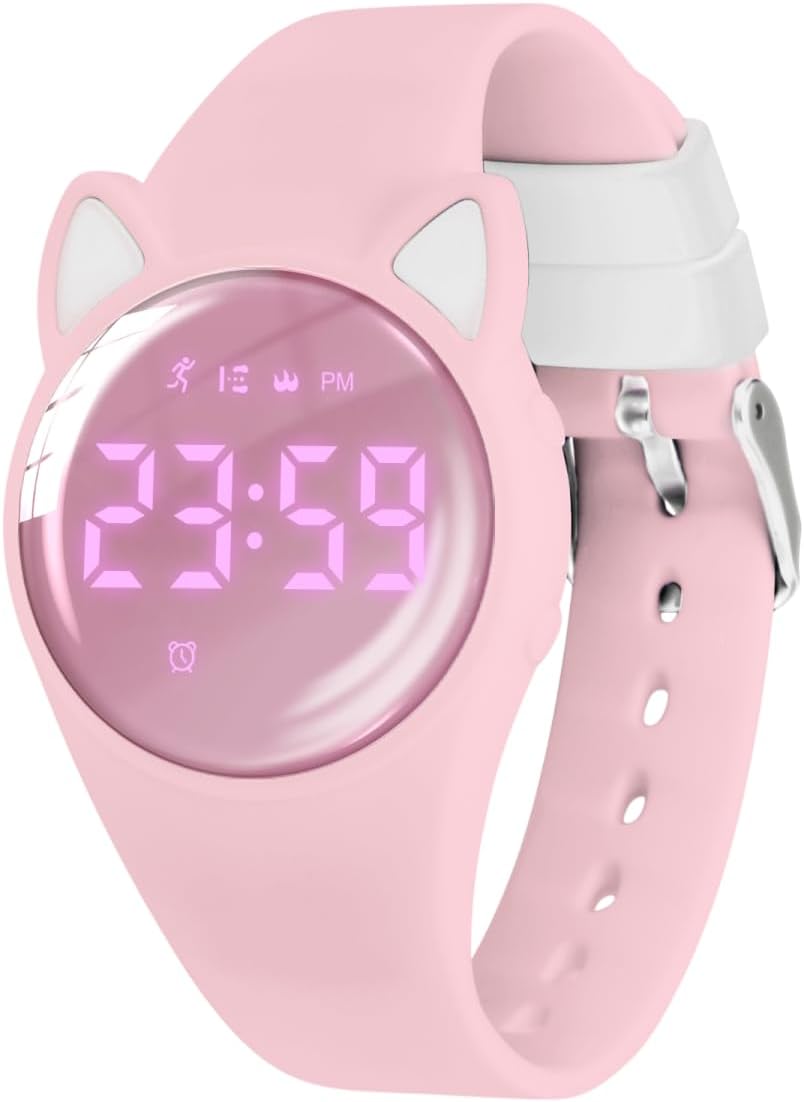
Image 1.1: The Bomieux Kids Digital Watch in pink, displaying the time 23:59.
2. Product Features
The Bomieux Kids Digital Watch offers a range of functions to support daily activities and fitness tracking:
- Multi-functional Display: Shows time, calendar, and includes an alarm clock, stopwatch, pedometer, calorie counter, and mileage tracker.
- Fitness Tracking: Intelligently monitors steps, calories burned, and distance without requiring a phone connection or app.
- Silent Vibration Alarm: Two customizable silent vibration alarms help manage study, rest, and hydration times without disturbing others.
- Rechargeable Design: Features a convenient USB charging port integrated into the dial for easy charging with any standard USB adapter.
- Waterproof for Daily Use: Designed for daily life activities such as hand washing, splashing, and rainy days (not suitable for swimming or bathing).
- Durable Construction: Made with an environmentally friendly ABS case and a high-quality stainless steel back cover.

Image 2.1: An overview of the watch's key features, including time, water resistance, pedometer, and USB charging.
3. Setup
3.1 Charging the Watch
The watch features a built-in USB charging port. To charge:
- Gently pull the watch dial out of the silicone strap. The USB charging port will be exposed.
- Insert the USB port directly into any standard USB adapter (e.g., smartphone charger, computer USB port, power bank).
- A full charge typically takes approximately 1 hour.
- Once fully charged, the watch can operate for 10-20 days depending on usage.
- If charging fails, rotate the module 180 degrees and reinsert it into the phone adapter.

Image 3.1: Visual guide for detaching the watch module and connecting it to a USB power source for charging.

Image 3.2: The watch module being charged via a laptop's USB port, highlighting the integrated charging design.
3.2 Initial Setup (Time and Date)
Upon first use or after a long period of inactivity, you may need to set the correct time and date. Refer to the watch's buttons for navigation and setting adjustments. Typically, a long press on a specific button allows entry into setting mode, and short presses cycle through options or adjust values.
4. Operating Instructions
4.1 Basic Operation
To wake up the screen and view the time or other information, simply press any button on the watch.
4.2 Pedometer and Fitness Tracking
The watch automatically tracks steps, calculates calories burned, and estimates mileage throughout the day. No external app or phone connection is required. Wear the watch on your wrist, and it will continuously monitor your child's activity.

Image 4.1: The watch's fitness tracker function, displaying steps, distance, and calories, shown with children engaged in activity.
4.3 Silent Vibration Alarm
The watch supports two silent vibration alarms. These can be set to remind children about various activities such as study time, breaks, or drinking water. The gentle vibration ensures that others are not disturbed, making it suitable for quiet environments like classrooms or libraries.

Image 4.2: A child sleeping peacefully, illustrating the silent vibration alarm feature of the watch.
4.4 Stopwatch
The integrated stopwatch function allows for timing various activities. Consult the watch's button layout for specific instructions on how to start, stop, and reset the stopwatch.
5. Maintenance
5.1 Water Resistance
The watch is rated for 50M water resistance, making it suitable for daily activities such as:
- Hand washing
- Rainy days
- Splash protection
Important Note:
Do not wear the watch when it is completely submerged in water, such as during swimming or bathing, as this may damage the device.

Image 5.1: The watch demonstrating its 50M water resistance, suitable for splashes and rain.
5.2 Cleaning
To clean the watch, wipe it gently with a soft, damp cloth. Avoid using harsh chemicals or abrasive materials, which could damage the watch's finish or components.
6. Troubleshooting
If you encounter any issues with your Bomieux Kids Digital Watch, please consider the following common solutions:
- Watch not turning on: Ensure the watch is fully charged. Refer to Section 3.1 for charging instructions.
- Incorrect time/date: Follow the instructions in Section 3.2 to reset the time and date.
- Pedometer not tracking: Ensure the watch is worn securely on the wrist. Movement tracking requires consistent wear.
- Alarm not vibrating: Check that the alarm is correctly set and activated.
For persistent issues, please contact Bomieux customer support.
7. Specifications
| Feature | Detail |
|---|---|
| Model Number | T6F-DJ-Pink-Y |
| Brand | Bomieux |
| Case Thickness | 12.4mm / 0.49 inches |
| Product Weight | 25g / 0.88oz |
| Band Length | 22.5cm / 8.86 inches |
| Wrist Fit Range | 14cm (5.51in) to 20cm (7.87in) |
| Water Resistance | 50M (Daily use, splash proof) |
| Charging Time | Approx. 1 hour |
| Battery Life | 10-20 days (depending on usage) |
| Department | Boys (suitable for boys and girls) |
| First Available | December 13, 2023 |

Image 7.1: Detailed dimensions and specifications of the watch, including wrist fit.
8. Warranty and Support
Bomieux is committed to providing high-quality products. If you have any questions, concerns, or require assistance with your Bomieux Kids Digital Watch, please do not hesitate to contact Bomieux customer support. Refer to the product packaging or the Bomieux official website for contact information.