
1. Introduction
This manual provides comprehensive instructions for the installation, operation, and maintenance of your FilterTech PremiumPlus Compatible Replacement Water Filter Set, designed for use with Coway CHP-08AR water purification systems. Please read this manual thoroughly before proceeding with installation or use to ensure proper function and longevity of your filters.
2. Safety Information
Important: Before consuming water after filter replacement, it is crucial to flush the new filters thoroughly. This process ensures that any air trapped within the filter system is discharged and removes carbon powder (charcoal powder) that may be present from the filter manufacturing process.
Flushing Procedure:
- After installing each new filter, allow water to flow through it for approximately 2 minutes.
- This will typically flush about 4 liters of water.
- Repeat this flushing procedure for each individual filter installed in your system.
Failure to flush filters properly may result in cloudy water or the presence of carbon particles initially.
3. Package Contents
Your FilterTech PremiumPlus Replacement Water Filter Set for Coway CHP-08AR typically includes the following items:
- Multiple replacement water filters (e.g., 3 filters for a 1-year supply, depending on the specific set purchased).
- Instruction manual (this document).
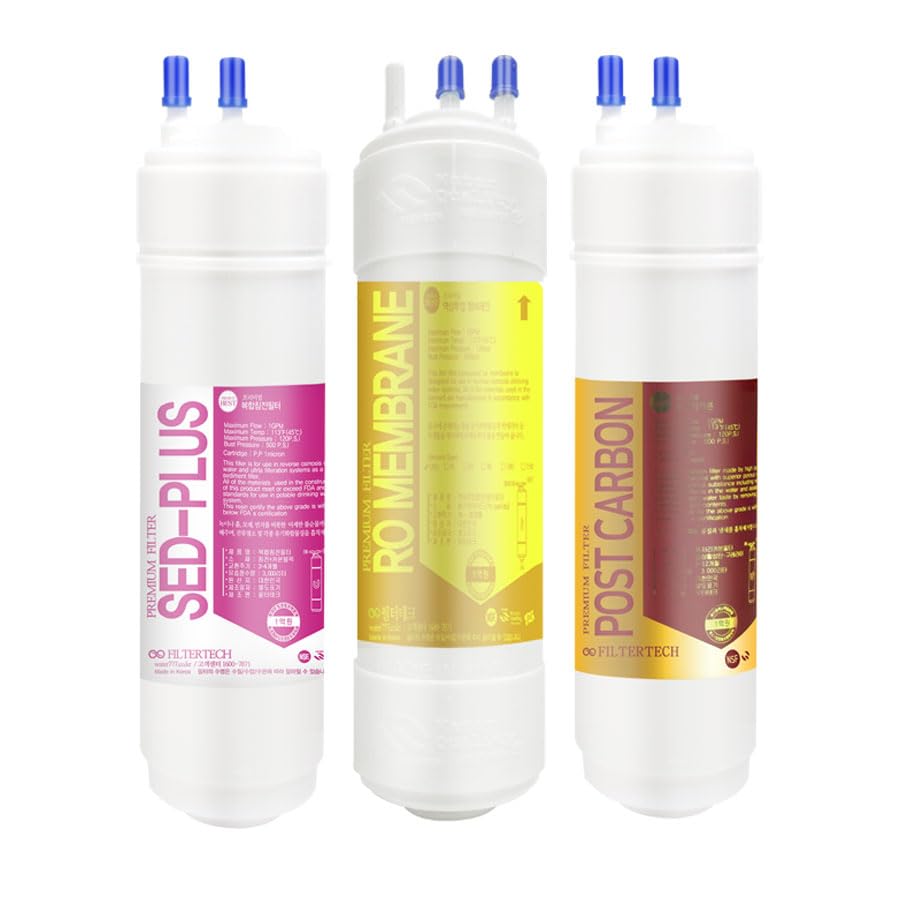
This image displays the 3EA PremiumPlus Filtertech Compatible Replacement Water Filter set, typically including multiple filters for a year's supply. The exact number and type of filters may vary based on the specific product package.
4. Installation Guide
This section outlines the general steps for replacing water filters in a compatible Coway CHP-08AR system. Refer to your Coway system's original manual for specific filter compartment locations and locking mechanisms.
- Prepare the System: Turn off the water supply to your Coway water purifier. Unplug the unit from the power outlet.
- Drain Water: Dispense any remaining water from the system to relieve pressure and minimize spills.
- Locate Filters: Open the filter compartment cover on your Coway CHP-08AR system. Identify the filters to be replaced.
- Remove Old Filters: Depending on your system, filters may twist out or pull out. Follow the specific removal instructions for your Coway model. Dispose of old filters responsibly.
- Install New Filters:
- Unpack the new FilterTech PremiumPlus replacement filter.
- Insert the new filter into the designated slot. Ensure it is seated correctly and securely.
- Twist or push the filter into place until it locks, if applicable.
- Repeat for All Filters: Install all replacement filters included in your set, one by one.
- Restore System: Close the filter compartment cover. Turn on the water supply to the purifier. Plug the unit back into the power outlet.
- Flush Filters: Proceed immediately to the "Operating Instructions" section to perform the essential flushing procedure.
5. Operating Instructions (Initial Flushing)
After installing new filters, it is critical to perform an initial flushing to prepare them for use. This removes air and fine carbon particles.
- Ensure the water supply to your Coway system is fully open.
- Dispense water from the cold water tap of your purifier.
- Allow water to flow continuously for approximately 2 minutes (about 4 liters) for each filter that was replaced. If you replaced multiple filters, ensure each one has been flushed adequately.
- Initially, the water may appear cloudy or contain black specks. This is normal and will clear as flushing continues.
- Once the water runs clear, the filters are ready for regular use.
6. Maintenance
Regular maintenance ensures optimal performance and water quality from your filtration system.
- Filter Replacement Schedule: The FilterTech PremiumPlus Replacement Water Filter Set is designed for a 1-year supply. It is recommended to replace filters according to the schedule provided by your Coway CHP-08AR system's manufacturer, or at least once a year, whichever comes first. Factors like water quality and usage volume can affect filter lifespan.
- System Cleaning: Periodically clean the exterior of your Coway water purifier with a soft, damp cloth. Avoid abrasive cleaners.
- Water Quality Monitoring: If you notice a decrease in water flow, a change in taste, or unusual odors, it may indicate that filters need to be replaced sooner than scheduled.
7. Troubleshooting
This section addresses common issues you might encounter.
- Cloudy Water / Black Specks After Installation: This is typically due to carbon fines from new filters. Continue flushing the filters as described in the "Operating Instructions" section until the water runs clear.
- Low Water Flow:
- Check if the water supply valve to the purifier is fully open.
- Ensure filters are correctly seated and not obstructed.
- If filters are old, they may be clogged. Replace them according to the maintenance schedule.
- Unusual Taste or Odor:
- Ensure filters were properly flushed after installation.
- If filters are past their recommended lifespan, they may no longer be effective. Replace them.
- Leaks:
- Turn off the water supply immediately.
- Check all connections and ensure filters are securely installed.
- Verify that O-rings or gaskets are properly seated and not damaged.
If problems persist, contact customer support.
8. Specifications
| Feature | Detail |
|---|---|
| Brand | FilterTech |
| Compatibility | Coway CHP-08AR Water Purifier Systems |
| Material | Carbon Fiber |
| Product Dimensions (Approx.) | 6 x 11 x 22 inches (packaging/set dimensions) |
| Number of Items in Set | 3 (as per product details, may vary by package) |
| Manufacturer | FilterTech |
| Date First Available | December 4, 2018 |
9. Warranty and Support
For warranty information or technical support regarding your FilterTech PremiumPlus Replacement Water Filter Set, please refer to the packaging or contact FilterTech customer service directly. Keep your purchase receipt as proof of purchase.
Contact Information: Please visit the official FilterTech website or refer to your product packaging for the most current customer support contact details.