
1. Introduction
This manual provides comprehensive instructions for the setup, operation, and maintenance of your VINABTY 6711R1P081G replacement remote control. This remote is specifically designed to be compatible with Insignia DVD Player VCR Combo models IS-DVD040924 and IS-DVD040924A, offering a direct replacement without the need for programming.
2. Product Overview
The VINABTY 6711R1P081G remote control is an ergonomic, black-colored replacement unit. It provides full functionality for your compatible Insignia DVD Player VCR Combo, allowing control over DVD and VCR playback, menu navigation, and other essential features.

Figure 2.1: Front view of the VINABTY 6711R1P081G remote control. This image displays the layout of all control buttons, including power, numerical keys, DVD/VCR mode selection, navigation, and playback controls.
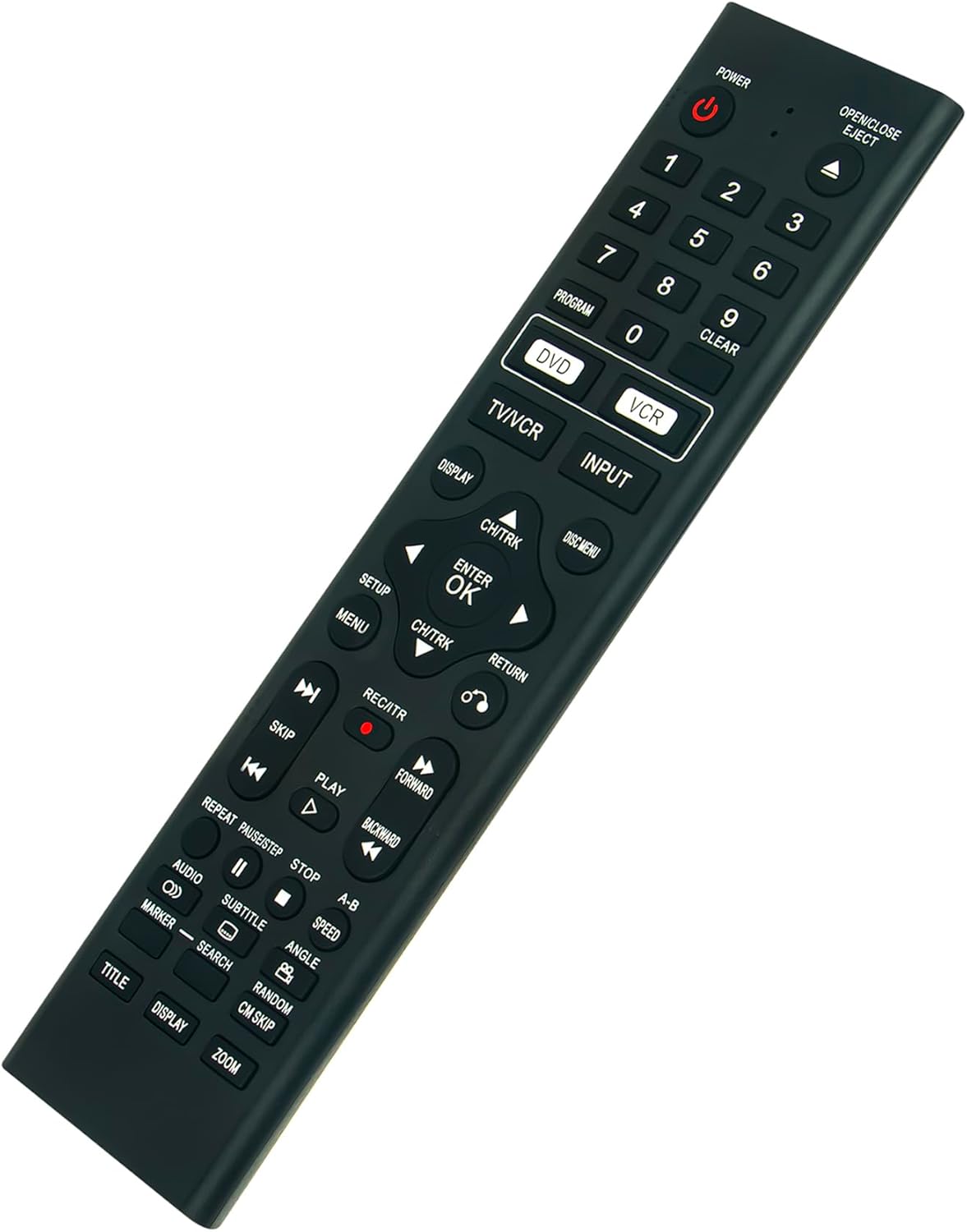
Figure 2.2: Angled view of the VINABTY 6711R1P081G remote control. This perspective illustrates the remote's ergonomic shape and button placement from a side angle.
3. Setup
3.1 Battery Installation
The remote control requires two (2) AAA batteries (not included) for operation. Follow these steps to install the batteries:
- Locate the battery compartment cover on the back of the remote control.
- Press down on the tab and slide the cover downwards to open the compartment.
- Insert two AAA batteries, ensuring the positive (+) and negative (-) terminals align correctly with the markings inside the compartment.
- Slide the battery compartment cover back into place until it clicks securely.
Note: No programming is required for this replacement remote control. It is ready for use once batteries are installed.

Figure 3.1: Back view of the VINABTY 6711R1P081G remote control, illustrating the battery compartment location.
4. Operating Instructions
This section details the primary functions of the remote control buttons.
- POWER: Turns the DVD Player VCR Combo on or off.
- OPEN/CLOSE EJECT: Opens or closes the disc tray, or ejects a VHS tape.
- Numerical Buttons (0-9): Used for direct track/chapter selection or inputting numbers.
- DVD / VCR: Switches between DVD and VCR playback modes.
- TV/VCR: Switches the TV input to the VCR.
- INPUT: Selects the input source on the connected display.
- DISPLAY: Shows on-screen information about the current playback.
- DISC MENU: Accesses the DVD disc menu.
- SETUP: Enters the system setup menu.
- MENU: Accesses the main menu.
- CH/TRK (Up/Down): Navigates through channels or tracks.
- Directional Arrows (Left/Right/Up/Down): Navigates through menus and options.
- ENTER / OK: Confirms a selection.
- RETURN: Returns to the previous menu or screen.
- PLAY (►): Starts or resumes playback.
- PAUSE/STEP (⏸): Pauses playback or advances frame by frame.
- STOP (■): Stops playback.
- SKIP (⏭ / ⏮): Skips to the next or previous track/chapter.
- FORWARD (⏩) / BACKWARD (⏪): Fast forwards or rewinds playback.
- REC/ITR (●): Initiates recording (VCR mode).
- AUDIO: Changes audio tracks or languages.
- SUBTITLE: Toggles or selects subtitle options.
- ZOOM: Adjusts the screen zoom level.
- TITLE: Accesses the DVD title menu.
5. Maintenance
5.1 Cleaning
To clean the remote control, use a soft, dry cloth. For stubborn dirt, lightly dampen the cloth with water or a mild cleaning solution. Avoid using abrasive cleaners or solvents, as these can damage the remote's surface and buttons.
5.2 Battery Replacement
Replace batteries when the remote control becomes unresponsive or its range decreases. Always replace both batteries simultaneously with new AAA batteries. Do not mix old and new batteries, or different types of batteries, as this can lead to leakage or malfunction.
Dispose of used batteries according to local regulations.
6. Troubleshooting
- Remote not responding:
- Ensure batteries are installed correctly with the correct polarity.
- Replace old batteries with new ones.
- Check for any obstructions between the remote control and the DVD Player VCR Combo's infrared sensor.
- Ensure you are within the effective operating range and line of sight of the device.
- Specific functions not working:
- Verify that the remote is in the correct mode (DVD or VCR) for the function you are trying to perform.
- Some functions may only be available in specific menus or playback states.
7. Specifications
| Feature | Description |
|---|---|
| Model Number | 6711R1P081G |
| Compatible Devices | Insignia DVD Player VCR Combo IS-DVD040924, IS-DVD040924A |
| Battery Type | 2 x AAA (not included) |
| Color | Black |
| Product Dimensions | 8.2 x 2 x 0.7 inches |
| Item Weight | 3 ounces |
| Special Feature | Ergonomic design |
8. Warranty and Support
For any questions, concerns, or support regarding your VINABTY 6711R1P081G replacement remote control, please contact the seller or manufacturer directly. Please refer to your purchase documentation for specific warranty details and contact information.