
1. Introduction
This manual provides essential information for the proper installation, operation, and maintenance of your SHYEEH WJ-CO999 Carbon Monoxide Detector. Please read it thoroughly before use and retain it for future reference.
Important Safety Information
- This device is designed to detect carbon monoxide (CO) gas. It is not a smoke detector or a fire alarm.
- Carbon monoxide is an invisible, odorless, and tasteless gas that can be fatal.
- Regular testing and maintenance are crucial for ensuring proper device function.
- Do not paint the detector. Painting can interfere with the sensor's operation.
2. Product Overview
The SHYEEH WJ-CO999 Carbon Monoxide Detector features an advanced electrochemical sensor for accurate CO detection, an LCD display for real-time readings, and an audible alarm for warnings.
Components

- Alarm Light (Red): Illuminates during a CO alarm.
- Operate Light (Green): Flashes every 30 seconds to indicate normal operation.
- Buzzer: Emits an audible alarm during CO detection or test.
- Test Button: Used to test the alarm function and silence it.
- LCD Display: Shows real-time CO concentration in parts per million (ppm) and battery status.
3. Setup and Installation
Battery Installation
The detector is powered by 3 x 1.5V AA batteries (not included). Ensure batteries are inserted with correct polarity.
- Twist the back cover counter-clockwise to open the battery compartment.
- Insert three 1.5V AA batteries, observing the correct polarity (+/-).
- Align the back cover and twist clockwise until it clicks securely into place.
Mounting Location
For optimal detection, install the CO detector in areas where CO is likely to accumulate or where occupants sleep. Avoid dead air spaces, corners, or areas near ventilation.
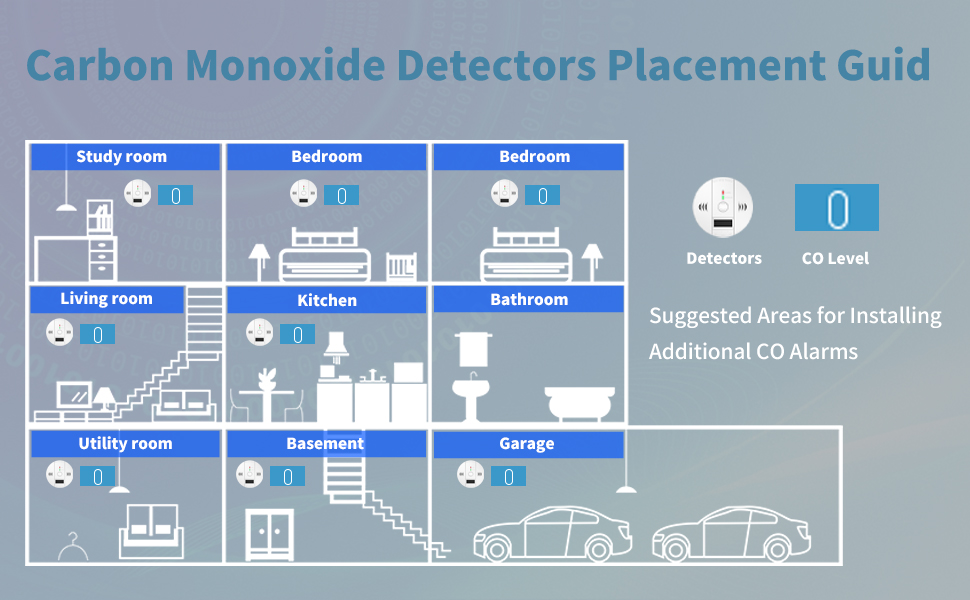
- Install at least one detector on each level of your home, especially near sleeping areas.
- Place detectors at least 5 feet (1.5 meters) away from fuel-burning appliances.
- Mount on a wall or ceiling. For wall mounting, place the detector at eye level. For ceiling mounting, place it at least 6 inches (15 cm) from any wall.
- Avoid placing near windows, doors, or vents where drafts could affect readings.
Physical Installation

- Choose a suitable mounting location.
- Use the provided screws and plastic plugs to secure the mounting bracket to the wall or ceiling.
- Align the detector with the mounting bracket and twist clockwise to secure it.
4. Operating Instructions
Normal Operation
Once batteries are installed, the detector will perform a self-test. The green "Operate" light will flash every 30 seconds, and the LCD will display "0 ppm" in normal conditions.
Alarm Criteria
The detector is programmed to alarm at specific CO concentration levels and durations:

- 50 ppm: Alarm within 60-90 minutes.
- 100 ppm: Alarm within 10-40 minutes.
- ≥300 ppm: Alarm within 3 minutes.
When an alarm occurs, the red "Alarm" light will flash, the buzzer will emit a loud sound (85dB), and the LCD will display the detected CO level.
Testing the Detector
Press and hold the "Test" button for a few seconds. The alarm will sound, and the LCD will light up, indicating the unit is functioning correctly. Release the button to stop the test.
Silencing the Alarm
In case of a false alarm or after clearing a CO event, press the "Test" button to silence the alarm. The detector will re-enter monitoring mode after a few minutes if CO levels return to normal.
5. Maintenance
Regular Cleaning
- Clean the detector regularly (at least once a month) to prevent dust accumulation from affecting performance.
- Use a soft, damp cloth to wipe the exterior. Do not use cleaning sprays or solvents.
- Do not paint the detector, as this can block the sensor openings.
Battery Replacement
When the batteries are low, the detector will chirp periodically, and the LCD may display a low battery indicator. Replace all three AA batteries promptly.
- Twist the back cover counter-clockwise to open.
- Remove old batteries and insert new 1.5V AA batteries, ensuring correct polarity.
- Close the back cover by twisting clockwise until it locks.
- Test the detector after replacing batteries.
6. Troubleshooting
Common Issues and Solutions
| Problem | Possible Cause | Solution |
|---|---|---|
| Detector chirps periodically. | Low battery. | Replace all three AA batteries. |
| Alarm sounds without visible CO source. | High CO levels, false alarm, or sensor malfunction. | Ventilate the area immediately. If alarm persists, evacuate and call emergency services. If false, press test button to silence. |
| LCD display is blank. | No batteries, dead batteries, or unit malfunction. | Install or replace batteries. If still blank, contact support. |
| Detector does not respond to test button. | Dead batteries or unit malfunction. | Replace batteries. If issue persists, contact support. |
What to do if the Alarm Sounds
- Immediately move to fresh air outdoors or open doors/windows to ventilate the area.
- Do a head count to check that all persons are accounted for.
- Do not re-enter the premises or move away from the open door/window until emergency services responders have arrived, the premises have been aired out, and your alarm remains in its normal condition.
- Call your emergency services (Fire Department or 911).
7. Specifications
| Feature | Detail |
|---|---|
| Model Number | WJ-CO999 |
| Power Source | 3 x 1.5V AA Batteries (Not Included) |
| Sensor Type | Electrochemical |
| Alarm Volume | ≥85dB at 1 meter |
| CO Detection Range | 0-999 ppm |
| Operating Temperature | 5°C to 40°C (41°F to 104°F) |
| Operating Humidity | 20% to 90% RH (non-condensing) |
| Product Dimensions | Approximately 4.25 x 4.21 x 1.93 inches |
| Item Weight | 3.84 ounces |
8. Warranty and Support
For warranty information or technical support, please refer to the product packaging or contact SHYEEH customer service directly. Keep your purchase receipt as proof of purchase.


