
EDISHINE HOWL08C
EDISHINE Outdoor Wall Light with GFCI Outlet User Manual
Model: HOWL08C
Product Overview
The EDISHINE Outdoor Wall Light is a versatile lighting fixture designed for exterior use, featuring a built-in GFCI outlet, motion sensor, and dusk-to-dawn functionality. Its contemporary design with water ripple glass and a black and gold finish makes it suitable for various outdoor settings.

Image: EDISHINE Outdoor Wall Light, showcasing its design and integrated GFCI outlet.
Key Features:
- Built-in 2 GFCI Outlets: Provides convenient and safe power access for outdoor appliances (Max 15A, 1800W).
- Upgraded 3 Lighting Modes: Auto+ (dim to full brightness on motion), Auto (off to full brightness on motion), and PC (dusk to dawn).
- Motion Sensor & Photocell Sensor: Super-responsive motion detection (10-33ft, 140° range) and automatic light sensing.
- Weatherproof Aluminum Material: Constructed from die-cast aluminum with a high-tech coating for rust and corrosion resistance, suitable for diverse weather conditions.
- E26 Base Compatibility: Works with E26 bulbs (incandescent or dimmable LED recommended, bulbs not included).
Setup and Installation
Before beginning installation, ensure the power supply to the installation area is turned off at the circuit breaker. This fixture is designed for surface mounting and should be installed at least 6 feet above the ground for optimal performance of the motion sensor.
Included Components:
- Wall Light Fixture
- Wire Connectors
- Mounting Screw
- Instruction Manual
- E26 Bulb (possibly, but generally not included)
Installation Steps:
Step 1: Prepare Mounting Plate. Attach the mounting plate to the junction box. Ensure the screws are securely fastened.

Image: Diagram showing how to attach the mounting plate to the wall.
Step 2: Secure Mounting Plate. Use the provided screws to firmly secure the mounting plate to the wall or junction box.

Image: Diagram illustrating the securing of the mounting plate with screws.
Step 3: Wire Connections. Connect the fixture's wires to your household wiring using the wire connectors. Match live to live, neutral to neutral, and ground to ground. Ensure all connections are secure.

Image: Diagram showing the electrical wire connections using wire nuts.
Step 4: Mount Fixture. Carefully align the fixture with the mounting plate and secure it using the provided screws or nuts. Ensure the fixture is flush against the wall.

Image: Diagram showing the final mounting of the light fixture onto the secured plate.
Step 5: Install Bulb. Insert an E26 base bulb (not included) into the socket. For best results with all modes, use an incandescent or dimmable LED bulb.
Step 6: Activate GFCI Outlet. After installation, turn on the power. Press the "TEST" button on the GFCI outlet once, then press the "RESET" button to activate the outlet. This ensures proper functionality and safety.

Image: Close-up of the built-in GFCI outlets, highlighting the TEST and RESET buttons.
Operating Instructions
The EDISHINE Outdoor Wall Light offers three distinct operating modes, selectable via a switch located on the sensor module. Familiarize yourself with each mode to optimize lighting for your needs.

Image: Close-up of the sensor module showing the PC, Auto, and Auto+ mode selection switch, along with adjustable settings for brightness, time, and sensitivity.
Lighting Modes:
- 1. Auto+ Mode:
In this mode, the light will illuminate at 20%-50% brightness during the night. Upon detection of motion, it will switch to 100% brightness. After 20-180 seconds of no motion, it will return to the dim light setting. This mode is ideal for continuous low-level illumination with full brightness on demand.
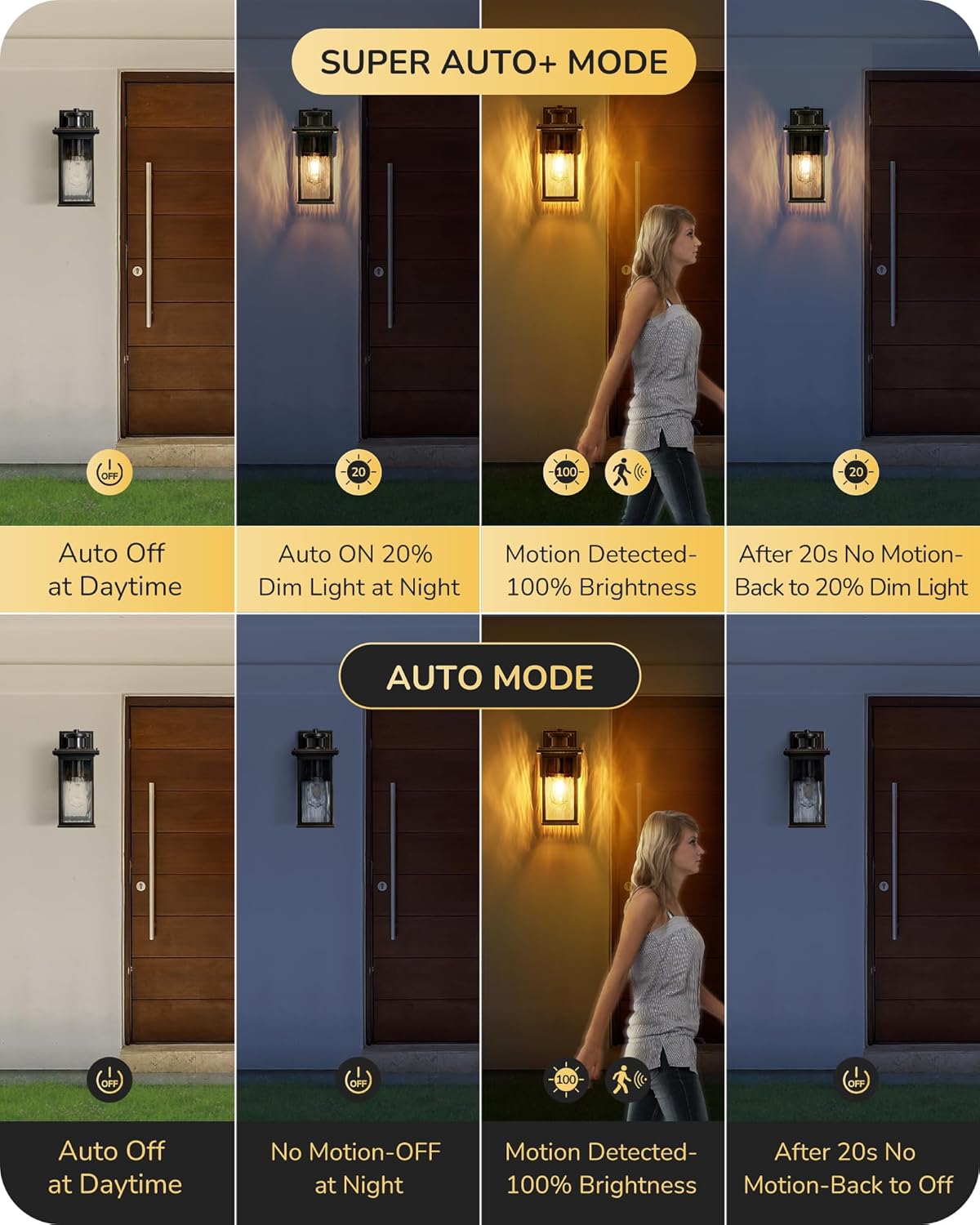
Image: Visual representation of Auto+ mode, showing dim light at night, full brightness on motion, and return to dim after no motion.
- 2. Auto Mode:
The light remains off during the daytime. At night, it will automatically turn on to 100% brightness when motion is detected. After 20-180 seconds of no motion, the light will turn off completely. This mode is energy-efficient, providing light only when needed.

Image: Diagram illustrating Auto mode, showing the light off during the day and activating to full brightness only when motion is detected at night.
- 3. PC Mode (Photocell / Dusk to Dawn):
In PC mode, the light remains off during the day and automatically turns on at dusk, staying on until dawn. This mode provides continuous illumination throughout the night, based on ambient light levels.

Image: Visual of PC mode, demonstrating the light turning on automatically at dusk and off at dawn.
Motion Sensor & Photocell Sensor:
The integrated PIR motion sensor detects movement within a range of 10-33 feet and a 140° detection angle. The photocell sensor ensures the light operates only when ambient light conditions require it (e.g., at night for motion modes, or continuously from dusk to dawn in PC mode).

Image: Diagram illustrating the motion sensor's detection range (10-33ft) and angle (140°), with adjustable lighting time (20-180s).
GFCI Outlet Usage:
The two built-in GFCI (Ground Fault Circuit Interrupter) outlets provide extra protection against electrical shock. They are suitable for two-prong and three-prong plugs and can handle a maximum power of 15A (1800W). Always ensure the GFCI outlet is reset after installation or a power interruption by pressing the "TEST" then "RESET" buttons.
Maintenance
Regular maintenance ensures the longevity and optimal performance of your EDISHINE Outdoor Wall Light. Always turn off the power at the circuit breaker before performing any maintenance.
- Cleaning: Periodically clean the fixture with a soft, damp cloth. Avoid using abrasive cleaners or solvents that could damage the finish or glass.
- Inspection: Annually inspect the wiring and connections for any signs of wear, corrosion, or damage. Ensure all screws and mounting hardware remain tight.
- GFCI Test: Test the GFCI outlets monthly by pressing the "TEST" button. The "RESET" button should pop out, indicating the circuit has tripped. Press "RESET" to restore power. If the GFCI does not trip or reset, it may be faulty and should be replaced by a qualified electrician.
- Bulb Replacement: Replace the E26 bulb as needed. Ensure the replacement bulb's wattage does not exceed the fixture's maximum rating (60W MAX).

Image: Visual demonstrating the light's weatherproof properties, including resistance to water, snow, sun, and wind.
Troubleshooting
If you encounter issues with your EDISHINE Outdoor Wall Light, refer to the following common problems and solutions. Always disconnect power before attempting any repairs.
| Problem | Possible Cause | Solution |
|---|---|---|
| Light does not turn on. |
|
|
| Light stays on continuously. |
|
|
| Light flashes or flickers. |
|
|
| GFCI outlet does not reset or provide power. |
|
|
Specifications
| Attribute | Detail |
|---|---|
| Brand | EDISHINE |
| Model Number | HOWL08C |
| Style | Contemporary |
| Color | Black and Gold |
| Material | Aluminum (Fixture), Glass (Shade) |
| Product Dimensions | 6.7"L x 5.7"W x 11.8"H |
| Item Weight | 4.95 pounds |
| Power Source | AC |
| Voltage | 120 Volts (AC) |
| Bulb Base | E26 |
| Max Wattage (Bulb) | 60W (MAX) |
| GFCI Outlet Max Power | 15A, 1800W |
| Special Features | Energy Efficient, Motion Sensor, Waterproof |
| Control Method | Touch (for mode selection) / Dusk to Dawn (sensor) |
| Motion Sensor Range | 10-33 feet |
| Motion Sensor Angle | 140° |
| Adjustable Lighting Time | 20-180 seconds |
| Water Resistance Level | Waterproof |

Image: Diagram showing the physical dimensions of the light fixture and compatible E26 bulb types.
Warranty and Support
EDISHINE products are designed for durability and performance. For specific warranty details, please refer to the documentation included with your purchase or contact EDISHINE customer support.
Return Policy:
This product typically comes with a 30-day return policy for refund or replacement, as per standard retail terms. Please check your purchase receipt or retailer's policy for exact details.
Protection Plans:
Extended protection plans may be available for purchase, offering additional coverage beyond the standard warranty period. Options may include 3-Year or 4-Year protection plans.
Customer Support:
For technical assistance, troubleshooting not covered in this manual, or warranty claims, please visit the official EDISHINE store or contact their customer service. You can find more information and contact details on the EDISHINE Brand Store on Amazon.
Related Documents - HOWL08C
 |
HIHUOS Porch Light User Manual and Installation Guide Comprehensive user manual and installation guide for the HIHUOS Porch Light, featuring a GFCI outlet, dusk-to-dawn motion sensor, and three lighting modes. Includes troubleshooting and setup instructions. |
 |
OPAXIS P81611 Outdoor Wall Lantern Use and Care Guide Comprehensive guide for installing, using, and caring for the OPAXIS P81611 outdoor wall lantern with motion sensor and GFCI outlet. Includes safety instructions, assembly steps, and warranty information. |
 |
Legrand CP498TR Kitchen Countertop Power Outlet Installation Guide Detailed installation guide and product information for the Legrand CP498TR series countertop power outlet, designed for kitchen and bathroom surfaces. Includes safety warnings, product features, and warranty details. |
 |
Edishine Outdoor Wall Light HOWL07F Installation and Operation Manual Comprehensive installation and operation manual for the Edishine Outdoor Wall Light, model HOWL07F. Includes safety warnings, packing list, step-by-step installation instructions, motion sensor operation modes, technical specifications, and a one-year limited warranty. |
 |
Everly Quinn 30" Wall Sconce Installation Manual Comprehensive installation manual for the Everly Quinn 30-inch large wall sconce featuring water ripple glass. Includes step-by-step unpacking, accessory identification, safety instructions, warnings, and preparation guidelines. |
 |
Leviton GFCI Outlet with USB Ports Installation and Operation Manual Comprehensive guide for installing and operating Leviton GFCI Outlets with USB Ports, including wiring instructions, safety warnings, testing procedures, and warranty information. |
Ask a question about this manual
Ask about setup, troubleshooting, compatibility, parts, safety, or missing instructions. Manuals+ will review the question and use this page’s manual context to help answer it.