
W-KING T9 Pro
W-KING T9 Pro Party Speaker User Manual
Model: T9 Pro
Brand: W-KING
Introduction
The W-KING T9 Pro is a powerful and versatile portable Bluetooth speaker designed to deliver an exceptional audio experience for parties, gatherings, and personal enjoyment. Featuring a robust 270W peak power output, dual 6.5-inch woofers, and 2.5-inch tweeters, it produces massive 125dB sound with deep, customized bass. This manual provides essential information for setting up, operating, and maintaining your T9 Pro speaker.
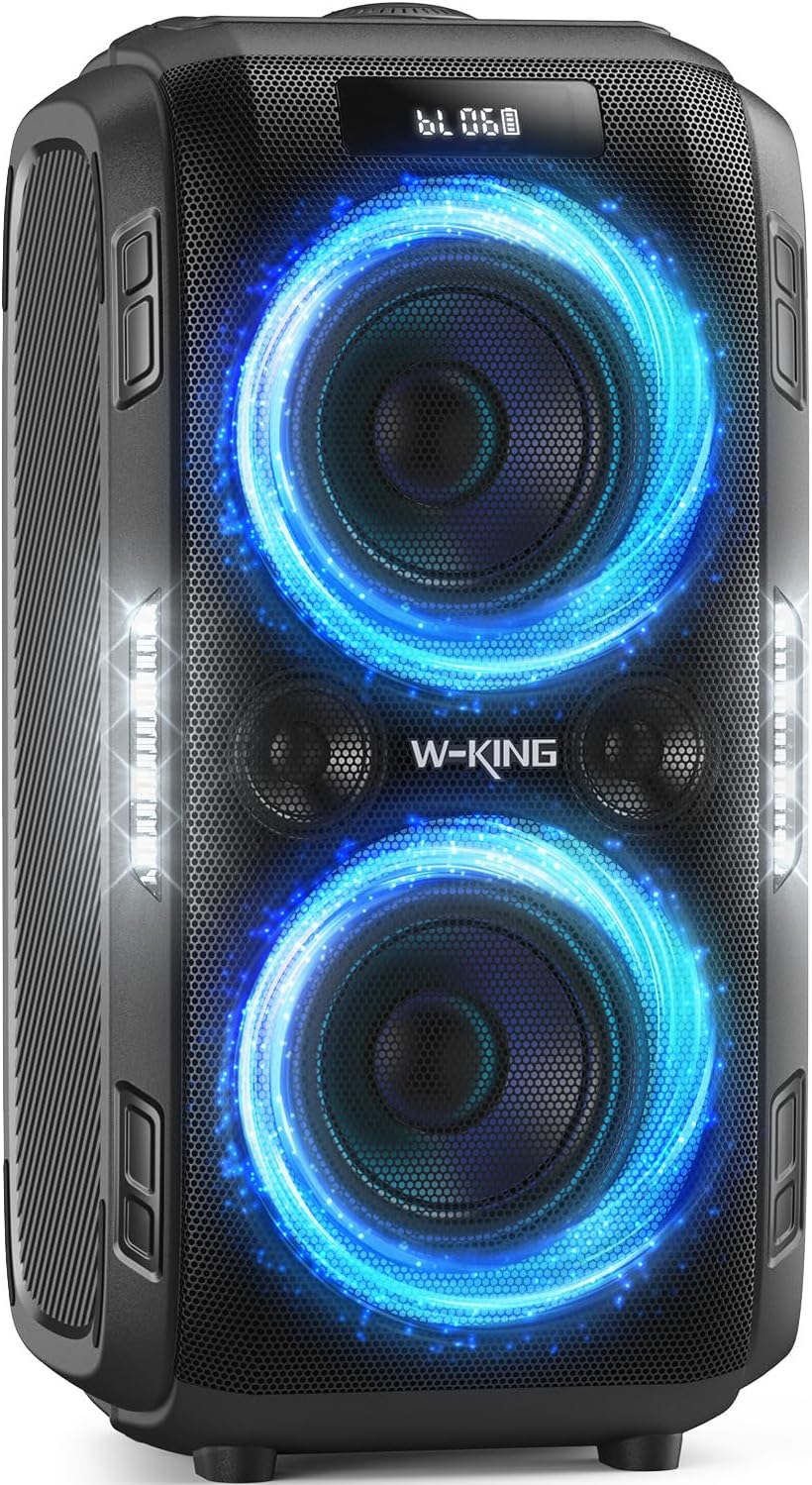
Figure 1: Front view of the W-KING T9 Pro Party Speaker, showcasing its illuminated woofers and robust design.
Package Contents
Please check the package carefully to ensure all items are present and in good condition.
- T9 PRO Party Large Speaker x 1
- 3.5MM AUX cable x 1
- T9 PRO Charging adapter x 1
- User manual x 1
- Detachable Battery x 1

Figure 2: Illustration of the W-KING T9 Pro speaker and its included accessories, such as the charging adapter and AUX cable.
Safety Information
To ensure safe operation and prevent damage, please observe the following precautions:
- Keep away from liquids, extreme heat, and strong magnetic fields.
- Do not disassemble or attempt to repair the device yourself.
- Use only the provided charging adapter.
- Avoid prolonged exposure to very high volumes to prevent hearing damage.
- Ensure proper ventilation when operating the speaker.

Figure 3: Important safety warnings regarding liquids, heat, and magnetic fields, as found in the product manual.
Setup
1. Charging the Battery
The T9 Pro comes with a removable rechargeable battery. Before first use, fully charge the speaker using the included T9 PRO Charging adapter. Connect the adapter to the DC charging port on the back of the speaker and plug it into a power outlet. The digital display will show charging status. It is recommended to charge the battery every six months if the speaker is not in regular use to maintain battery health.

Figure 4: The removable battery compartment and the dedicated power adapter for charging the T9 Pro speaker.
2. Powering On/Off
Press and hold the Power button located on the control panel to turn the speaker on or off. A sound prompt will indicate the power status.
3. Bluetooth Pairing
- Turn on the T9 Pro speaker. It will automatically enter Bluetooth pairing mode, indicated by a flashing Bluetooth icon on the display.
- Enable Bluetooth on your device (smartphone, tablet, etc.).
- Select "W-KING T9 Pro" from the list of available Bluetooth devices.
- Once connected, the Bluetooth icon on the speaker's display will become solid, and a confirmation sound will play.

Figure 5: The speaker's display showing Bluetooth mode and a smartphone screen indicating successful Bluetooth 5.3 connection.
4. True Wireless Stereo (TWS) Pairing
For an enhanced stereo experience, you can pair two W-KING T9 Pro speakers together:
- Ensure both T9 Pro speakers are powered on and not connected to any Bluetooth device.
- On one speaker (this will be the primary speaker), press the TWS button. The speaker will enter TWS pairing mode.
- The primary speaker will automatically search for and connect to the second T9 Pro speaker.
- Once successfully paired, both speakers will play audio in stereo. You can then connect your device via Bluetooth to the primary speaker.

Figure 6: Two T9 Pro speakers operating in True Wireless Stereo mode, providing a wider soundstage.
Operating Instructions
1. Control Panel Overview
The top panel of the T9 Pro speaker features various controls for managing playback, volume, bass, and lighting effects.

Figure 7: Detailed view of the speaker's control panel, highlighting the bass adjustment knob and other function buttons.
- Power Button: Press and hold to turn on/off.
- Volume Knob: Rotate to adjust the master volume.
- Bass Knob: Rotate to customize bass levels (12 customized bass settings). Press to activate bass mode.
- Light Button: Press to cycle through different light modes or turn lights off.
- Mode (M) Button: Press to switch between input modes (Bluetooth, AUX, USB, TF Card). Hold to disconnect Bluetooth.
- Play/Pause Button: Play or pause audio playback.
- Previous/Next Track Buttons: Skip to the previous or next track.
- TWS Button: Initiate True Wireless Stereo pairing.
- Echo Button: Adjust echo reverb effects for microphone (0-15 levels).
- Mic Volume Button: Adjust microphone volume.
2. Playback Modes
The T9 Pro supports multiple audio input options:
- Bluetooth 5.3: Wireless connection for audio streaming from compatible devices.
- 3.5mm AUX Input: Connect external audio devices using the included 3.5mm audio cable.
- USB Flash Drive: Insert a USB drive into the USB port to play audio files.
- TF Card: Insert a TF (microSD) card into the TF card slot to play audio files.

Figure 8: The multiple connectivity options available on the T9 Pro, including Bluetooth, AUX, TF card, and USB inputs.
3. Microphone and Guitar Input
The T9 Pro features a 6.35mm jack for connecting dynamic microphones or guitars. This allows for karaoke, live performances, or public speaking.
- Connect your microphone or guitar to the 6.35mm input port.
- Adjust the microphone volume using the dedicated Mic Volume button.
- Use the Echo button to add reverb effects to your vocals. Note: In MIC mode with the guitar function, press the ECHO button to adjust to 0 if no echo is desired.

Figure 9: The T9 Pro speaker being used for karaoke, demonstrating its microphone input capability.

Figure 10: The T9 Pro speaker connected to a bass guitar, illustrating its instrument input functionality.
4. Light Effects
The T9 Pro features colorful beat lights that can enhance your party atmosphere. Press the Light button to cycle through various dynamic light shows or turn the lights off.

Figure 11: The T9 Pro speaker displaying its unique light show, adding visual flair to any event.
Maintenance
- Cleaning: Use a soft, dry cloth to clean the speaker's exterior. Do not use abrasive cleaners or solvents.
- Battery Care: If the speaker is not used for extended periods, charge the battery at least once every six months to prolong its lifespan.
- Storage: Store the speaker in a cool, dry place away from direct sunlight and extreme temperatures.
- Water Resistance: The speaker has an IPX5 splash-proof rating, meaning it can withstand splashes and light rain. Do not submerge the speaker in water.
Troubleshooting
| Problem | Possible Cause | Solution |
|---|---|---|
| Speaker does not power on. | Battery is depleted. | Connect the speaker to the power adapter and charge it fully. |
| No sound from the speaker. | Volume is too low or muted; incorrect input mode; device not connected. | Increase volume on both speaker and connected device. Press 'M' button to cycle through input modes. Re-pair Bluetooth or check AUX/USB/TF connections. |
| Bluetooth pairing fails. | Speaker is already connected to another device; device Bluetooth is off; speaker too far from device. | Ensure speaker is in pairing mode. Disconnect from other devices. Turn Bluetooth on your device. Move device closer to speaker (within 33 feet/10 meters). |
| Sound distortion. | Volume too high; audio source quality is poor. | Reduce volume. Try a different audio source or file. |
| Settings reset after power off. | This is a characteristic of the device's design. | Adjust bass and light settings each time the speaker is powered on, if desired. |
Specifications
| Feature | Detail |
|---|---|
| Model Number | T9 Pro |
| Output Wattage | 120 Watts (RMS), 270W Peak |
| Sound Pressure Level (SPL) | 125dB |
| Woofers | 2 x 6.5 inches |
| Tweeters | 2 x 2.5 inches |
| Connectivity Technology | Bluetooth 5.3, AUX, USB, TF Card, 6.35mm Microphone & Guitar input |
| Water Resistance Rating | IPX5 (Splashproof) |
| Power Source | Battery Powered (Removable Lithium Ion battery) |
| Item Weight | 10.71 Kilograms (23.6 pounds) |
| Product Dimensions (L x W x H) | 10.79 x 10.1 x 21 inches |
| Material | Metal |
| Manufacturer | SHENZHEN WEIKING TECHNOLOGY CO.,LTD |
Warranty and Support
For warranty information or technical support, please contact W-KING customer service through their official channels or the retailer from whom you purchased the product. Please retain your proof of purchase for warranty claims.
Visit the W-KING Store: W-KING Official Store
Related Documents - T9 Pro
 |
W-KING T12 Bluetooth Party Speaker User Manual Comprehensive user manual for the W-KING T12 370W Powerful Bluetooth Party Speaker with Subwoofer Bass, covering setup, operation, features, troubleshooting, and specifications. |
 |
W-KING H10 Portable Bluetooth Speaker User Manual User manual for the W-KING H10 portable Bluetooth speaker, detailing its features, operation, and specifications. Includes information on connectivity, controls, and sound adjustments. |
 |
W-KING T11 Portable Party Speaker User Manual User manual for the W-KING T11 portable party speaker, detailing features, operation, safety precautions, and specifications. Includes information on 100W Beast Mode, microphone and guitar input, power bank functionality, and IPX6 waterproof rating. |
 |
W-KING 100W Bluetooth Speaker User Manual User manual for the W-KING 100W Bluetooth Speaker V5.3, featuring IPX6 waterproof, deep bass, 110dB sound, DSP, karaoke, and microphone/guitar ports. |
 |
W-KING X10 Portable Bluetooth Speaker User Manual User manual for the W-KING X10 portable Bluetooth speaker, detailing features, operation, and specifications for this 70W IPX6 waterproof outdoor speaker with deep bass and a 42-hour battery life. |
 |
W-KING T9II Bluetooth Party Speaker User Manual | Setup & Features Guide User manual for the W-KING T9II Bluetooth Party Speaker. This guide covers setup, connectivity (Bluetooth, TWS), microphone pairing, remote control functions, product specifications, and important safety notices for optimal use. |