
1. Product Overview
The SYESWAY 4-in-1 Lift-Top Coffee Table with LED is a versatile furniture piece designed to adapt to various living space needs. It seamlessly transforms from a standard coffee table into a dining table, dual workstation, or a storage unit, making it ideal for small apartments and multi-functional rooms. This model also features integrated RGB LED lighting for customizable ambiance.

Image: The SYESWAY 4-in-1 Lift-Top Coffee Table configured as a dining table, showcasing its versatility in a modern living room.
2. Assembly Instructions
This coffee table is designed for straightforward assembly. All necessary parts are labeled, and tools are included. Please follow the instructions carefully to ensure proper setup and functionality.
2.1. Before You Begin
- Verify all components are present according to the packing list.
- Clear a spacious area for assembly.
- It is recommended for one person to assemble this product.
- Tools required: Screw Driver (included).
2.2. Assembly Steps
Refer to the included Assembly Guide for detailed, step-by-step instructions. Pay close attention to diagrams and part numbers.
Important Safety Note: Always lift the lower table first to avoid damage when transforming the table.
2.3. Assembly Video Guide
For visual assistance, please watch the official assembly video:
Video: Official SYESWAY guide demonstrating the assembly process and key features of the Lift Top Coffee Table with Drawers.

Image: Detail of the robust metal lift mechanism and the smooth-gliding wooden drawers, highlighting key structural components.
3. Operating Instructions
3.1. 4-in-1 Lift-Top Functionality
The coffee table offers four primary modes of use:
- Regular Coffee Table: The top remains closed, providing a standard surface.
- One Side Lift Top: One side of the tabletop lifts to create a comfortable workstation or dining surface for one person.
- Double Lift Top: Both sides of the tabletop lift, offering a larger surface for two users or expanded workspace.
- Dining Table for 4-8 People: The table fully unfolds, expanding to accommodate 4 to 8 individuals for dining or larger activities.
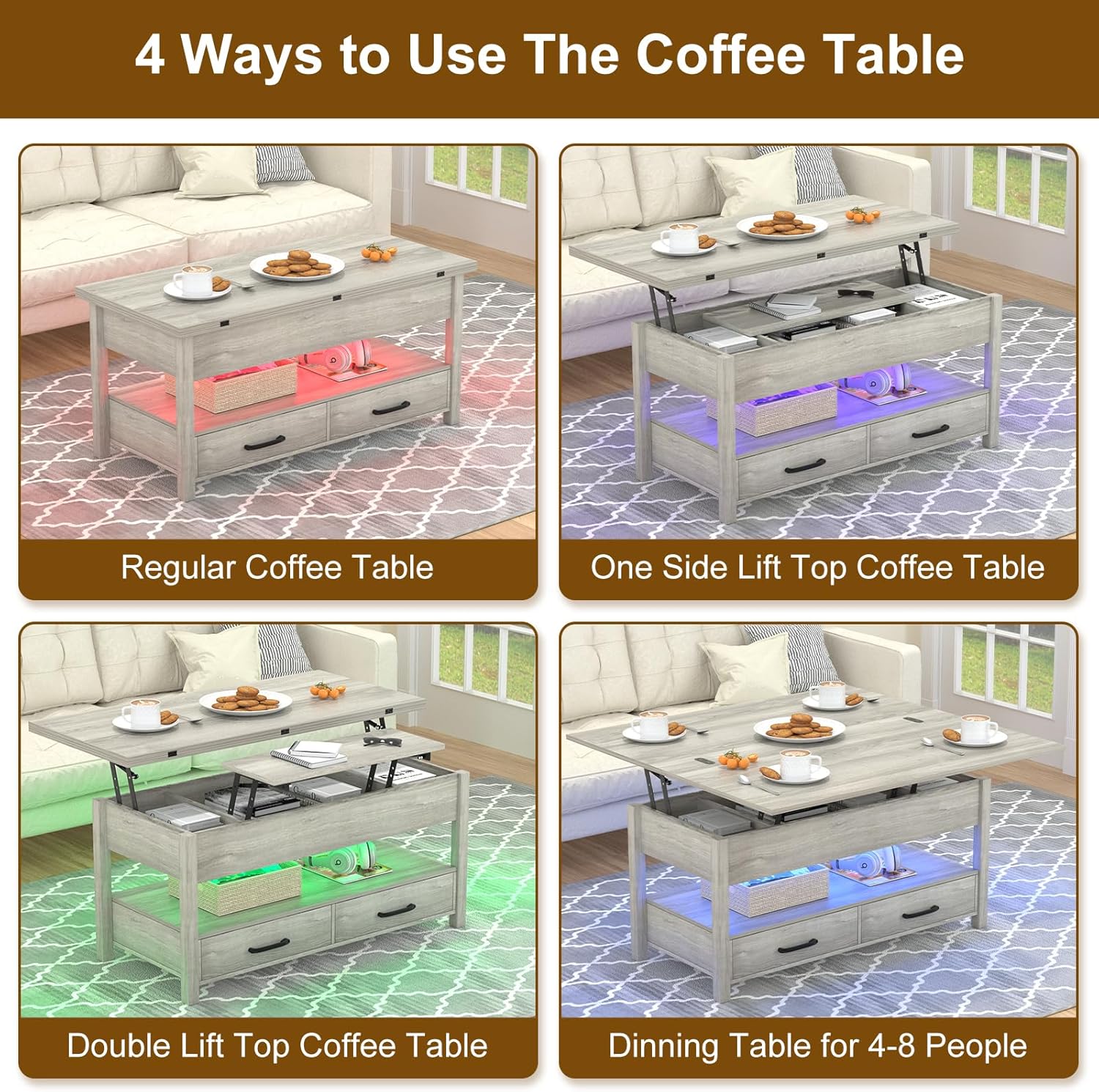
Image: Visual representation of the four versatile ways to use the SYESWAY coffee table, from compact to extended dining.

Image: A step-by-step visual guide illustrating the transformation of the coffee table from its compact form to a fully extended dining surface.
3.2. APP-Controlled RGB LED Lighting
The integrated RGB LED strips can be controlled via a dedicated mobile application or the included remote control. This allows for customization of colors and lighting modes to create various ambiances.
- Download the specified app from your device's app store.
- Follow the app's instructions to pair with the LED lighting.
- Use the app or remote to select desired colors, brightness, and dynamic lighting effects.

Image: The coffee table illuminated with blue LED lights, demonstrating the APP-controlled RGB lighting feature with a smartphone and remote control.
3.3. Storage Features
The table provides ample storage options to keep your living space organized:
- Hidden Compartments: Three concealed compartments beneath the lift-top are perfect for private items or clutter.
- Sliding Drawers: Two smooth-gliding drawers are ideal for everyday essentials like remote controls, magazines, or small accessories.
- Open Lower Shelf: An accessible shelf below the main compartment can be used for displaying decor or storing frequently accessed items.

Image: An aerial view highlighting the extensive storage capacity of the coffee table, including hidden compartments and accessible drawers.
4. Maintenance
To ensure the longevity and appearance of your SYESWAY coffee table, follow these maintenance guidelines:
- Cleaning: Wipe surfaces with a soft, damp cloth. Avoid harsh chemicals or abrasive cleaners. For spills, clean immediately to prevent staining.
- Lift Mechanism: Periodically check the metal lift mechanism for any loose screws or signs of wear. Tighten screws as needed. Avoid forcing the mechanism.
- LED Lighting: Ensure the LED strips and wiring are not damaged. If issues arise, refer to the troubleshooting section.
- Weight Limit: Do not exceed the maximum weight recommendation of 150 pounds on the tabletop.
- Placement: Avoid prolonged exposure to direct sunlight or extreme temperature changes, which can affect the wood finish.
5. Troubleshooting
If you encounter any issues with your coffee table, please refer to the common problems and solutions below:
| Problem | Possible Cause | Solution |
|---|---|---|
| Lift-top is stiff or uneven. | Mechanism needs lubrication or screws are loose. | Apply a silicone-based lubricant to moving parts. Check and tighten all screws on the lift mechanism. Ensure the lower table is lifted first. |
| Drawers do not slide smoothly. | Drawer slides are misaligned or obstructed. | Check that the drawer slides are properly aligned and free of debris. Ensure drawers are not overloaded. |
| LED lights are not working. | Power connection issue, remote battery dead, or app not connected. | Verify the power adapter is securely plugged in. Check remote control battery. Re-pair the app with the LED lights. |
| Table feels wobbly after assembly. | Screws are not fully tightened or parts are misaligned. | Carefully re-check all assembly steps and tighten all screws. Ensure all panels are correctly oriented and seated. |
If the problem persists, please contact customer support for further assistance.
6. Specifications
| Feature | Detail |
|---|---|
| Brand | SYESWAY |
| Model Name | Coffee Table |
| Model Number | ST6-335SSJCFZ |
| Color | Grey-led |
| Product Dimensions (Closed) | 19.66"D x 41.73"W x 18.5"H (approx. 49.9cm D x 106cm W x 47cm H) |
| Product Dimensions (Fully Unfolded) | 41.73"D x 39.4"W x 25.2"H (approx. 106cm D x 100cm W x 64cm H) |
| Maximum Weight Recommendation | 150 Pounds (68 kg) |
| Frame Material | Metal, Wood |
| Top Material | Wood (CARB P2-certified particle board) |
| Number of Drawers | 2 |
| Number of Shelves | 1 (open lower shelf) |
| LED Lighting | RGB, APP-controlled |
| Assembly Required | Yes (Assembly Guide and tools included) |

Image: Detailed dimensional diagram of the SYESWAY coffee table, illustrating its size in both compact and fully extended configurations.
7. Warranty and Support
SYESWAY is committed to providing quality products and customer satisfaction. For any questions, concerns, or assistance with your product, please contact our customer support team.
- Customer Service: Refer to your purchase documentation or the SYESWAY official website for contact information.
- Warranty Information: Details regarding product warranty are typically included with your purchase or available on the manufacturer's website.
- Returns: Standard return policy is 30 days from purchase.
We value your feedback and are here to help ensure you have a positive experience with your SYESWAY product.