1. Introduction
This manual provides essential information for the proper installation, operation, and maintenance of your NULKOMMA X008-AB006A 48V 18A Brushless Motor Controller. This controller is designed to provide stable speed and sensitive control for electric bicycles, e-bikes, scooters, and tricycles. Please read this manual thoroughly before installation and use to ensure optimal performance and safety.
Note: This product is a customized model. Ensure compatibility with your specific electric bicycle system before installation. For any questions regarding compatibility, please contact NULKOMMA support.
2. Safety Information
- Always disconnect the battery power before performing any installation, maintenance, or repair work on the controller or associated components.
- Ensure all connections are secure and correctly matched to prevent electrical shorts or damage.
- Avoid exposing the controller to extreme temperatures, direct sunlight for prolonged periods, or corrosive substances.
- Do not attempt to open or modify the controller casing, as this may void the warranty and pose a safety risk.
- Keep the controller away from water and moisture, despite its waterproof connectors, to prevent internal damage.
3. Product Overview
The NULKOMMA X008-AB006A Brushless Motor Controller is engineered for efficient power management in electric vehicles. Its robust aluminum alloy shell features a groove design for effective heat dissipation, protecting the internal circuitry from thermal overload. The controller provides sensitive control for braking and direction changes, ensuring a smooth riding experience.
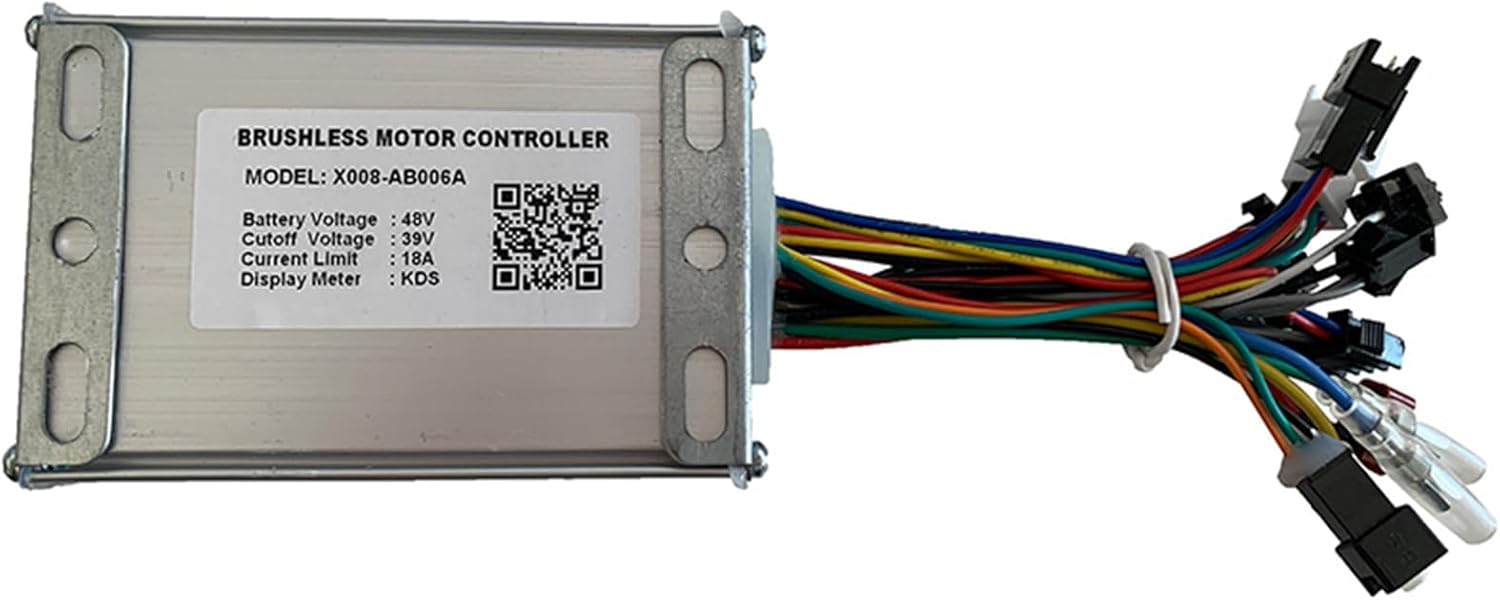
Image 3.1: Front view of the NULKOMMA X008-AB006A Brushless Motor Controller, showing the label with specifications and various wire connectors.

Image 3.2: Close-up view of the controller's label, detailing the model number X008-AB006A, Battery Voltage (48V), Cutoff Voltage (39V), Current Limit (18A), and Display Meter type (KDS).

Image 3.3: The controller with its dimensions indicated: approximately 98mm (3.8in) length, 64mm (2.5in) width, and 31mm (1.2in) height.
4. Specifications
| Feature | Specification |
|---|---|
| Model Name | NKM-X008-AB006A |
| Part Number | X008-AB006A |
| Battery Voltage | 48V |
| Cutoff Voltage | 39V |
| Current Limit | 18A |
| Display Meter Type | KDS |
| Material | Aluminum, Plastic |
| Color | Silver White |
| Product Identifier | EB06A/X008-AB006A/48V/39V/18A/KDS/PAS3S/20230407002 |
5. Installation
Proper installation is crucial for the safe and effective operation of your controller. Follow these steps carefully:
- Prepare for Installation: Ensure the electric bicycle's power is completely off and the battery is disconnected. Gather any necessary tools.
- Identify Connectors: The controller features various wires and connectors. Each interface is labeled for easy identification. Carefully match each connector on the controller to its corresponding component on your electric bicycle (e.g., motor, battery, display, throttle, brake levers).
- Connect the Motor: Connect the motor phase wires (usually thicker wires, often green, yellow, blue) from the controller to the motor.
- Connect the Battery: Connect the main power wires from the controller to the battery. Ensure correct polarity (red to positive, black to negative).
- Connect the Display Meter: Connect the KDS display meter cable to the designated display interface on the controller.
- Connect Other Components: Connect the throttle, brake levers (if applicable), pedal assist sensor (PAS), and any other accessories to their respective waterproof interfaces on the controller. Refer to the labels on each interface.
- Secure the Controller: Mount the controller securely in a protected location on your bicycle, ensuring it is not exposed to excessive vibration or impact. The aluminum casing is designed for heat dissipation, so ensure adequate airflow around it.
- Verify Connections: Double-check all connections to ensure they are firm and correctly matched. Loose or incorrect connections can lead to malfunction or damage.

Image 5.1: Close-up view of the various waterproof wire connectors extending from the controller, each designed for specific components like the motor, battery, display, and sensors.
6. Operating Instructions
Once the controller is correctly installed and all connections are verified, you can begin operating your electric bicycle:
- Power On: Connect the battery and turn on the electric bicycle's main power switch, if present. The KDS display meter should illuminate.
- Display Meter (KDS): The KDS display meter provides real-time information such as speed, battery level, and assist mode. Refer to your KDS display manual for specific operating instructions and settings adjustments.
- Throttle/Pedal Assist: Engage the throttle or begin pedaling (if using pedal assist) to activate the motor. The controller will provide stable speed and sensitive control based on your input.
- Braking: The controller is designed for sensitive braking control. When the brake levers are engaged, the motor power will be cut off, and braking will be initiated.

Image 6.1: An example of a KDS display meter, which interfaces with the controller to show operational data like speed and battery status.
7. Maintenance
To ensure the longevity and reliable performance of your NULKOMMA controller, follow these maintenance guidelines:
- Regular Inspection: Periodically check all wire connections for tightness and signs of wear or damage.
- Cleaning: Keep the controller clean and free from dirt, dust, and debris. Use a dry or slightly damp cloth for cleaning. Avoid using harsh chemicals or solvents.
- Heat Dissipation: Ensure the controller's aluminum casing remains unobstructed to allow for proper heat dissipation. Avoid covering it with materials that could trap heat.
- Water Exposure: While connectors are waterproof, avoid submerging the controller in water. If it gets wet, dry it thoroughly before reconnecting power.
8. Troubleshooting
If you encounter issues with your controller, consider the following common troubleshooting steps:
- No Power to Display/Motor:
- Check battery connection and ensure the battery is charged.
- Verify all main power cables are securely connected.
- Inspect the display meter cable for damage or loose connections.
- Motor Not Responding/Intermittent Operation:
- Check motor phase wire connections.
- Ensure throttle or pedal assist sensor (PAS) connections are secure and functioning correctly.
- Verify brake lever cut-off switches are not stuck in the engaged position.
- Overheating:
- Ensure the controller has adequate ventilation and is not covered.
- Reduce continuous high-power usage if operating in extreme conditions.
If these steps do not resolve the issue, please contact NULKOMMA customer support for further assistance.
9. Warranty and Support
The NULKOMMA X008-AB006A Brushless Motor Controller comes with a 180-day warranty from the date of purchase. This warranty covers manufacturing defects under normal use.
For warranty claims, technical support, or any questions regarding your product, please contact NULKOMMA customer service. You can typically find contact information on the NULKOMMA official website or through your purchase platform.